
MSBA-300 · Lesson 3 of 12 · 22 min
Events and triggers
▶ Video coming soon A video version of this lesson is on the way.
Grace Achterberg, the managing editor, came to the third clinic with a complaint. The check workflow ran on every pull request to TrailCheck, including the dozens that only changed photographs, and each run took four minutes and occasionally failed for reasons unrelated to the change. Meanwhile the weekly external link check that she had asked for still did not exist. Both problems were about the same part of a workflow file: the on key, which decides when a workflow runs.
The on key
Every workflow needs an on key that lists one or more events. In its simplest form it names a single event, such as push. It can list several events as a sequence, or, more usefully, as a mapping in which each event can carry filters and settings. An event starts a run only if all its filters match.
# One event
on: push

# Several events, no filters
on: [push, pull_request]

# Events with filters and settings
on:
  pull_request:
    branches: [main]
    paths-ignore:
      - "images/**"
  workflow_dispatch:
GitHub's documentation groups the many available events, and the GH-200 outline asks you to configure workflows for scheduled, manual, webhook and repository events and to choose the right scope and permissions for each. Thinking in families makes the list manageable.
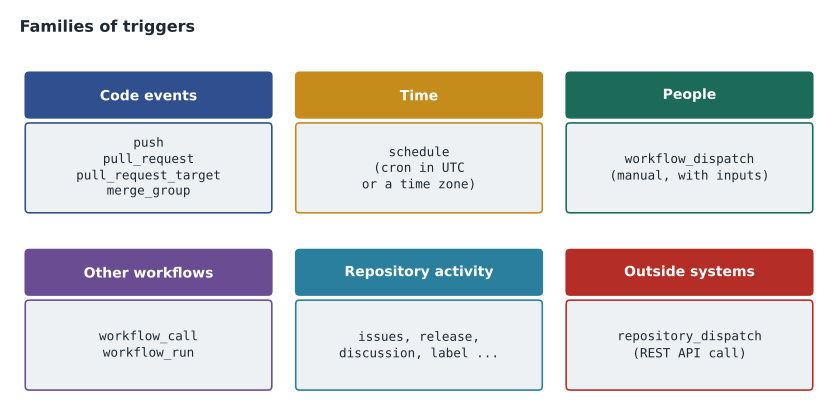
Code events: push and pull_request
The push event fires when commits or tags are pushed. It accepts branches and tags filters, their negative forms branches-ignore and tags-ignore, and paths and paths-ignore filters that look at the files changed. Filters use glob patterns: an asterisk matches any characters except a slash, two asterisks match any characters including slashes, and an exclamation mark at the start of a pattern in a branches or paths list excludes what earlier patterns included. You cannot use branches and branches-ignore together for the same event; use one list with exclamation marks instead.
The pull_request event fires for activity on pull requests. By default it reacts to three activity types: opened, synchronize (new commits pushed to the head branch) and reopened. The types key changes that list, for example to add ready_for_review or labeled. Its branches filter refers to the pull request's base branch, the one it will merge into, not the branch it comes from. A pull request workflow runs against a merge commit that GitHub prepares, so the checks test the result of merging, not just the branch on its own.
on:
  push:
    branches:
      - main
      - "release/**"
    tags:
      - "v*"
    paths:
      - "site/**"
      - "!site/drafts/**"
  pull_request:
    types: [opened, synchronize, reopened, ready_for_review]
    branches: [main]
Glob patterns at a glance
| Pattern | Matches | Does not match |
|---|---|---|
| main | The branch main | main-backup |
| feature/* | feature/map, feature/search | feature/map/v2 |
| feature/** | feature/map and feature/map/v2 | features/map |
| v* | Tags v1, v2.0.1 | release-1 |
| site/** | Every file under site at any depth | docs/site.md |
| **.md | Markdown files in any folder | README.txt |
| !site/drafts/** | Excludes drafts after an earlier include | Has no effect on its own |
Order matters in a list that mixes positive and negative patterns: GitHub reads the list from top to bottom, so a later pattern overrides an earlier one. Putting a negative pattern first does nothing, because there is nothing included yet for it to exclude. Path filters also have a practical limit: for very large pushes and pull requests, GitHub compares only the first few hundred changed files and a limited number of commits, so a huge change may run a workflow that its path filters would otherwise skip.
When both branch or tag filters and path filters are set on push, both must match. One subtle rule follows: if a push contains only tags, path filters have nothing to compare, so a workflow that filters on paths and tags together may not run for a tag push the way you expect. Separate workflows for tag releases and branch builds avoid the confusion.
Pull requests from forks
Malik Osei, the volunteer trail reporter, contributes from a fork, and that changes the rules. For a pull_request run from a fork, GitHub gives the GITHUB_TOKEN read-only permissions and does not pass the repository's secrets, because the code being tested came from someone outside the team. Depending on the repository settings, workflows from first-time contributors may also wait for a maintainer to approve the run. That was the red cross on the closures-page pull request: the workflow tried to use a secret to call the trail API, the secret was empty in the fork's run, and the request failed.
The pull_request_target event exists for the opposite case: automation that must act on a fork's pull request with the base repository's permissions, such as adding labels or posting a comment. It runs in the context of the base branch, with the workflow file from the base branch, and it does receive secrets. That makes it dangerous to combine with checking out and running the pull request's code, because untrusted code would then run with trusted credentials. The safe pattern is to use pull_request for anything that builds or tests contributed code, and to keep pull_request_target workflows to actions that never execute the contributor's files.
| Event | Workflow file used | Token from a fork | Secrets from a fork | Use for |
|---|---|---|---|---|
| pull_request | From the pull request's merge commit | Read-only | Not available | Building and testing contributed code |
| pull_request_target | From the base branch | As configured for the base | Available | Labelling, commenting, triage without running contributed code |
The merge_group event belongs to the same family. Repositories that use a merge queue run their required checks on a temporary branch that combines queued pull requests, and the merge queue triggers merge_group runs. A workflow that provides a required check must listen for merge_group as well as pull_request, or queued pull requests will wait forever for a check that never starts.
Time: schedule
The schedule event runs a workflow at times written in cron syntax: five fields for minute, hour, day of the month, month and day of the week. Scheduled workflows run on the latest commit of the default branch. The shortest interval allowed is once every five minutes. Times are in UTC unless you add the timezone key with an IANA time zone name, an option that makes schedules follow daylight saving time instead of drifting by an hour twice a year.
on:
  schedule:
    # 07:30 every Monday
    - cron: "30 7 * * 1"
      timezone: "America/Moncton"
  workflow_dispatch:
Scheduled runs are a best effort. At busy times, such as the top of every hour, runs can start late, and GitHub may drop some if the load is very high, so pick an odd minute rather than zero. GitHub also disables scheduled workflows in public repositories that have had no activity for 60 days, to stop forgotten repositories using runners. Adding workflow_dispatch next to a schedule is good practice: it lets you test the workflow without waiting for Monday.
Worked problem
Reading a cron expression
What does the schedule 15 22 * * 1-5 mean, and when would it run for a team in Atlantic Canada if no timezone key is set?
Show solution
- The fields are minute 15, hour 22, any day of the month, any month, and days 1 to 5, Monday to Friday.
- Without a timezone key, cron times are UTC.
- 22:15 UTC is 19:15 Atlantic Daylight Time in summer and 18:15 Atlantic Standard Time in winter.
Answer: At 22:15 UTC on weekdays, which moves by an hour in local time when daylight saving changes; adding a timezone key would pin it to local time.
People: workflow_dispatch
The workflow_dispatch event adds a Run workflow button to the Actions tab, and lets the GitHub CLI and the REST API start the workflow. It can declare inputs that the person fills in. Each input can have a description, a type, a required flag and a default. Supported types are string, boolean, choice (with a list of options), number and environment. A workflow can declare up to 25 inputs, a limit GitHub raised from 10 in December 2025. Inside the workflow, inputs are read from the inputs context.
on:
  workflow_dispatch:
    inputs:
      chapter:
        description: "Chapter file to build"
        type: string
        required: true
      paper:
        description: "Paper size for the proof"
        type: choice
        options: [letter, a5]
        default: letter
      draft-watermark:
        type: boolean
        default: true
Owen loved this one. Instead of asking a developer to build a PDF proof of a chapter, he could press the button, type the file name, choose the paper size and download the result from the run page ten minutes later. Only people with write access to the repository can run a workflow manually.
Other workflows, repository activity and outside systems
Three more families complete the picture. workflow_call makes a workflow reusable by other workflows; it has its own inputs, secrets and outputs, and lesson 9 is devoted to it. workflow_run starts a workflow when another named workflow is requested or completes, which is useful for a deployment that must follow a build, or for a privileged follow-up to an unprivileged pull request run; like pull_request_target, it runs with the repository's permissions and must be written carefully.
Repository activity events cover issues, issue comments, labels, releases, discussions, milestones, project changes, deployments and more, most with types to narrow them down. repository_dispatch lets an outside system start a workflow by sending an event type and a JSON payload through the REST API, which is how a content system or another company's service can trigger automation in your repository. Tidewater used it later so that a nightly trail-data export in its partner's system could start a TrailCheck rebuild.
on:
  issues:
    types: [labeled]
  release:
    types: [published]
  repository_dispatch:
    types: [trail-data-updated]
Most events carry a payload describing what happened, available in the github.event context: the pull request number and title, the label added to an issue, the client payload of a repository_dispatch. Later lessons use these values in conditions and steps.
When an event does not start a run
Several rules stop events from starting runs, and they explain many "my workflow did not run" questions. Events caused by the GITHUB_TOKEN, such as a push made by a workflow step or a label added by a workflow, do not start new workflow runs, except for workflow_dispatch and repository_dispatch. This rule prevents a workflow from accidentally triggering itself in an endless loop. If one workflow really must trigger another through a push, it needs a GitHub App token or a personal access token, or the second workflow can listen for workflow_run instead.
Commit messages can also opt out. If the head commit of a push, or of a pull request's synchronize event, contains a skip instruction such as [skip ci] or [ci skip] in its message, workflows triggered by push and pull_request do not run for it. That is handy for a commit that only fixes a typo in a comment, and a trap when someone copies the phrase into a real change. Finally, a workflow does not run if Actions is disabled for the repository or organization, if the workflow itself has been disabled in the Actions tab, or if the file on the relevant branch is invalid.
Worked problem
The missing release run
A workflow creates a release automatically after a merge to main, using the default GITHUB_TOKEN. Another workflow listens for release published and should attach a PDF proof. The release appears, but the second workflow never runs. Why?
Show solution
- The release was created by a workflow using the GITHUB_TOKEN.
- Events caused by the GITHUB_TOKEN do not start new runs, apart from workflow_dispatch and repository_dispatch.
- So the release published event is recorded but triggers nothing.
- Options: create the release with a GitHub App token, call the second workflow directly as a reusable workflow, or trigger it with workflow_run.
Answer: Events caused by the GITHUB_TOKEN do not trigger new workflow runs; use an app token, a reusable workflow call or workflow_run.
Fixing Grace's two problems
With the families clear, both of Grace's problems had short answers. The check workflow got paths-ignore for the images folder and the Markdown files that only the editors touched, so photograph-only pull requests no longer started it. The weekly link check became its own workflow with a schedule in local time and a manual trigger. One catch remained: the check workflow was a required check, and a workflow skipped by path filters reports nothing, so pull requests that only changed images would wait for a check that never arrived. Priya fixed that in a later session with a job-level condition instead of a workflow-level filter, a pattern lesson 4 explains.
Common mistakes
MistakeUsing pull_request_target to build and test code from forks so that secrets are available.
InsteadBuild and test contributed code with pull_request; keep pull_request_target for actions that never run the contributor's code.
MistakeExpecting the branches filter on pull_request to match the contributor's branch.
InsteadFor pull requests, branches matches the base branch the pull request targets.
MistakeWriting schedules in local time without a timezone key.
InsteadCron is UTC by default; add timezone or convert the time.
MistakeUsing path filters on a workflow that provides a required check.
InsteadA skipped workflow reports no status, so required checks wait; filter inside jobs or use a different approach.
Summary and key terms
- The on key lists the events that trigger a workflow, with filters and activity types.
- push filters on branches, tags and paths; pull_request filters on the base branch and defaults to opened, synchronize and reopened.
- Fork pull requests run with a read-only token and no secrets; pull_request_target has base permissions and must not run contributed code.
- schedule uses five-field cron in UTC unless timezone is set; runs are best effort and can be delayed.
- workflow_dispatch adds a manual button with up to 25 typed inputs.
- workflow_call, workflow_run, repository activity events and repository_dispatch connect workflows to other workflows and systems.
- Event payload
- Data describing the activity that triggered a run, available in github.event.
- Activity type
- A specific kind of activity within an event, chosen with the types key.
- Glob pattern
- A wildcard pattern used in branch, tag and path filters.
- Cron
- A five-field schedule format: minute, hour, day of month, month, day of week.
- workflow_dispatch
- An event that lets people start a workflow manually, with inputs.
- pull_request_target
- A pull request event that runs with the base repository's permissions and secrets.
- repository_dispatch
- An event that an outside system triggers through the REST API.
- Merge queue
- A feature that tests combined pull requests before merging, triggering merge_group runs.
Practice problems
Work each problem on paper first, then reveal the answer to check.
A pull request targets main from a branch called fix-map. Which branch name does a pull_request branches filter compare?
Show answer
main, the base branch.
Why add workflow_dispatch to a scheduled workflow?
Show answer
So it can be run and tested on demand without waiting for the schedule.
Which event would a partner's system use to start a TrailCheck rebuild?
Show answer
repository_dispatch, sent through the REST API with an event type.
Lesson quiz · 5 questions
Score 60% or more to complete this lesson.
Create a free account to save your progress, take quizzes and earn a certificate.