
MSBA-300 · Lesson 5 of 12 · 22 min
Variables, contexts and expressions
▶ Video coming soon A video version of this lesson is on the way.
The fifth clinic started with a small mystery. The publish workflow wrote the build number into the footer of every TrailCheck page, but the footer showed nothing at all. The step set a variable with export in one step and used it in the next, a mistake lesson 4 had warned about, and when Lena fixed that, a second problem appeared: a value that should have been the branch name came out as the literal text she had typed. Both problems came down to the same subject, how a workflow gets information into its steps: environment variables, configuration variables, secrets, contexts and the expressions that read them.
Environment variables
An environment variable is a named value that the shell and programs on the runner can read. You can set environment variables in a workflow with the env key at three levels: the whole workflow, a job, or a step. Inner levels override outer ones, so a step-level value replaces a job-level value with the same name for that step only. Inside a run step, the shell reads them in its own syntax, a dollar sign before the name in bash and an env prefix in PowerShell.
env:
  SITE_NAME: TrailCheck

jobs:
  build:
    runs-on: ubuntu-latest
    env:
      NODE_ENV: production
    steps:
      - name: Show values
        env:
          NODE_ENV: test
        run: echo "$SITE_NAME built in $NODE_ENV mode"
GitHub also sets default environment variables on every runner. Their names start with GITHUB_ or RUNNER_, and they describe the run: GITHUB_REPOSITORY is the owner and repository name, GITHUB_SHA the commit, GITHUB_REF the branch or tag reference, GITHUB_WORKSPACE the folder where checkout puts the code, RUNNER_OS the operating system and RUNNER_TEMP a temporary folder cleared after each job. You cannot override most of them, and you should not try to set your own variables with these prefixes.
Passing values between steps with environment files
Because each step is a new process, a value created in one step has to be written somewhere the next step can see. GitHub provides environment files for this. Each is a file whose path is in a default variable, and a step appends lines to it.
| File variable | Line format | Effect |
|---|---|---|
| GITHUB_ENV | NAME=value | Sets an environment variable for all later steps in the job |
| GITHUB_OUTPUT | name=value | Sets an output of this step, read as steps.<id>.outputs.<name> |
| GITHUB_PATH | A folder path | Adds a folder to PATH for all later steps |
| GITHUB_STEP_SUMMARY | Markdown text | Adds to the job summary on the run page (lesson 10) |
steps:
  - name: Compute build label
    id: label
    run: |
      LABEL="build-$GITHUB_RUN_NUMBER"
      echo "BUILD_LABEL=$LABEL" >> "$GITHUB_ENV"
      echo "label=$LABEL" >> "$GITHUB_OUTPUT"
  - name: Use it two ways
    run: |
      echo "From the environment: $BUILD_LABEL"
      echo "From the step output: ${{ steps.label.outputs.label }}"
For values that span several lines, the file format uses a delimiter: the name, two less-than signs and a unique marker on the first line, the value on the following lines, and the marker again on its own line. Older workflows used special printed commands, set-env, add-path and set-output, to do the same job; those commands were deprecated for security reasons and replaced by environment files, so treat any workflow that still uses them as due for an update.
From step outputs to job outputs
A step output is visible only inside its own job. To pass a value to another job, declare it in the job's outputs mapping, pointing at a step output, and read it in the dependent job through the needs context. Job outputs are strings, they are limited in size, and they are meant for small values such as a version number, an artifact name or a flag that tells later jobs whether to run. Larger data, such as a built site, travels as an artifact (lesson 7).
jobs:
  version:
    runs-on: ubuntu-latest
    outputs:
      tag: ${{ steps.calc.outputs.tag }}
      changed: ${{ steps.calc.outputs.changed }}
    steps:
      - id: calc
        run: |
          echo "tag=v1.$GITHUB_RUN_NUMBER" >> "$GITHUB_OUTPUT"
          echo "changed=true" >> "$GITHUB_OUTPUT"
  publish:
    needs: version
    if: needs.version.outputs.changed == 'true'
    runs-on: ubuntu-latest
    steps:
      - run: echo "Publishing ${{ needs.version.outputs.tag }}"
Notice the quotes around true in the condition. Outputs are always text, so the comparison is between the string true and the string true; comparing with the boolean true would also work because expressions convert types loosely, but writing the string makes the intent clear. The same applies to numbers read from outputs, which fromJSON can convert when arithmetic is needed.
Keeping values out of the logs
Masking protects values that GitHub knows are secret: the secrets you defined and the GITHUB_TOKEN. It cannot protect values it does not know about. A token that a step fetches from a cloud provider, a password assembled from two secrets, or a secret that was base64 encoded before printing will appear in the log in plain text unless you tell the runner to hide it. The add-mask workflow command does that: print it with the value, and every later occurrence of that exact text in the job's logs is replaced with asterisks. Masking is a safety net, not a design. The better habit is never to print sensitive values at all, and to avoid passing them between jobs through outputs, which are stored with the run.
Configuration variables and secrets
Values that should not live in the workflow file go into repository, environment or organization settings. Configuration variables hold non-sensitive settings such as a site URL or a feature flag; they are read through the vars context and appear in logs in plain text. Secrets hold sensitive values such as API keys; they are encrypted, read through the secrets context, and masked in logs, which means GitHub replaces their exact values with asterisks if they appear in output.
Both can be defined at the organization level, shared with all or selected repositories; at the repository level; and at the environment level, where they are released only to jobs that use that environment. When the same name exists at several levels, the most specific wins: environment over repository over organization. Lesson 8 covers environments; the enterprise course covers secret management through the REST API and at scale.
Secrets are not passed to actions automatically. A step receives a secret only if you give it explicitly, as an input in with or as an environment variable in env. Secrets also cannot be referenced directly in if conditions; set the secret into a job-level environment variable and test whether that variable is empty instead. Workflows triggered from forks do not receive secrets at all, which, as lesson 3 showed, was the cause of the failing closures-page check.
Contexts
A context is a set of information about the run, grouped under a name, that expressions can read. The contexts you meet most are these.
| Context | Contains | Example |
|---|---|---|
| github | The run, the event and the repository | github.ref, github.sha, github.actor, github.event_name, github.event |
| env | Environment variables set in the workflow | env.SITE_NAME |
| vars | Configuration variables from settings | vars.SITE_URL |
| secrets | Secrets available to the run | secrets.TRAIL_API_KEY |
| job | The current job, including container and services | job.status |
| jobs | Outputs and results of jobs in a reusable workflow | jobs.build.outputs.version |
| steps | Outputs and outcomes of earlier steps with an id | steps.label.outputs.label, steps.test.outcome |
| runner | The runner machine | runner.os, runner.arch, runner.temp |
| strategy and matrix | The current matrix combination and its settings | matrix.os, strategy.job-index |
| needs | Outputs and results of jobs this job needs | needs.build.outputs.artifact-name, needs.build.result |
| inputs | Inputs to a reusable or manually run workflow | inputs.chapter |
The github.event context deserves special attention. It holds the full payload of the triggering event, so its contents depend on the event: for a pull request it includes the pull request number, title, author and labels; for an issue event, the issue; for repository_dispatch, the client payload the sender provided. Printing it as JSON once, with the toJSON function, is the fastest way to learn what a new event offers.
Expressions
An expression is a small formula that GitHub evaluates. In most places you write an expression inside a dollar sign and double curly braces; in if conditions you may leave that wrapper out. Expressions can read contexts, compare values, combine conditions and call a short list of built-in functions.
run-name: Publish ${{ github.ref_name }} by @${{ github.actor }}

jobs:
  publish:
    if: github.ref == 'refs/heads/main' && github.event_name != 'pull_request'
    runs-on: ubuntu-latest
    steps:
      - run: echo "Event was ${{ github.event_name }}"
      - if: contains(github.event.head_commit.message, '[preview]')
        run: echo "Preview requested"
      - if: failure()
        run: echo "Something above failed"
      - if: always()
run: echo "This always runs"| Group | Members | Notes |
|---|---|---|
| Literals | Strings in single quotes, numbers, true, false, null | Double quotes are not string delimiters in expressions |
| Operators | Comparison, logical and, or, not, grouping with parentheses | String comparisons ignore case |
| String functions | contains, startsWith, endsWith, format, join | contains also searches arrays |
| Data functions | toJSON, fromJSON, hashFiles | fromJSON turns text into objects, numbers or booleans |
| Status functions | success, always, cancelled, failure | success() is implied when a condition has no status function |
Status functions change when a step or job runs relative to earlier failures. A condition without a status function behaves as if success() were added, so it runs only when everything before it succeeded. failure() runs only when something earlier failed; always() runs no matter what, even when the run was cancelled; cancelled() runs only when the run was cancelled. A clean-up step usually wants always(), and a step that posts a failure message wants failure().
Static and runtime evaluation
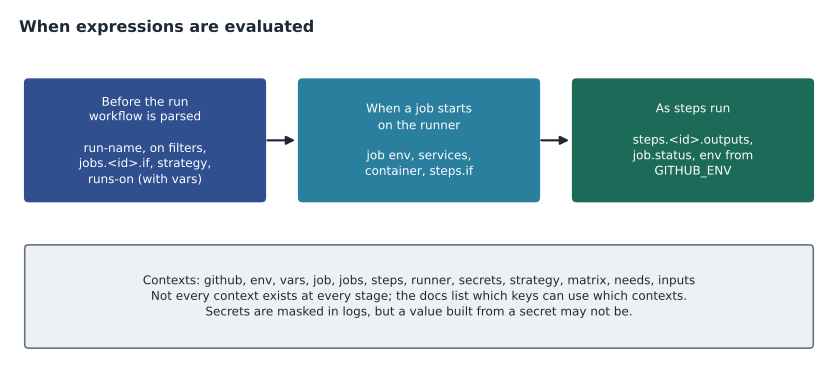
Expressions are evaluated at different moments, which explains many puzzling errors. Some keys are evaluated when GitHub reads the workflow, before any runner exists: the run-name, a job-level if, the strategy and, in most cases, runs-on. Those can use github, vars, inputs and needs, but not steps or runner, because no steps have run. Other keys are evaluated on the runner as the job proceeds, so a step condition can read the outputs of earlier steps. GitHub's documentation includes a table of which contexts each key may use; when an expression fails with an "unrecognized named-value" error, the cause is usually a context used too early.
Expressions and safety
An expression in a run block is replaced by its value before the shell sees the script. If that value comes from someone outside the team, such as a pull request title or an issue body, it can contain shell commands, and the shell will run them. This is called script injection, and the GH-200 outline lists its mitigation as a security objective. The safe pattern is to pass untrusted values into an environment variable with env and refer to the variable in the script, so the shell treats the text as data. Lena's branch-name problem from the start of the session was a milder version of the same confusion: she had written the expression in single quotes inside the shell command, so the shell printed the text instead of the value.
# Unsafe: the title is pasted into the script before bash runs
- run: echo "Checking ${{ github.event.pull_request.title }}"

# Safe: the title arrives as data in an environment variable
- env:
    PR_TITLE: ${{ github.event.pull_request.title }}
  run: echo "Checking $PR_TITLE"
Worked problem
Choosing the right place for a value
TrailCheck needs: the public site URL, which differs between staging and production; an API key for the trail data service; and the label of the current build, computed in one step and used in three later steps. Where should each live?
Show solution
- The site URL is not sensitive and differs by deployment target, so it is an environment-level configuration variable read through vars.
- The API key is sensitive, so it is a secret, ideally at the environment level, passed to steps explicitly through env.
- The build label is created during the run, so the computing step writes it to GITHUB_ENV, or to GITHUB_OUTPUT if other jobs need it.
Answer: Site URL in vars at the environment level; API key in secrets passed through env; build label written to GITHUB_ENV or GITHUB_OUTPUT.
Worked problem
Diagnosing an unrecognized named-value error
Lena wrote a job-level condition that checks steps.changes.outputs.site to decide whether the build job should run at all, and GitHub rejected the workflow with an error about an unrecognized named-value. What is wrong, and how should the decision be made?
Show solution
- A job-level if is evaluated before the job starts, when no steps have run.
- The steps context therefore does not exist at that point, so GitHub rejects the expression.
- Move the detection into an earlier job, expose its result as a job output, and make the build job need that job.
- The build job's condition then reads needs.changes.outputs.site, which is available before the job starts.
Answer: The steps context is not available in a job-level condition. Compute the value in an earlier job, expose it as a job output and read it through needs.
Priya added a general rule to Lena's notes: decide which job owns a value, and let the value flow forward through outputs and needs. Values never flow backwards, and a job can only read the outputs of jobs it directly needs.
Common mistakes
MistakeUsing export or set-output to pass values between steps.
InsteadAppend to GITHUB_ENV or GITHUB_OUTPUT; the old commands are deprecated.
MistakeTesting a secret directly in an if condition.
InsteadPut the secret in a job-level environment variable and test that variable.
MistakeInserting pull request titles or issue text directly into run scripts.
InsteadPass untrusted values through env and quote them in the shell.
MistakeUsing the steps context in a job-level if.
InsteadJob conditions are evaluated before any step runs; use needs, github, vars or inputs there.
Summary and key terms
- env sets environment variables at workflow, job and step level; inner levels override outer ones.
- Default GITHUB_ and RUNNER_ variables describe the run; environment files pass values between steps.
- Configuration variables (vars) hold settings; secrets are encrypted, masked and must be passed explicitly.
- Contexts such as github, env, vars, secrets, steps, needs, matrix and inputs expose run information to expressions.
- Expressions use literals, operators and functions; status functions control behaviour after failures.
- Some expressions are evaluated before the run and some on the runner; untrusted text belongs in env, not in scripts.
- Environment variable
- A named value available to processes on the runner.
- Environment file
- A file such as GITHUB_ENV or GITHUB_OUTPUT that steps append to in order to pass values on.
- Configuration variable
- A non-sensitive setting stored in GitHub and read through vars.
- Secret
- An encrypted value stored in GitHub, masked in logs and read through secrets.
- Context
- A named group of run information that expressions can read.
- Expression
- A formula evaluated by GitHub, written inside a dollar sign and double braces.
- Status function
- success, failure, always or cancelled, used in conditions.
- Script injection
- Untrusted text being executed as commands because it was inserted into a script.
Practice problems
Work each problem on paper first, then reveal the answer to check.
A step sets env NODE_ENV to test while the job sets it to production. What does the step see?
Show answer
test, because the step level overrides the job level.
Which file do you append to so a later job can read a value?
Show answer
GITHUB_OUTPUT in a step with an id, then expose it as a job output.
Which status function should a clean-up step use?
Show answer
always(), so it runs even after failures or cancellation.
Lesson quiz · 5 questions
Score 60% or more to complete this lesson.
Create a free account to save your progress, take quizzes and earn a certificate.