
MSBA-300 · Lesson 2 of 12 · 22 min
Workflow files and YAML syntax
▶ Video coming soon A video version of this lesson is on the way.
The second clinic began with a confession from Lena. Over the weekend she had tried to add a link check to the TrailCheck check workflow, pushed the change, and seen nothing happen at all: no run, no error, no red cross. Priya asked to see the file and found the problem in seconds. One line was indented with a tab character, and another key was two spaces too far to the left, so GitHub could not read the file. "Most first problems with Actions are YAML problems," she said. "So today is about YAML, and about the handful of keys that every workflow file has."
Where workflow files live
GitHub looks for workflows in exactly one place: the .github/workflows directory at the root of the repository. Each file there with the extension .yml or .yaml defines one workflow. Files in subfolders of that directory are not treated as workflows, and neither are YAML files elsewhere in the repository, even if they look like workflows. A repository can have as many workflow files as it needs, and they run independently: if three workflows listen for pull requests, a pull request starts three runs.
File names matter only to people. GitHub identifies a workflow by its path, shows the name key in the Actions tab, and falls back to the file path when there is no name. Tidewater settled on short, descriptive file names, check.yml, publish.yml and weekly-links.yml, and a name key in sentence case for each.
Which version of the file runs depends on the event. For a push, GitHub uses the workflow file as it exists in the commit that was pushed. For a pull request, it uses the version on the pull request's merge ref, so a contributor can change a workflow in a pull request and see the changed workflow run. For a schedule or a manual run, it uses the file on the default branch, or on the branch the person chose. That is why Lena's broken file would only ever have run on her own branch, and why a scheduled workflow added on a feature branch never fires until it reaches main.
YAML in ten minutes
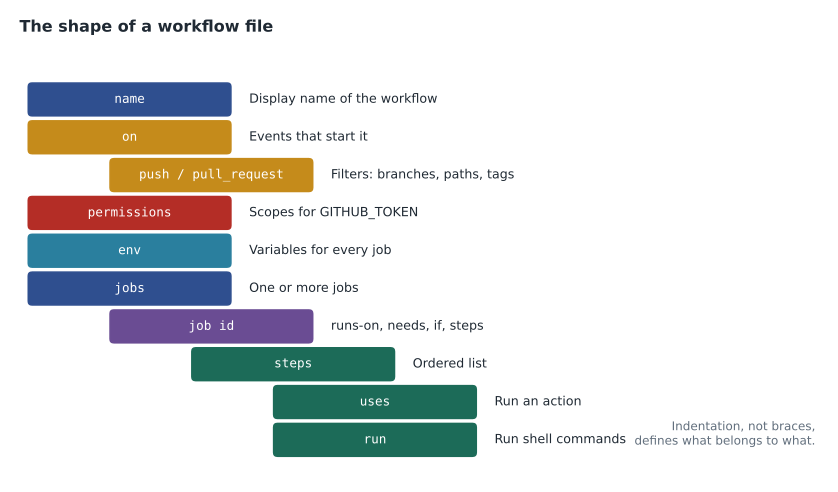
YAML is a format for writing structured data as plain text. It is designed to be easy to read, which is why GitHub chose it, but it is strict about layout. Four ideas cover almost everything a workflow needs.
Mappings are key and value pairs, written as a key, a colon, a space and the value. Sequences are lists, written one item per line with a hyphen and a space in front. Nesting is shown by indentation with spaces: everything indented under a key belongs to that key. Scalars are single values: strings, numbers, true or false, and null.
# A mapping with nested mappings and a sequence
name: Publish site
on:
  push:
    branches:
      - main
      - "release/**"
jobs:
  build:
    runs-on: ubuntu-latest
    timeout-minutes: 15
    steps:
      - uses: actions/checkout@v5
      - run: npm ci
Indentation must use spaces, never tabs. The number of spaces is up to you, as long as everything at the same level uses the same amount; GitHub's own examples use two. The usual mistake is a step whose keys do not line up: if run starts two spaces further left than name in the same step, YAML reads it as belonging to something else, and the file either fails to load or means something you did not intend.
Strings, quotes and multi-line text
Most strings need no quotes. Quotes become necessary when a value starts with a character that YAML treats specially, such as an asterisk, an ampersand, a brace, a square bracket or a colon followed by a space, or when a value could be mistaken for another type. A branch pattern such as release/** must be quoted because it starts with a character YAML reserves. Version numbers deserve care too: an unquoted 3.10 is read as the number 3.1, so a matrix of language versions should quote them.
Shell commands often span several lines. A literal block, introduced with a vertical bar after the key, keeps every line break, so each line runs as a separate command. A folded block, introduced with a greater-than sign, joins the lines into one long line, which suits a long single command broken for readability.
steps:
  - name: Build and report
    run: |
      npm ci
      npm run build
      echo "Built $(ls dist | wc -l) files"
  - name: Call the trail API
    run: >
      curl --fail --silent
      --header "Accept: application/json"
      https://api.trailcheck.example/status
The keyword that is also a boolean
One YAML oddity deserves a mention. In older YAML rules the bare word on can be read as the boolean true. GitHub's parser understands on as the trigger key, so workflows work, but a general-purpose YAML linter may show the key as true. That is a quirk of the linter, not a problem with the workflow. The same family of quirks is why yes, no, off and similar words should be quoted when you mean them as text.
The keys every workflow uses
| Key | Level | Purpose |
|---|---|---|
| name | Workflow, job, step | Display name in the Actions tab and in checks |
| run-name | Workflow | Name for each run, which can include expressions such as the actor or branch |
| on | Workflow | The events that trigger the workflow, with filters |
| permissions | Workflow or job | The scopes granted to the automatic GITHUB_TOKEN |
| env | Workflow, job or step | Environment variables available at that level and below |
| defaults | Workflow or job | Default shell and working directory for run steps |
| concurrency | Workflow or job | Limits runs or jobs in the same group to one at a time |
| jobs | Workflow | The jobs to run, each with a unique id |
| runs-on | Job | The runner label or group the job needs |
| steps | Job | The ordered list of steps |
| uses / run | Step | Use an action, or run shell commands |
| with | Step | Inputs passed to an action |
Job ids are the keys under jobs. They must be unique in the file, must start with a letter or an underscore, and may contain only letters, digits, hyphens and underscores. A job id is how other jobs refer to it in needs and how expressions refer to its outputs, so choose ids that read well: lint, test, build-site, deploy.
Each step can have a name, an id, an if condition, env variables, a timeout and continue-on-error. A step that runs commands uses run and, optionally, shell and working-directory. A step that uses an action names it with uses, in the form owner/repository@ref, optionally with a path inside that repository, and passes inputs with a with mapping. A step uses either run or uses, never both.
- name: Set up Node.js
  id: node
  uses: actions/setup-node@v5
  with:
    node-version: "24"
    cache: npm
- name: Show the version
  run: node --version
  shell: bash
  working-directory: site
Reusing repeated blocks with anchors
Long workflows often repeat the same mapping: the same environment variables in three jobs, or the same setup steps. Since September 2025 GitHub supports YAML anchors and aliases in workflow files. An anchor, written with an ampersand and a name, marks a value; an alias, written with an asterisk and the same name, repeats it elsewhere in the same file. The merge key, two less-than signs, merges an anchored mapping into another mapping, so you can repeat most of a block and override one key. The GH-200 outline expects you to read and expand anchors, because troubleshooting questions may show a file that uses them.
jobs:
  lint:
    runs-on: ubuntu-latest
    env: &node_env
      NODE_ENV: test
      LOG_LEVEL: info
    steps:
      - uses: actions/checkout@v5
  test:
    runs-on: ubuntu-latest
    env:
      <<: *node_env
      LOG_LEVEL: debug
    steps:
      - uses: actions/checkout@v5
Expanded, the test job has NODE_ENV set to test and LOG_LEVEL set to debug, because a key written after the merge replaces the merged value. Anchors work only within one file. To share configuration across files and repositories you need reusable workflows, composite actions or workflow templates, which lesson 9 covers.
Comments and readable files
A hash sign starts a comment that runs to the end of the line, and comments are the cheapest documentation a workflow can have. Priya's rule was that any choice a newcomer might question deserved one: why a job has a 15-minute timeout, why a step pins an exact tool version, why a path filter leaves out the images folder. Comments cost nothing at run time, and six months later they answer the question "can I delete this?" without a meeting.
Readability also comes from structure. Put the triggers near the top, then permissions and environment, then jobs in the order they run. Give each job a name that will make sense as a check on a pull request, because "Check / spelling" tells a reviewer far more than "Check / job1". Keep steps short; when a run block grows past a dozen lines, move the commands into a script file in the repository and call the script, which also makes it possible to run the same commands on a laptop.
| Symptom | Likely YAML cause | Fix |
|---|---|---|
| No run appears and the Actions tab shows an invalid file | Tab character, or keys misaligned in a step | Re-indent with spaces and align keys under the hyphen |
| A step runs a command you did not expect | run belongs to a different step because of indentation | Check that each run sits under its own hyphen |
| A branch filter never matches | Unquoted pattern starting with an asterisk | Quote the pattern |
| A matrix job installs the wrong language version | Version such as 3.10 read as a number | Quote versions in the matrix |
| A multi-line command runs as one long line | Folded block used instead of a literal block | Use a vertical bar for separate commands |
| A duplicated key silently wins | The same key written twice in one mapping | Remove the duplicate; linters flag this |
The last row deserves a warning. If a mapping contains the same key twice, many YAML parsers keep only one of the values without complaint, so a second env block or a second steps list can quietly replace the first. A linter catches this; a human reading a long file often does not.
Checking a file before you push it
There are three good ways to catch YAML problems early. The workflow editor on GitHub.com highlights syntax errors and unknown keys as you type and offers completion for keys and action inputs. The GitHub Actions extension for Visual Studio Code validates workflow files against the schema, completes keys, shows action metadata and lets you view runs without leaving the editor; the GH-200 outline mentions this kind of editor tooling by name. And a general YAML linter, or the actionlint tool that many teams run in their own CI, catches indentation errors and many logic errors before a push.
When a broken file reaches GitHub anyway, the Actions tab shows the workflow with an error describing the problem and the line number, instead of a run. Lena found hers there once she knew where to look: a message saying the file could not be parsed, pointing at the line with the tab.
Worked problem
Fixing a file that never runs
This step is meant to install dependencies and run tests, but GitHub reports an invalid workflow file. The step is written as: a hyphen and name: Test on one line; the next line starts with three spaces and run: npm test; the run key is meant to align with name. What is wrong?
Show solution
- In a sequence item, the keys of the mapping must align with the first key after the hyphen.
- After "- " the key name starts two characters in from the hyphen, so run must start at that same column.
- With three spaces instead of the hyphen's column plus two, run lines up with nothing, and the parser rejects the mapping.
- Align run with name, using spaces only.
Answer: The run key is misaligned with name in the same step. Indent it to the same column as name, using spaces.
Worked problem
Expanding an anchor in your head
A workflow defines a mapping under the build job with the anchor defaults, containing runs-on: ubuntu-latest and timeout-minutes: 10. The deploy job is written as a merge of that anchor followed by timeout-minutes: 30 and environment: production. What does the deploy job contain once expanded?
Show solution
- The merge key copies every key from the anchored mapping: runs-on and timeout-minutes.
- Keys written after the merge in the same mapping take priority, so timeout-minutes becomes 30.
- New keys such as environment are simply added.
Answer: The deploy job runs on ubuntu-latest with a 30-minute timeout and the production environment.
Lena wrote one more note in her guide after that example: when a troubleshooting question shows anchors, expand them on paper first. Most wrong answers come from forgetting that a later key overrides a merged one, or from assuming an alias can reach into another file. The same habit helps with real files, where a long anchored block can hide the one value that differs between jobs.
Common mistakes
MistakeSaving workflow files in .github/workflows/ci/ or in the repository root.
InsteadOnly files directly in .github/workflows with a .yml or .yaml extension are workflows.
MistakeIndenting with tabs or with uneven numbers of spaces.
InsteadUse spaces only, and the same indentation for keys at the same level.
MistakeLeaving version numbers such as 3.10 unquoted.
InsteadQuote them, or YAML may read them as numbers and drop trailing zeros.
MistakeExpecting a new scheduled workflow on a feature branch to run.
InsteadScheduled and manual workflows use the file on the default branch unless a branch is chosen for a manual run.
By the end of the session Lena had fixed her link-check change, added the Actions extension to her editor and written a short style guide for the team: two-space indentation, quoted patterns and versions, a name for every job and every non-obvious step, and comments wherever a choice was not obvious.
Summary and key terms
- Workflows are .yml or .yaml files directly in .github/workflows; each file is one workflow.
- YAML uses mappings, sequences, indentation with spaces, and scalars; tabs are not allowed.
- Quote values that start with special characters and version numbers that YAML might read as numbers.
- Literal blocks keep line breaks; folded blocks join lines into one.
- Common keys: name, run-name, on, permissions, env, defaults, concurrency, jobs, runs-on, steps, uses, run, with.
- Anchors, aliases and the merge key reuse blocks within one file; editor tooling and linters catch errors early.
- YAML
- A plain-text format for structured data that uses indentation to show nesting.
- Mapping
- A set of key and value pairs.
- Sequence
- An ordered list, written with a hyphen before each item.
- Literal block
- A multi-line string introduced with a vertical bar that keeps line breaks.
- Folded block
- A multi-line string introduced with a greater-than sign that joins lines.
- Anchor
- A named marker on a YAML value, written with an ampersand.
- Alias
- A reference that repeats an anchored value, written with an asterisk.
- Job id
- The unique key that names a job in the jobs mapping.
Practice problems
Work each problem on paper first, then reveal the answer to check.
Why must a branch pattern such as release/** be quoted?
Show answer
Because it starts with a character that YAML reserves, so unquoted it is not read as a plain string.
Which block style would you use for three separate shell commands?
Show answer
A literal block, introduced with a vertical bar, which keeps each line separate.
Can a YAML anchor defined in check.yml be used in publish.yml?
Show answer
No. Anchors work only within the same file.
Lesson quiz · 5 questions
Score 60% or more to complete this lesson.
Create a free account to save your progress, take quizzes and earn a certificate.