
MSBA-263 · Lesson 9 of 12 · 18 min
Power BI in Microsoft Fabric
▶ Video coming soon A video version of this lesson is on the way.
For most of its history Power BI was a product on its own: Desktop for building, the service for sharing. Since Microsoft introduced Microsoft Fabric, the Power BI service has become one part, or workload, of a larger analytics platform that also handles data engineering, data warehousing, real-time analytics and data science. The workspaces, reports and semantic models of earlier lessons are now Fabric items, and the service a Power BI user signs in to is the Fabric portal. This lesson explains what that means for a data analyst maintaining Power BI content, and why Lumenvale moved its Student Success workspaces onto a Fabric capacity in November 2026. Most of it goes beyond the PL-300 objectives, which focus on Power BI itself, but the vocabulary appears throughout the exam's scenarios.
Fabric in one page
Fabric brings several kinds of item into the same workspaces.
| Item | What it does | How it touches Power BI |
|---|---|---|
| Lakehouse | Stores files and Delta tables in OneLake for data engineering | A source for semantic models, including Direct Lake |
| Warehouse | A SQL data warehouse with tables stored in OneLake | A source for semantic models, including Direct Lake |
| Dataflow Gen2 | Power Query transformations that load data to a destination | Prepares data once for many models (MSBA-260) |
| Pipeline | Orchestrates copy activities, dataflows and notebooks on a schedule | Can refresh a semantic model when upstream loads finish |
| Notebook | Code for data engineering and data science | Prepares tables that reports use |
| Semantic model, report, dashboard, paginated report | The Power BI items of earlier lessons | Unchanged in purpose; now Fabric items |
| Activator | Watches data and takes action when conditions are met | Alerts from report visuals (lesson 10) |
All Fabric items store their data in OneLake, a single data lake for the whole organization, organized by workspace. Shortcuts let one lakehouse point to data stored elsewhere, in another workspace or in external storage, without copying it. For a data analyst, the practical effect is that data engineers can prepare clean tables once in a lakehouse or warehouse, and analysts can build semantic models on them without each team building its own copy.
Direct Lake
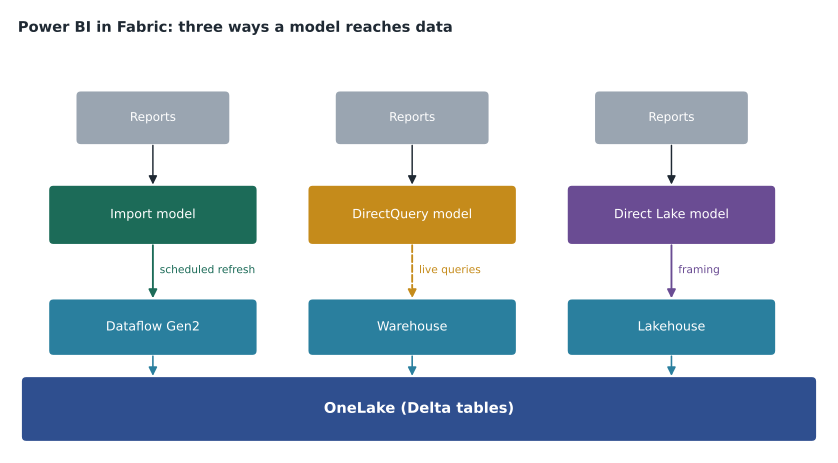
Fabric adds a third storage mode to Import and DirectQuery. Direct Lake semantic models read Delta tables in OneLake directly into memory when queries need them, without an import refresh that copies the data. Instead of refreshing, the model is framed: a lightweight operation that points the model at the latest version of the Delta tables. That gives near-import performance on large tables with data that is as fresh as the last load into the lake.
Microsoft documents two variants. Direct Lake on OneLake reads Delta tables in OneLake directly. Direct Lake on SQL endpoints reads through the SQL analytics endpoint of a lakehouse or warehouse and can fall back to DirectQuery when a query cannot be answered in Direct Lake mode, for example when guardrails on table size are exceeded or when the endpoint's security rules require it. Direct Lake requires a Fabric capacity and does not use a gateway. The PL-300 study guide's objective *choose between DirectLake, DirectQuery, and Import* belongs to the preparing-data group, which MSBA-260 covered; this lesson adds the maintenance view: Direct Lake models have no scheduled import refresh to monitor, but they depend on the pipelines that load the lake.
Capacities and licences
Fabric content runs on a capacity: a pool of compute that an organization buys, measured in capacity units and sold in sizes called F SKUs, from F2 upward. Every workspace is either on a capacity or in a licence mode that uses shared capacity, such as Pro. Microsoft has been moving organizations from the older Power BI Premium capacity SKUs, named P1 and upward, to Fabric F SKUs.
Capacity size matters for two reasons beyond speed. First, many Fabric items, such as lakehouses, warehouses and Direct Lake models, need a Fabric capacity at all. Second, the right to view Power BI content with a free licence depends on size: on a capacity of F64 or larger, or a Premium P capacity, people with free licences can view content shared with them. On smaller capacities, as with Pro workspaces, readers need a Pro or Premium per user licence.
| Licence or capacity | Who it is for | Notes |
|---|---|---|
| Free | Personal use, and viewing content on F64 or larger capacities | Cannot share or collaborate in Pro workspaces |
| Power BI Pro | Creators and readers in Pro workspaces and on smaller capacities | Published list price about 19 Canadian dollars per user per month, varying by agreement |
| Premium per user | Individuals who need Premium features without a capacity | Content in a Premium per user workspace can be used only by Premium per user users |
| Fabric capacity (F SKU) | Organizations running Fabric items and shared Power BI content | Sized from F2; F64 and larger allow free viewers |
| Fabric trial | Trying Fabric features for a limited period | Some features, such as Copilot, are not supported on trial capacities |
Lumenvale bought a modest Fabric capacity in 2026, smaller than F64, for its shared dataflows and the Copilot features covered in MSBA-262. Because it was below F64, the deans and coordinators still needed Pro licences to read reports on it; they already held them through Lumenvale's Microsoft 365 agreement, so moving the Student Success workspaces to the capacity changed nothing for readers. It gave Kwabena 48 scheduled refreshes a day, deployment pipelines, and the option of Direct Lake when the data engineers finished the student lakehouse planned for 2027.
Assigning a workspace to a capacity
A workspace is assigned to a capacity through its licence mode setting, by an admin of the workspace who also has permission to assign workspaces to that capacity. Capacity administrators control who has that permission, which is how Rupert stopped every workspace in the college from landing on the capacity. Moving a workspace between capacities, or back to Pro, keeps its items but changes the limits and features available; items that need a capacity, such as lakehouses, stop working if the workspace leaves it, so Rupert checked each workspace's contents before moving it.
Capacity administrators can also delegate some settings to the capacity level and set how the capacity responds to overload, and Fabric capacities can be paused and resumed in Azure to save cost. Pausing stops everything on the capacity, including report viewing, so Lumenvale never paused its production capacity during term.
Copilot and capacity
Copilot in Power BI, covered in MSBA-262 and MSBA-132, requires the content to be on a paid capacity of F2 or larger, or P1 or larger; trial capacities are not supported, and Pro or Premium per user licences alone are not enough. A Fabric Copilot capacity lets an organization designate one capacity to carry Copilot usage for assigned users even when their content is in Pro or Premium per user workspaces. Lumenvale had designated its capacity this way for Kwabena, Maribeth and the deans, which is why they could use Copilot on reports that were still in Pro workspaces before November.
What changes for maintenance
Moving Power BI content into Fabric changes a maintainer's work in a few concrete ways. Upstream items, such as pipelines and dataflows, become part of the same workspace or a neighbouring one, so lineage view (lesson 8) shows the whole chain from source to report. Refresh may move from a fixed schedule to a pipeline that refreshes the semantic model when the nightly load finishes, which avoids refreshing stale data. Capacity use becomes shared between Power BI and other workloads, so a heavy notebook can slow reports, and the Capacity Metrics app becomes part of routine monitoring. And governance tools such as domains, the OneLake catalog and Purview integration apply across all items, not only Power BI.
Worked problem
Does the Student Success workspace need a capacity?
Rupert asks Kwabena to justify moving the Student Success workspaces from Pro to the Fabric capacity. The model is 800 megabytes, refreshes twice a day, has twenty-five readers who all hold Pro licences, and the team wants deployment pipelines and, next year, hourly refresh during registration week. Is the move justified, and does it let readers drop their Pro licences?
Show solution
- Model size is under the 1 gigabyte limit for Pro, so size alone does not require a capacity.
- Twice-daily refresh fits within Pro's eight a day, but hourly refresh during registration would exceed it; a capacity allows up to 48.
- Deployment pipelines need capacity-backed workspaces, so the move enables them.
- Readers need Pro on a capacity smaller than F64, so they keep their licences; only an F64 or larger capacity would allow free viewers.
Answer: The move is justified by deployment pipelines and the planned registration-week refresh frequency, not by size. Readers keep their Pro licences because Lumenvale's capacity is smaller than F64.
Workspace identity and other Fabric settings
Fabric adds a few workspace settings that matter to maintainers. A workspace identity is a Microsoft Entra identity that belongs to the workspace rather than to a person; items in the workspace can use it to authenticate to some data sources, which avoids connections breaking when the person who set them up leaves. Domains group workspaces by business area and let domain administrators manage some settings and certification for their area. Spark and other engineering settings appear for workspaces that use data engineering items. Most data analysts will see these settings but not change them; knowing what they are avoids surprises when a workspace's behaviour changes after an administrator adjusts them.
OneLake integration for semantic models
Fabric can also write an imported semantic model's tables to OneLake as Delta tables, a feature Microsoft calls OneLake integration for semantic models. Once enabled, other Fabric items, such as notebooks or a lakehouse shortcut, can read the model's imported data without querying the model itself. Lumenvale's data engineers used it to read the curated program and campus tables from the Student Success model when building their student lakehouse, which avoided rebuilding the same cleaning steps a second time. It is an administrator-controlled feature with its own settings and costs, and it goes beyond what a data analyst needs for PL-300.
Choosing storage modes as a maintainer
The choice between Import, DirectQuery and Direct Lake was covered from the modelling side in MSBA-260. From the maintenance side, the questions are different. Import needs refresh schedules, credentials and, for on-premises data, gateways, and its data is only as fresh as the last refresh. DirectQuery needs no data refresh but puts load on the source and the gateway every time a reader opens a page, and slow sources make slow reports. Direct Lake needs no import refresh and no gateway, but needs a Fabric capacity, depends on the pipelines that load the lake, and can fall back to DirectQuery in one variant. Kwabena kept Import for the Student Success model in 2026, planned Direct Lake once the student lakehouse existed, and kept DirectQuery only for the registration-week table where minutes mattered.
Capacity planning in brief
Capacity size is a budget decision with technical inputs. The Capacity Metrics app (lesson 8) shows how much of the capacity each workspace uses, how much is interactive and how much is background, and how often throttling happens. Fabric smooths usage over time, so short spikes are absorbed, but sustained overuse leads to delays and then to rejected requests. Rupert reviewed the numbers each month and made two kinds of decision: move or reschedule heavy background work, such as overlapping refreshes, and, if sustained use stayed high, propose a larger capacity in the next budget. A capacity of F64 or larger would also have removed the need for readers' Pro licences, which made the comparison more than a question of speed.
Common mistakes
MistakeThinking Fabric replaced Power BI.
InsteadPower BI is a workload within Fabric; reports and semantic models work as before and gain new neighbours.
MistakeAssuming any Fabric capacity lets free users view reports.
InsteadFree viewing needs a capacity of F64 or larger, or a Premium P capacity.
MistakeScheduling import refresh for a Direct Lake model.
InsteadDirect Lake models are framed against the latest Delta tables; monitor the pipelines that load the lake.
MistakePausing a capacity to save cost during working hours.
InsteadPausing stops everything on the capacity, including report viewing.
MistakeMoving a workspace off a capacity without checking its items.
InsteadItems that need a capacity, such as lakehouses, stop working if the workspace leaves it.
Summary and key terms
- Fabric is Microsoft's analytics platform; Power BI is one of its workloads.
- Fabric items store data in OneLake; shortcuts reference data without copying it.
- Direct Lake models read Delta tables directly and are framed rather than refreshed; one variant can fall back to DirectQuery.
- Capacities are sold as F SKUs; F64 or larger lets free licences view content.
- Workspaces join a capacity through their licence mode, controlled by capacity administrators.
- Copilot needs a paid capacity of F2 or P1 or larger, or a designated Fabric Copilot capacity.
- Microsoft Fabric
- Microsoft's analytics platform that includes Power BI and other data workloads.
- OneLake
- The single data lake that stores data for all Fabric items in an organization.
- Direct Lake
- A storage mode that reads Delta tables in OneLake directly without import refresh.
- Framing
- The lightweight operation that points a Direct Lake model at the latest Delta table versions.
- Capacity
- A purchased pool of compute on which workspaces and their items run.
- F SKU
- A size of Fabric capacity, from F2 upward.
Practice problems
Work each problem on paper first, then reveal the answer to check.
A college wants staff with free licences to read reports. What capacity does it need?
Show answer
A Fabric capacity of F64 or larger, or a Premium P capacity.
What happens to a Direct Lake model when new rows land in its Delta tables?
Show answer
The model is framed to the latest table versions and queries read the new data; no import refresh copies it.
Why might a report slow down when a data engineer runs a large notebook?
Show answer
They share the same capacity, so the notebook consumes capacity units the reports also need.
Lesson quiz · 5 questions
Score 60% or more to complete this lesson.
Create a free account to save your progress, take quizzes and earn a certificate.