
MSBA-263 · Lesson 5 of 12 · 18 min
Gateways
▶ Video coming soon A video version of this lesson is on the way.
The Power BI service runs in Microsoft's cloud. Lumenvale's student information system runs on a SQL Server in the college's own data centre, behind a firewall that does not accept connections from the internet. Something has to carry queries and data between the two, safely and without opening the firewall. That something is a gateway. The PL-300 study guide asks data analysts to *identify when a gateway is required*; this lesson also covers the kinds of gateway, how connections are set up and who manages them, so that Kwabena can work with Rupert's team rather than wait on them.
When a gateway is required
A gateway is required when the service must reach a data source that it cannot reach directly over the internet. In practice that means three groups of sources.
On-premises sources, such as SQL Server, Oracle, file shares, SharePoint Server and on-premises Analysis Services, running in the organization's own buildings or data centre.
Sources inside private networks in the cloud, such as an Azure SQL database that accepts connections only from a virtual network.
Files on a network drive, such as an Excel workbook on a shared drive mapped as S:, which the service cannot see.
A gateway is not required for cloud sources the service can reach directly: SharePoint Online and OneDrive for work or school, Dataverse, Azure SQL Database with a public endpoint, Fabric lakehouses and warehouses, and most software-as-a-service connectors. It is also not required for files uploaded to the service, or for semantic models stored as OneDrive or SharePoint files whose data is fully imported from cloud sources.
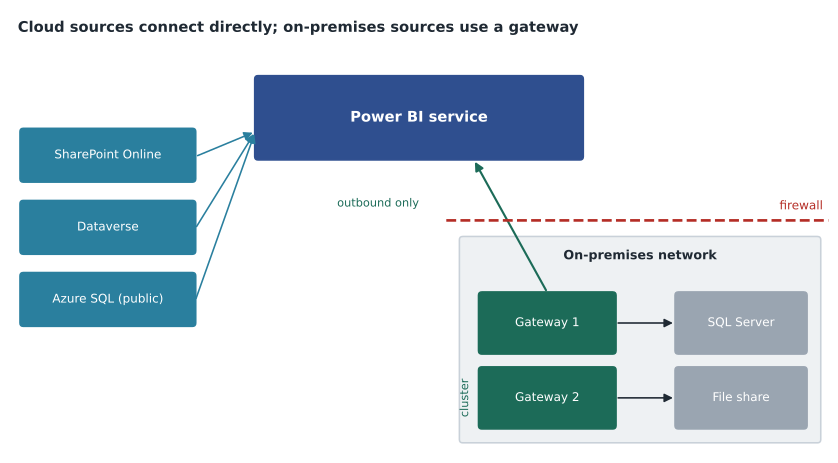
The exam often frames this as a scenario: *a report combines an on-premises SQL Server table with a SharePoint Online list; what is needed for scheduled refresh?* The answer is a gateway connection for the SQL Server source. The SharePoint Online source does not need one, although Microsoft documents that a model mixing on-premises and cloud sources can be configured to send cloud sources through the gateway as well, if the organization wants all traffic to follow one path.
How a gateway works
The on-premises data gateway is software installed on a Windows computer inside the network. It makes outbound connections to Azure Relay and the Power BI service, so no inbound firewall ports need to be opened. When a refresh or DirectQuery query needs on-premises data, the service sends the request through the relay to the gateway; the gateway connects to the source using stored credentials, runs the query and returns the results. Credentials are encrypted, and the gateway uses a recovery key chosen at installation, which is needed to restore or migrate it.
The gateway computer should be dedicated, always on, close to the data sources on the network and not a domain controller. It needs enough processor and memory for the busiest refresh windows, because transformations that do not fold are processed by the gateway, not the source. Microsoft releases gateway updates regularly, and only recent versions are supported, so Rupert's team scheduled an update every month.
Gateway modes
| Type | Who uses it | Supports | Typical use |
|---|---|---|---|
| On-premises data gateway (standard mode) | Many users, through shared connections | Scheduled refresh, DirectQuery, live connections; Power BI, Power Apps, Power Automate, Fabric | Production gateways managed by IT |
| On-premises data gateway (personal mode) | One user, for their own semantic models | Import refresh for Power BI only; no DirectQuery or sharing | Individual analysts without IT support |
| Virtual network data gateway | Many users; managed by Microsoft inside an Azure virtual network | Sources in Azure virtual networks; needs capacity licensing | Cloud sources that are private to a virtual network |
Personal mode is tempting because an analyst can install it on their own laptop in minutes. It has serious limits: it serves only its installer, it cannot be shared, it does not support DirectQuery, and refresh stops whenever the laptop is asleep or off the network. Lumenvale's tenant settings did not block it, but Rupert's governance policy did, and the policy explained why with a story every analyst recognized: a report that stopped refreshing for two weeks while its author was on vacation with her laptop.
Gateway clusters
A single gateway computer is a single point of failure. A gateway cluster groups two or more gateway installations under one name. The service sends requests to the primary member and fails over to other members if it is unavailable, and an option distributes requests across members to spread the load. Lumenvale's standard gateway was a two-server cluster in the data centre, so Rupert's team could patch one server while the other carried the refreshes.
Connections
In the service, a gateway does nothing until it has connections. A connection defines one data source through one gateway or cluster: the connector type, the server and database, the authentication method and the credentials. Connections are managed in the service under Manage connections and gateways.
Each connection has users with one of three roles. Owner can edit and delete the connection and manage its users. User can use the connection in their semantic models. User with resharing can use it and share it with others. Gateways themselves have admin roles for the people who manage the gateway installation. At Lumenvale, Rupert's team owned the gateway and its connections; Kwabena was a User on the StudentRecords connection and could map his models to it but could not see or change its password.
To use the connection, Kwabena opened the semantic model's settings after publishing, expanded Gateway and cloud connections, and mapped the model's SQL Server source to the existing connection. The mapping works only when the server and database names in the model match the connection exactly; a model that used the server's short name would not match a connection defined with the fully qualified name. That small mismatch was the single most common gateway problem at Lumenvale.
Worked problem
Does this model need a gateway?
Kwabena's Student Success model has four sources: the StudentRecords SQL Server database in Lumenvale's data centre; the official program list, a SharePoint Online list owned by Maribeth; tutoring session records in Dataverse; and a budget extract in an Excel file on the Finance department's network share. Which sources need a gateway connection for scheduled refresh?
Show solution
- StudentRecords is on premises, so it needs a gateway connection through the standard gateway cluster.
- SharePoint Online is a cloud source the service reaches directly; no gateway is needed.
- Dataverse is a cloud source; no gateway is needed.
- The Excel file on a network share is invisible to the cloud service, so it needs a gateway connection for the file path. A better long-term fix is to move the file to SharePoint Online or use Finance's certified budget semantic model.
Answer: Two of the four sources need gateway connections: the on-premises SQL Server database and the file on the network share. Kwabena asked Finance to publish the budget extract to SharePoint instead, which removed one gateway dependency.
Gateways, DirectQuery and performance
With DirectQuery or live connections to on-premises sources, every visual's query passes through the gateway while readers use the report, not just during refresh. Gateway capacity then affects report speed. Lumenvale's registration-week page used DirectQuery to the student system with automatic page refresh every two minutes, so Rupert's team watched the gateway's performance counters during registration week. Microsoft provides gateway performance monitoring logs and a template report for analyzing them.
Single sign-on through the gateway
By default the gateway connects to the source with the stored credentials, the same for every reader. For DirectQuery, some sources support single sign-on, where the gateway connects as the reader, so that the source's own security applies to each person. That is powerful but needs careful configuration of Kerberos or Microsoft Entra ID and is an administrator's task; for the Student Success model, row-level security in the semantic model was simpler and enough.
Planning a gateway for production
A gateway that carries production refreshes deserves the same care as any other server. Rupert's team followed a short plan when they built Lumenvale's cluster. The two gateway servers sat in the same data centre as the student information system, on a fast network path to it, so that refresh traffic did not cross the campus network. Each ran on its own virtual machine, not alongside the database, so a busy refresh could not slow the student system and a database patch did not stop the gateway. The gateway service ran under a dedicated service account with only the permissions it needed, and the recovery key was stored in the college's password vault with two people able to retrieve it.
Monitoring completed the plan. The gateway's own logs and performance counters showed how busy each member was during the morning refresh window, and the gateway status in the service showed whether each member was online. When one member failed in October because its disk filled with logs, the other carried every refresh, and the only sign readers saw was nothing at all. Rupert's team then added a disk alert and a monthly log clean-up.
Who does what
Gateways sit between teams, so clear responsibilities prevent delays. At Lumenvale, Rupert's infrastructure team installed, updated and monitored the gateway servers and held the gateway admin role. The same team created connections for each on-premises database and file share, owned them, and stored their credentials, so that no analyst ever handled a database password. Analysts such as Kwabena were added to connections as Users and mapped their semantic models to them. When an analyst needed a new source, they filed a short request naming the server, database, authentication method and the semantic models that would use it, and the connection usually existed the same day.
This split also kept the audit trail clean. Every change to a connection, such as new credentials or a new user, was made by someone on the infrastructure team and recorded in the activity log, and the privacy office could see exactly which semantic models reached the student information system through which connection.
Gateways and the other Power Platform services
The same standard-mode gateway serves more than Power BI. Power Apps and Power Automate use it for on-premises connectors, Fabric uses it for Dataflow Gen2 and pipelines that read on-premises sources, and Azure Logic Apps can use it too. Lumenvale's media equipment flows (MSBA-131) and the facilities energy readings both reached on-premises systems through the same cluster. That is efficient, but it also means a gateway outage affects several services at once, which is one more reason to run it as a cluster.
Gateways in exam scenarios
PL-300 questions on gateways are almost always about *when* one is required, not about installing it. A useful way to answer them is to ask, for each source in the scenario, *can a computer on the public internet reach this source with credentials alone?* If yes, as for SharePoint Online, Dataverse, Azure SQL with a public endpoint or a Fabric lakehouse, no gateway is needed. If no, as for an on-premises SQL Server, a network file share or a database inside a private virtual network, a gateway is needed, and the scenario's other details decide which kind: standard mode for shared production content and DirectQuery, personal mode only for one person's own imported models, and a virtual network data gateway for sources private to an Azure virtual network.
Watch for distractors that sound related but are not gateways. An app, a deployment pipeline, a sensitivity label or a Fabric capacity never replaces a gateway for an on-premises source. And a model that uses DirectQuery to an on-premises source needs the gateway at every query, not only at refresh time, so a gateway outage stops those reports entirely.
Common mistakes
MistakeInstalling a gateway for cloud sources such as SharePoint Online or Dataverse.
InsteadCloud sources the service can reach directly do not need a gateway.
MistakeRelying on a personal-mode gateway on a laptop for shared reports.
InsteadUse a standard-mode gateway, ideally a cluster, managed by IT.
MistakeUsing different server name formats in the model and the connection.
InsteadMake the server and database names in the model match the gateway connection exactly.
MistakeRunning a single gateway server for production refreshes.
InsteadUse a cluster of two or more members so updates and failures do not stop refresh.
MistakeIgnoring gateway updates.
InsteadUpdate regularly; only recent gateway versions are supported.
Summary and key terms
- A gateway is required for on-premises sources, private-network sources and network-share files.
- Cloud sources such as SharePoint Online, Dataverse and public Azure SQL need no gateway.
- The on-premises data gateway makes outbound connections, so no inbound firewall ports are opened.
- Standard mode serves many users and DirectQuery; personal mode serves one user with import refresh only.
- Virtual network data gateways serve sources private to an Azure virtual network.
- Clusters provide high availability; connections hold credentials and are shared through connection roles.
- On-premises data gateway
- Software installed inside a network that carries queries and data between the service and on-premises sources.
- Personal mode
- A gateway mode that serves one user's semantic models with import refresh only.
- Virtual network data gateway
- A Microsoft-managed gateway for sources inside an Azure virtual network.
- Gateway cluster
- Two or more gateway installations grouped for failover and load balancing.
- Connection
- A data source definition with credentials, used through a gateway or in the cloud.
- Recovery key
- A key chosen at gateway installation, needed to restore or migrate the gateway.
Practice problems
Work each problem on paper first, then reveal the answer to check.
A report imports from an Azure SQL database with a public endpoint and a SharePoint Online list. Is a gateway needed?
Show answer
No. Both sources are reachable from the cloud.
Why does a gateway not require inbound firewall ports?
Show answer
It makes outbound connections to Azure Relay and the service, which send requests back through that connection.
An analyst can map his model to a connection but cannot change its password. Which connection role does he have?
Show answer
User.
Lesson quiz · 5 questions
Score 60% or more to complete this lesson.
Create a free account to save your progress, take quizzes and earn a certificate.