
MSBA-263 · Lesson 7 of 12 · 19 min
Sensitivity labels and endorsement
▶ Video coming soon A video version of this lesson is on the way.
Two questions follow every Power BI item around the organization. *How sensitive is this?* and *can I trust it?* A report on tutoring hours by campus is internal but not secret. A semantic model with student names, birth dates and accommodation records is confidential, and an export of it left on a shared drive would be a privacy incident. Separately, an analyst choosing between three semantic models that all claim to contain enrolment needs to know which one the registrar stands behind. Sensitivity labels answer the first question and endorsement answers the second. The PL-300 study guide covers them as *apply sensitivity labels* and *promote or certify Power BI content*.
Sensitivity labels
Sensitivity labels come from Microsoft Purview Information Protection, the same labels people apply to Word documents and Outlook messages. An organization's compliance team defines them, such as *Public*, *General*, *Confidential* and *Highly Confidential*, and publishes them to users through label policies. When Power BI is enabled for labels, the same set appears on reports, semantic models, dashboards, dataflows and other Fabric items, so a confidential label means the same thing everywhere.
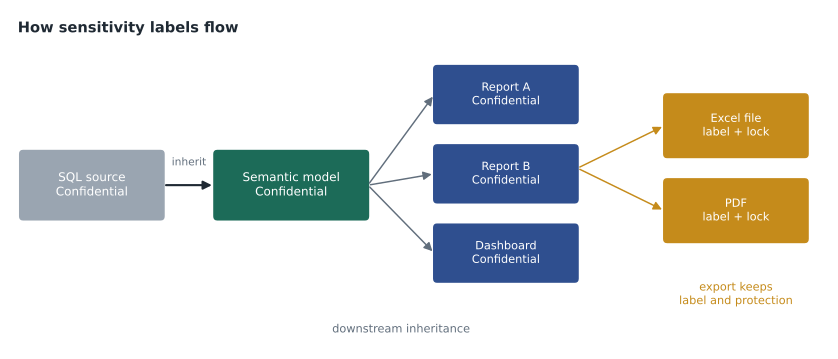
A label on a Power BI item is first a visible marker: it appears next to the item's name in the workspace, in the report header and in search, so people know how to treat it. It also travels with the data when it leaves Power BI. When someone exports data to Excel, PowerPoint or PDF, or downloads a Power BI Desktop file, the label goes with the exported file, and if the label applies protection, such as encryption that limits who can open the file, that protection goes too. That is the part that prevents the privacy incident: a confidential export that reaches the wrong person cannot be opened by them.
Turning labels on
Labels are a tenant-level decision. A Fabric administrator enables them in the admin portal's tenant settings, usually for the whole organization or for specific groups, and the labels themselves are managed in the Microsoft Purview portal. Applying labels requires a Power BI Pro or Premium per user licence and an appropriate Microsoft Purview Information Protection entitlement, which Lumenvale had through its Microsoft 365 agreement. Rupert enabled labels in September 2026, after the privacy office, led by Dr. Philippa Ondaatje-Ruiz, confirmed the four labels Lumenvale used for documents applied equally to reports.
Applying labels
There are two places to apply a label. In Power BI Desktop, the Sensitivity button on the Home ribbon applies a label to the file, and the label is carried to the service when the file is published. In the service, the label can be set from the item's settings or from the sensitivity indicator in the report header. Kwabena labelled the Student Success semantic model *Confidential* because it held student-level records, and labelled the reports built on it *Confidential* as well.
Several features reduce the work and the risk of forgetting.
| Feature | What it does |
|---|---|
| Inheritance from data sources | For supported sources that carry Purview labels, a semantic model can inherit the source's label when data is imported |
| Downstream inheritance | When a label is applied to a semantic model, it can be applied automatically to reports, dashboards and other items built on it |
| Inheritance on create | A new report created from a labelled model, or a copy of a labelled report, can receive the same label |
| Default label | A label policy can apply a default label to new, unlabelled items |
| Mandatory labelling | A label policy can require users to apply a label before saving or publishing |
| Justification | Policies can require a reason when someone lowers a label, and the change is audited |
These features are switched on by administrators, and each has conditions that Microsoft documents, such as which data sources support inheritance and when an automatic label will not overwrite one set by a person. Kwabena's practical rule was to set labels on semantic models first, because downstream inheritance then took care of most reports, and to check the labels of new reports in the workspace list after each release.
What labels do not do
A label does not control who can open a report in Power BI. Access inside the service is still decided by workspace roles, apps, permissions and row-level security. A confidential report shared with the whole organization is visible to the whole organization; the label tells them it is confidential and protects what they export, but it does not stop them viewing it. Labels and permissions work together, and Lumenvale's privacy review checked both.
Labels also do not apply to everything that leaves Power BI. Microsoft documents which export paths carry labels and protection. For example, data in an email subscription's image is a picture, not a labelled file, and a screenshot carries no label at all. Lumenvale's training for deans covered these gaps in plain terms: confidential reports are for reading in Power BI, not for photographing.
Endorsement
Endorsement marks items that people can trust and reuse. There are three kinds of badge.
| Badge | Meaning | Who can apply it |
|---|---|---|
| Promoted | The creator believes the item is ready for others to use | Anyone with write permission on the item |
| Certified | An authorized reviewer has checked the item against the organization's quality standards | Only users an administrator has designated; anyone can request it |
| Master data | The item is a core, authoritative source of organizational data, such as the official program list | Only users an administrator has designated; applies to items that contain data, such as semantic models and lakehouses |
Endorsement applies to Fabric and Power BI items except dashboards. Endorsed items show their badge in the workspace, in search and in the OneLake catalog, and in some lists they appear first. Certification and master data are available only if an administrator enables them, and certification can be delegated to domain administrators so that each domain has its own reviewers.
Endorsement is set in the item's settings, under the endorsement section. Kwabena promoted the Student Success semantic model as soon as it was stable, which told the deans' analysts it was ready to use. Certification took longer. Lumenvale's certification process, written by Rupert and the institutional research director, required documentation of every measure, a named owner, a refresh schedule with a monitored contact list, row-level security reviewed by the privacy office, and a sensitivity label. Kwabena submitted the request in November with those items attached; the institutional research director, one of the designated certifiers for the Academic domain, reviewed it and certified the model on November 18, 2026.
Maribeth's official program list, the SharePoint list behind every report that counted programs, was loaded into a small semantic model in the Lumenvale Data workspace and given the Master data badge by Rupert, so that anyone building a report knew which program list was authoritative.
Worked problem
Labelling and endorsing a new model
Signe publishes a new Continuing Education semantic model with learner names, contact details and course registrations. It will feed three reports and be reused by the marketing office. What should be done about labels and endorsement before the marketing analysts start building on it?
Show solution
- Apply the Confidential label to the semantic model, because it holds personal information.
- Confirm downstream inheritance applied Confidential to the three reports, and fix any that are unlabelled.
- Check access: grant the marketing analysts Read and Build on the model directly, without workspace roles, and confirm row-level security if they should see only some programs.
- Promote the model, so analysts can see it is ready to use.
- If it meets the certification checklist, request certification from a designated certifier.
Answer: Label the model Confidential, check that its reports inherited the label, grant Build deliberately, promote it, and request certification once the checklist is met. The label protects exports; the badge tells analysts which model to trust.
Governance beyond the exam
Labels and endorsement are part of a wider governance picture in Microsoft Fabric. The OneLake catalog lets people browse and search items they can access, filtered by endorsement and label. Domains group workspaces by business area, such as Academic or Finance, and let domain administrators manage settings for their area. Microsoft Purview can scan the Fabric tenant to build a data map with lineage, and the Purview hub in Fabric gives administrators reports on labelled and endorsed items. A data analyst does not configure these, but knowing they exist explains why accurate labels, descriptions and endorsement matter: they are what the governance tools read.
Choosing the right label
Labels only help if people choose them consistently. Lumenvale's privacy office published a one-page guide that matched each label to the kind of data in a semantic model. Public: data already published on the college website, such as total enrolment by program. General: internal operational data without personal information, such as facilities energy use or room bookings. Confidential: data about identifiable students or staff, such as registrations, grades or tutoring records. Highly Confidential: data whose exposure could cause serious harm, such as accommodation records, health information or disciplinary files, which Lumenvale kept out of Power BI altogether unless the privacy office approved a specific case.
The guide also told builders to label by the most sensitive data the model contains, not by the report's purpose. A summary report of tutoring hours by campus, built on a model that also held student names, was Confidential because anyone with Build permission on the model could query the names. That rule pushed teams towards models that contained only the data their reports needed, which reduced risk more than any label could.
Endorsement in practice
Endorsement changes behaviour only when people look for it. Lumenvale's training for new report builders included a short exercise: search the OneLake catalog for *enrolment*, notice that four semantic models appear, and pick the certified one. The search results showed the badges, and the certified model's description named its owner and refresh schedule. Within a term, new reports increasingly used certified models, and two older uncertified models with overlapping content were retired after their owners moved their reports to the certified one.
Certification also needs maintenance. A certified model that stops refreshing, loses its owner or drifts from its documented definitions no longer deserves its badge. Lumenvale's certifiers reviewed certified models every term, and Rupert's monitoring flagged any certified model whose refresh had failed for more than two days. A certifier could remove the badge, and did so once in 2026, for a model whose owner had left without a replacement.
Labels, endorsement and the exam
Exam questions on this objective usually ask which feature solves a stated problem. *Users must know which semantic model is the official source* points to certification or master data. *Exported files must stay protected* points to sensitivity labels with protection. *Every new report must have a label* points to mandatory labelling or a default label policy. *A creator wants others to know a model is ready* points to promotion. Keeping the two questions apart, how sensitive and how trustworthy, makes these questions straightforward.
Labels for content in apps and Teams
Labels appear wherever readers meet the content. In an app, the label shows in the report header, so a dean reading the Student Success report saw *Confidential* at the top of every page. In Microsoft Teams, a report tab shows the same header. On the mobile apps, the label appears in the report information. The consistency matters for training: Lumenvale's guide for readers showed a single screenshot of the label in the header and explained in two sentences what Confidential meant for them, namely that exports would be protected and that the content must not be photographed or forwarded outside the college.
When an administrator changes a label's protection settings in Purview, such as who can open protected files, the change applies to files exported afterwards; files already exported keep the protection they were given, although protected files are checked against the current settings when opened, depending on the protection configuration. Lumenvale's privacy office tested exports after every policy change to confirm the behaviour they expected.
Common mistakes
MistakeBelieving a Confidential label stops people in the organization from viewing a report.
InsteadLabels mark and protect exported data; access is controlled by roles, apps, permissions and row-level security.
MistakeLabelling every report by hand and missing new ones.
InsteadLabel semantic models and rely on downstream inheritance, then check new items after each release.
MistakeCertifying your own model because you think it is good.
InsteadPromote it; certification is applied by designated reviewers through the organization's process.
MistakeEndorsing a dashboard.
InsteadEndorsement applies to Fabric and Power BI items except dashboards.
MistakeAssuming every export path carries the label.
InsteadCheck Microsoft's list of supported export paths; screenshots and images carry no label.
Summary and key terms
- Sensitivity labels come from Microsoft Purview Information Protection and mean the same in Power BI as in Office files.
- Labels are visible markers and travel with exports to Excel, PowerPoint, PDF and downloaded files, with their protection.
- Administrators enable labels; inheritance, default labels and mandatory labelling reduce manual work.
- Labels do not control access inside Power BI.
- Endorsement badges are Promoted, Certified and Master data; certification and master data need designated reviewers.
- Endorsement applies to items except dashboards and helps people find trusted content.
- Sensitivity label
- A Microsoft Purview classification, such as Confidential, applied to items and carried with exported data.
- Protection
- Encryption and access restrictions that a label applies to exported files.
- Downstream inheritance
- Automatic application of a label from a semantic model to items built on it.
- Mandatory labelling
- A policy that requires users to apply a label before saving or publishing.
- Promoted
- An endorsement applied by the creator to show an item is ready for others.
- Certified
- An endorsement applied by a designated reviewer to show an item meets organizational standards.
Practice problems
Work each problem on paper first, then reveal the answer to check.
A confidential report is shared with everyone in the organization. Can they view it?
Show answer
Yes. The label marks it and protects exports, but permissions decide who can view it.
Who can apply the Certified badge?
Show answer
Only users designated by an administrator, after the organization's review process.
Why label the semantic model rather than each report?
Show answer
Downstream inheritance can then apply the label to reports and dashboards built on it.
Lesson quiz · 5 questions
Score 60% or more to complete this lesson.
Create a free account to save your progress, take quizzes and earn a certificate.