
MSBA-263 · Lesson 4 of 12 · 18 min
Scheduled and incremental refresh
▶ Video coming soon A video version of this lesson is on the way.
An imported semantic model is a copy of the data taken at a moment. Without refresh it ages quietly: the report keeps working, but the numbers stop changing, and nobody notices until a dean asks why last week's bookings are missing. In this lesson Kwabena configures refresh for the Student Success model, which the PL-300 study guide covers as *configure a semantic model scheduled refresh*, and then goes beyond the exam to set up incremental refresh for the largest table.
Which models need refresh
Whether a model needs refresh depends on its storage mode. Import tables hold a copy of the data and must be refreshed to change. DirectQuery tables query the source each time a visual loads, so they show current data without a data refresh, although the service can refresh caches for dashboard tiles. Direct Lake tables in Fabric read Delta tables in OneLake and pick up changes through a lightweight process called framing rather than a full import. Live connections to another semantic model use that model's data and need nothing of their own. The Student Success model was mostly Import, with one DirectQuery table for the registration-week page, so its refresh schedule covered everything except that page.
Refresh types
There are several ways to start a refresh.
| Type | How it starts | Notes |
|---|---|---|
| Scheduled refresh | At times set on the semantic model's settings page | The standard way to keep imported data current |
| On-demand refresh | Refresh now, from the workspace or model page | Useful after a fix; counts toward some daily limits |
| API or automation | The Power BI REST API, Power Automate or a Fabric pipeline | Lets refresh follow an upstream event, such as a nightly load finishing |
| OneDrive or SharePoint file refresh | Automatic for models whose Desktop file is stored there | Picks up file changes, not source data changes |
Configuring scheduled refresh
Scheduled refresh is set in the semantic model's settings in the service. Before the schedule can be turned on, the service needs working data source credentials and, for on-premises sources, a gateway connection (lesson 5). The settings page shows any source that lacks credentials with a warning, and refresh will fail until it is fixed.
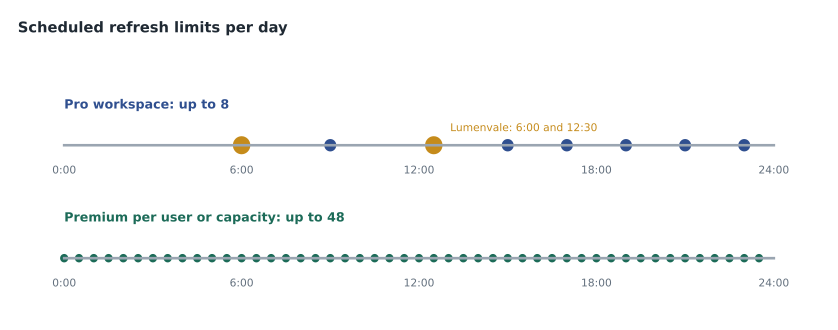
The schedule itself has a few parts: whether it is on, the frequency (daily or weekly), the time zone, one or more times of day, and whether failure notifications go to the model owner and to other contacts. Kwabena's schedule ran at 6:00 a.m. and 12:30 p.m. on weekdays in Lumenvale's time zone, so that deans saw the overnight student-system load first thing and the morning's tutoring bookings after lunch. He added the institutional research mailbox to the failure notification list.
The number of scheduled refreshes is limited by the workspace's licence mode. A model in a Pro workspace can be scheduled up to eight times a day. A model on Premium per user, a Premium capacity or a Fabric capacity can be scheduled up to 48 times a day, every half hour. Refreshes are queued rather than started at the exact second; Microsoft documents a window of about 15 minutes after the scheduled time, with possible delays of up to an hour at busy times.
Rules that switch refresh off
The service protects itself from failing or unused refreshes. If a scheduled refresh fails four times in a row, the service turns the schedule off and notifies the owner; some unrecoverable errors switch it off sooner. If nobody has viewed any dashboard or report built on a model for two months, scheduled refresh is paused, and it starts again only when someone visits. Both rules surprise teams that set a schedule once and forget it. Lumenvale's monitoring (lesson 8) included a weekly check of failed and disabled schedules.
Refresh also has a time limit: Microsoft documents two hours for a refresh on shared capacity and five hours on Premium, and a refresh that runs longer is cancelled. Large models that approach these limits are the main reason to use incremental refresh.
Refresh history
Each semantic model's Refresh history lists recent refreshes with their start and end times, type, status and any error message. It is the first stop when someone says the data looks old. Kwabena kept a habit of glancing at it every Monday morning before council, and of reading the full error text before trying anything else; most failures named their cause plainly, such as expired credentials or an offline gateway.
Incremental refresh: why
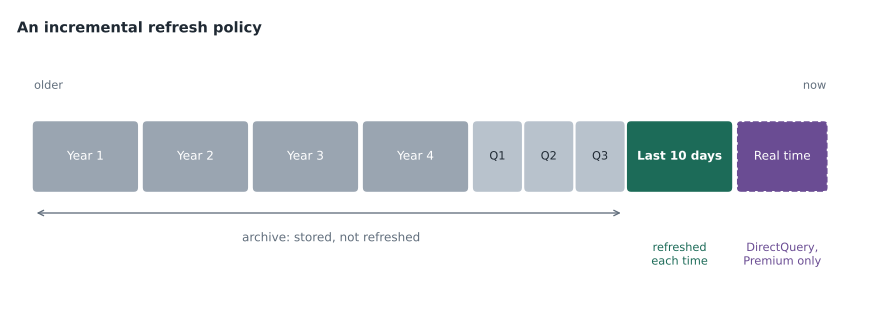
The Student Success model's largest table, Tutoring Sessions, held five years of history: several million rows. Every scheduled refresh reloaded all of it, although only the last few days ever changed. That took time, loaded the student-system server and the gateway, and edged toward the time limit as the table grew. Incremental refresh solves this by splitting the table into partitions by date and refreshing only recent partitions, while older ones are kept as they are. It goes beyond the PL-300 objectives, but it is one of the most valuable skills for anyone who maintains models of real size.
Incremental refresh is available for models on Power BI Pro, Premium per user, Premium capacities and Power BI Embedded. Its optional real-time feature, described below, needs Premium per user, a Premium capacity or Embedded.
Incremental refresh: how
Setting it up has four steps, all but the last in Power BI Desktop.
First, create two parameters. In Power Query, create date/time parameters named exactly RangeStart and RangeEnd. The names are reserved and case-sensitive. Give them values that load a small slice of data in Desktop, such as one month.
Second, filter the table. Filter the date column so that rows on or after RangeStart and before RangeEnd are kept. One boundary must be inclusive and the other exclusive, so that no row lands in two partitions.
#"Filtered Rows" = Table.SelectRows(Source, each [SessionDateTime] >= RangeStart and [SessionDateTime] < RangeEnd)The filter must fold to the source, so that the source returns only the requested rows. Folding was covered in MSBA-260; here it matters even more, because a filter that does not fold makes the service download every row for every partition. Kwabena placed the filter directly after the source step against the SQL Server view, checked that View Native Query showed a WHERE clause, and noted that Desktop warns when it cannot confirm folding.
Third, define the policy. On the table's context menu, Incremental refresh opens the policy dialog. Two settings define the partitions. Archive data starting a number of years, quarters, months or days before the refresh date sets how much history is kept. Incrementally refresh data starting a number of days or months before the refresh date sets the window that is reloaded each time. Kwabena chose to archive five years and incrementally refresh the last ten days, because tutors could correct session records for up to a week.
Two optional settings refine the policy. Detect data changes uses a date/time column, usually a last-modified audit column, to refresh only those partitions in the window whose maximum value has changed; the column must not be the one used for partitioning. Only refresh complete days leaves out the current partial day. And Get the latest data in real time with DirectQuery adds a DirectQuery partition after the refresh window, making the table a hybrid table; it needs Premium per user, a Premium capacity or Embedded, a single data source and transformations that fold.
Fourth, publish and run the first refresh. In Desktop the parameters still load only the small slice. After publishing, the service overrides RangeStart and RangeEnd to create the partitions. The first refresh loads the whole history and can take a long time; Microsoft recommends running it manually and watching it. Later refreshes reload only the window.
Worked problem
Choosing an incremental refresh policy
The Tutoring Sessions table receives about 6,000 new rows a day during term. Tutors can edit a session for seven days after it happens. Reports need five years of history. The source has a ModifiedOn column updated whenever a row changes. Full refresh now takes 70 minutes in a Pro workspace. What policy should Kwabena define?
Show solution
- Create RangeStart and RangeEnd and filter SessionDateTime with one inclusive and one exclusive boundary, confirming the filter folds.
- Archive five years, to meet the history requirement.
- Incrementally refresh a window that covers the editing period with a margin, such as ten days.
- Turn on Detect data changes using ModifiedOn, so partitions in the window that have not changed are skipped.
- Leave real-time DirectQuery off; the workspace is Pro and the requirement does not call for it.
- Publish, run the first refresh manually, then let the schedule take over.
Answer: Archive 5 years, refresh the last 10 days, detect changes on ModifiedOn, no real-time partition. Each scheduled refresh now reloads about ten days of rows instead of five years.
Things that change after incremental refresh
Incremental refresh changes how the model is maintained. Republishing the Desktop file with a changed policy reapplies the policy and can trigger a large reload, so policy changes are planned. Historical partitions are never refreshed by the schedule, so a correction to old data needs a deliberate refresh of the affected partition; on capacities with the XMLA endpoint, tools such as SQL Server Management Studio can refresh single partitions. And the published model cannot be downloaded back to a Desktop file in the usual way once incremental refresh has created partitions, which is one more reason to keep the source of truth in Desktop files or Git.
Refreshing in the right order
Many models depend on upstream items that refresh too: a dataflow that prepares the program list, or a warehouse loaded overnight. If the semantic model refreshes before its dataflow, it imports yesterday's data. There are three ways to keep the order right. Schedule the model well after the upstream item usually finishes, with a margin. Use a Fabric pipeline that runs the dataflow and then refreshes the model as a second activity, so the model always waits. Or trigger the model's refresh from the upstream process through the REST API or Power Automate. Lumenvale moved the Student Success model to a pipeline in November: it ran the shared program-list dataflow, then refreshed the model, then emailed a short success message to the institutional research mailbox.
Refresh and the reader's view
Readers do not see a refresh happen; they see its result. A report shows a refreshed model's data the next time a visual queries it, and Kwabena added a card to every page showing the last refresh time, taken from a small table that Power Query filled with the current date and time during each refresh. When a dean asked whether the numbers were current, the answer was on the page. Dashboard tiles for imported data update after the refresh as well, while tiles for DirectQuery data update on their own cache schedule.
Refresh in exam scenarios
Exam questions on refresh usually test three facts. A semantic model that imports from an on-premises source cannot be scheduled until a gateway connection is mapped. A Pro workspace cannot schedule more than eight refreshes a day, so a requirement for hourly data during the day points to Premium per user or a capacity, or to DirectQuery for the tables that need it. And a schedule that has been switched off after repeated failures stays off until someone turns it on again, so fixing the cause is only half the answer.
Common mistakes
MistakeSetting a schedule and never checking it again.
InsteadCheck refresh history and disabled schedules regularly; four failures in a row switch the schedule off.
MistakeExpecting DirectQuery tables to need scheduled data refresh.
InsteadDirectQuery queries the source live; schedule refresh for Import tables.
MistakeNaming the parameters Range Start or rangestart.
InsteadUse exactly RangeStart and RangeEnd, of type date/time.
MistakeUsing inclusive boundaries on both sides of the filter.
InsteadMake one boundary inclusive and the other exclusive so no row is loaded twice.
MistakeApplying the incremental filter after a step that breaks folding.
InsteadFilter right after the source step and confirm the native query includes the filter.
Summary and key terms
- Import tables need refresh; DirectQuery, Direct Lake and live connections behave differently.
- Scheduled refresh needs valid credentials and, for on-premises sources, a gateway connection.
- Pro workspaces allow up to 8 scheduled refreshes a day; Premium per user and capacities allow up to 48.
- Four consecutive failures switch a schedule off, and two months without views pause it.
- Incremental refresh partitions a table by date using RangeStart and RangeEnd and reloads only a recent window.
- Detect data changes and hybrid tables refine incremental refresh; hybrid tables need Premium features.
- Scheduled refresh
- Automatic refresh of an imported semantic model at times set in the service.
- Refresh history
- The list of recent refreshes of a model with their status and error messages.
- Incremental refresh
- A policy that partitions a table by date and refreshes only recent partitions.
- RangeStart and RangeEnd
- Reserved date/time parameters that define the incremental refresh filter.
- Detect data changes
- An incremental refresh option that refreshes only partitions whose audit column has changed.
- Hybrid table
- A table with imported partitions and a DirectQuery partition for the most recent data.
Practice problems
Work each problem on paper first, then reveal the answer to check.
A model in a Pro workspace needs refreshing every hour during the working day. Is that possible?
Show answer
Not fully: Pro allows up to eight scheduled refreshes a day. Move the model to Premium per user or a capacity, or reduce the frequency.
Why must the incremental refresh filter fold?
Show answer
Otherwise the service retrieves all rows for each partition, which defeats the purpose of incremental refresh.
What happens on the first refresh after publishing an incremental refresh policy?
Show answer
The service creates the partitions and loads the full history, which can take a long time.
Lesson quiz · 5 questions
Score 60% or more to complete this lesson.
Create a free account to save your progress, take quizzes and earn a certificate.