
MSBA-260 · Lesson 8 of 12 · 18 min
Query folding
▶ Video coming soon A video version of this lesson is on the way.
The registration table was the largest Kwabena had worked with: twelve years of course registrations, more than 4 million rows, in the student system's SQL Server database. His first query against it took eleven minutes to refresh. Signe Tavernier-Mbeki looked over his applied steps and pointed at the fourth one. "Everything above this line is happening in SQL Server. Everything below it is happening on the refresh machine, row by row. You're pulling the whole table across the network and then throwing most of it away." She was describing query folding.
Query folding is not listed as its own bullet in the PL-300 skills, but it sits under several of them: choosing between Import and DirectQuery, configuring data loading, incremental refresh and almost every performance question. This lesson explains what folding is, how to see it, what breaks it and how to design queries that keep it.
What folding means
When a query reads from a source that understands a query language, such as a relational database, an OData feed or Dataverse, Power Query tries to translate the applied steps into a single query in the source's own language, such as SQL, and send that query to the source. The source does the filtering, column selection, joining and grouping, and sends back only the result. That translation is query folding. When a step cannot be translated, Power Query asks the source for the data as it stands at that point and does the remaining steps itself, in the mashup engine on the machine or gateway doing the refresh.
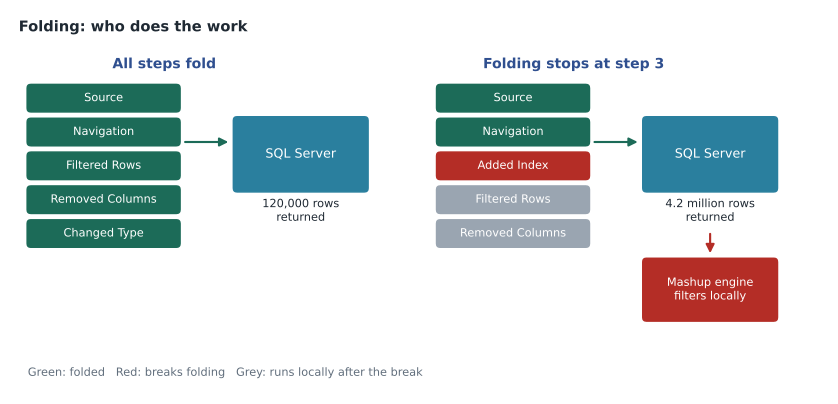
The difference is dramatic. Kwabena's first query connected to the Registration table, then added a custom column computing the term name with his fnTermInfo function, then filtered to the last five years, then removed columns. Because the custom column could not be translated to SQL, everything after it ran locally: all 4.2 million rows came across the network and were filtered on the refresh machine. When he moved the date filter and the column selection above the custom column, SQL Server returned 1.7 million rows with only nine columns, and the refresh took under two minutes.
Seeing whether a step folds
There are three ways to check folding.
View Native Query. In Power BI Desktop, right-click a step in Applied steps. If View Native Query is available, the step folds, and the dialog shows the SQL or other native query that will be sent. If the option is greyed out, either the step does not fold or Power Query cannot show it for that source. It is a quick check but not conclusive.
Step folding indicators. In Power Query Online, used by Dataflow Gen2 and other web experiences, each applied step has an icon showing whether it folds, does not fold, might fold, or is unknown. The indicators make the point where folding stops easy to spot.
Query plan. Also in Power Query Online, right-clicking a step and choosing View query plan shows a diagram of the operations, which ones are sent to the source as a remote query and which are done by the engine. It is the most detailed view.
select [_].[StudentID],
    [_].[TermCode],
    [_].[SectionKey],
    [_].[Credits],
    [_].[RegistrationDate]
from [dbo].[Registration] as [_]
where [_].[RegistrationDate] >= convert(datetime2, '2021-09-01 00:00:00')
What folds and what does not
Folding depends on the source and the connector, so no list is universal, but the pattern is consistent across relational sources:
| Usually folds to a SQL source | Usually breaks folding |
|---|---|
| Removing or choosing columns | Adding an index column |
| Filtering rows on values or dates | Custom columns using functions with no SQL equivalent |
| Renaming columns | Invoking a custom function row by row |
| Changing data types (most) | Merging with a query from a different source, such as an Excel file |
| Group By with standard aggregates | Fuzzy merges |
| Merges and appends between tables in the same database | Steps after one that has already broken folding |
| Sorting, keeping top rows | Changing type using a specific locale (often) |
Flat files such as CSV, Excel and the files from a folder never fold: there is no query language to translate to, so all the work is done by the engine. Folding is a concept for sources that can run queries: relational databases, Dataverse, OData feeds, and Fabric lakehouse and warehouse SQL endpoints.
Ordering steps to keep folding
The practical rule is to do the foldable work first. Filter rows and remove columns as early as possible, while the query still folds, so the source returns less. Put steps that break folding, such as index columns, custom functions and merges with other sources, as late as possible. When you must merge a database table with a small spreadsheet, the database side can still fold its filters and column selection before the merge, as long as those steps come first.
Worked problem
Reordering steps for folding
A query has these steps: Source, Navigation, Added Index, Filtered Rows (last five years), Removed Other Columns, Changed Type. The refresh is slow. Which step breaks folding, and how should the steps be ordered?
Show solution
- Adding an index column cannot be translated to SQL, so folding stops at Added Index.
- The filter and column removal come after it, so they run locally on the full table.
- Move Filtered Rows and Removed Other Columns directly after Navigation; they fold.
- Move Added Index to the end, if it is needed at all. Changed Type before the index usually folds too.
Answer: Source, Navigation, Filtered Rows, Removed Other Columns, Changed Type, Added Index. Only the final step runs locally, on the already reduced data.
Native queries and folding
Some connectors let you type your own SQL statement in the connection dialog (under Advanced options). That native query runs at the source, but by default Power Query does not fold later steps on top of it: it treats the SQL result as opaque. For SQL Server and some other sources you can write the query with Value.NativeQuery and set EnableFolding to true, which lets later steps fold around it. Without that, a native SQL statement followed by a filter means the full statement's result comes back before filtering.
Source = Sql.Database(ServerName, DatabaseName),
Active = Value.NativeQuery(Source,
    "select StudentID, ProgramCode, TermCode from dbo.Enrolment where Status = 'A'",
    null, [EnableFolding = true])
Kwabena's general advice to colleagues was to prefer the connector's navigation and normal steps over hand-written SQL, because they fold and are easier to maintain; and where a view or stored logic is genuinely needed, to ask the database team for a view in the database rather than pasting SQL into Power BI.
Why folding matters for DirectQuery and incremental refresh
Folding is essential in two places. In DirectQuery, every step must fold, because there is no local copy of the data to work on: a step that does not fold produces an error such as a message that the step is not supported in DirectQuery mode. Kwabena's fuzzy merge was one reason the first-week enrolment report stayed in Import (lesson 2).
For incremental refresh, the filter on RangeStart and RangeEnd (lesson 7) should fold. The service creates partitions, for example one per month, and refreshes only the recent ones by replacing the parameter values. If the filter folds, each partition's query asks the source for just that month. If it does not, each partition reads the whole table and filters locally, which can make incremental refresh slower than a full refresh. Power BI Desktop warns when it cannot confirm that the query folds while you define the policy.
#"Filtered by Range" = Table.SelectRows(Navigation,
    each [RegistrationDate] >= RangeStart and [RegistrationDate] < RangeEnd)
The comparison operators matter: using greater than or equal for RangeStart and strictly less than for RangeEnd means a row on a boundary belongs to exactly one partition. Using both inclusive comparisons would load boundary rows twice.
Folding and data types
Changing data types usually folds, but not always in the way you expect. A type change from text to whole number becomes a SQL conversion that the database runs. A change using a specific locale (lesson 4) may not fold, because the database does not know Power Query's culture rules. A type change to Date from a Date/Time column folds as a SQL conversion. When a type conversion breaks folding, a common fix is to ask the database team to return the column in the right type from a view, so the conversion is not needed at all.
Folding with other sources
Folding is not only for SQL Server. Dataverse queries fold filters and column selection into its Web API; OData feeds fold filters and selection into query options in the URL; SharePoint lists fold some filters; Fabric lakehouse and warehouse SQL analytics endpoints fold like SQL Server. The rules differ by connector, so the habit matters more than memorizing lists: after building a query against any queryable source, right-click the last step and check whether View Native Query is available, or look at the folding indicators in Power Query Online. If folding stops earlier than you expected, look for the first step that broke it.
Partial folding
Folding is not all or nothing. A query can fold for its first steps and then continue locally. That is often acceptable: if the folded steps have already reduced 4 million rows to 50,000, the local steps run on a small table. The aim is not to make every step fold, which is sometimes impossible, but to make sure the steps that reduce the data most fold before anything that breaks folding. Kwabena kept a small checklist above his desk: filter early, select columns early, merge within the same source, and leave index columns, custom functions and cross-source merges until last.
Folding in dataflows
Dataflows run Power Query in the cloud, and folding matters there too, perhaps more, because a Dataflow Gen2 refresh consumes capacity in proportion to the work it does. Power Query Online's folding indicators and query plan make it easier to see where folding stops. Dataflow Gen2 also offers a staging setting for each query; staged data is written to Fabric storage and later steps can fold against that storage even when the original source did not fold. Lesson 9 introduces dataflows; for now, the principle is the same in every Power Query host.
Exam patterns for folding questions
Folding questions usually describe a slow refresh or a DirectQuery error and a list of applied steps. Look for the first step that cannot fold, such as an index column, a custom function, a fuzzy merge or a merge with another source, and check whether filters and column removal come after it. The fix is usually to move the reducing steps above the non-folding one. If the question asks how to confirm folding in Power BI Desktop, the answer is View Native Query.
Folding and DirectQuery design
When a model must use DirectQuery, folding is not a performance concern but a design constraint. Kwabena's guidance for colleagues designing DirectQuery tables was to keep Power Query to the simplest steps, mostly choosing columns, filtering and renaming, and to push any complex logic into the source as a view. A database view can contain joins, calculated columns and business rules that the database team maintains and indexes, and Power Query then reads it as if it were a table, with every step folding. This also means the logic is available to other tools, not only Power BI.
He also reminded them that the generated SQL will run many times, once for each visual and interaction. A view that takes ten seconds to return is a report page that takes ten seconds to draw, every time someone moves a slicer.
Common mistakes
MistakeAdding an index or custom column right after the source.
InsteadFilter and choose columns first, while steps still fold; put non-folding steps last.
MistakeExpecting files from a folder to fold.
InsteadFiles never fold; folding applies to sources that run queries.
MistakePasting SQL into the connection dialog and then filtering.
InsteadUse navigation and normal steps, a database view, or Value.NativeQuery with EnableFolding.
MistakeWriting the incremental refresh filter with both boundaries inclusive.
InsteadUse >= RangeStart and < RangeEnd so no row is loaded twice.
Summary and key terms
- Query folding translates applied steps into one native query run by the source.
- Check folding with View Native Query, step folding indicators or the query plan in Power Query Online.
- Filtering, column selection, renames, most type changes and same-source merges usually fold; index columns, custom functions and cross-source merges usually do not.
- Order steps so foldable work comes first and non-folding steps come last.
- DirectQuery requires folding; incremental refresh depends on a folding RangeStart and RangeEnd filter.
- Query folding
- Translating Power Query steps into a query the source executes.
- Mashup engine
- The Power Query engine that runs steps that do not fold.
- View Native Query
- A right-click option showing the query sent to the source for a folded step.
- Step folding indicator
- An icon in Power Query Online showing whether each step folds.
- Query plan
- A Power Query Online diagram of which operations run at the source.
- Native query
- A query written in the source's own language, such as SQL.
Practice problems
Work each problem on paper first, then reveal the answer to check.
Why did moving the date filter above the custom column speed up Kwabena's refresh?
Show answer
The filter then folded, so SQL Server returned only recent rows instead of the whole table.
Does a query over a folder of CSV files fold?
Show answer
No; files have no query language, so all steps run in the engine.
What happens to a non-folding step in a DirectQuery table?
Show answer
It produces an error because DirectQuery requires every step to fold.
Lesson quiz · 5 questions
Score 60% or more to complete this lesson.
Create a free account to save your progress, take quizzes and earn a certificate.