
MSBA-260 · Lesson 11 of 12 · 18 min
Privacy levels and gateways
▶ Video coming soon A video version of this lesson is on the way.
Kwabena's first attempt to enrich the enrolment model with public labour-market data produced an error he had never seen: *Formula.Firewall: Query 'Enrolment' (step 'Merged Queries') references other queries or steps, so it may not directly access a data source. Please rebuild this data combination.* The query worked step by step, and yet Power Query refused to run it. Rupert was pleased rather than annoyed. "That's the firewall doing its job," he said. "It's stopping private student data from being sent to a public website. Let's set it up properly rather than switch it off."
This lesson covers the second half of the objective *change data source settings, including credentials and privacy levels*, and the gateways and cloud connections that let a published model refresh. Both decide whether a query that works on Kwabena's laptop keeps working, safely, once it is published.
Why privacy levels exist
When Power Query combines data from two sources, it may need to send values from one source to the other. With query folding (lesson 8), a merge can be turned into a query sent to the second source, filtered by values from the first. If the second source is a public web service and the first is the student database, that query could leak student IDs to the outside world. Privacy levels tell Power Query how sensitive each source is, so that its data privacy firewall can prevent data flowing from a more private source to a less private one.
| Privacy level | Meaning | Lumenvale examples |
|---|---|---|
| Private | Sensitive or confidential; visible only to authorized people. Data is not sent to other sources. | Student records, advising notes |
| Organizational | Can be shared within a trusted group, such as the organization. Can be combined with other organizational sources, but not sent to public ones. | Enrolment, outlet sales, the program list |
| Public | Anyone can see it. Can be combined freely. | Government labour-market tables, public holiday lists |
| None | No level set. Treated cautiously; you are prompted to choose one when combining. | A new source not yet classified |
Privacy levels are set per source in Data source settings (lesson 1), by editing the permissions of a source, or when Power Query prompts the first time it combines sources. In the Power BI service they are set in the data source settings of a published model or in the connection definition for a gateway.
The Formula.Firewall error
The firewall works by partitions: Power Query divides a query's evaluation into parts that each access sources, and checks how data moves between them. The *Formula.Firewall ... references other queries or steps* error means a single step both accesses a data source and uses data from another query, so the engine cannot keep the sources apart safely. It appears even when all sources have compatible privacy levels, because it is about the structure of the query, not only the levels.
There are three ways to resolve it, in order of preference:
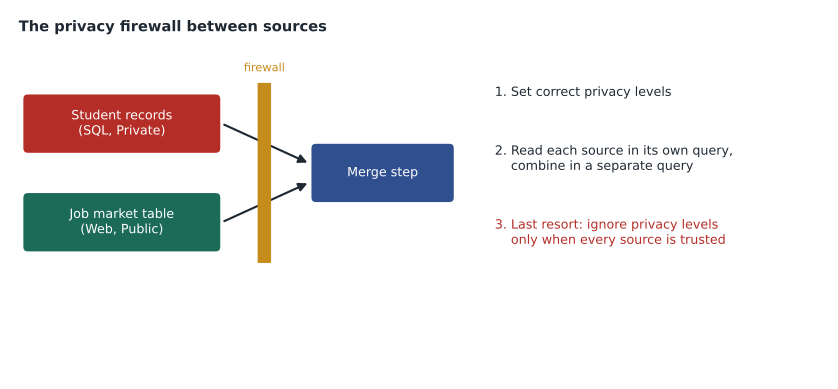
Set the right privacy levels. Classify each source accurately. Combining two Organizational sources, or an Organizational source with a Public one where data only flows from public to organizational, is allowed.
Restructure the query. Read each source in its own query, do its filtering there, and combine them in a separate query that references both. This keeps each source in its own partition. Kwabena's merge had a step that read the web table directly inside the enrolment query; moving the web read into its own Labour Market query, and merging the two queries in a third, cleared the error.
Ignore privacy levels, as a last resort. In Power BI Desktop, under File, Options and settings, Options, the Privacy setting for the current file can be set to ignore privacy levels, which may improve performance. Doing so can expose sensitive data to an unauthorized source, which is why Rupert's policy forbade it for any file containing student data. The global options also control whether privacy levels are combined according to each file's settings.
Because the labour-market table came from a provincial government open-data portal, it was correctly classified as Public. Student records at Lumenvale are protected under the province's privacy legislation for public bodies, so the student database was classified as Private.
Getting data to refresh after publishing
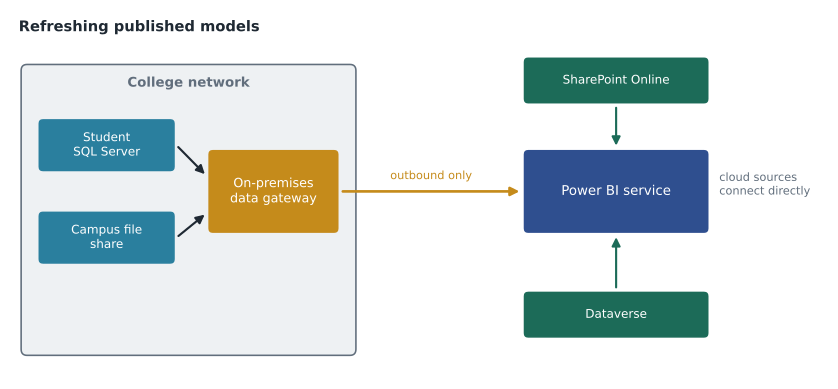
In Power BI Desktop, queries run on your computer, using your network and your saved credentials. When a model is published, refreshes run in the cloud. The service can reach cloud sources directly, such as SharePoint Online, Dataverse, Azure SQL Database and Fabric items, using credentials stored for the model or in a cloud connection. It cannot reach sources inside the college's network, such as the student system's SQL Server, a file share on a campus server, or an Excel file saved on someone's drive, without a gateway.
Types of gateway
| Gateway | Who uses it | Notes |
|---|---|---|
| On-premises data gateway (standard mode) | Many users and items: semantic models, dataflows, Power Apps, Power Automate | Installed on a server; managed centrally with data source connections; supports clusters for high availability |
| On-premises data gateway (personal mode) | One user, Power BI only | Runs as the user; no shared management; not for organizational solutions |
| Virtual network (VNet) data gateway | Sources in an Azure virtual network | Managed by Microsoft; no server to install; requires a Fabric or Premium capacity |
The gateway is installed on a computer inside the network that can reach the sources. It makes outbound connections to Azure Service Bus and the service, so no inbound firewall ports need to be opened. After installing and registering it, an administrator adds a connection for each source, with its server, database and credentials, and the semantic model is mapped to those connections in its settings under Gateway and cloud connections. The connection's details must match what the model uses: the server name typed in Power BI Desktop must match the one in the gateway connection.
Rupert installed a standard-mode gateway on two servers in the data centre and joined them in a gateway cluster, so a refresh still ran if one server was down for maintenance. He created connections for the student database and the archive server, and gave Kwabena permission to use them.
Worked problem
Working out which sources need the gateway
Kwabena's enrolment model uses: the student SQL Server in the data centre; the program list in SharePoint Online; the outlet sales folder in a SharePoint document library; a labour-market web table; and the archive SQL Server on campus. Which need the gateway after publishing?
Show solution
- Student SQL Server: inside the network, so it needs the gateway.
- SharePoint Online list and document library: cloud sources, refreshed directly with a cloud connection.
- Public web table: reachable from the cloud, so no gateway.
- Archive SQL Server: inside the network, so it needs the gateway.
Answer: Two sources need the gateway: the student database and the archive server. Storing the outlet files in SharePoint rather than a campus file share is what kept them off the gateway.
Mixing cloud and on-premises sources
A query that merges an on-premises source with a cloud source is evaluated on the gateway, because that is where the on-premises data can be read. The gateway connection settings include an option to allow cloud data sources to refresh through the gateway cluster alongside on-premises ones. Kwabena's design avoided most of these mixed queries by doing the combination in the model, with relationships, rather than in Power Query merges, so each table could refresh from its own source.
Credentials, roles and the refresh account
Each connection, whether through a gateway or a cloud connection, stores the credentials the refresh will use, and those credentials decide what data the refresh can read. Using a personal account means the refresh breaks when that person leaves or changes their password. Lumenvale created a dedicated, least-privileged database account for reporting refreshes, readable only on the views the models needed, and stored it in the gateway connection. Where sources support it, a service principal or workspace identity can be used instead of a user account for cloud connections.
Privacy levels in the service
Privacy levels set in Power BI Desktop travel with the file, but the published model uses the levels set in the service for its connections. When Kwabena published the enrolment model, the service asked him to configure each data source's credentials and privacy level in the semantic model's settings, and the gateway connection for the student database had its own privacy level set by Rupert. If the levels in the service are stricter than those in Desktop, a refresh can fail with a firewall error that never appeared on Kwabena's laptop. Keeping the two consistent is part of the release checklist.
Dataflows follow the same rules. In Power Query Online, privacy levels are set on each connection, and Dataflow Gen2 has a setting to allow combining data from multiple sources, which is needed when a query merges data from two sources with different levels.
Managing gateway connections
A gateway can serve many connections, and each connection has its own users. Gateway administrators decide who can use a connection in their semantic models and dataflows. Rupert gave Kwabena and the other analysts the User role on the student database connection, which let them map their models to it without seeing its stored password. Only Rupert's team held the Owner role and could change credentials. When the reporting account's password was rotated each quarter, it changed in one place, and every model refreshed the next morning without anyone editing a file.
Gateways also need care as infrastructure. The gateway software is updated monthly, and Microsoft supports only recent versions, so Rupert scheduled updates in the college's maintenance window, one cluster member at a time. He monitored the gateway servers' memory and CPU during the morning refresh peak, when every model refreshed within a short window, and spread schedules out when the load grew.
Exam patterns for privacy and gateway questions
Privacy questions usually describe a Formula.Firewall error or a requirement to stop sensitive data reaching a public source, and ask for the right levels or the right fix. Gateway questions usually list sources and ask which need a gateway, or describe a refresh failing in the service while working in Desktop. Sources inside a private network need an on-premises data gateway; cloud sources such as SharePoint Online, Dataverse and Azure SQL Database do not. If a question mentions many users and central management, the answer is a standard-mode gateway, not personal mode.
A refresh checklist for publishing
Kwabena's release checklist for any model with external sources had six items. Every source listed with its owner and location. Every source classified with a privacy level, matching between Desktop and the service. Every on-premises source mapped to a gateway connection with a dedicated account. Every cloud source signed in with an organizational account, service principal or workspace identity rather than a personal one where possible. A first manual refresh in the service, checked against the expected row counts. And failure notifications sent to at least two people. The first time he used it, the checklist caught a file path that pointed at his own OneDrive rather than the shared library, which would have broken the refresh the day he went on holiday.
The same checklist applied to dataflows, with one addition: dataflows refresh on their own schedules, so the models built on them had to be scheduled afterwards, as lesson 9 described.
Common mistakes
MistakeTurning off privacy levels to make a Formula.Firewall error go away.
InsteadClassify sources correctly or restructure so each source is read in its own query.
MistakeExpecting a published model to read a file on a laptop or campus share without a gateway.
InsteadMove files to SharePoint or OneDrive, or install a standard-mode gateway with a connection.
MistakeUsing a personal-mode gateway for an organizational model.
InsteadUse a standard-mode gateway, ideally in a cluster, managed centrally.
MistakeStoring a person's own credentials in a shared connection.
InsteadUse a dedicated least-privileged account or a service principal for refresh.
Summary and key terms
- Privacy levels are Private, Organizational, Public and None, set per source.
- The firewall stops data flowing from more private to less private sources; Formula.Firewall errors often mean a step mixes a source with another query.
- Fix firewall errors with correct levels or restructured queries; ignoring privacy levels is a last resort.
- Cloud sources refresh directly; sources inside a network need an on-premises data gateway.
- Standard-mode gateways serve many users and support clusters; personal mode is for one user; VNet gateways serve Azure virtual networks.
- Privacy level
- A classification of a source as Private, Organizational, Public or None.
- Data privacy firewall
- The Power Query mechanism that prevents unsafe data flows between sources.
- Formula.Firewall
- The error raised when a step's structure prevents the firewall from isolating sources.
- On-premises data gateway
- Software that lets cloud services refresh data from sources inside a private network.
- Gateway cluster
- Several gateway installations registered together for high availability.
- Cloud connection
- A stored connection with credentials used by the service to reach a cloud source.
Practice problems
Work each problem on paper first, then reveal the answer to check.
Which privacy level suits a government open-data table?
Show answer
Public.
Why does a gateway not need inbound firewall ports?
Show answer
It makes outbound connections to the cloud service.
Kwabena moves the outlet files from a campus share to SharePoint Online. What changes for refresh?
Show answer
They no longer need the gateway; the service reads SharePoint Online directly.
Lesson quiz · 5 questions
Score 60% or more to complete this lesson.
Create a free account to save your progress, take quizzes and earn a certificate.