
MSBA-260 · Lesson 2 of 12 · 19 min
Import, DirectQuery and Direct Lake
▶ Video coming soon A video version of this lesson is on the way.
Two weeks into the rebuild, the president's office asked Kwabena a question that sounded simple. "Can the enrolment dashboard show today's numbers during the first week of term, when students are still adding and dropping courses?" Kwabena's imported model refreshed overnight, so it was always a day behind. Signe Tavernier-Mbeki, the college's developer, suggested DirectQuery. Rupert, who paid the capacity bill, mentioned that the college's new Fabric lakehouse might make Direct Lake an option. Before choosing, Kwabena needed to understand what each storage mode actually does.
The PL-300 study guide lists the objective as *choose between DirectLake, DirectQuery, and Import*. Exam questions describe a requirement, such as data volume, freshness, the transformations needed or the licence available, and ask which mode meets it. This lesson explains how each mode works, what it costs and where it breaks.
Import: copy, compress, query in memory
In Import mode, Power Query runs during refresh and loads its result into the semantic model, where the VertiPaq engine stores it in a compressed, column-oriented format in memory. Report visuals then query the in-memory copy, not the source. This is why Import is the default and usually the fastest mode for users: the source is touched only during refresh, and the engine is built for exactly the aggregations reports need.
Import has three trade-offs. First, data is only as fresh as the last refresh. On shared capacity with a Power BI Pro licence, a semantic model can be scheduled to refresh up to eight times a day; on a Premium or Fabric capacity, up to 48 times a day. Second, the data takes memory and storage: models on shared capacity are limited to 1 GB, and larger models need Premium Per User or a capacity with the large semantic model storage format. Third, refresh takes time and puts load on the source. Kwabena's enrolment tables were small, a few million rows at most, so these limits did not bother him.
Import has one big advantage for data preparation: every Power Query transformation is available, because the engine can always do the work itself if the source cannot. Merging an Excel list with a SQL table, adding custom columns, unpivoting a spreadsheet: all of it works in Import.
DirectQuery: leave the data at the source
In DirectQuery mode, the semantic model stores only metadata: table and column definitions, relationships and measures. When a user opens a report page, each visual sends a query to the model, and the model translates it into the source's native language, such as SQL, and sends it to the source. Results come back and are drawn. Nothing is copied in advance, so the numbers are as fresh as the source itself.
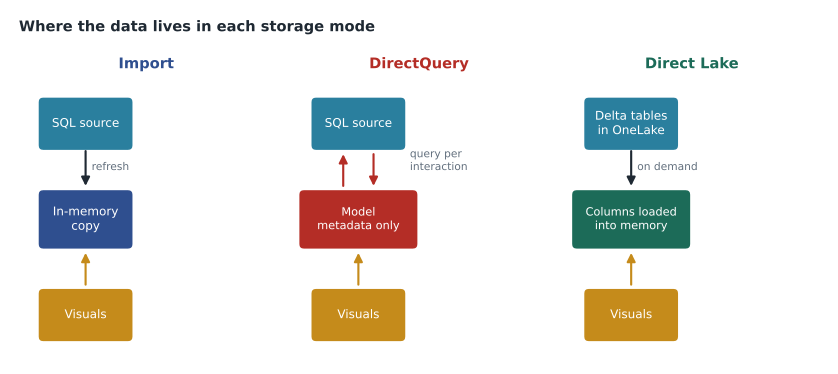
The price is performance and flexibility. Every interaction, such as changing a slicer, sends queries to the source, so report speed depends on the source database and the network. Busy reports can put real load on an operational system: Maribeth Ferreira-Quon in the registrar's office was not pleased to hear that a dashboard might query her live enrolment system every time someone clicked a filter during registration week.
DirectQuery also limits Power Query. Because transformations must be translated into the source's query language, only steps that can fold are allowed (lesson 8 explains folding). A step that cannot be translated, such as some custom M functions, produces an error telling you the step is not supported in DirectQuery mode. There are also guardrails on results: by default a DirectQuery query can return no more than one million rows of intermediate results to the model, so visuals that need to bring back huge detail tables fail.
| Consideration | Import | DirectQuery |
|---|---|---|
| Freshness | As of last refresh (8 a day on Pro, 48 on capacity) | As fresh as the source |
| Report speed | Fast: in-memory engine | Depends on source and network |
| Source load | Only during refresh | Every visual interaction |
| Power Query | All transformations | Only steps that fold to the source |
| Model size | Limited by licence and memory | Metadata only; data stays in source |
| DAX | Full | Some functions limited or slower |
Direct Lake: Fabric's third way
Direct Lake is a storage mode for semantic models built on Microsoft Fabric. The data lives as Delta tables, a column-oriented open format based on Parquet files, in OneLake, Fabric's single data lake. When a report needs a column, the engine loads that column from the Delta files straight into memory, and then queries it at in-memory speed, much as in Import. There is no copy step during refresh: a Direct Lake refresh, called framing, only reads the latest table metadata and points the model at the newest files, so it completes in seconds.
Microsoft's Fabric documentation (updated September 2026) describes two variants. Direct Lake on OneLake reads Delta tables from one or more Fabric sources, can sit in a composite model next to Import tables, and does not fall back to DirectQuery: if a guardrail is exceeded, refresh fails until the tables are optimized. Direct Lake on SQL reads through a lakehouse or warehouse SQL analytics endpoint, which handles table discovery and permission checks; it can fall back to DirectQuery when data cannot be read directly from a Delta table, for example a non-materialized SQL view or a table protected by SQL-based access rules, depending on the model's Direct Lake behaviour setting.
Direct Lake has firm requirements. It needs a Fabric capacity; Power BI Premium per-capacity P SKUs are being retired, so new deployments use F SKUs. Guardrails scale with the capacity size: on the smallest F2 capacity a table may have up to 300 million rows and 1,000 Parquet files, while F64 allows 1.5 billion rows and 5,000 files. Gateways are not supported, because the data is already in the cloud. And Direct Lake models cannot be created in a personal My workspace.
The most important point for this course: Direct Lake moves data preparation upstream. A Direct Lake table is a Delta table, so there is no Power Query inside the semantic model to clean it. The cleaning happens before the table is written, in a Dataflow Gen2, a notebook or a pipeline that loads the lakehouse or warehouse. Power Query still matters, but it lives in the dataflow, not in the model. Lesson 9 returns to this.
Composite models and the Dual mode
A model does not have to use one mode. A composite model mixes storage modes table by table. A common design keeps a huge fact table in DirectQuery while small dimension tables such as dates, campuses and programs are imported. Tables used on both sides can be set to Dual storage mode, which means the table is imported but can also act as DirectQuery when a query needs to join it with a DirectQuery table at the source. Dual avoids sending an imported table's values across to the source for every join.
Power BI also offers aggregations and hybrid tables. An aggregation table stores pre-summarized imported data that answers most queries quickly, while detail queries fall through to a DirectQuery table. A hybrid table, created by an incremental refresh policy, keeps older partitions imported and the newest partition in DirectQuery, giving fresh recent data and fast history. These are advanced designs, but the exam may ask which one meets a mixed freshness and volume requirement.
Connecting to semantic models: live or DirectQuery
A fourth way to get data is to connect to a semantic model someone else has already built. There are two variants, and the exam distinguishes them. A live connection makes the report a thin client of the remote model: the report has no tables of its own, no Power Query and no local relationships, though report-level measures can still be added. It is the right choice when a certified model already answers every question. DirectQuery for Power BI semantic models and Analysis Services turns the remote model into a source within a local composite model. You can then add imported tables, build relationships between local and remote tables and write measures that use both.
Kwabena used both. The president's budget overview was a thin report with a live connection to finance's certified model, because it needed nothing else. His program-cost analysis combined the same budget model with his own imported enrolment table, so it used DirectQuery for Power BI semantic models. Rupert insisted on one check: the finance team had to allow the model to be used this way, through the tenant and model settings that permit building on top of a semantic model, and people using the report needed Build permission on the remote model.
Thinking about cost and licences
Storage mode choices are also cost choices. Import on shared capacity is included in Power BI Pro, but the 1 GB model limit and eight daily refreshes are the ceiling. Premium Per User raises the model size limit and allows 48 refreshes a day for the people licensed. A Fabric capacity is billed by size around the clock, whether reports are busy or quiet, and is required for Direct Lake. DirectQuery shifts the cost to the source: a busy report can push an Azure SQL database into a higher service tier. Rupert kept a simple rule for Lumenvale: the cheapest mode that meets the requirement wins, and anything that queries a live operational system needs the system owner's written agreement.
That rule turned out to matter for one more source. The student services team asked whether advising appointments in Dataverse could be shown live. Dataverse supports DirectQuery, but the appointments table was small and changed only a few dozen times an hour, so an imported table refreshed hourly during the day met the need without adding load to the advising app. Kwabena wrote the reason into the connection plan so the next analyst would not have to rediscover it.
Deciding: a flowchart
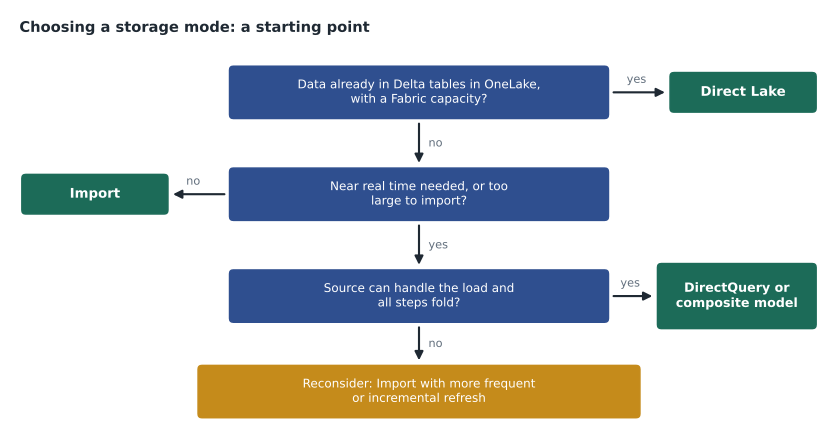
Kwabena worked through the questions for the first-week enrolment requirement. The enrolment data was relational, in SQL Server, not in Fabric, so Direct Lake was out for now. The data was small enough to import, but the president wanted it current within the hour during add and drop week. DirectQuery would deliver that, but Maribeth objected to the load on her live system, and two of Kwabena's steps, a fuzzy merge and a custom column, would not fold.
Worked problem
Meeting a freshness requirement without DirectQuery
The model refreshes once a night. During the first two weeks of term the president wants numbers no more than an hour old, from 7 a.m. to 7 p.m. The workspace is on a Fabric capacity. How many scheduled refreshes would that take each day, and is it allowed?
Show solution
- From 7 a.m. to 7 p.m. is 12 hours.
- Hourly refreshes from 7 a.m. through 7 p.m. inclusive are 13 refreshes.
- Keep the overnight refresh as well: 14 a day.
- A capacity allows up to 48 scheduled refreshes a day, so 14 is well within the limit; on shared capacity with Pro the limit would be 8.
Answer: Fourteen refreshes a day fits easily on the capacity. Kwabena kept Import, added the hourly schedule for the two weeks, and later added incremental refresh so each run only reloaded the current term.
The decision is not permanent, but changing it is costly. A model can be switched from DirectQuery to Import, but not from Import back to DirectQuery in Power BI Desktop for the same table: you would rebuild the table. Moving an Import model to Direct Lake means building the Delta tables first and creating a new model. That is why Rupert wanted the storage mode written into the connection plan before any report was built.
Where each mode is set
In Power BI Desktop, the mode for a new SQL source is chosen in the connection dialog: Import or DirectQuery. Afterwards, each table's storage mode appears in the Model view, on the table's Properties pane under Advanced, where it can be changed between DirectQuery, Import and Dual (with the one-way limits above). Live connections are chosen by connecting to a Power BI semantic model. Direct Lake models are usually created in the Fabric web experience from a lakehouse or warehouse, and can be edited live from Power BI Desktop.
Common mistakes
MistakeChoosing DirectQuery just because users want fresh data.
InsteadCheck whether more frequent or incremental refresh in Import meets the need with less source load.
MistakeExpecting to clean Direct Lake tables with Power Query in the model.
InsteadPrepare the Delta tables upstream, in a Dataflow Gen2, notebook or pipeline.
MistakeAssuming every Direct Lake model falls back to DirectQuery.
InsteadOnly Direct Lake on SQL can fall back; Direct Lake on OneLake does not.
MistakeForgetting the refresh limits.
InsteadUp to 8 scheduled refreshes a day on shared capacity with Pro, 48 on Premium or Fabric capacity.
Summary and key terms
- Import copies data into an in-memory model: fastest for users, full Power Query, fresh only as of refresh.
- DirectQuery leaves data in the source and sends queries at report time: fresh, but slower and limited to folding steps.
- Direct Lake loads Delta tables from OneLake into memory on demand and needs a Fabric capacity.
- Direct Lake on SQL can fall back to DirectQuery; Direct Lake on OneLake cannot.
- Composite models mix modes per table, and Dual tables can act as either Import or DirectQuery.
- Storage mode
- The setting that decides whether a table is imported, queried directly or read through Direct Lake.
- VertiPaq
- The in-memory column store engine behind Import and Direct Lake.
- Framing
- A Direct Lake refresh that only updates which Delta files the model reads.
- Dual mode
- A table that is imported but can also behave as DirectQuery in joins.
- Composite model
- A semantic model that combines more than one storage mode or source.
- Fallback
- When a Direct Lake on SQL query is answered by DirectQuery instead.
Practice problems
Work each problem on paper first, then reveal the answer to check.
Why can a Direct Lake model refresh in seconds?
Show answer
Refresh only reframes the model to the latest Delta file metadata; it does not copy data.
A step works in Import but errors in DirectQuery. What is the likely reason?
Show answer
The step cannot fold, so it cannot be translated to the source query language.
What storage mode suits a small date table used with both imported and DirectQuery tables?
Show answer
Dual.
Lesson quiz · 5 questions
Score 60% or more to complete this lesson.
Create a free account to save your progress, take quizzes and earn a certificate.