
MSBA-221 · Lesson 12 of 12 · 18 min
Case study: cleaning up team sprawl
▶ Video coming soon A video version of this lesson is on the way.
This final lesson brings the course together in one project: Corvallin Home Care's clean-up of its Teams environment during the 2026 relaunch. Where earlier lessons used pieces of the story to explain individual tools, this lesson follows the project from inventory to steady state. It shows how the tools fit together, the decisions Teodor and Ines made, what they would do differently, and how another organization could apply the same approach.
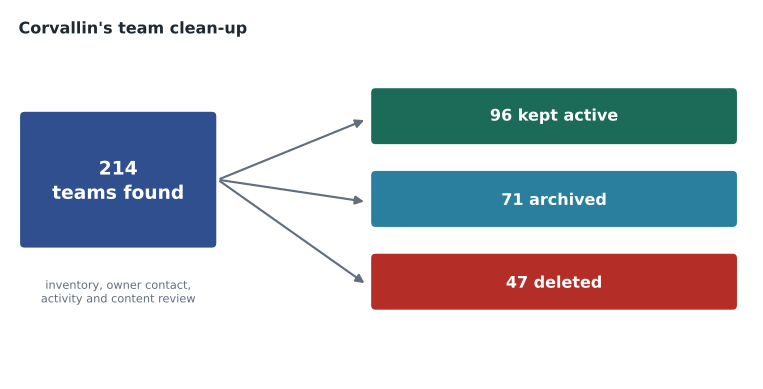
When the project began, Corvallin had 214 teams for about 450 staff. Many had one owner or none, few had labels, dozens had guests nobody remembered, and 63 apps were in use without review. When it ended, 96 teams remained active, 71 were archived and 47 were deleted, every active team had at least two owners and a label, and the app catalog was down to 27 reviewed apps. The steps below explain how.
Phase 1: inventory
You cannot clean up what you cannot see, so the first two weeks were spent building an inventory. Teodor exported every team with its creation date, owners, member count, guest count, channel count, last activity and sensitivity label, using the Teams admin center's usage reports and a PowerShell script. He added each team's SharePoint storage from the SharePoint admin center and its private and shared channels from the MicrosoftTeams module.
# Inventory: one row per team
Get-Team | ForEach-Object {
    $gid = $_.GroupId
    $owners = Get-TeamUser -GroupId $gid -Role Owner
    $guests = Get-TeamUser -GroupId $gid -Role Guest
    $chans  = Get-TeamChannel -GroupId $gid
    [pscustomobject]@{
        Team = $_.DisplayName; Visibility = $_.Visibility; Archived = $_.Archived
        Owners = $owners.Count; Guests = $guests.Count
        Channels = $chans.Count; Private = ($chans | Where-Object MembershipType -ne 'Standard').Count
    }
} | Export-Csv .\teams-inventory.csv -NoTypeInformation
The inventory surprised everyone. Of the 214 teams, 58 had a single owner and 19 had none. 41 teams had no activity in the past 180 days. Nine teams were public and contained clinical material. 58 guests were spread across 34 teams. Three teams had more than 30 channels, most of them empty. Ines took the summary to the leadership meeting, where the numbers did more to win support than any argument about governance.
Phase 2: decide the rules
Before touching any team, Teodor and Ines agreed the rules that every team would follow afterwards, so that clean-up decisions had a standard to measure against. They wrote them on one page.
| Rule | Tool that enforces or supports it |
|---|---|
| Only Team Creators create teams, from a Corvallin template | Group creation restriction, template policy, request flow |
| Every team name starts with CHC- and avoids blocked words | Naming policy |
| Every team has at least two owners | Request form, monthly two-owner report, ownerless group policy |
| Every team has a sensitivity label; clinical teams are private with no guests | Container labels: General, Partner Work, Clinical Confidential |
| Project teams expire after 180 days unless active or renewed | Group expiration policy for selected groups |
| Guests are reviewed quarterly | Entra access reviews |
| Third-party and custom apps are reviewed before use | Org-wide app defaults, app availability, custom app process |
| Finished work is archived, not deleted, when it has records value | Archiving with read-only site |
Having the rules first made each clean-up decision quicker. A team either met the rules, could be brought into line, should be archived or should be deleted. The rules also gave owners a clear explanation of why their team was changing.
Phase 3: contact owners and classify
Each team was classified as keep, archive or delete, but never without its owners. Teodor emailed every owner with their team's inventory row and a proposed classification, and asked them to confirm or object within two weeks. Teams with no owner were sent to the manager of the department that had used them most, identified from member lists.
The champions network made this phase work. Each branch's champions helped owners understand what archiving meant and reassured them that nothing would be lost without agreement. About 70 percent of owners responded in the first two weeks, and the champions chased the rest. Only four classifications were disputed, and in each case the team was kept for another review.
Phase 4: act in batches
Changes were made in batches, each with a CSV file of agreed decisions, a script and a check afterwards. The order was deliberate: fix ownership first, so that every surviving team had someone accountable; then archive; then delete; then apply labels and settings to the teams that remained.
Ownership. Teams staying active received a second owner where they had only one, and an owner where they had none. Archiving. The 71 teams with finished work and records value were archived with read-only sites, ten at a time. Deletion. The 47 teams with no business value, mostly tests, duplicates and empty experiments, were deleted after owners confirmed, knowing they could be restored for 30 days. Two were restored in that window when owners realised they held files they needed, which is exactly why the window exists. Applying the standard. The 96 remaining teams received labels, the branch settings standard from lesson 3, and the Infection Control channel for branch teams.
Private channels got their own review. Of 88 private channels, 31 were converted to standard channels by recreating them and moving files, 22 were deleted as empty, and the rest stayed with at least two channel owners. Shared channels were reviewed for external participants, and the partner pharmacy channel was the only one left with people from another organization.
Phase 5: apps
The app review ran alongside the team work. The 63 apps in use were listed from the app usage report and classified by publisher, permissions, certification and business owner. Apps with no business owner were set to No one after a two-week notice. Admin consents for retired apps were revoked in Entra ID. The org-wide default for new third-party and custom apps was set to not available until reviewed, and user app requests were turned on.
At the end, 27 apps remained: Microsoft apps in daily use, a handful of reviewed third-party apps limited to the groups that needed them, and Corvallin's custom visit checklist app published to the organization catalog. Built-in Teams agents were limited to the IT team until the Copilot pilot, with Channel Agent auto-creation turned off.
Phase 6: keep it clean
The last phase is the one most clean-ups skip. Corvallin put four recurring tasks into the IT calendar: the monthly two-owner report, the quarterly guest access review, the quarterly app review and the quarterly governance report to Ines. The ownerless group policy and the expiration policy for project teams run automatically. Message center posts about Teams and agents are reviewed weekly in the Tenant changes plan.
| Measure | Before | After (November 2026) |
|---|---|---|
| Teams | 214 | 96 active, 71 archived |
| Teams with fewer than two owners | 77 | 0 |
| Teams with a sensitivity label | About 20 | All active teams |
| Public teams with clinical content | 9 | 0 |
| Guests | 58 | 27 after the first access review |
| Apps in use | 63 | 27 |
| Collaboration tickets per month | About 120 | About 70 |
The ticket figure mattered most to Ama. Fewer, clearer teams meant fewer "where is it?" calls, and the troubleshooting routine from lesson 11 meant the remaining calls were resolved faster.
What they would do differently
In the project review, Teodor listed three lessons. First, start with ownership; once every team had two owners, every other decision was easier because someone could answer for it. Second, communicate earlier; some owners felt ambushed by the first email, and a short announcement from Dr. Marguerite Ostrander-Bey and the branch managers a week before would have helped. Third, script everything and keep the scripts; the decision log with every CSV and script made the project auditable and repeatable.
Ines added a fourth: set the rules before cleaning up. Without the one-page rules, each decision would have been a debate. With them, most decisions were obvious, and the hard ones were about genuine exceptions.
Applying the approach elsewhere
The same six phases apply to any organization, with the numbers scaled. For a larger organization, the inventory needs automation and the owner contact phase needs more time and more champions. For a smaller one, the rules can be simpler, but the two-owner rule, labels for sensitive teams, archiving instead of deleting and a regular review are worth keeping at any size. Kittiwake, the physiotherapy clinic Corvallin acquired in November 2026, is a good test: when its tenant is merged in 2027, its teams will go through the same inventory, rules and batches before they join Corvallin's environment.
Worked problem
Planning a clean-up for a new acquisition
Kittiwake has 18 staff and about 25 teams in its own tenant. Its teams will move into Corvallin's tenant in 2027. Using the six phases, outline Teodor's plan.
Show solution
- Inventory: export Kittiwake's teams with owners, guests, activity, channels and storage.
- Rules: apply Corvallin's existing one-page rules; no new rules needed.
- Owners: contact each owner with the proposed classification, helped by Kittiwake's owner, Hollis Brandreth.
- Act: migrate only teams classified as keep, recreate them from Corvallin templates with CHC- names and labels, and archive the rest in Kittiwake's tenant before it is retired.
- Apps: review any Kittiwake apps against Corvallin's catalog.
- Keep clean: add the new teams to the monthly and quarterly reports.
Answer: The same six phases, using Corvallin's existing rules and templates, so Kittiwake's teams arrive already compliant.
Communication plan
The clean-up touched almost everyone at Corvallin, so communication was planned as carefully as the scripts. Ines sent the first announcement to all staff, explaining why the clean-up was happening and what would and would not change. Branch managers followed up in their weekly huddles. Owners received personal emails with their team's details and proposed classification. Champions answered questions in each branch. A final message summarised the results and pointed staff to the new request form and owners' guide.
Teodor kept the messages short and specific. Instead of "we are improving Teams governance", the owner email said: "Your team CHC-Event Planning 2024 has had no activity since March. We propose to archive it, which makes it read-only but keeps everything searchable. Reply by October 30 if you would like to keep it active." Specific messages got answers; vague ones would not have.
Risks and how they were handled
Every clean-up carries risks, and naming them early helped. The project's risk list had five entries. Deleting something needed: handled by owner agreement and the 30-day restore window. Breaking links or apps connected to a team: handled by archiving first when unsure. Owners not responding: handled by champions and escalation to department managers. Staff resistance: handled by explaining the reasons and showing benefits, such as easier navigation on phones. Losing track of what was done: handled by the decision log with every CSV and script.
| Risk | Control |
|---|---|
| A needed team is deleted | Owner agreement; 30-day restore; retention for records |
| A connected app or link breaks | Archive first when unsure; review after six months |
| Owners do not respond | Champions follow up; department managers decide |
| Staff resist changes | Clear reasons, specific messages, visible benefits |
| No record of changes | Decision log with CSV files and scripts |
Measuring success
Ines judged the project by four measures she set at the start: fewer teams with no accountable owner, no sensitive content in public teams, fewer collaboration tickets, and a process that would keep things clean without another project. All four were met by November 2026. The fifth measure, added by the board, was readiness for the Copilot pilot: the clean-up removed overshared, forgotten content that Copilot might otherwise have surfaced, which made the pilot's data condition achievable.
Timeline
The project ran over about ten weeks. Weeks one and two were the inventory. Week three agreed the rules and got leadership approval. Weeks four to six were owner contact and classification, with champions chasing replies. Weeks seven to nine were the batches: ownership, archiving, deletion and applying the standard, with the app review running in parallel. Week ten set up the recurring reports and policies and wrote the final summary. Keeping each phase short kept momentum; nobody had time to forget why the work mattered.
Common mistakes
MistakeStarting a clean-up by deleting obviously dead teams.
InsteadInventory and agree rules first, then fix ownership, then archive and delete with owners' agreement.
MistakeTreating the clean-up as a one-time project.
InsteadPut recurring reports and reviews in the calendar and let lifecycle policies run automatically.
MistakeChanging teams without telling owners.
InsteadContact owners with clear proposals and use champions to explain the changes.
MistakeIgnoring private channels and apps.
InsteadReview private and shared channels and the app catalog as part of the same project.
Summary and key terms
- Corvallin's clean-up ran in six phases: inventory, rules, owner contact, batched action, apps and keeping it clean.
- Rules were agreed before any change and enforced with group settings, naming, templates, labels, expiration, access reviews and app controls.
- Ownership was fixed first, then teams were archived or deleted in batches with owners' agreement and the 30-day restore window as a safety net.
- Private channels, shared channels and apps were reviewed in the same project.
- Recurring reports and reviews, plus automatic lifecycle policies, keep the environment from sprawling again.
- The same approach scales to larger organizations and to acquisitions.
- Team sprawl
- The build-up of unused, duplicate or ungoverned teams over time.
- Inventory
- A complete list of teams with the attributes needed to make governance decisions.
- Classification
- The keep, archive or delete decision for each team.
- Decision log
- A record of governance decisions, scripts and evidence kept for audit and repeatability.
- Champions network
- Staff who support colleagues and help administrators communicate changes.
Practice problems
Work each problem on paper first, then reveal the answer to check.
Why did Corvallin fix ownership before archiving or deleting?
Show answer
Owners are needed to agree decisions and to stay accountable for surviving teams.
Why delete in batches rather than all at once?
Show answer
Problems are caught early, and the 30-day restore window covers mistakes in a manageable number of teams.
Name two recurring tasks that keep teams from sprawling again.
Show answer
For example, the monthly two-owner report and the quarterly guest access review.
Lesson quiz · 5 questions
Score 60% or more to complete this lesson.
Create a free account to save your progress, take quizzes and earn a certificate.