
MSBA-213 · Lesson 7 of 12 · 18 min
App protection policies for unmanaged devices
▶ Video coming soon A video version of this lesson is on the way.
The device course ended with a decision about personal phones. At a meeting on November 2, 2026, Dr. Ostrander-Bey and two staff representatives agreed that about 150 staff could keep using Outlook, Teams, OneDrive and Edge on their own phones without enrolling them, provided Intune protected the work data inside those apps. VisitWise would stay on corporate phones only, because it does not support Intune app protection. The device course explained why that was the right choice. This lesson is about building it: the settings inside an app protection policy, how Conditional Access makes them stick, and what the North Branch pilot from November 16 to 23 taught the team.
What app protection does
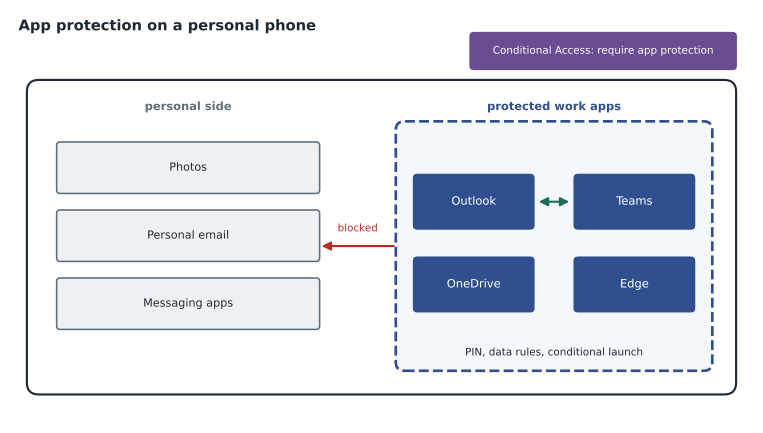
An app protection policy (APP) applies rules to a supported app when a user signs in to it with a work account. It does not touch the rest of the phone. The rules decide where work data can go, what the user must do to open the app, and under what conditions the app refuses to open or wipes its work data. Because the rules live in the app, through the Intune App SDK, they work on enrolled and unenrolled devices alike, and on a phone that also holds a personal Outlook account, they apply only to the work account.
The three groups of settings
Every app protection policy has three groups of settings. Microsoft publishes a data protection framework with three levels, basic, enhanced and high, that fill these groups with recommended values. Ama started from the enhanced level, as the device course described, and adjusted a handful of settings after the clinical review.
| Group | Examples | Corvallin's choice for personal phones |
|---|---|---|
| Data protection | Send and receive data with other apps; save copies; cut, copy and paste; screen capture on Android; printing; backup to cloud services | Data moves only between policy-managed apps; save only to OneDrive and SharePoint; paste into personal apps blocked; Android screen capture blocked; no backup of work data to personal cloud |
| Access requirements | PIN for access; biometrics instead of PIN; work account credentials; recheck after a time out | Six-digit PIN or biometrics; recheck after 30 minutes of inactivity |
| Conditional launch | Maximum PIN attempts; offline grace period; minimum OS and app versions; jailbroken or rooted devices; device threat level | Wipe work data after 10 failed PINs; block after 12 hours offline, wipe after 90 days; block jailbroken or rooted devices; minimum OS versions set to supported releases |
Data protection settings decide where data goes. The most important is which apps a protected app can send data to: all apps, policy-managed apps only, or none. Choosing policy-managed apps means a nurse can open a PDF attachment from Outlook in Edge or save it to OneDrive, but cannot open it in a personal messaging app or save it to the phone's personal storage. Cut, copy and paste is controlled the same way, with an option to allow pasting into managed apps while still allowing paste from personal apps into work apps.
Access requirements decide how the user gets in. The app PIN is separate from the phone's passcode, which matters on personal phones where Intune does not control the passcode. Biometrics can replace the PIN on devices that support them. The policy can also ask for the work account password periodically, which Ama left off because Conditional Access and multifactor authentication already handled sign-in.
Conditional launch decides when the app refuses to work. Each condition has a value and an action: warn, block access or wipe data. Microsoft's guidance warns against overly aggressive wipe settings, because a wipe removes only work data from the app, but a user who loses it may have unsent messages or drafts. Ama's offline rule blocked access after 12 hours without contact with the service and wiped after 90 days, enough for a worker on holiday to come back and sign in again without losing anything.
Targeting app protection
App protection policies target users, not devices, and list the apps they protect. A policy can apply to all app types or to specific ones: apps on unmanaged devices, apps on Android Enterprise devices or apps on Intune MDM devices. That is how one tenant can have stricter rules for personal phones and lighter ones for corporate phones, whose device-level controls already cover some risks. Corvallin had two Android and two iOS policies: APP-AND-Personal and APP-IOS-Personal for unmanaged devices at the enhanced level, and lighter versions for corporate phones that mainly controlled data transfer.
On Android, app protection depends on a broker app: the Company Portal must be installed, even though the device is not enrolled, or Microsoft Authenticator in some scenarios, because it carries the policy and handles the device registration with Microsoft Entra ID that app protection needs. The staff guide for the pilot said this in its first line, because "install Company Portal but don't enroll" confused several people.
Making app protection stick with Conditional Access
An app protection policy only protects data inside apps that receive it. Without Conditional Access, a user could open Microsoft 365 from an unprotected app, or from a browser, and bypass the policy. The Entra grant control Require app protection policy makes Microsoft 365 release data only to apps that have a policy applied. For years there was a related control, Require approved client app, which accepted a list of Microsoft apps. Microsoft retired it: the retirement date moved from March 2026 to June 30, 2026, and since then policies using it are read-only, although existing ones keep being enforced until they are disabled or deleted. Microsoft's guidance is to use Require app protection policy for every new policy.
| Conditional Access policy | Users | Platforms | Grant |
|---|---|---|---|
| CA014 Mobile app protection (pilot) | North Branch pilot group | iOS and Android, devices not marked compliant | Require app protection policy |
| CA006 Require compliant device (mobile grant updated) | All staff | iOS and Android | Require device to be marked as compliant, or require app protection policy |
| CA015 Mobile browsers (report-only) | All staff | iOS and Android browsers other than Edge | Block access to Microsoft 365 from unprotected browsers |
Browser access needed a thought of its own. A user who opened Outlook on the web in the phone's built-in browser would bypass app protection, because the browser is not a protected app. Ama's third policy limited mobile browser access to Microsoft Edge, which enforces app protection when signed in with a work account. Before enforcing anything, she ran all three policies in report-only mode for a week and read the sign-in logs; they showed 14 users still reading email in a phone's built-in mail app, which the pilot guide asked them to replace with Outlook.
Selective wipe
When someone leaves Corvallin, or loses a personal phone, the help desk can issue an app selective wipe. It removes the work account and its data from the protected apps on that user's devices and leaves personal data alone. Selective wipe is requested per user and per device in the admin center and takes effect when the app next opens. Conditional launch can also wipe work data automatically, for example after too many failed PIN attempts. The offboarding checklist from the device course gained a line: run app selective wipe for every personal device listed against the user.
Microsoft Tunnel for MAM
Some organizations need protected apps on personal phones to reach internal websites. Microsoft Tunnel for Mobile Application Management lets protected apps, such as Edge, reach on-premises resources through the Microsoft Tunnel VPN gateway without enrolling the device. MD-102 includes configuring it, and it is part of the Intune Suite capabilities. Corvallin had no on-premises web apps left after its 2022 move to the cloud, so Ama did not deploy it, but she wrote a one-page note on what it would take, because the partner home-care network the device course mentioned still had an internal intranet.
Windows: app protection in Edge
Personal Windows computers are the next frontier. Intune supports app protection for Microsoft Edge on Windows, so a user on a personal laptop can reach work data in a protected Edge work profile, with rules about copy and paste, printing and downloads, without enrolling the laptop. Conditional Access can require it for browser access from unmanaged Windows devices. Corvallin's office staff rarely worked on personal laptops, so this was on the 2027 list, but Teodor tested it on his own home computer and confirmed the profile and its restrictions behaved as Microsoft described.
What the North Branch pilot showed
The pilot ran from November 16 to 23 with 37 users. Twenty-nine set up their phones themselves from the guide, six needed help at the branch, and two chose not to use work apps on their phones at all, which the privacy notice had said was their right. The help desk took nine calls. Most were about the Company Portal requirement on Android and about the PIN prompt appearing in Teams and Outlook separately, which happens when the apps do not share a PIN on that platform. One was a real gap: OneDrive's camera upload, when turned on by a user, tried to send personal photos to the work OneDrive, and Ama added a line to the guide on keeping it off. The full rollout was planned for December, branch by branch.
Worked problem
A lost personal phone
On November 20 a pilot user at the North Branch reports her personal phone lost. It has Outlook and Teams with Corvallin's app protection policy. The phone is not enrolled. What can the help desk do?
Show solution
- The device cannot be wiped or located by Intune, because it is not enrolled.
- The help desk issues an app selective wipe for her account on that device, removing work data from Outlook and Teams when the apps next open.
- Teodor revokes her sessions so the apps must sign in again, and the app protection offline rule blocks access after 12 hours if the phone never connects.
Answer: Work data was protected in three layers: the app PIN, the selective wipe and the offline block. Her personal data was untouched, which was the point of the design.
App protection for corporate phones
Corporate phones received app protection too, with a different purpose. On a fully managed Samsung phone, Intune already controls the whole device, so the app protection policy did not need a separate PIN; the device passcode and compliance policy covered access. What it still did was stop work data in Outlook and Teams from being shared into apps outside the managed set, such as a messaging app a worker might install from managed Google Play if it were ever approved. On corporate iPhones, the same logic applied, with the added benefit that managed open-in restrictions from the device course worked alongside it.
| Setting | Personal phones | Corporate phones |
|---|---|---|
| App PIN | Required | Not required; the device passcode applies |
| Send data to other apps | Policy-managed apps only | Policy-managed apps only |
| Save copies | OneDrive and SharePoint only | OneDrive and SharePoint only |
| Offline block and wipe | 12 hours and 90 days | Longer, since the device is managed |
| Minimum OS | Supported releases | Enforced mainly by compliance policy |
Communicating with staff
The pilot guide was two pages, written with the staff representatives from the November 2 meeting. It explained in plain words what Corvallin could and could not see on a personal phone: the work account and work data in four apps, yes; photos, messages, location and personal apps, no. It listed the steps to set up each app, the PIN rule, and what would happen if the phone was lost. Dr. Ostrander-Bey insisted on a line saying staff could choose not to use work apps on their phones at all and use a branch laptop instead, and two pilot users took that option. Ama thought the guide did more for adoption than any setting.
Common mistakes
MistakeUsing Require approved client app in a new Conditional Access policy.
InsteadThat control was retired on June 30, 2026 and its policies are read-only. Use Require app protection policy.
MistakeRelying on app protection without Conditional Access.
InsteadConditional Access stops Microsoft 365 releasing data to apps and browsers without a policy.
MistakeSetting aggressive wipe rules that remove work data after a short offline period.
InsteadBlock first, wipe much later, so travellers and people on leave do not lose unsent work.
MistakeTelling Android users they need nothing but Outlook.
InsteadAndroid app protection needs a broker app, usually Company Portal, installed without enrolling.
Summary and key terms
- App protection policies protect work data inside supported apps on enrolled and unenrolled devices.
- Settings fall into data protection, access requirements and conditional launch; Microsoft's framework gives basic, enhanced and high levels.
- Policies target users and app types, so personal and corporate phones can have different rules.
- Conditional Access with Require app protection policy enforces it; Require approved client app was retired on June 30, 2026.
- App selective wipe removes work data only; Microsoft Tunnel for MAM and Edge app protection on Windows extend the model.
- App protection policy (APP)
- Intune rules applied inside a supported app when a user signs in with a work account.
- Data protection framework
- Microsoft's recommended app protection settings at basic, enhanced and high levels.
- Conditional launch
- App protection settings that warn, block or wipe when conditions are not met.
- Policy-managed app
- An app that has an app protection policy applied for the current user.
- App selective wipe
- Removal of work data from protected apps, leaving personal data alone.
- Microsoft Tunnel for MAM
- A way for protected apps on unenrolled devices to reach internal resources through Microsoft Tunnel.
Practice problems
Work each problem on paper first, then reveal the answer to check.
What does an app selective wipe remove?
Show answer
The work account and work data from protected apps, not personal data.
Which Conditional Access grant should new policies use for mobile apps?
Show answer
Require app protection policy.
Why did Ama add a policy about mobile browsers?
Show answer
A built-in browser is not a protected app, so Outlook on the web there would bypass app protection.
Lesson quiz · 5 questions
Score 60% or more to complete this lesson.
Create a free account to save your progress, take quizzes and earn a certificate.