
MSBA-213 · Lesson 6 of 12 · 18 min
App configuration policies
▶ Video coming soon A video version of this lesson is on the way.
Installing an app is half the job. The other half is making it start in the right state: pointed at the right server, signed in with the right account, with the right features on or off. On a laptop, much of that comes from settings that live in Windows, such as the settings catalog and Office policies covered earlier. On phones and tablets, apps keep their settings inside themselves, and Intune reaches them through app configuration policies. MD-102 asks candidates to plan and implement app configuration policies for both managed apps and managed devices, and the two kinds behave quite differently.
Two delivery channels
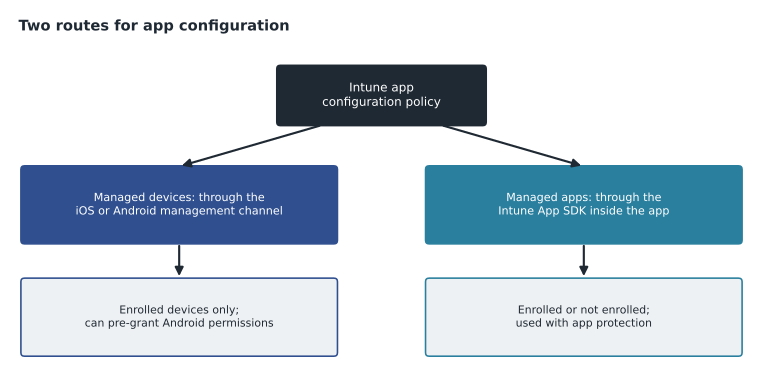
An app configuration policy can travel by one of two routes. A managed devices policy is delivered through the operating system's device management channel, so it works only on enrolled devices, and the app reads it the way Apple or Google designed: managed app configuration on iOS and iPadOS, and managed configurations through Android Enterprise. A managed apps policy is delivered through the Intune App SDK, the same library that makes app protection work, so it reaches supported apps whether or not the device is enrolled. Some apps, such as Outlook and Microsoft Edge, accept both.
| Question | Managed devices policy | Managed apps policy |
|---|---|---|
| Device must be enrolled | Yes | No |
| How it reaches the app | The platform's managed configuration | The Intune App SDK inside the app |
| Apps supported | Any app that documents managed configuration keys | Apps built with the Intune App SDK, such as Outlook, Teams and Edge |
| Android permissions | Can pre-grant runtime permissions | No |
| Typical use | Server addresses, account names, Wi-Fi-only downloads on corporate phones | Settings for Microsoft apps on personal phones |
Keys, values and tokens
Each app decides which settings it accepts. Vendors publish a list of configuration keys, each with a type and allowed values. Intune offers two ways to enter them: a configuration designer, which presents the keys as a form when Intune knows the app's schema, and raw input, an XML property list on iOS or a JSON-like set of keys on Android. Values can include tokens that Intune replaces for each user or device, such as the user's principal name, email address or the device's Intune ID. Tokens let one policy configure hundreds of phones, each with its own user's details.
<dict>
  <key>tenantUrl</key>
  <string>https://corvallin.visitwise.example</string>
  <key>userName</key>
  <string>{{userprincipalname}}</string>
  <key>allowPhotoExport</key>
  <false/>
</dict>
VisitWise's vendor documented four keys: the tenant address, the user name, whether photos could be exported to the phone's gallery, and whether the app would download the next day's schedule over cellular data. Ama set the tenant address and user name so staff did not have to type them, turned photo export off so wound photos stayed inside VisitWise, and allowed cellular downloads because many clients' homes had no Wi-Fi. The same keys went into an Android policy for the Samsung phones, plus a permission section that pre-granted location and camera.
Android permissions and the managed configuration
On Android Enterprise devices, a managed devices policy can also set runtime permissions: grant, deny or let the user decide, for permissions such as location, camera and microphone. Pre-granting suits a fully managed work phone whose purpose is known; on a personally owned work profile, Ama would let users decide. The policy can also set connected apps, which let a work-profile app share data with its personal-profile copy when the app supports it, something Corvallin did not need.
| VisitWise setting on Samsung phones | Value | Reason |
|---|---|---|
| Location permission | Auto grant | Visit check-in confirms the worker is at the client's address |
| Camera permission | Auto grant | Wound photos are taken in the app |
| Microphone permission | Prompt | Voice notes are optional |
| tenantUrl | Corvallin's VisitWise address | No typing on first use |
| allowPhotoExport | false | Photos stay inside VisitWise |
Configuring Microsoft apps
Microsoft's own mobile apps accept many settings through app configuration. Outlook can be limited to work accounts only, so a manager cannot add a personal mailbox to the work Outlook on a corporate iPhone; it can be told which account to configure automatically, and it can turn features such as contact sync on or off. Microsoft Edge can be given a homepage, managed bookmarks and a list of allowed or blocked sites. Teams and OneDrive accept settings such as which accounts are allowed. Microsoft documents the keys for each app on Microsoft Learn, and for Outlook and Edge the admin center offers a designer so most settings are chosen from menus.
On corporate iPhones, which are enrolled, Ama used a managed devices policy for Outlook that set the account to the user's principal name and allowed only work accounts. For the personal phones in the next lesson, the same settings would have to go through a managed apps policy, because those phones are not enrolled. Microsoft's documentation explains that for some settings, such as restricting Outlook to organization accounts, both a device-channel key and an app-protection setting are involved, and it lists the combination for each platform. Ama followed that page exactly rather than copying keys from blog posts.
Worked problem
Edge for the policy library
Staff open Corvallin's policy library and intranet from their phones. Dr. Ostrander-Bey wants Edge on work phones to open the policy library by default and show the four most-used intranet pages as bookmarks. Which policy?
Show solution
- Edge is built with the Intune App SDK and accepts both kinds of configuration.
- On corporate phones, a managed devices policy works; on personal phones only a managed apps policy reaches Edge.
- Using a managed apps policy for both means one policy covers everyone who uses Edge with a work account.
Answer: Ama created one managed apps app configuration policy for Edge, targeted to all staff, setting the homepage to the policy library and four managed bookmarks. Corporate and personal phones got the same experience.
Targeting and conflicts
App configuration policies are assigned to groups, like apps. A managed devices policy must target the same platform and app as the assignment, and for iOS it applies only to devices where the app is managed. A managed apps policy targets users and applies when they sign in to the app with a work account. If two policies set the same key with different values, the result depends on the app and the channel; Microsoft's guidance is to avoid overlaps rather than rely on precedence. Ama's rule was one configuration policy per app per platform, named after the app and platform, such as APPCFG-IOS-Outlook and APPCFG-AND-VisitWise.
Checking that a configuration arrived
Each app configuration policy has device and user status reports in the admin center, showing whether it was delivered and, for some apps, whether the app reported applying it. On the device, the evidence is the app itself: Outlook opening straight to the work mailbox, Edge showing the managed bookmarks. On Android, the Company Portal or Microsoft Intune app's diagnostics show which policies the device received. When a VisitWise setting did not apply on four Samsung phones, the report showed the policy pending, and the cause turned out to be those phones had never checked in after an update; a sync fixed them.
Windows and macOS
App configuration policies in this sense are mainly a mobile feature. On Windows, apps are configured through the settings catalog, administrative templates, custom configuration profiles and, for Office, the Cloud Policy service. On macOS, apps that support managed preferences read them from configuration profiles, often called preference files, which Intune deploys as a custom profile or through the settings catalog. The principle is the same everywhere: configure apps centrally, document every setting, and never rely on users to type server addresses.
Planning a configuration policy
Before writing any app configuration, Ama answered five questions for each app, and the answers decided the kind of policy and its settings.
| Question | Why it matters |
|---|---|
| Is the device enrolled? | Unenrolled devices only receive managed apps policies |
| Does the app document configuration keys? | Without published keys, there is nothing to set |
| Is the app built with the Intune App SDK? | Only SDK apps accept managed apps policies |
| Which settings vary by user? | Those values should use tokens |
| What happens if the setting is missing? | Decides whether a failed delivery is a nuisance or an outage |
The last question shaped the testing. If VisitWise's tenant address failed to arrive, a new worker would see a sign-in screen asking for a server she had never heard of, which would end in a call to the help desk on her first morning. So the VisitWise policy was tested on spare phones before each change, and the enrollment checklist for new staff included opening VisitWise once at the branch before going on the road.
Configuration and app protection together
App configuration and app protection are separate policies but often work as a pair. App protection decides what users can do with work data; app configuration decides how the app is set up. On personal phones at Corvallin, the app protection policy from lesson 7 prevented copying work data into personal apps, and a managed apps configuration for Outlook turned off features the clinical director considered unnecessary on a personal phone, such as saving contacts to the phone's native address book. The device course's rule applied here too: one policy per job, so that when something went wrong it was clear which policy to look at.
The exam's view
MD-102 tests app configuration with scenario questions. The key distinction is the delivery channel: a question that mentions personal or unenrolled devices points to managed apps policies, while one that mentions server addresses for a third-party app on corporate iPhones points to managed devices policies. Questions may also test that permissions can be pre-granted only on Android Enterprise, and that tokens let one policy serve many users.
A mistake worth recording
Ama's first Outlook configuration on the corporate iPhones went to the wrong place. She created it as a managed apps policy, because that was how the Outlook pages she read first described it, and targeted it to the iPhone users. It applied, but one setting that needed the device channel on enrolled iPhones, the automatic account setup, did nothing, so managers still had to type their address. Microsoft's Outlook configuration documentation explains which settings use which channel on enrolled devices. Ama split the policy in two: a managed devices policy for account setup on corporate iPhones, and a managed apps policy for the features that work the same everywhere. She wrote the split into the naming convention so the next person would not repeat the mistake.
| Policy name | Kind | Targets | Purpose |
|---|---|---|---|
| APPCFG-IOS-Outlook-Device | Managed devices | Corporate iPhones | Automatic work account setup; work accounts only |
| APPCFG-ALL-Outlook-App | Managed apps | All staff using Outlook | Feature settings such as contact sync |
| APPCFG-AND-VisitWise | Managed devices | Fully managed Samsung phones | Tenant address, user name, permissions |
| APPCFG-IOS-VisitWise | Managed devices | Corporate iPhones with VisitWise | Tenant address and user name |
| APPCFG-ALL-Edge-App | Managed apps | All staff using Edge | Homepage and managed bookmarks |
Five policies covered the whole estate. Ama reviewed them each quarter against the vendors' documentation, because app vendors add and retire configuration keys as their apps change, and a key that no longer exists is silently ignored rather than reported as an error.
Teodor asked whether the same five policies would scale if Corvallin grew. Ama's answer was that the number of policies should follow the number of apps and platforms, not the number of people, because tokens and group targeting handle the differences between users. A merger would add groups, not policies.
Common mistakes
MistakeUsing a managed devices policy to configure Outlook on personal, unenrolled phones.
InsteadUnenrolled devices only receive managed apps policies through the Intune App SDK.
MistakeCopying configuration keys from blog posts.
InsteadUse the keys the app's vendor documents, and Microsoft Learn for Microsoft apps.
MistakeCreating several overlapping configuration policies for the same app.
InsteadKeep one policy per app per platform so values do not conflict.
MistakePre-granting camera and location on personally owned work profiles.
InsteadPre-grant permissions on fully managed corporate devices; let users decide on personal ones.
Summary and key terms
- App configuration policies set an app's internal settings centrally.
- Managed devices policies use the platform's management channel and need enrollment; managed apps policies use the Intune App SDK and work without enrollment.
- Values come from keys the app documents and can include tokens such as the user's principal name.
- On Android Enterprise, managed devices policies can pre-grant runtime permissions.
- On Windows and macOS, apps are configured mainly through configuration profiles and policies.
- App configuration policy
- An Intune policy that sets an app's own settings.
- Managed devices policy
- An app configuration policy delivered through the device management channel to enrolled devices.
- Managed apps policy
- An app configuration policy delivered through the Intune App SDK, with or without enrollment.
- Configuration key
- A named setting an app documents for administrators to set.
- Token
- A placeholder, such as the user's principal name, that Intune replaces for each user or device.
- Intune App SDK
- Microsoft's library that lets apps receive app protection and managed apps configuration.
Practice problems
Work each problem on paper first, then reveal the answer to check.
Which kind of app configuration policy can pre-grant Android camera permission?
Show answer
A managed devices policy on an Android Enterprise device.
What does a token such as the user's principal name do in a configuration value?
Show answer
Intune replaces it with each user's value, so one policy fits everyone.
Why did Ama use a managed apps policy for Edge?
Show answer
It reaches Edge on both corporate and personal phones, so one policy covers everyone.
Lesson quiz · 5 questions
Score 60% or more to complete this lesson.
Create a free account to save your progress, take quizzes and earn a certificate.