
MSBA-161 · Lesson 9 of 12 · 21 min
Secret scanning basics
▶ Video coming soon A video version of this lesson is on the way.
Lena Fischer started at Tidewater as the summer developer on March 29, three weeks earlier than planned because the TrailCheck release needed help. On her first afternoon she tried to push a change that added a map to the trail-report page, and GitHub refused it. The message said the push contained a secret: the access key for the map tile service, copied into a configuration file from the setup notes. Lena was embarrassed; Priya was delighted. "That is the best thing that could have happened on your first day," she said, and turned the Monday session into a lesson on secret scanning and push protection, using Lena's blocked push as the example.
What a secret is and why it leaks
In this context a secret is any value that grants access: a password, an API key for a service such as a map provider or a payment processor, a cloud access key, a token for GitHub itself, a private key for signing or encryption, or a database connection string with a password in it. Anyone who has the secret can act as its owner, usually without any further check. Secrets leak into repositories in ordinary ways: pasted into a configuration file to get something working quickly, left in a test, included in an example, committed in a file that should have been in .gitignore, or posted in an issue while asking for help.
A leak in Git is stubborn. Deleting the file in a later commit does not remove the secret from history, where anyone who can read the repository can still find it, and a public repository may have been cloned or forked before anyone noticed. Automated tools scan public repositories constantly for keys, so a secret pushed to a public repository can be found and misused within minutes. That is why the response to a leak always starts with the secret itself, not with the repository.
What secret scanning does
Secret scanning searches a repository for strings that match the known formats of secrets from hundreds of service providers. It scans the entire Git history of every branch, not only the latest files, and also issues, pull requests, discussions and wikis. When it finds a match, it raises a secret scanning alert on the repository's Security tab, showing the type of secret, where it was found, and when. GitHub rescans repositories when it adds support for new types of secret.
For public repositories, two things happen automatically and for free. Through the secret scanning partner program, when GitHub finds a secret belonging to a participating provider, it notifies that provider, which can revoke the key or warn its customer; this happens even if the repository owner has not turned anything on. And repository owners receive user alerts for secrets found in their repositories, so they can act themselves. For private and internal repositories owned by organizations, secret scanning is part of GitHub Secret Protection (lesson 7).
| Partner alerts | User alerts | |
|---|---|---|
| Who is told | The service provider that issued the secret | The repository's administrators and security managers |
| Where it appears | Not shown in the repository | The repository's Security tab |
| What usually happens | The provider revokes the key or warns its customer | The team rotates the secret and closes the alert |
Beyond the providers' own formats, secret scanning can also look for generic secrets, such as private keys, connection strings and passwords that do not follow a provider's pattern, some of them found with AI-based detection; organizations can define custom patterns for their own internal formats. Validity checks ask the provider whether a found secret is still active, so the team can tell a dangerous live key from an old one that was already revoked.
Push protection
Secret scanning finds secrets that are already in a repository. Push protection stops them getting there. When someone pushes commits, GitHub checks them for supported secrets before accepting the push; if it finds one, it blocks the push and tells the person which file, which line and which type of secret, with links explaining what to do. The same check runs when someone edits a file in the web interface. For personal accounts, push protection for users is on by default for pushes to any public repository, which is what stopped Lena, and repositories and organizations can turn push protection on for their own repositories.
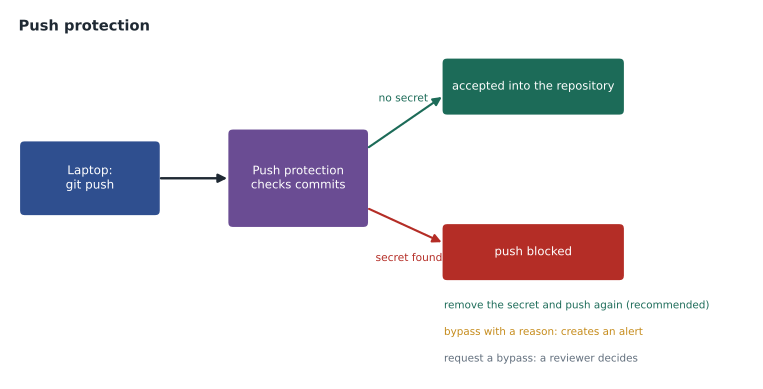
The person whose push was blocked has a choice. The right response, almost always, is to remove the secret from the commits and push again. If the value really is not a live secret, they can bypass the block by giving a reason: the value is used only in tests, it is a false positive, or the secret will be fixed later. A bypass lets the push through, records who bypassed and why, and creates an alert so that someone checks. Organizations can require delegated bypass, in which a bypass is only a request that a named reviewer must approve.
Worked problem
Fixing Lena's blocked push
Lena made two commits on her branch: the first added config/maps.json containing the key, the second added the map page. Push protection blocked the push. What should she do?
Show solution
- The secret is in the first commit, so deleting it in a third commit would not help: the push still contains the first commit.
- She removes the key from config/maps.json and amends or rewrites her unpushed commits so that no commit contains it; because nothing has been pushed yet, rewriting her own local history is safe.
- She reads the key from an environment variable at build time instead, and adds a placeholder to the file with a comment saying where the real value comes from.
- She pushes again; push protection finds nothing and accepts it.
- Because the key never reached GitHub, it was never exposed there, so it does not need to be revoked; Priya still notes that the setup notes should not contain live keys.
Answer: Remove the key from the unpushed commits, load it from a secure setting instead, and push again. Nothing leaked, so no rotation is needed.
Keeping secrets out of code
Push protection is a safety net, not the plan. The plan is that secrets never go into files that Git tracks. Configuration that varies between computers, including keys, belongs in environment variables or a local file listed in .gitignore. Automated workflows read secrets from GitHub Actions secrets, which are stored encrypted, available only to workflows, and hidden in logs. Codespaces have their own encrypted secrets. Teams keep the real values in a password manager or a secrets service, and repositories hold only placeholders and instructions. Example and test files use obviously fake values.
| Where a secret might go | Safe? | Better choice |
|---|---|---|
| A configuration file committed to the repository | No | An environment variable or a .gitignored local file |
| A workflow file | No | A GitHub Actions secret referenced by name |
| An issue or discussion asking for help | No | Describe the problem; never paste the value |
| The README setup instructions | No | Instructions on where to obtain the value |
| GitHub Actions secrets | Yes | Encrypted and hidden in logs |
| The team password manager | Yes | With access limited to those who need it |
How workflows use secrets safely
GitHub Actions workflows often need secrets: the TrailCheck deployment needs the map key at build time, and the trail-report validator needs a token to post results. An administrator stores each value once as an Actions secret, at the repository, environment or organization level, and the workflow file refers to it only by name, such as MAP_KEY. GitHub supplies the value to the running job, never shows it in the web interface again, and replaces it with asterisks if it appears in a log. Secrets are not passed to workflows triggered by pull requests from forks, so an outside contributor cannot write a workflow that prints them. Environment secrets can additionally require an approval before a job that uses them may run, which Tidewater uses for the production deployment.
Two habits keep this arrangement safe. Give each workflow the narrowest secret it needs, for example a key that can only read map tiles rather than one that can also change the account, and rotate long-lived secrets on a schedule, recorded in the admin repository. Where a cloud provider supports it, workflows can avoid stored secrets altogether by using OpenID Connect, in which the workflow proves its identity to the provider and receives a short-lived credential for that run only; the cloud courses cover this in detail.
| Where secrets hide in practice | How it happens | Prevention |
|---|---|---|
| Configuration files | A key pasted in to get something working | Environment variables and .gitignore |
| Test fixtures | A real token used to make a test pass | Fake values and mocked services |
| Notebooks and scripts | Credentials typed into a cell or a variable | Read from the environment at run time |
| Logs pasted into issues | Debug output that prints a connection string | Remove secrets before sharing logs |
| Screenshots | A settings page captured with a key visible | Crop or blur before posting |
Screenshots are the one case secret scanning cannot help with, because it reads text, not images. Grace added a line to the contributing guide asking everyone to check screenshots of settings pages before attaching them, after a test screenshot in a draft pull request showed most of an email service password.
Responding to a leaked secret
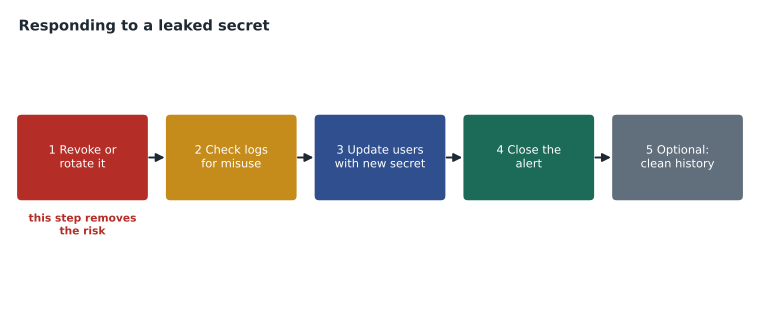
If a secret does reach GitHub, the order of the response matters. First, revoke or rotate the secret at the service that issued it, so the leaked value stops working; this is the only step that actually removes the risk, and it should happen before anything else. Second, check for misuse, using the provider's logs to see whether the key was used by anyone else while it was exposed. Third, update everything that legitimately used the old secret with the new one, stored properly. Fourth, close the alert with a note of what was done. Removing the secret from Git history is a fifth and optional step: it is slow, it disrupts everyone who has cloned the repository, and it achieves little once the secret has been revoked, because the old value no longer works.
Worked problem
A key in an issue comment
On April 1, while asking for help with a build error, a volunteer pasted the error log into an issue in the public open-trail-report repository. The log included a cloud storage access key. Secret scanning raised an alert at 14:06, and the provider's partner notification arrived at 14:07. Priya saw the alert at 14:20. What should she do, and how long was the key exposed if she revokes it at 14:25?
Show solution
- Revoke the key at the cloud provider first; the provider may already have flagged or revoked it after the partner notification.
- Check the provider's access logs for use of the key between the comment being posted and its revocation.
- Edit the comment to remove the key and hide the original revision; this tidies the issue but does not undo the exposure.
- Thank the volunteer, explain what happened without blame, and point to the contributing guide's note on logs.
- The comment was posted at about 14:06 and the key revoked at 14:25, so it was exposed for about 19 minutes.
Answer: Revoke first, check logs, then clean up the comment. The key was exposed for about 19 minutes.
Secret scanning in a small organization
For Tidewater, the decision about the paid product came down to numbers. Public repositories, which hold most of the code, already had secret scanning and push protection at no cost. The free secret risk assessment that Rosa ran in April scanned the private repositories and found two secrets, both old keys for services the company no longer used, both already inactive according to the providers. Rather than buy GitHub Secret Protection for one private code repository, the team revoked the two keys formally, moved the private repository's configuration to Actions secrets, and agreed to repeat the assessment every six months.
Owen asked what he should remember for the exam. Priya's summary was three sentences: secret scanning finds secrets that are already in a repository, push protection stops new ones getting in, and when a secret leaks, the first step is always to revoke it.
Common mistakes
MistakeDeleting the file that contained the secret and considering the problem solved.
InsteadThe secret remains in history; revoke or rotate it first.
MistakeBypassing push protection to get a change in quickly.
InsteadRemove the secret from the commits and push again; bypass only for real false positives or test values.
MistakeSpending hours rewriting history before revoking the key.
InsteadRevoke immediately; history cleanup is optional and comes last.
MistakePasting logs that contain credentials into issues.
InsteadRemove secrets from logs before sharing them, and never paste real values.
Summary and key terms
- Secrets such as keys, tokens and passwords grant access to whoever holds them, and leaks in Git remain in history.
- Secret scanning searches the full history and issues, pull requests, discussions and wikis, raising alerts on the Security tab.
- For public repositories, partner alerts go to providers and user alerts to owners, at no cost.
- Push protection blocks pushes that contain secrets; bypasses need a reason and create alerts.
- Keep secrets in environment variables, Actions secrets and password managers, never in tracked files.
- When a secret leaks: revoke it, check for misuse, update its users, close the alert, and only then consider cleaning history.
- Secret
- A value such as a key, token or password that grants access.
- Secret scanning
- Searching a repository and its conversations for strings that match known secret formats.
- Partner program
- The arrangement under which GitHub tells service providers about their leaked secrets.
- Push protection
- A check that blocks pushes containing secrets before they reach the repository.
- Bypass
- Letting a blocked push through with a recorded reason.
- Validity check
- Asking the provider whether a found secret is still active.
- Rotate
- Replace a secret with a new value and revoke the old one.
Practice problems
Work each problem on paper first, then reveal the answer to check.
What is the first step after a secret is exposed in a repository?
Show answer
Revoke or rotate it at the service that issued it.
Is push protection for users on by default for public repositories?
Show answer
Yes.
Name the three reasons offered when bypassing push protection.
Show answer
Used in tests, a false positive, or it will be fixed later.
Lesson quiz · 5 questions
Score 60% or more to complete this lesson.
Create a free account to save your progress, take quizzes and earn a certificate.