
MSBA-161 · Lesson 6 of 12 · 22 min
GitHub Marketplace and apps
▶ Video coming soon A video version of this lesson is on the way.
Dmitri arrived at the March 18 session with a list of tools he wanted: something to check spelling in pull requests, a service that would build a preview of the TrailCheck site for every pull request, a bot to welcome first-time contributors, and a chat integration so editors would hear about new corrections without watching their email. "Every one of these is a few clicks in the Marketplace," he said. "That is exactly why I want us to decide how we choose them," Rosa replied. The session covered the GitHub Marketplace, the difference between GitHub Apps, OAuth apps and actions, and how to judge what a tool will be allowed to do before installing it.
What the Marketplace is
The GitHub Marketplace is GitHub's catalog of tools that extend GitHub. It lists two kinds of thing. Apps are services that connect to GitHub and act on repositories or organizations: continuous integration services, code review bots, project management integrations, chat notifications, security scanners and many others. Actions are reusable steps for GitHub Actions workflows, such as checking out a repository, setting up a language, or checking links, which a workflow file refers to by name. Anyone can publish an action to the Marketplace; apps must meet listing requirements, and publishers can apply for a verified badge, which shows that GitHub has confirmed the publisher's identity and that the publisher meets certain standards.
Many listings are free. Paid apps offer plans, which can be bought through GitHub so the charge appears on the organization's GitHub bill, or directly from the vendor. Every listing shows a description, the publisher, pricing, the permissions the app requests, links to its privacy policy and terms of service, and often the number of installations.
| Marketplace listing | What it is | How you use it |
|---|---|---|
| App | A service that connects to GitHub and acts on repositories | Install it on an account or organization and choose repositories |
| Action | A reusable workflow step published in a repository | Refer to it with uses: in a workflow file |
GitHub Apps
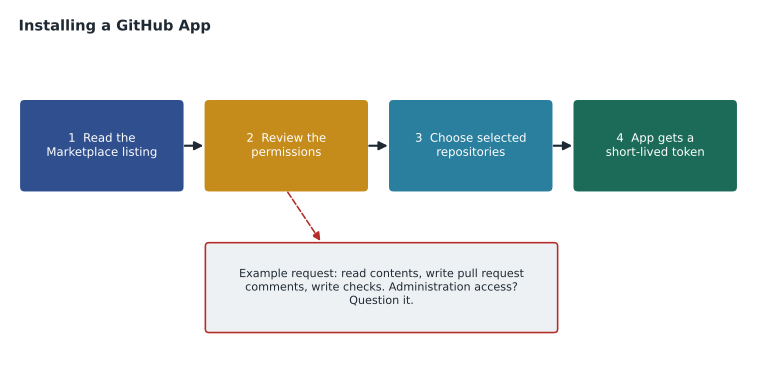
A GitHub App is an integration with its own identity. When an organization installs one, an owner chooses which repositories it may reach, all or selected ones, and the app receives exactly the permissions it asked for, such as read access to repository contents, write access to pull requests or read access to members. The app acts as itself, shown with a bot badge, not as any person, so its actions do not depend on one employee's account and do not stop when that person leaves. It authenticates with short-lived installation tokens that expire after an hour, which limits the damage if one leaks. GitHub recommends GitHub Apps over OAuth apps for most integrations for these reasons.
Apps can also subscribe to webhooks, notifications that GitHub sends to the app's server when events happen, such as an issue being opened or a pull request being merged. That is how a welcome bot knows to post a comment on a newcomer's first pull request. When an app is updated to request new permissions, an owner must approve the change before it takes effect.
OAuth apps
An OAuth app works differently: a person authorizes it to act on their behalf. The app receives a token that carries the person's identity and access, limited by the scopes the app requested, such as repo, which covers all of the person's repositories. Whatever the app does appears as the person's own action. OAuth apps are common for tools that sign you in with GitHub or show your repositories inside another product. Their weakness is that scopes are broad, the access lasts until revoked, and the app can reach every organization the person belongs to unless the organization restricts it.
| GitHub App | OAuth app | |
|---|---|---|
| Acts as | Itself, with a bot identity | The person who authorized it |
| Access granted by | Installation on chosen repositories | A person's authorization |
| Permissions | Fine-grained, per area | Broad scopes |
| Tokens | Short-lived installation tokens | Long-lived until revoked |
| Survives the person leaving | Yes | No, tied to that person |
| Typical use | Bots, CI services, automation | Signing in with GitHub, personal tools |
Controlling third-party access
Organizations have two controls that matter most. OAuth app access restrictions stop OAuth apps from reading the organization's private data until an owner approves each app; new organizations have the restriction on by default, and members can request approval when they try to use an app. For GitHub Apps, owners decide whether members may request installations and who may install; installations themselves need an owner, or a member with the necessary access to the chosen repositories. The GitHub App manager role from lesson 1 covers apps the organization itself has created. Every installed app and approved OAuth app is listed in the organization settings, where an owner can review, change or remove it, and installations and approvals appear in the audit log.
Worked problem
Reading a permission request
A spelling-check app asks for: read access to repository contents, write access to pull requests (to post comments), write access to checks (to report a result), and read and write access to administration. Should Rosa install it on trail-notes?
Show solution
- Reading contents is needed to check the text.
- Writing pull request comments and checks is needed to report spelling problems.
- Administration access would let the app change repository settings, which a spelling checker has no reason to do.
- An app requesting more than its job needs is a warning sign; check the documentation for why, or choose another app.
Answer: Not as requested. The first three permissions fit the job; administration access does not, so Rosa should ask the publisher or choose another app.
Actions from the Marketplace
Actions are code that runs inside a workflow, with access to the repository and to whatever the workflow's token allows, so choosing one deserves the same care. Prefer actions from GitHub itself, from verified publishers, or from well-known projects with active maintenance. Read the action's source, which is in a public repository. Refer to a specific version rather than a moving branch: a version tag such as v4 is common, and pinning to a full commit identifier is the safest, because a tag can be moved but a commit cannot. Give workflows only the token permissions they need, using the permissions key. Dependabot, covered in lesson 8, can keep pinned actions up to date.
name: Check links
on: [pull_request]
permissions:
  contents: read
jobs:
  links:
    runs-on: ubuntu-latest
    steps:
      - uses: actions/checkout@v4
      - name: Check links in Markdown
        uses: example-org/markdown-link-check@3f1c2e7b9a8d6c5b4a3f2e1d0c9b8a7f6e5d4c3b
        with:
          folder-path: docs
Organizations can also set an actions policy: allow all actions, allow only actions in the organization, or allow only actions from GitHub, verified creators and a named list. Tidewater chose the last option and listed the three outside actions it used.
Webhooks: how integrations hear about events
Most integrations depend on webhooks. A webhook is a subscription: when a chosen event happens, such as an issue being opened, a push to a branch, a pull request being merged or a release being published, GitHub sends a short message describing the event to an address the integration provides. The integration then decides what to do, for example posting in a chat channel or starting a preview build. Webhooks can be set up by a GitHub App as part of its installation, or added by a repository or organization administrator directly in the settings, pointing at any web address. Each delivery is logged, with its response, so an administrator can see whether a message arrived and redeliver it if the receiving service was down.
Because a webhook sends repository information to another server, it deserves the same scrutiny as an app. Administrators should know where every webhook points, use a secret so the receiving server can confirm messages really came from GitHub, and remove webhooks for services the team no longer uses. Tidewater found one webhook pointing at a website-monitoring service that had been cancelled a year earlier; nothing was receiving the messages, but repository events had been sent to an address the company no longer controlled.
Reviewing and removing integrations
Installed tools accumulate quietly, so Rosa added them to the quarterly access review. For each installed GitHub App, approved OAuth app, webhook and allowed action, the owner named in the admin repository confirms it is still used, still needs the access it has, and still has a current publisher. Anything without an owner or a use is removed. Removing a GitHub App is done from the organization's installed apps page and takes effect immediately; its tokens stop working. Revoking an OAuth app's approval stops it from reading the organization's private data, although each person who authorized it can also revoke it from their own account settings, which Rosa asked everyone to check once a year.
Worked problem
A quarterly integration review
In June the review lists 5 GitHub Apps, 2 approved OAuth apps, 3 webhooks and 4 allowed outside actions. One app and one webhook are no longer used, and one OAuth app has been replaced by a GitHub App doing the same job. How many integrations remain after the review?
Show solution
- Total before the review: 5 + 2 + 3 + 4 = 14.
- Removed: one unused app, one unused webhook and the replaced OAuth app, which is 3.
- The replacement GitHub App is already counted among the 5 apps.
- Remaining: 14 - 3 = 11.
Answer: 11 integrations remain, each with a named owner.
Choosing tools: a checklist
Rosa turned the session into a checklist that anyone proposing a new tool fills in as an issue in the admin repository. It is deliberately short, because a checklist nobody completes protects nothing.
| Question | What a good answer looks like |
|---|---|
| What problem does it solve? | A specific need that GitHub does not already meet |
| Who publishes it? | GitHub, a verified publisher or a well-maintained project |
| What permissions does it request? | Only what the job needs; no administration unless required |
| Which repositories need it? | Selected repositories, not all |
| What data leaves GitHub? | Explained in the privacy policy; nothing confidential |
| What does it cost? | Free, or a plan approved by the budget holder |
| Who owns it? | A named person who reviews it each quarter |
Worked problem
Comparing two preview services
Two apps build a preview of TrailCheck for each pull request. App A is from a verified publisher, requests read access to contents and write access to deployments and pull request comments, and costs 15 dollars (US) a month. App B is free, unverified, and requests read and write access to contents, administration and members. Which should the team choose, and is App A affordable on a monthly tools budget of 40 dollars (US) that already includes a 20-dollar chat tool?
Show solution
- App A requests only what a preview service needs; App B asks to change code, settings and membership.
- App A is verified; App B is not.
- Budget used: 20 + 15 = 35 dollars, which is within 40, leaving 5.
- Cost alone favours App B, but its permissions are far beyond its job.
Answer: App A, installed on trailcheck only. It fits the budget with 5 dollars to spare.
Marketplace prices are listed in US dollars, so Tidewater's bank in Moncton converts each charge to Canadian dollars at the exchange rate of the day. Rosa budgets with a small margin for that, and records each tool's cost in US dollars so the comparison between tools stays fair.
What the team installed
By the end of the session three tools had passed the checklist: the verified preview service on trailcheck only, a welcome bot on the two public repositories with permission only to comment on issues and pull requests, and the chat integration, a GitHub App that posts new issues with the correction label to the editors' channel. The spelling checker was dropped in favour of a spelling action that runs inside the existing workflow, needs no extra app permissions, and is pinned to a commit. Each tool got an owner, and the list went into the admin repository's README.
Common mistakes
MistakeInstalling an app on all repositories because it is quicker.
InsteadInstall on selected repositories that need it.
MistakeApproving permissions without reading them.
InsteadCheck each requested permission against the app's job.
MistakeReferring to an outside action by a branch name such as main.
InsteadUse a version tag or, safest, pin to a full commit identifier.
MistakeBuilding integrations on one employee's OAuth token.
InsteadPrefer a GitHub App, which has its own identity and survives staff changes.
Summary and key terms
- The GitHub Marketplace lists apps, which connect to GitHub, and actions, which are reusable workflow steps.
- Listings show the publisher, verification, pricing, permissions and policies.
- GitHub Apps act as themselves with fine-grained permissions on chosen repositories and short-lived tokens.
- OAuth apps act on a person's behalf with broad scopes; organizations can restrict their access.
- Choose actions carefully, pin them to a version or commit, and limit workflow token permissions.
- A short checklist covering purpose, publisher, permissions, repositories, data, cost and owner keeps tool choices deliberate.
- GitHub Marketplace
- GitHub's catalog of apps and actions that extend GitHub.
- GitHub App
- An integration with its own identity and fine-grained permissions, installed on chosen repositories.
- OAuth app
- An integration that acts on behalf of the person who authorized it.
- Scope
- The breadth of access an OAuth token grants.
- Webhook
- A message GitHub sends to a server when an event happens.
- Verified publisher
- A Marketplace publisher whose identity GitHub has confirmed.
- Pinning
- Referring to an action by a full commit identifier so its code cannot change.
Practice problems
Work each problem on paper first, then reveal the answer to check.
Which kind of integration keeps working when the employee who set it up leaves?
Show answer
A GitHub App, because it has its own identity.
What is the safest way to refer to an outside action in a workflow?
Show answer
Pin it to a full commit identifier.
What do OAuth app access restrictions do?
Show answer
Stop OAuth apps from reading the organization's private data until an owner approves them.
Lesson quiz · 5 questions
Score 60% or more to complete this lesson.
Create a free account to save your progress, take quizzes and earn a certificate.