
MSBA-161 · Lesson 10 of 12 · 20 min
GitHub plans and products
▶ Video coming soon A video version of this lesson is on the way.
Every spring Rosa prepares Tidewater's budget for the coming year, and this year GitHub had its own line. At the April 1 session she walked the team through the bill: what the organization pays for, what it gets free, what the extra products are, and what the alternatives would cost. Owen took notes for a different reason. The GH-900 exam expects candidates to know GitHub's plans and products well enough to recommend one, and he had found the official pages confusing, partly because they change often. This lesson sets out the structure, which is stable, and shows how to read the current numbers, which are not.
Accounts and plans, once more
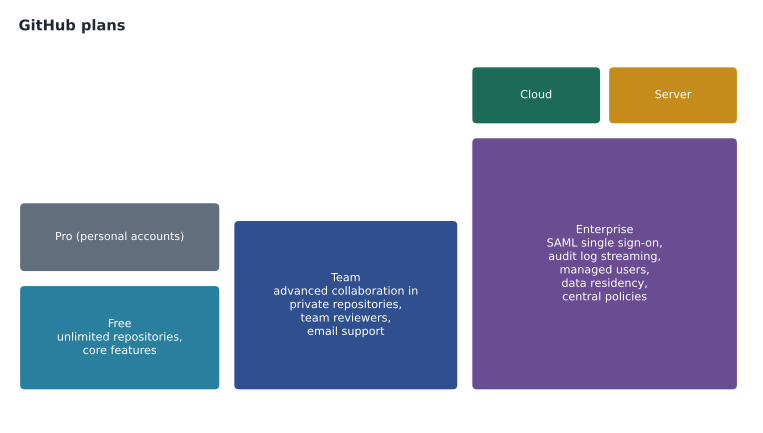
A plan always belongs to an account. Personal accounts can be on GitHub Free or GitHub Pro. Organizations can be on GitHub Free for organizations, GitHub Team or GitHub Enterprise. An enterprise account, which groups organizations, comes with GitHub Enterprise. The plan decides which collaboration and administration features are available in the account's private repositories, how much included usage comes with it, such as minutes of GitHub Actions and storage for GitHub Packages, and what kind of support is offered. Public repositories get most features on every plan, which is one of the ways GitHub supports open source.
| Plan | For | Price per user per month at time of writing | Highlights |
|---|---|---|---|
| GitHub Free | Personal accounts | Free | Unlimited public and private repositories; core features; community support |
| GitHub Pro | Personal accounts | Paid (individual) | Protected branches, required reviewers, code owners, wikis and Pages for private repositories; more Actions minutes |
| GitHub Free for organizations | Organizations | Free | Unlimited repositories and members; core collaboration |
| GitHub Team | Organizations | 4 dollars (US) | Advanced collaboration in private repositories, team reviewers, more included usage, email support |
| GitHub Enterprise | Enterprises | 21 dollars (US) | Enterprise account, SAML single sign-on, audit log streaming, Enterprise Managed Users, data residency, enterprise support |
What the paid organization plans add
For an organization, the step from Free to Team is mostly about private repositories. Features such as protected branches, required reviewers, code owners, draft pull requests, multiple reviewers, and wikis and Pages for private repositories are available in public repositories on the free plan but need Team or higher in private ones. Team also raises included usage, adds team reviewers and scheduled reminders, and moves support from community forums to email. That is why Tidewater chose Team in MSBA-160: Grace's required review on the private trail-notes repository needed it.
The step from Team to Enterprise is mostly about identity, control and compliance across a larger organization: an enterprise account with several organizations under central policies, SAML single sign-on through the company's identity provider, automatic user provisioning, audit log streaming to a security system, Enterprise Managed Users, data residency in a chosen region, higher included usage, enterprise-level support, and access to features such as custom repository roles, custom organization roles and some organization-wide rulesets.
Ways to run GitHub Enterprise
GitHub Enterprise comes in more than one form, and the exam expects you to tell them apart.
| Option | Where it runs | Who manages it | Typical reason |
|---|---|---|---|
| GitHub Enterprise Cloud | GitHub's cloud at github.com | GitHub runs it; the customer configures it | Most companies: no servers to run, newest features first |
| Enterprise Cloud with Enterprise Managed Users | github.com | Accounts created and controlled by the company's identity provider | Strict control of who has an account |
| Enterprise Cloud with data residency | A dedicated subdomain of GHE.com in a chosen region | GitHub runs it in that region | Legal or contractual requirements about where data is stored |
| GitHub Enterprise Server | The customer's own data centre or private cloud | The customer installs, upgrades and backs it up | Networks that must be isolated from the internet |
Enterprise Managed Users and Copilot policies
Two administration ideas from the GH-900 outline are worth a closer look. With Enterprise Managed Users (EMU), the company's identity provider creates, updates and removes the user accounts; employees do not use their personal GitHub accounts at all, their managed accounts cannot create public content or contribute to repositories outside the enterprise, and leaving the company removes the account automatically. EMU suits companies that need strong control over identity, at the cost of some convenience for developers who also work in open source.
Copilot policies let organization and enterprise owners decide whether members may use GitHub Copilot, which features and models are allowed, whether Copilot may suggest code matching public code, and which content it should not read. Policies set by an enterprise apply to every organization in it. This matters for companies that need to control how an AI tool handles their code; MSBA-303 covers the details.
Products beyond the plan
Several GitHub products are bought or measured separately from the plan, and a realistic budget includes them.
| Product | What it is | How it is charged |
|---|---|---|
| GitHub Actions | Automated workflows on GitHub-hosted or self-hosted runners | Included minutes per plan, then by the minute; free for public repositories on standard runners |
| GitHub Packages | A registry for software packages and container images | Included storage and transfer per plan, then by usage |
| GitHub Codespaces | Cloud development environments | Included core hours and storage for personal accounts; organizations pay for members' use |
| GitHub Copilot | AI coding assistant | Free, Pro, Pro+ and other individual plans; Business and Enterprise per seat |
| GitHub Secret Protection | Secret scanning and push protection for private repositories | Per active committer |
| GitHub Code Security | Code scanning, Autofix and dependency review for private repositories | Per active committer |
| Large file storage (Git LFS) | Storage for large binary files outside normal Git | Included quota, then by usage |
Usage-based products have spending limits or budgets: an organization can set a monthly maximum for Actions, Packages, Codespaces and similar products, and GitHub stops or warns when it is reached. Rosa set every usage budget to a small amount above Tidewater's average, with an email alert at three-quarters of each, so a runaway workflow could not produce a surprise bill.
Copilot plans at a glance
GitHub Copilot has its own set of plans. For individuals there is Copilot Free, with a limited monthly allowance, Copilot Pro and Copilot Pro+, with larger allowances and more choice of models, and other options that GitHub adds from time to time; students, teachers and maintainers of popular open-source projects may qualify for free access. For organizations there is Copilot Business, priced per seat with central policy management, and Copilot Enterprise, for companies on GitHub Enterprise Cloud. At the time of writing, Business was listed at 19 dollars (US) and Enterprise at 39 dollars (US) per seat per month. Allowances are measured in units that GitHub has changed more than once, so they are best checked on the plans page when needed.
Worked problem
Pricing Tidewater's options
Tidewater has 10 people in its GitHub organization. Using the listed prices (Team 4 dollars, Enterprise 21 dollars per user per month, Copilot Business 19 dollars per seat), what does a year of Team cost, what would a year of Enterprise cost, and what would Copilot Business add for the 3 web developers?
Show solution
- Team: 10 users x 4 dollars = 40 dollars a month; x 12 = 480 dollars a year.
- Enterprise: 10 x 21 = 210 dollars a month; x 12 = 2,520 dollars a year.
- The difference is 2,520 - 480 = 2,040 dollars a year.
- Copilot Business for 3 seats: 3 x 19 = 57 dollars a month, or 684 dollars a year.
Answer: Team costs 480 dollars a year and Enterprise 2,520; Copilot Business for 3 developers would add 684 dollars a year.
Rosa reminded everyone that GitHub bills in US dollars, so Tidewater's Canadian-dollar cost moves with the exchange rate, and that GST or HST may apply to the purchase. She budgets in US dollars and adds a margin for conversion when the budget is approved in Canadian dollars.
What open source, students and teachers get
GitHub's pricing is shaped by its role in open source. Public repositories receive almost every collaboration feature on the free plans, GitHub Actions minutes on standard GitHub-hosted runners are free for public repositories, and the main security features from lessons 7 to 9 are free for them too. Maintainers of popular open-source projects may be offered GitHub Copilot at no charge. GitHub Education offers verified students and teachers benefits such as GitHub Pro, Copilot access and a pack of partner tools, and GitHub Classroom helps teachers distribute and collect assignments as repositories. GitHub Sponsors, covered in lesson 12, lets people and companies fund the developers whose work they depend on.
For a small company, the practical consequence is that the cheapest way to get advanced features is often to work in public where the work can be public. Tidewater's open trail-report format and the public style guide have branch protection, Actions and secret scanning at no cost, while only the private manuscripts and the admin repository depend on the Team plan.
Support and service status
Plans also differ in support. Free accounts rely on the GitHub Community discussion forums and documentation; GitHub Pro and Team include email support from GitHub staff; Enterprise includes Enterprise Support, with faster response targets, and a Premium Support option with named contacts and service-level agreements can be added. Whatever the plan, the GitHub Status page shows whether a GitHub service, such as Actions, Pages or Codespaces, is having problems right now, which is the first thing to check when something that worked yesterday suddenly fails for everyone. Rosa added the status page to the team's bookmarks and to the troubleshooting section of the contributing guide, after a morning in February when the team spent an hour debugging a workflow that was failing because GitHub Actions itself was degraded.
| Plan | Support offered |
|---|---|
| Free and Free for organizations | Community forums and documentation |
| Pro and Team | Email support from GitHub |
| Enterprise | Enterprise Support, with optional Premium Support |
Choosing a plan
The plan question is less about price than about needs. A useful way to decide is to work from the requirements to the lowest plan that meets them, then add products only where there is a clear reason.
Worked problem
Which plan fits?
Recommend a plan for each: (a) a volunteer group with three public repositories and no private work; (b) Tidewater, with private manuscripts that need required reviews; (c) a provincial agency with 400 developers, single sign-on through its identity provider, and a rule that data must stay in its region.
Show solution
- (a) Public repositories get protected branches, reviews and the main security features on the free plan, so GitHub Free for organizations is enough.
- (b) Required reviews in private repositories need GitHub Team; nothing on Tidewater's list needs single sign-on or managed accounts.
- (c) Single sign-on and a large user base point to Enterprise; the residency rule points to Enterprise Cloud with data residency, or Enterprise Server if the network must be isolated.
- In each case, usage products such as Actions and Codespaces are added according to need, with budgets.
Answer: (a) Free for organizations; (b) Team; (c) Enterprise Cloud with data residency, or Enterprise Server.
Tidewater's answer did not change: the Team plan, usage budgets on Actions and Codespaces, no paid security products yet (lesson 7), and a decision on Copilot Business for the web team after a month's trial. Rosa wrote it up as a one-page decision record in the admin repository, with the date and the prices used, so next year's review would start from facts rather than memory.
Reading GitHub's own pages
Because plans and prices change, the most useful skill is knowing where to look. The pricing page at github.com/pricing shows current plan prices and a feature comparison. The plans article in GitHub Docs lists what each plan includes. The billing section of GitHub Docs explains how each product is measured and charged. An organization's own billing and plans settings show what it is actually paying, its usage this month, and its budgets. Owen's exam tip, which Priya endorsed, was to learn the shape of the plans, Free to Team to Enterprise, private-repository collaboration at Team, identity and compliance at Enterprise, and not to memorize numbers that may have changed by exam day.
Common mistakes
MistakeChoosing Enterprise because it is the most complete plan.
InsteadStart from requirements; Team is enough for most small organizations.
MistakeThinking protected branches need a paid plan in every repository.
InsteadPublic repositories have them on the free plan; private ones need Pro or Team and above.
MistakeConfusing Enterprise Server with Enterprise Cloud.
InsteadServer is installed and run by the customer; Cloud is run by GitHub.
MistakeBudgeting only for seats.
InsteadInclude Actions, Packages, Codespaces, Copilot and security products, with usage budgets.
Summary and key terms
- Personal accounts use Free or Pro; organizations use Free, Team or Enterprise.
- Team adds advanced collaboration in private repositories; Enterprise adds single sign-on, audit streaming, managed users, data residency and central control.
- Enterprise runs as Enterprise Cloud, optionally with managed users or data residency, or as self-hosted Enterprise Server.
- Actions, Packages, Codespaces, Copilot and the security products are charged separately, often by usage.
- Spending limits and budgets keep usage costs predictable.
- Check github.com/pricing and GitHub Docs for current prices; learn the structure rather than the numbers.
- GitHub Team
- The paid organization plan with advanced collaboration in private repositories.
- GitHub Enterprise
- The plan for enterprises, with central control, single sign-on and compliance features.
- GitHub Enterprise Server
- A self-hosted version of GitHub run by the customer.
- Enterprise Managed Users
- Accounts created and controlled by a company's identity provider.
- Data residency
- Storing an enterprise's data in a chosen geographic region.
- Spending limit
- A monthly maximum for a usage-based product.
- Copilot Business
- The per-seat Copilot plan for organizations, with central policy management.
Practice problems
Work each problem on paper first, then reveal the answer to check.
Which plan is the lowest that offers required reviewers in an organization's private repositories?
Show answer
GitHub Team.
Which form of GitHub Enterprise does the customer install and upgrade?
Show answer
GitHub Enterprise Server.
Where can you find current GitHub plan prices?
Show answer
github.com/pricing.
Lesson quiz · 5 questions
Score 60% or more to complete this lesson.
Create a free account to save your progress, take quizzes and earn a certificate.