
MSBA-161 · Lesson 3 of 12 · 21 min
Branch protection and rulesets
▶ Video coming soon A video version of this lesson is on the way.
In MSBA-160 Priya turned on a single branch protection rule for main in trail-notes: changes had to arrive through a pull request with one approval, and editors were code owners for the chapter folders. It had worked all winter. At the March 8 session she showed what had gone wrong in the meantime. The new open-trail-report repository had no protection at all, and Malik had pushed a broken data file straight to main. The style guide had a protection rule that nobody remembered creating. And release tags in trailcheck had been deleted once by mistake. "Protection is one of those things you set up once and forget," Priya said. "The problem is the forgetting." This lesson covers the two tools GitHub provides, branch protection rules and rulesets, and how to choose between them.
Why protect branches at all
A branch is just a pointer, and anyone with write access can move it. Without protection, a single push can put untested or unreviewed changes on main, delete a branch, or rewrite its history with a force push, and on a busy team it can take a while to notice. Protection turns team agreements, such as "every change is reviewed" and "the build must pass", into rules GitHub enforces. It also makes those agreements visible to newcomers, who can see on the pull request page exactly which conditions are still unmet before the merge button becomes available.
Branch protection rules
A branch protection rule applies to the branches whose names match a pattern, such as main or release/*. An administrator creates it in the repository settings. Only one branch protection rule applies to any branch, and the most specific matching pattern wins. The settings fall into a few groups.
| Setting | What it enforces |
|---|---|
| Require a pull request before merging | No direct pushes; changes must arrive through a pull request |
| Required approvals | A number of approving reviews, for example 1 or 2 |
| Dismiss stale approvals | New commits remove earlier approvals so reviewers see the final version |
| Require review from code owners | An owner listed in CODEOWNERS must approve changes to their files |
| Require status checks to pass | Named checks, such as a build or link checker, must succeed |
| Require branches to be up to date | The branch must include the latest main before merging |
| Require conversation resolution | All review comments must be marked resolved |
| Require signed commits | Commits must carry a verified signature |
| Require linear history | No merge commits; squash or rebase only |
| Require a merge queue | Pull requests merge one at a time through a queue that tests each |
| Lock branch | The branch becomes read-only |
| Restrict who can push | Only listed people, teams or apps may push |
| Allow force pushes / allow deletions | Off by default on protected branches |
| Do not allow bypassing | Applies the rules to administrators too |
Two settings deserve a closer look. Dismiss stale approvals stops a common loophole: without it, someone can get an approval and then push more commits that nobody has reviewed. Do not allow bypassing the above settings (in older wording, include administrators) decides whether repository administrators must follow the rules. By default they can merge without meeting them, which is convenient in an emergency and risky the rest of the time.
Worked problem
Reading the merge box
In trail-notes, main requires a pull request, 1 approval from a code owner, the link-check status check, and resolved conversations. Owen's pull request has an approval from Priya, who is not a code owner for chapter 7, the link check has passed, and one comment from Grace is unresolved. Can it merge, and what is missing?
Show solution
- A pull request is in use, so the first condition is met.
- There is one approval, but not from a code owner of the changed files, so the code-owner review is still missing.
- The status check has passed.
- One conversation is unresolved, so conversation resolution is not met.
Answer: It cannot merge yet: it needs an approval from a chapter 7 code owner and Grace's comment must be resolved.
Rulesets
Rulesets are the newer way to protect branches and tags. A ruleset is a named collection of rules with a target, an enforcement status and a bypass list. Rulesets cover the same ground as branch protection rules and add several things that branch protection cannot do.
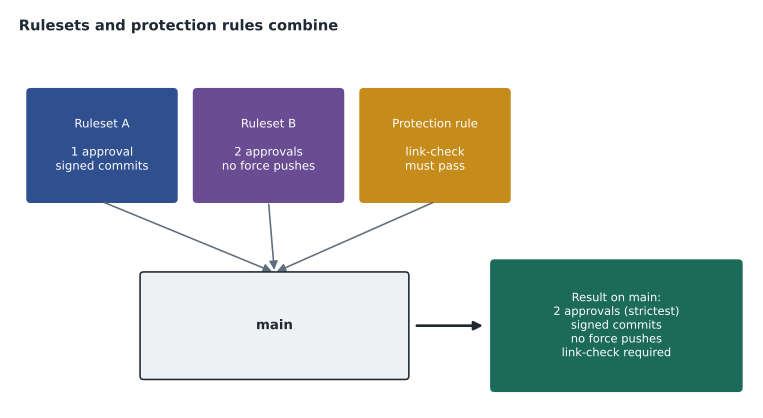
First, several rulesets can apply to the same branch at once, and they layer: GitHub combines every rule from every matching ruleset and any branch protection rule, and where the same rule is set differently, the most restrictive version applies. Second, a ruleset has an enforcement status: Active, Disabled, and on GitHub Enterprise, Evaluate, which reports what would have been blocked without blocking it, so a team can test a rule before turning it on. Third, a ruleset has a bypass list naming the roles, teams or apps that may skip it, instead of the all-or-nothing administrator switch. Fourth, anyone with read access can see which rulesets apply, so a contributor does not have to guess why a push was refused. And fifth, rulesets can target tags as well as branches, and can include metadata rules, such as a pattern every commit message must match.
| Branch protection rule | Ruleset | |
|---|---|---|
| How many apply to a branch | One | Many, combined |
| Can be paused without deleting | No | Yes, by changing enforcement |
| Test before enforcing | No | Evaluate mode on GitHub Enterprise |
| Who may skip it | Administrators unless blocked | A named bypass list of roles, teams or apps |
| Who can see it | Administrators | Anyone with read access |
| Protects tags | No | Yes |
| Organization-wide | No | Yes, on the plans that offer organization rulesets |
Rulesets and branch protection rules can be used together, which makes moving from one to the other gradual. GitHub recommends rulesets for new protections. Rulesets are available for public repositories on every plan and for private repositories on GitHub Pro, Team and Enterprise Cloud. Push rulesets, which can block pushes containing particular file paths, extensions or files above a size limit, are available for private and internal repositories on the paid organization plans. Organization rulesets target many repositories at once by name pattern or property, which is how an owner can make sure every repository has a protected main without visiting each one; check GitHub's plans page for which plans include them, because availability has changed as the feature has grown.
The rules available in a ruleset
The rules in a ruleset mirror the branch protection settings with a few additions. They include restricting creations, updates and deletions of matching branches; requiring linear history; requiring a pull request, with options for approvals, code-owner review, dismissing stale reviews and resolving conversations; requiring status checks; blocking force pushes; requiring signed commits; requiring deployments to succeed in named environments before merging; requiring code scanning results; and metadata restrictions on commit messages, author emails and branch names.
Rulesets can be exported and imported as JSON files, which lets a team keep a copy of its protection policy in a repository and apply the same policy elsewhere. A simplified export of the ruleset Priya wrote for the open trail-report repository looks like this.
{
  "name": "protect-main",
  "target": "branch",
  "enforcement": "active",
  "conditions": {
    "ref_name": { "include": ["~DEFAULT_BRANCH"], "exclude": [] }
  },
  "bypass_actors": [
    { "actor_type": "Team", "bypass_mode": "pull_request" }
  ],
  "rules": [
    { "type": "deletion" },
    { "type": "non_fast_forward" },
    { "type": "pull_request",
      "parameters": { "required_approving_review_count": 1,
                      "dismiss_stale_reviews_on_push": true,
                      "require_code_owner_review": true,
                      "required_review_thread_resolution": true } },
    { "type": "required_status_checks",
      "parameters": { "required_status_checks": [ { "context": "validate-data" } ] } }
  ]
}
Reading it from top to bottom: the ruleset is called protect-main, protects branches, and is active. It targets the default branch. One team, the maintainers, may bypass it, but only through a pull request, so even a bypass leaves a record. The rules block deletion and force pushes, require a pull request with one approval that is dismissed by new commits and must come from a code owner, require review threads to be resolved, and require a status check called validate-data to pass. In the web interface the same settings are a page of check boxes; the JSON simply makes them easy to copy and compare.
Signed commits and the Verified badge
One rule in both tools, require signed commits, needs a little background. Git records an author name and email on every commit, but anyone can type any name and email into their Git configuration, so the author field alone proves nothing. A signed commit carries a cryptographic signature made with a key that belongs to the author, using GPG, SSH or S/MIME. When the matching public key is registered on the author's GitHub account, GitHub shows a Verified badge beside the commit. Commits made in the GitHub web interface are signed by GitHub automatically. With the rule turned on, unsigned commits cannot reach the protected branch.
For Tidewater, signed commits were a judgment call. They add a setup step for every contributor, and the editors already worked through pull requests that showed who had pushed what. Priya decided to require them only in open-trail-report, where outside contributors' work is merged and where a forged commit would be hardest to spot, and to encourage them elsewhere. Owen set up an SSH signing key in ten minutes by following GitHub's documentation, and checked that his next commit showed the badge.
Status checks: where they come from
A status check is a result that an automated system reports on a commit, shown as a green tick, a red cross or a yellow dot on the pull request. Most checks come from GitHub Actions workflows, which MSBA-160 introduced; others come from installed apps, such as a deployment preview service. A protection rule names the checks that must pass, by name. If a check is renamed in the workflow but not in the rule, pull requests wait forever for a check that never reports, which is one of the most common protection problems and the first thing to look at when a merge button stays grey for no visible reason.
Protecting tags and releases
Branches are not the only things worth protecting. A tag marks a release, and if a tag is moved or deleted, a reader of the release history can be misled about what was published. MSBA-160 used tags such as v2.0.0 for TrailCheck releases. A tag ruleset targeting v* with deletion and update restricted, and only the release managers on the bypass list, means a published tag can never be changed by accident. Priya added one to trailcheck the same afternoon, after confirming that the deleted tag from January could be recreated from the release notes.
Worked problem
Combining rulesets
An organization ruleset requires 1 approval and blocks force pushes on every default branch. The trailcheck repository has its own ruleset requiring 2 approvals and the build check, and an old branch protection rule on main requiring signed commits. What does a pull request into trailcheck main need?
Show solution
- All three apply, because they all match main and they layer.
- Approvals: the organization asks for 1, the repository for 2; the stricter, 2, applies.
- Force pushes are blocked by the organization ruleset.
- The build check comes from the repository ruleset, and signed commits from the branch protection rule.
Answer: Two approvals, a passing build check, signed commits, and no force pushes.
Choosing protection for a small organization
With six regular contributors, Tidewater does not need elaborate rules. The team agreed on four patterns. Every repository has its default branch protected with a pull request, one approval and no force pushes or deletions. Repositories with automated checks, such as trailcheck and open-trail-report, also require those checks. Content repositories require code-owner review, so an editor approves every text change. Release tags are protected against deletion and updates. The old unnamed branch protection rule in style-guide was replaced by a ruleset with a clear name, and a short note in each repository's CONTRIBUTING file explains what the rules are and why.
| Repository | Protection | Bypass |
|---|---|---|
| trail-notes | PR, 1 approval from code owner, link check, resolved conversations | None |
| trailcheck | PR, 1 approval, build check, no force push; tag ruleset on v* | Release managers for tags only |
| open-trail-report | PR, 1 approval from code owner, validate-data check | Maintainers, through pull requests |
| style-guide | PR, 1 approval | None |
Malik asked what happens in a real emergency, for example a safety notice that must go on TrailCheck within minutes. Priya's answer was that the protections are not the obstacle they look like: a one-line pull request can be opened, approved and merged in a couple of minutes by two people, and if only one person is available, the bypass list for trailcheck includes Priya and Rosa, whose bypasses are recorded. What the rules prevent is the quiet change nobody looked at, which is exactly the kind that causes trouble later.
Common mistakes
MistakeCreating several branch protection rules and expecting them all to apply to main.
InsteadOnly one branch protection rule applies to a branch; use rulesets when you need layers.
MistakeRequiring approvals but leaving stale approvals in place.
InsteadDismiss stale approvals so reviewers approve the final version.
MistakeAssuming administrators are bound by branch protection by default.
InsteadBlock bypassing explicitly, or name a bypass list in a ruleset.
MistakeProtecting branches but leaving release tags unprotected.
InsteadAdd a tag ruleset that restricts updates and deletions of release tags.
Summary and key terms
- Branch protection turns team agreements into rules GitHub enforces before a merge.
- A branch protection rule matches a name pattern; only one applies to a branch.
- Common rules require pull requests, approvals, code-owner review, status checks, resolved conversations, signed commits and linear history.
- Rulesets layer, can be paused, have bypass lists, are visible to anyone with read access, and can protect tags.
- Where rules overlap, the most restrictive setting applies.
- Organization rulesets and push rulesets extend protection across many repositories and file types on paid plans.
- Branch protection rule
- A set of conditions that a branch matching a pattern must meet.
- Ruleset
- A named, layered set of rules for branches or tags with an enforcement status and bypass list.
- Status check
- An automated test whose result is reported on a pull request.
- Stale approval
- An approval given before newer commits were pushed.
- Bypass list
- The roles, teams or apps allowed to skip a ruleset.
- Evaluate mode
- A ruleset status that reports what would be blocked without blocking it, on GitHub Enterprise.
- Merge queue
- A queue that merges pull requests one at a time after testing each.
Practice problems
Work each problem on paper first, then reveal the answer to check.
Which ruleset enforcement status lets a team test a rule without blocking anyone?
Show answer
Evaluate, on GitHub Enterprise.
Two rulesets ask for 1 and 3 approvals. How many are required?
Show answer
3, the more restrictive.
Which setting stops a reviewer's approval from counting after new commits are pushed?
Show answer
Dismiss stale approvals.
Lesson quiz · 5 questions
Score 60% or more to complete this lesson.
Create a free account to save your progress, take quizzes and earn a certificate.