
MSBA-161 · Lesson 11 of 12 · 22 min
Inner source practices
▶ Video coming soon A video version of this lesson is on the way.
At the April 5 session Grace described a small problem that turned out to be a big idea. The editors had asked the web team for months to change how trail difficulty appeared on TrailCheck. The web team agreed it was a good change but never had time. Finally Owen, who had learned enough over the winter, opened a pull request against trailcheck himself, Priya reviewed it, and it was live in two days. "Why did that take four months to ask for and two days to do?" Grace asked. Priya's answer was that Tidewater had just practised inner source without meaning to. This lesson covers what inner source is, how GitHub supports it, and the community features that make work easy to find and follow.
What inner source is
Inner source means applying the practices of open-source development inside an organization. Code and documents are open to everyone in the company rather than locked inside the team that owns them; anyone can read them, report problems and propose changes; the owning team reviews and accepts contributions; and the conversation happens in the open, in issues and pull requests, where others can learn from it. The term was coined in 2000, and many large companies now use it to reduce duplicated work, spread knowledge and get past bottlenecks like the one Grace described.
Inner source is not the same as making everything public. The repositories stay private to the organization; what changes is who inside the organization can see and contribute. It is also not a free-for-all: the owning team still decides what is merged, and the same protections, reviews and checks apply. The difference is that a person outside the team can contribute instead of waiting.
| Closed team ownership | Inner source | Open source | |
|---|---|---|---|
| Who can read | The owning team | Everyone in the organization | Everyone |
| Who can propose changes | The owning team | Anyone in the organization | Anyone |
| Who decides | The owning team | The owning team, through review | The maintainers |
| Where it lives on GitHub | Private repository, team access | Internal or widely readable private repository | Public repository |
The principles
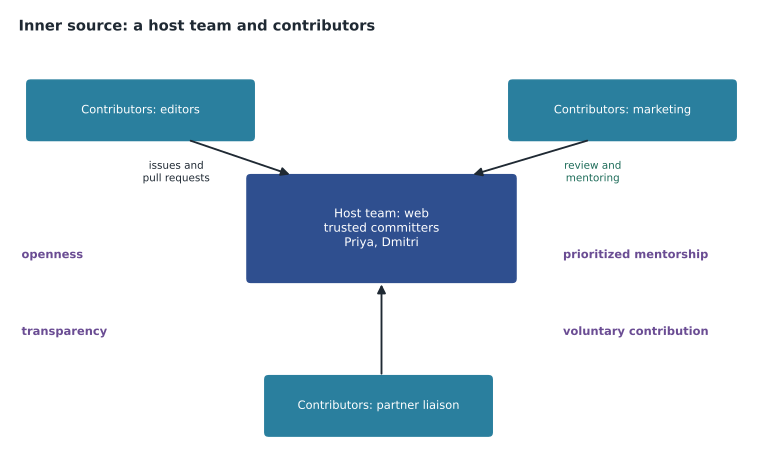
The InnerSource Commons, a community of practitioners, describes four principles that make inner source work. Openness: projects are easy to find and easy to join, with clear documentation of how to contribute. Transparency: decisions, discussions and reviews are visible, so people understand why things are the way they are. Prioritized mentorship: the owning team treats helping contributors as real work, not an interruption. And voluntary code contribution: people contribute because they want or need to, and the owning team remains free to decline what does not fit.
Roles in an inner source project
Inner source borrows its roles from open source. The host team owns the repository and is responsible for it. Within the host team, trusted committers are the people who review and merge contributions and mentor the contributors; in GitHub terms they are usually code owners with Write or Maintain access. Contributors are people from other teams who report issues and open pull requests. A product owner for the host team decides what the project should and should not do, which tells contributors in advance which proposals are likely to be accepted.
| Role | Inner source meaning | GitHub setting | trailcheck |
|---|---|---|---|
| Host team | Owns the repository | Team with Write or Maintain | web |
| Trusted committer | Reviews, merges and mentors | Code owner in CODEOWNERS | Priya and Dmitri |
| Contributor | Proposes changes from another team | Read access, pull requests from branches or forks | Owen, Grace, marketing |
| Product owner | Decides the project's direction | Documented in README or GOVERNANCE.md | Priya |
How GitHub supports inner source
Most of what inner source needs is already in GitHub. Visibility comes first. In an enterprise, an internal repository is visible to every member of every organization in the enterprise but not to the public, which is designed for exactly this purpose. In a single organization like Tidewater, a base permission of Read, from lesson 1, gives the same effect for private repositories. Contributors who cannot push to a repository can fork it, if forking is allowed for internal or private repositories, or the host team can grant them a role that lets them push branches but not merge, with protection rules making sure everything goes through review.
Process comes next. CONTRIBUTING.md files, issue and pull request templates, and CODEOWNERS files from lessons 4 and 5 tell contributors what to do and route their work to the trusted committers automatically. Branch protection and rulesets from lesson 3 mean the host team does not have to fear contributions, because nothing reaches main without review and checks. Discussions give contributors a place to ask before they build. Repository templates let a team share a well-set-up starting point, so new projects begin with the right health files and workflows already in place.
Making repositories discoverable
Inner source fails if people cannot find what exists. A repository is discoverable when it has a clear name, a one-line description, topics (searchable tags such as maps, style-guide or data-validation), a README that explains what it is and how to contribute, and, in larger organizations, custom properties, labels that owners define for repositories, such as team, product or data sensitivity, which can be used to search and to target rulesets. GitHub search can then find repositories by topic, language or property across the organization.
Worked problem
Finding existing work before starting new work
The marketing coordinator wants to build a page listing every trail with water access for a summer campaign. Before starting, she searches the organization for repositories with the topic trail-data. What should she find, and what should she do next?
Show solution
- The search shows trailcheck and open-trail-report, both tagged trail-data.
- The open-trail-report README explains that every trail record already has a water-access field.
- TrailCheck already renders trail lists from that data, so a filtered list is a small change rather than a new project.
- She opens an issue in trailcheck describing the campaign page, and a trusted committer replies with where the list template lives.
- She, or someone she asks, opens a pull request adding a water-access filter, which the web team reviews.
Answer: She finds the existing data and site, opens an issue, and contributes a small change instead of building a separate page.
Stars, watching and following
GitHub has several ways to keep track of people and projects, and the GH-900 outline includes them under the community domain. Starring a repository bookmarks it in your list of stars and signals appreciation; star counts are a rough measure of interest, and you can organize your stars into lists. Watching a repository decides which notifications you receive about it: all activity, only participating and mentions, or custom choices such as releases, issues or security alerts. Following a person or an organization adds their public activity, such as new repositories and releases, to your dashboard feed. GitHub's Explore pages and topics pages highlight trending repositories and collections to help people discover projects.
| Action | What it does | Use it when |
|---|---|---|
| Star | Bookmarks a repository and shows appreciation | You want to find it again or support it |
| Watch | Chooses which notifications you get from a repository | You need to know what happens in it |
| Follow | Adds a person's or organization's activity to your feed | You want to keep up with their work |
| Topics and Explore | Group and highlight repositories by subject | You are looking for projects in an area |
Getting a repository ready for contributors
Priya turned the session's ideas into a readiness checklist that a host team completes before inviting contributions from other teams. A repository that fails several items is not ready, however willing the team is, because contributors who hit an undocumented setup or wait weeks for a review rarely try a second time.
| Item | Why it matters | trailcheck status |
|---|---|---|
| README says what the project is and who owns it | Contributors know they are in the right place | Done |
| CONTRIBUTING.md explains setup, branches and review | A first pull request can succeed without help | Done, from the organization default plus a setup section |
| CODEOWNERS routes reviews to trusted committers | Nobody has to guess who reviews | Done |
| Issues labelled good first issue | Newcomers have an easy starting point | Four open |
| Protection on main with checks | The host team can accept contributions safely | Done, lesson 3 |
| A stated time to first review | Contributors know when to expect an answer | Three working days |
| A codespace or dev container | Setup takes minutes rather than an afternoon | Done, from MSBA-160 |
| Topics and description | The repository can be found | Added at this session |
Worked problem
Scoring readiness
The style-guide repository meets 5 of the 8 checklist items: it lacks CODEOWNERS, good first issues and a stated review time. If each missing item takes about 20 minutes to add, how long will it take to make the repository fully ready, and what score will it have?
Show solution
- Missing items: 8 - 5 = 3.
- Time: 3 x 20 = 60 minutes, about an hour.
- After adding them, it meets all 8 items.
- Grace can add the review time and good first issues herself; CODEOWNERS needs a pull request reviewed by Priya.
Answer: About an hour of work takes it from 5 of 8 to 8 of 8.
When the contributor is outside the company
The partner publisher that borrows the style guide sits at the edge of inner source. Its editor is not part of Tidewater, so she is an outside collaborator on style-guide only, as lesson 2 described, and the guide itself was made public in lesson 2's example so that other publishers could adapt it through forks. In practice the same habits served both groups: the partner editor used the same contributing guide, the same issue forms and the same review process as Tidewater's own staff. That is a common pattern. Projects that start as inner source and work well often become open source later, because the documentation, review habits and protections are already in place. Lesson 12 follows exactly that path for the trail-report format.
Measuring whether it works
Inner source is a change in habits, so it helps to measure it. Useful signs include the number of pull requests from people outside the host team, how long contributions wait for a first review, how many contributions are accepted, and how many duplicate projects are avoided. A repository's Insights tab shows contributors, commit activity and pull request trends, and for public repositories, traffic. Rosa made a simple monthly count for trailcheck and style-guide.
Worked problem
Counting outside contributions
In April, trailcheck received 20 merged pull requests: 14 from the web team and 6 from other staff. In January, it received 16, of which 1 came from outside the web team. How did the share of outside contributions change?
Show solution
- January: 1 of 16 came from outside, a little over 6 in 100.
- April: 6 of 20 came from outside, which is 30 in 100.
- The share rose from about 6 in 100 to 30 in 100, roughly five times as large.
- The total also rose, from 16 to 20, so outside contributions added work rather than replacing the web team's.
Answer: Outside contributions rose from about 6 in 100 to 30 in 100 of merged pull requests.
Common obstacles
Inner source has predictable obstacles. Host teams worry about the extra review work and about being responsible for code they did not write, which prioritized mentorship and clear contribution rules address. Contributors hesitate if their first pull request is ignored, which is why a service promise, such as a first review within three working days, matters more than any tool. Managers may not count contributions to other teams' projects as real work, which needs to be settled openly. And discoverability decays as repositories multiply, so descriptions, topics and READMEs need the same occasional review as access.
Grace's difficulty display, live since February, became the team's standard example. When new staff asked how to get a change into the website, the answer was no longer "ask the web team and wait" but "open an issue, and if you can, open a pull request; Priya and Dmitri will help you get it right."
Common mistakes
MistakeTreating inner source as making all repositories public.
InsteadInner source opens repositories inside the organization; public is a separate decision.
MistakeOpening repositories to contributions without a contributing guide or code owners.
InsteadWrite CONTRIBUTING.md, use templates and CODEOWNERS so contributions are routed and reviewed.
MistakeLeaving contributors' first pull requests waiting for weeks.
InsteadTreat mentoring and timely review as real work, with a stated response time.
MistakeStarting a new project without searching for existing ones.
InsteadSearch by topic, description and README first, and contribute to what exists.
Summary and key terms
- Inner source applies open-source practices inside an organization: open to read, open to contribute, reviewed by the owning team.
- Its principles are openness, transparency, prioritized mentorship and voluntary code contribution.
- Host teams, trusted committers, contributors and product owners map onto GitHub teams, code owners and access.
- Internal repositories, low base permissions, forks, templates, health files and protection rules support inner source on GitHub.
- Descriptions, topics, READMEs and custom properties make repositories discoverable.
- Starring bookmarks, watching controls notifications, and following adds activity to your feed.
- Inner source
- The use of open-source development practices within an organization.
- Host team
- The team that owns an inner source repository.
- Trusted committer
- A host team member who reviews contributions and mentors contributors.
- Internal repository
- An enterprise repository visible to all enterprise members but not the public.
- Topic
- A searchable tag that classifies a repository.
- Custom property
- An owner-defined label on repositories used for search and policy.
- Watching
- Choosing which notifications you receive about a repository.
Practice problems
Work each problem on paper first, then reveal the answer to check.
Name the four inner source principles.
Show answer
Openness, transparency, prioritized mentorship and voluntary code contribution.
Which repository visibility is designed for inner source in an enterprise?
Show answer
Internal.
What is the difference between starring and watching a repository?
Show answer
Starring bookmarks it; watching controls the notifications you receive.
Lesson quiz · 5 questions
Score 60% or more to complete this lesson.
Create a free account to save your progress, take quizzes and earn a certificate.