
MSBA-161 · Lesson 8 of 12 · 22 min
Dependabot alerts basics
▶ Video coming soon A video version of this lesson is on the way.
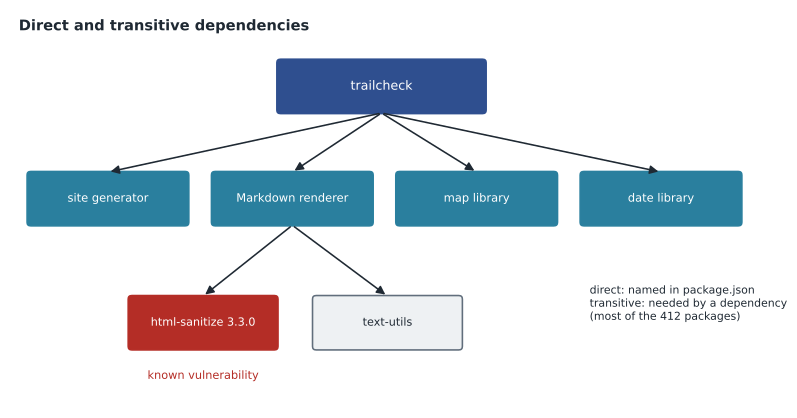
TrailCheck is a small website, but when Priya counted at the March 25 session, it depended on 412 outside packages. Eleven of them were listed directly in its package.json file: a static site generator, a Markdown renderer, a map library, a date library and a few build tools. The other 401 came along because those eleven depended on packages of their own. "Nobody on this team chose most of what runs when we build the site," she said. "Dependabot is how we find out when one of them has a known problem." The session followed TrailCheck's first real Dependabot alert from start to finish.
Direct and transitive dependencies
A dependency is a package a project uses. A direct dependency is one the project names itself, in a manifest file such as package.json for JavaScript, requirements.txt or pyproject.toml for Python, or Gemfile for Ruby. A transitive dependency is one that a dependency needs, and so on down the chain. A lock file, such as package-lock.json, records the exact version of every package, direct and transitive, that was installed, so the same versions are used on every computer and every build. Most known vulnerabilities in a typical project are in transitive dependencies, which is why a tool that reads the lock file matters.
The dependency graph
The dependency graph is GitHub's map of a repository's dependencies. GitHub builds it automatically from supported manifest and lock files on the default branch, and it appears under the repository's Insights tab. For each package it shows the version and the manifest it came from, and for public repositories it also shows dependents, the other public repositories that use this one. The graph can also be filled in by build tools through the dependency submission API, for ecosystems where the full list only exists at build time. The dependency graph is on by default for public repositories and can be turned on for private ones on every plan; it is the foundation for every other Dependabot feature.
From the dependency graph a team can also export a software bill of materials (SBOM), a standard list of every component in the project, which some customers and regulators ask for. Rosa exported one for TrailCheck after the session, because the provincial parks agency that licenses its trail data had started asking suppliers for them.
How Dependabot alerts work
Dependabot alerts connect the dependency graph to the GitHub Advisory Database described in lesson 7. When a new reviewed advisory is published, GitHub checks every repository whose dependency graph includes an affected version of that package. When a repository's dependencies change, for example because a pull request upgrades a package, GitHub checks again. If a dependency matches, GitHub raises an alert in the repository's Security tab and notifies the people responsible. Dependabot alerts are available on every plan; repository administrators and organization owners turn them on, and organizations can turn them on for all repositories at once through a security configuration.
Each alert shows the affected package and the vulnerable version range, the manifest or lock file where it was found, the severity, a description of the weakness, links to the advisory and any CVE identifier, the first patched version if one exists, and whether Dependabot can open a pull request to fix it. Where available, it also shows an EPSS score, an estimate of how likely the vulnerability is to be exploited in the next 30 days, which helps decide what to fix first.
| Severity | What it suggests | Tidewater target |
|---|---|---|
| Critical | Serious impact and often easy to exploit | Same or next working day |
| High | Serious impact, may need specific conditions | Within two working days |
| Moderate | Limited impact or harder to exploit | Within the month |
| Low | Minor impact | At the next routine update |
TrailCheck's first alert
The alert arrived on a Tuesday morning. A package called html-sanitize, which cleans up HTML so that pasted text cannot inject scripts into a page, had a published vulnerability: versions before 3.4.2 could be tricked into letting certain scripts through. TrailCheck did not use html-sanitize directly; the Markdown renderer did, and the lock file had version 3.3.0. The severity was high. The alert said the vulnerability was fixed in 3.4.2, and that Dependabot could open a security update.
Worked problem
Is TrailCheck affected?
The advisory affects html-sanitize versions from 3.0.0 up to but not including 3.4.2. TrailCheck's lock file has 3.3.0. The staff-only admin site has 2.9.5, and the trail-report validator has 3.4.2. Which of the three are affected?
Show solution
- TrailCheck: 3.3.0 is between 3.0.0 and 3.4.2, so it is affected.
- Admin site: 2.9.5 is below 3.0.0, the start of the affected range, so this advisory does not apply (although an old version may have other problems).
- Validator: 3.4.2 is the first patched version, so it is not affected.
- Only TrailCheck needs an update for this advisory.
Answer: Only TrailCheck, with version 3.3.0, is in the affected range.
Dependabot security updates
Dependabot security updates turn an alert into a pull request. When they are turned on, Dependabot works out the smallest upgrade that removes the vulnerability without breaking the version rules in the manifest, changes the manifest and lock file, and opens a pull request that links to the alert and includes the package's release notes. Because it is an ordinary pull request, it goes through the same checks and reviews as any other change. If the fix needs a version the manifest does not allow, or a newer version of the direct dependency, Dependabot explains that it cannot open a pull request and the team upgrades by hand.
For TrailCheck, Dependabot opened a pull request within minutes that raised html-sanitize from 3.3.0 to 3.4.2 in the lock file. The build and link checks passed, Dmitri looked at a preview of the closures page to make sure nothing looked different, and approved it. When it merged, the alert closed automatically as fixed. From the alert to the fix took 47 minutes.
Dependabot version updates
Security updates react to vulnerabilities. Dependabot version updates keep dependencies current on a schedule whether or not there is a known problem, which makes each upgrade smaller and the security updates that do come easier to merge. Version updates are configured with a file called dependabot.yml in the .github folder, which lists each package ecosystem, where its manifest is, and how often to check. The github-actions ecosystem keeps the actions used in workflows up to date too, including actions pinned to commit identifiers, as lesson 6 recommended.
version: 2
updates:
  - package-ecosystem: "npm"
    directory: "/"
    schedule:
      interval: "weekly"
      day: "monday"
    groups:
      build-tools:
        patterns: ["*-plugin", "site-generator*"]
    open-pull-requests-limit: 5
  - package-ecosystem: "github-actions"
    directory: "/"
    schedule:
      interval: "monthly"
Reading the file: version 2 is the format of the configuration file. For npm packages, whose manifest is at the root of the repository, Dependabot checks every Monday, groups updates to the build tools into a single pull request rather than one each, and keeps no more than five update pull requests open at a time. For GitHub Actions, it checks once a month. Grouping matters for a small team, because ten separate pull requests every Monday would soon be ignored.
| Dependabot alerts | Security updates | Version updates | |
|---|---|---|---|
| What it does | Warns about a vulnerable dependency | Opens a pull request to fix an alert | Opens pull requests to keep dependencies current |
| Triggered by | A new advisory or a dependency change | An alert with an available fix | A schedule |
| Configured in | Repository or organization settings | Repository or organization settings | .github/dependabot.yml |
Choosing dependencies with care
The cheapest vulnerability to fix is the one never added. Before a new package goes into package.json, the team now asks a few questions, recorded in the pull request that adds it. Is the package actively maintained, with recent releases and issues that get answers? How many other projects depend on it, which the dependents view and package registries show? How many transitive dependencies will it bring along, since a small helper that pulls in fifty other packages enlarges everything Dependabot has to watch? Is its licence compatible with how Tidewater publishes TrailCheck? And could the job be done in a few lines of the project's own code instead?
Worked problem
Weighing a new package
Lena proposes a date-formatting package to show trail report times. Option 1 has a release last month, is used by thousands of public repositories and has no dependencies of its own. Option 2 has not been released for three years and brings 38 transitive dependencies. The site already uses a date library that can format times. What should she do?
Show solution
- Option 2 is unmaintained and would add 38 packages to watch, so it is the weakest choice.
- Option 1 is healthy and adds nothing transitive, so it would be acceptable.
- But the existing date library already does the job, so adding any new package adds risk with no new ability.
- The best change uses the existing library and adds no dependency.
Answer: Use the date library TrailCheck already has; if a new package were really needed, Option 1 would be the one.
Dependency review, described below, makes this conversation visible: when a pull request adds a package, the review shows exactly what arrives with it, including transitive packages and their licences, before anyone approves.
Dependency review in pull requests
Dependency review catches problems before they are merged rather than after. In a pull request's Files changed tab, it shows a readable summary of every dependency the change adds, removes or upgrades, with any known vulnerabilities and the licence of each new package. A dependency review action can make this a required status check, failing the pull request if it introduces a vulnerability above a chosen severity or a package with a licence the organization does not allow. Dependency review is free in public repositories and part of GitHub Code Security for private ones.
Dismissing alerts and auto-triage
Not every alert needs a fix. A vulnerability might affect a function the project never calls, or a package used only on a developer's computer and never on the live site. In those cases a maintainer can dismiss the alert and choose a reason: a fix has already been started, there is no bandwidth to fix it, the risk is tolerable, the alert is inaccurate, or the vulnerable code is not actually used. A dismissed alert can be reopened later. Auto-triage rules can dismiss or snooze alerts automatically, for example for low-severity alerts in development-only dependencies, so that people's attention goes to the alerts that matter; GitHub provides some preset rules, and organizations with GitHub Code Security can write custom ones.
Worked problem
A Monday review of open alerts
At the Monday slot, trailcheck has 9 open alerts: 1 high, 3 moderate and 5 low. The 5 low ones are all in a test tool used only on developers' computers. Dependabot has pull requests ready for the high alert and 2 of the moderate ones. What can be cleared this week, and what is left?
Show solution
- Merging the 3 ready pull requests, after their checks pass, closes the high alert and 2 moderate alerts.
- The 5 low alerts in a development-only tool can be dismissed as tolerable risk, or handled by an auto-triage rule.
- Cleared: 3 + 5 = 8 alerts.
- Left: 9 - 8 = 1 moderate alert, which needs a manual upgrade and goes into an issue.
Answer: 8 of the 9 alerts can be cleared; 1 moderate alert needs a manual upgrade.
Notifications and keeping it sustainable
By default, people with write access or higher who watch a repository and have security notifications turned on receive new Dependabot alerts by email and in their web inbox. People can choose a weekly digest instead, which suits small teams. Organization owners and security managers can see alerts across all repositories in security overview. Turning on Dependabot does not send notifications about vulnerabilities already present, only new ones, so the first look at an existing repository should be in the Security tab itself.
The habit that made the system work at Tidewater was the Monday slot from lesson 7. Every week, someone merged the grouped version updates, handled any security updates, and either fixed or dismissed with a reason every alert older than a week. After a month, the open alert count for all repositories had fallen from 23 to 4, and each of those 4 had an issue explaining what was blocking it.
Common mistakes
MistakeChecking only the packages listed in package.json.
InsteadMost vulnerabilities are in transitive dependencies; rely on the lock file and the dependency graph.
MistakeMerging a Dependabot pull request without checks or a quick look.
InsteadTreat it like any other pull request: run checks and review it.
MistakeLeaving irrelevant alerts open forever.
InsteadDismiss them with a reason, or use auto-triage rules.
MistakeTurning on version updates for every package with no grouping.
InsteadGroup related updates and limit open pull requests so the team keeps up.
Summary and key terms
- Projects have direct dependencies, named in a manifest, and transitive dependencies, recorded in a lock file.
- The dependency graph lists a repository's dependencies and can export a software bill of materials.
- Dependabot alerts match the dependency graph against reviewed advisories and show severity, affected versions and fixes.
- Security updates open pull requests to fix alerts; version updates, configured in dependabot.yml, keep dependencies current.
- Dependency review shows dependency changes in pull requests and can block vulnerable additions.
- Alerts can be dismissed with reasons or handled by auto-triage rules; a regular review keeps the list short.
- Manifest
- A file listing a project's direct dependencies, such as package.json.
- Lock file
- A file recording the exact version of every installed package.
- Transitive dependency
- A package required by one of a project's dependencies.
- Dependency graph
- GitHub's map of a repository's dependencies.
- Software bill of materials
- A standard list of every component in a piece of software.
- Dependabot security update
- A pull request Dependabot opens to fix a vulnerable dependency.
- dependabot.yml
- The configuration file for Dependabot version updates.
Practice problems
Work each problem on paper first, then reveal the answer to check.
Where is the configuration file for Dependabot version updates?
Show answer
.github/dependabot.yml.
What database do Dependabot alerts use?
Show answer
The GitHub Advisory Database, using reviewed advisories.
What does it mean when an alert closes as fixed?
Show answer
A change, such as a merged update, removed the vulnerable version.
Lesson quiz · 5 questions
Score 60% or more to complete this lesson.
Create a free account to save your progress, take quizzes and earn a certificate.