
MSBA-150 · Lesson 6 of 12 · 20 min
Data migration
▶ Video coming soon A video version of this lesson is on the way.
The old desktop accounting package at Corbel & Finch held nine years of history. Bettina's first instinct was to bring all of it across. Noor's first slide at the migration workshop in October answered that: "Migrate what you need to run the business. Archive what you need to remember it." This lesson covers how to decide what moves, the tools Business Central offers for moving it, and the discipline that turns a risky weekend into a routine one: cleansing, mapping, test runs and reconciliation.
Deciding what to migrate
A migration plan separates data into categories, because each category moves differently.
| Category | Examples | Usual approach |
|---|---|---|
| Setup data | Payment terms, posting groups, number series, tax setup | Configured fresh in Business Central and moved with configuration packages |
| Master data | Customers, vendors, items, G/L accounts, bank accounts, fixed assets | Cleansed, mapped and imported |
| Open transactions | Unpaid customer and vendor invoices, open purchase and sales orders | Imported as open documents or journal lines |
| Balances | G/L balances, inventory on hand, fixed asset values | Opening balance journals at the cutover date |
| History | Closed invoices, past years' detailed transactions | Usually summarized (monthly net change per account) or archived and kept read-only |
Detailed history is expensive to migrate and rarely used. A common compromise is to bring in monthly net changes per general ledger account for the current and previous fiscal year, so that comparative reports work, and to keep the old system available read-only (or exported to files) for lookups and audits. Corbel & Finch chose exactly that: 24 months of monthly G/L net change, open documents only, and the old package kept on one laptop in read-only mode for seven years.
Migration tools
Business Central offers several routes into a company. The right one depends on where the data comes from.
| Tool | Best for | Notes |
|---|---|---|
| Configuration packages (RapidStart) | Any system, through Excel | Full control of tables, fields, mapping and validation (lesson 4) |
| Migrate business data guide | Smaller companies moving from Excel or supported packages | Assisted setup that imports from Excel templates or uses migration extensions |
| Cloud migration | Moving from Business Central on-premises or Dynamics GP to the online service | Set up from the Business Central administration center and the Cloud Migration Setup guide; replicates data in runs |
| Edit in Excel | Bulk updates to existing lists | Good for adjusting many records after import |
| APIs and integration tools | Very large volumes or ongoing feeds | Developers use Business Central APIs or partner tools |
| Partner and AppSource migration tools | Specific source systems | Check AppSource for tools that match the old system |
Cloud migration deserves a note because it is a distinct process. Customers moving from Business Central on-premises or from Dynamics GP set up a connection from the online environment to the source database, choose companies, and run replication, which copies data into the cloud environment. Replication can run several times, so a customer can test and then run a final replication at cutover. For Business Central on-premises, the source must be on a supported version; for GP, the migration brings master data, open transactions and selected history into Business Central's structure. Corbel & Finch's old package was neither, so the project used configuration packages and Excel.
"Migrating data within Business Central" also appears in the MB-800 outline. This covers moving data between companies and environments: copying a company inside an environment (useful for creating a test company from a configured one), copying an environment to a sandbox in the administration center, and exporting and importing configuration packages between companies.
Cleansing
Migration is the best chance a business will ever get to clean its data, and the worst time to discover how dirty it is. Callum's first export of customers from the old package contained 2,117 records. Many were one-time web-shop buyers. Others were duplicates: "Bayside Café", "Bayside Cafe" and "The Bayside Cafe Ltd." were the same business.
Cleansing rules the team agreed on:
| Rule | Why | Corbel & Finch result |
|---|---|---|
| Migrate only active customers and vendors | Dormant records clutter lists and searches | Customers with activity in the last 24 months or an open balance: 228 |
| Merge duplicates before export | Duplicates split history and balances | 31 duplicate wholesale customers merged |
| Use one customer for web-shop sales | The web shop keeps its own customer records | Web-shop orders post to a single WEB customer through the integration |
| Standardize codes | Old codes are inconsistent | Payment terms reduced from 11 codes to 4 |
| Fill required fields | Imports fail on blanks | Tax registration and email added for every wholesale customer |
| Check item units of measure | Wrong units cause wrong costs | Coffee sold by 340 g and 2.27 kg bags; green coffee bought by kilogram |
The units-of-measure rule caught a serious problem. The old system tracked green coffee in 69 kg sacks on purchase but in pounds on roasting sheets. In Business Central, the item's base unit of measure is the unit in which inventory is counted, and other units are defined as multiples of it. The team chose the kilogram as the base unit for green coffee, with SACK as a purchase unit equal to 69 kg, so that purchasing, roasting consumption and inventory value all agree.
Mapping
Mapping translates old structures into new ones. The chart of accounts is the biggest mapping job: Corbel & Finch's old chart had 410 accounts, many created ad hoc, and the new chart has 168, designed around Business Central's account categories and the company's dimensions. Every old account gets a target account (sometimes with a dimension value), recorded in a mapping workbook that the auditors reviewed. Customers, vendors and items need mappings for codes such as payment terms, posting groups, tax areas and salespeople.
Worked problem
Mapping accounts to accounts plus dimensions
The old chart had separate revenue accounts 4010 Café 1 Sales, 4020 Café 2 Sales and 4030 Wholesale Sales. The new chart has one account, 40100 Coffee Sales, and a dimension BUSINESS LINE with values CAFE1, CAFE2 and WHOLESALE. How should the monthly net-change history be mapped?
Show solution
- Map 4010 to 40100 with dimension BUSINESS LINE = CAFE1.
- Map 4020 to 40100 with BUSINESS LINE = CAFE2.
- Map 4030 to 40100 with BUSINESS LINE = WHOLESALE.
- Import the history through a general journal so each line carries its dimension value; reports by account show total coffee sales, and reports by dimension show each business line.
Answer: Three old accounts map to one new account with three dimension values, preserving both views of the history.
Test migrations and reconciliation
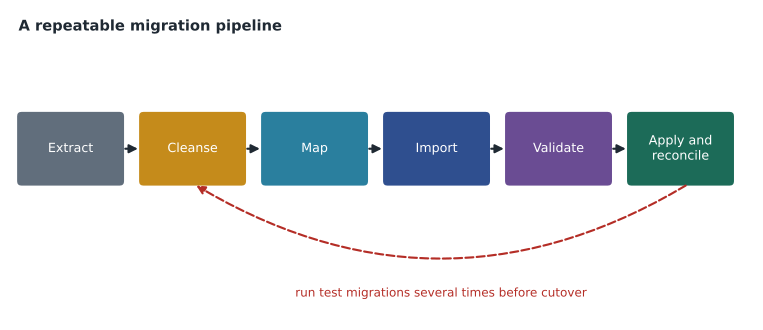
A migration is a rehearsal-heavy event. The team planned three test migrations into a sandbox before the real one: the first in October to find problems, the second in November with cleaned data, and a dress rehearsal in mid-December using a copy of production. Each run followed a checklist and was timed, so that by the third run everyone knew how long the real weekend would take.
Every run ends with reconciliation, comparing the new company with the old system:
| Check | Compare | Tolerance |
|---|---|---|
| Record counts | Number of customers, vendors, items, open documents | Exact |
| Customer and vendor balances | Aged receivables and payables totals by customer and vendor | Exact |
| Inventory | Quantity and value by item and location | Exact quantity; value to the cent |
| Trial balance | Each account at the cutover date | Exact |
| Spot checks | Ten random customers and items checked field by field | No errors |
Reconciliation is signed off by the business, not the consultant. Bettina signed the final reconciliation on the cutover weekend after Callum walked her through each line.
Migration in the project plan
Migration sits on the critical path of a project because nothing can be tested realistically without data. A sensible order is: configure setup data first; migrate master data into a sandbox early so testers have realistic records; run process testing with that data; freeze master data changes in the old system shortly before cutover; then load open transactions and balances as of the cutover date. Cutover dates are usually the start of an accounting period, so that opening balances are the old system's closing balances for the previous period.
Corbel & Finch's cutover will happen over the New Year weekend: the old system closes on December 31, 2026; opening balances are dated December 31; the first Business Central transactions are dated January 2, 2027. Lesson 12 turns this into a full cutover plan.
Migrating items and inventory in detail
Items are usually the hardest master data to migrate, because each item card carries settings that decide how the item is costed, posted and taxed. A wrong setting on an item affects every transaction for it, and some settings cannot be changed once entries exist. Callum built his item workbook with these columns, and Noor reviewed every value before import.
| Item field | Why it matters | Corbel & Finch example |
|---|---|---|
| Base Unit of Measure | Inventory is counted and valued in this unit | KG for green coffee; BAG340 for retail bags |
| Costing Method | How cost of goods sold is calculated | Average for green coffee; Standard considered for finished bags |
| Inventory Posting Group | Which inventory account is used | GREEN, FINISHED, PACKAGING, MERCH |
| Gen. Prod. Posting Group | Which sales and cost accounts are used | COFFEE, GREEN-COFFEE, MERCH |
| Tax Group Code | How sales tax applies | Groups for food and non-food items |
| Replenishment System | Whether the item is purchased or assembled | Purchase for green coffee; Assembly for bagged coffee |
| Item Category and attributes | Grouping, search and reporting | Category COFFEE with attributes origin and roast level |
The costing method deserves special care because it cannot be changed after an item has ledger entries, except by creating a new item. Business Central supports FIFO, LIFO, Average, Standard and Specific costing. The MB-800 outline expects candidates to differentiate between them, which the Business Central Finance and inventory courses cover in depth. For migration, the practical point is to decide the method per item group before the first opening inventory is posted, and to bring opening inventory in at the right unit cost, because that cost becomes the starting point for every later cost calculation.
Worked problem
Bringing in opening inventory
On December 31, the roastery holds 2,415 kg of a Colombian green coffee with an average cost of 8.95 dollars per kg, and Café 1 holds 36 bags of House Blend at a cost of 6.50 dollars each. How should these enter Business Central?
Show solution
- Use an item journal with entry type Positive Adjustment and posting date December 31, 2026.
- Line 1: green coffee item, location ROASTERY, quantity 2,415 KG, unit cost 8.95, amount 2,415 × 8.95 = 21,614.25 dollars.
- Line 2: House Blend item, location CAFE1, quantity 36 BAG340, unit cost 6.50, amount 234 dollars.
- Post the journal; the inventory accounts receive the values, and the offset uses the inventory adjustment account from the general posting setup line with a blank business group.
- Point that adjustment account to the opening balance account for the migration, so the trial balance nets correctly.
Answer: Item journal positive adjustments at the counted quantity and cost per location, dated December 31, with the offset to the opening balance account.
Data quality has owners. The team agreed that Bettina owns pricing data, Imogen owns vendor and green-coffee data, the roastery manager owns item and unit data, and Callum owns finance data. Each owner checked their workbook before each test migration and signed it off. When data problems appeared in testing, the owner fixed them in the source workbook, not in Business Central, so that the next migration run would not reintroduce them.
After the migration
Migration does not end when the last package is applied. In the first weeks after go-live, the old system stays available read-only for lookups, users will find records that look wrong, and some will turn out to be wrong. Corbel & Finch kept a short "data issues" list during hypercare; each item had an owner and was fixed in Business Central directly, since the source workbooks were now retired. After one month, Callum ran a set of data quality checks: customers without email addresses, items without a tax group, vendors without bank details, and duplicate names. The checks became a quarterly habit.
Common mistakes
MistakeMigrating every record and all history.
InsteadMigrate active master data, open items and balances; summarize or archive history.
MistakeRunning the migration once, on the go-live weekend.
InsteadRun several timed test migrations in a sandbox first.
MistakeLeaving units of measure as they were.
InsteadChoose base units carefully and define other units as multiples.
MistakeTreating reconciliation as the consultant's job.
InsteadThe business compares and signs off counts, balances, inventory and the trial balance.
Summary and key terms
- Plan migration by category: setup, master data, open transactions, balances and history.
- Detailed history is usually summarized or archived rather than migrated.
- Tools include configuration packages, the Migrate business data guide, cloud migration from BC on-premises or GP, Edit in Excel, APIs and partner tools.
- Cleansing, mapping and units of measure decisions prevent most migration problems.
- Test migrations and reconciliation of counts, balances, inventory and the trial balance make go-live predictable.
- Data migration
- Moving data from an old system into Business Central.
- Cloud migration
- Replicating data from Business Central on-premises or Dynamics GP into the online service.
- Data cleansing
- Removing duplicates, dormant records and errors before migration.
- Mapping
- Rules that translate old codes and accounts into Business Central values.
- Base unit of measure
- The unit in which an item's inventory is counted and valued.
- Reconciliation
- Comparing migrated data with the old system to prove it is complete and correct.
- Cutover
- The point at which the business stops using the old system and starts using the new one.
Practice problems
Work each problem on paper first, then reveal the answer to check.
A company runs Business Central on-premises. Which tool moves it to the online service?
Show answer
Cloud migration, set up through the administration center and the Cloud Migration Setup guide.
Why choose the kilogram, not the sack, as green coffee's base unit?
Show answer
Roasting consumes partial sacks; a small base unit lets purchasing, consumption and inventory agree.
Who signs off the migration reconciliation?
Show answer
The business owner of the data (here Bettina, with Callum).
Lesson quiz · 5 questions
Score 60% or more to complete this lesson.
Create a free account to save your progress, take quizzes and earn a certificate.