
MSBA-150 · Lesson 12 of 12 · 20 min
Case study: moving a business off spreadsheets
▶ Video coming soon A video version of this lesson is on the way.
This capstone brings the course together. You will work through the decisions Corbel & Finch made in November 2026 as they prepared to switch from an old desktop accounting package and a family of spreadsheets to Business Central on January 1, 2027. Each part sets a task, shows the facts the team had, and then gives the answer they reached, with the reasoning. Try each task before reading the answer.
The situation in November 2026
| Fact | Detail |
|---|---|
| Business | Coffee roaster with wholesale, a web shop and two cafés; about 40 staff; one legal entity |
| Old systems | Desktop accounting package, spreadsheets for inventory, pricing and green-coffee contracts |
| Users | 9 people need full access, 3 café managers need read access and approvals, 2 shared warehouse scanners |
| Volumes | About 600 sales invoices and 120 supplier invoices a month; 228 active customers; 180 vendors; 260 items |
| Production | Green coffee is roasted in batches and bagged; one input, one roast, one bagging step per product |
| Go-live target | January 1, 2027, the start of the fiscal year; first transactions dated January 2 |
| Team | Bettina (owner, sponsor), Callum (in-house lead), Noor (partner consultant and developer), Imogen (purchasing) |
Task 1: choose licences
Decide which licences Corbel & Finch needs and whether full users should have Essentials or Premium. Use the United States list prices from November 2025 (80 dollars for Essentials, 110 for Premium, per user per month) as a reference, and consider whether the roasting process needs manufacturing features.
Worked problem
Licence decision
Nine full users, three café managers who look up data and approve requests, and two shared scanners. Is Premium worth it for roasting?
Show solution
- Full users: 9. The café managers fit the Team Member licence (read, approve, light edits). The scanners each take a Device licence.
- Premium adds manufacturing (production orders, routings, capacity) and service management. Corbel & Finch's process has one input, one roast and one bagging step, which assembly orders in Essentials can represent: an assembly bill of materials consumes green coffee and packaging and outputs bagged coffee at a calculated cost.
- Cost difference at list price: 9 users × (110 − 80) = 270 dollars a month, or 3,240 dollars a year, for features the company would not use.
- Decision: Essentials for full users, revisit Premium if the company later needs routings, capacity planning or service contracts.
Answer: 9 Essentials, 3 Team Member and 2 Device licences. Assembly orders cover roasting; Premium would cost about 3,240 dollars a year more at list prices without a matching need.
Because Essentials and Premium cannot be mixed freely for full users in one tenant, the team noted that a later move to Premium would apply to all nine full users, and recorded that in the decision log.
Task 2: environments and companies
Lay out the environments and companies the project needs from now until a month after go-live.
| Environment | Type | Companies | Use |
|---|---|---|---|
| PROD | Production | Corbel & Finch Coffee Roasters Ltd. | Live company from go-live |
| CONFIG | Sandbox | The configured company, plus CRONUS | Configuration, test migrations, user testing |
| TRAINING | Sandbox | A copy of the configured company with test data | Staff training in December |
| UPDATE-TEST | Sandbox | A copy of production made each release wave | Testing major updates and extensions before they reach production |
One company is enough because there is one legal entity; the cafés and wholesale are separated with the BUSINESS LINE dimension and locations. The sandboxes use the three included with the subscription, so no extra environments need to be bought.
Task 3: the setup checklist
List, in order, the setup that must be complete in the CONFIG sandbox before the final test migration. Then say how it reaches production.
| Order | Setup | Lesson |
|---|---|---|
| 1 | Company Information, accounting periods for 2026 and 2027, posting date windows | 3 |
| 2 | Number series and links on Sales & Receivables, Purchases & Payables and Inventory Setup | 3 |
| 3 | Chart of accounts with account categories, 168 accounts | 6, 11 |
| 4 | Posting groups: specific and general, general posting setup, inventory posting setup by location | 7 |
| 5 | Tax setup: tax areas, jurisdictions and groups | 7 |
| 6 | Dimensions: BUSINESS LINE and DEPARTMENT global, CAMPAIGN, SALESPERSON, ORIGIN shortcut; defaults and blocked combinations | 8 |
| 7 | Templates for customers, vendors and items | 4 |
| 8 | Approval user setup, workflows, notifications and email | 9 |
| 9 | Report layouts and report selections for invoices and statements | 3 |
| 10 | Security groups, permission sets and profiles, customized pages for each role | 2, 5 |
| 11 | Copilot capabilities reviewed and set | 10 |
| 12 | Financial reports, the analysis view and Power BI apps | 11 |
Setup reaches production as a configuration package exported from CONFIG and applied to the production company, followed by a check that each setup table matches. Security groups, profiles and Copilot settings are applied in production by hand, because some of them are environment-wide rather than company data.
Task 4: migration and opening balances
Describe what will be migrated, how, and how the team will prove it is right.
Worked problem
Migration plan
The old system holds nine years of history. The cutover date is December 31, 2026. What moves, by which method, in what order?
Show solution
- Master data (December 18 to 20, after a freeze on new customers and vendors in the old system): 228 customers, 180 vendors and 260 items, cleansed and mapped, imported through configuration packages with templates.
- Open transactions (January 1 to 2): 340 open sales invoices and about 90 open purchase invoices as individual documents through journals; open purchase orders for green coffee re-entered as purchase orders.
- Balances (January 1 to 2): inventory by item and location through item journals from the December 31 count; bank balances and remaining G/L balances through a general journal, excluding receivables and payables already posted through customers and vendors.
- History: 24 months of monthly G/L net change by account and BUSINESS LINE for comparatives; detailed history kept read-only in the old package.
- Proof: reconcile record counts, aged receivables and payables, inventory quantity and value, and the trial balance account by account; Bettina signs off.
Answer: Master data first, then open documents, then balances, then summarized history, with a signed reconciliation of counts, subledgers, inventory and the trial balance.
Task 5: the cutover timeline
Build a timeline from the start of December to the first month-end close.
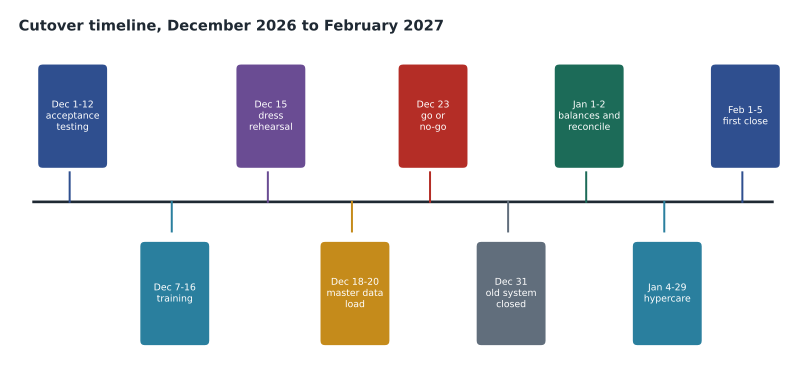
| Date | Milestone | Owner |
|---|---|---|
| Dec 1 to 12 | User acceptance testing with scripted scenarios for each role | Callum |
| Dec 7 to 16 | Training in the TRAINING sandbox, by role | Noor and Callum |
| Dec 15 | Dress-rehearsal migration, timed, into a copy of production | Noor |
| Dec 18 to 20 | Master data freeze in the old system; load master data into production | Callum |
| Dec 23 | Go or no-go decision against agreed criteria | Bettina |
| Dec 31 | Final sales and purchases in the old system; physical inventory count | Callum and roastery manager |
| Jan 1 to 2 | Open documents, opening balances, reconciliation and sign-off | Callum, Noor, Bettina |
| Jan 4 | First full trading day in Business Central | Everyone |
| Jan 4 to 29 | Hypercare: daily check-ins, quick fixes, issue log | Noor |
| Feb 1 to 5 | First month-end close in Business Central | Callum |
Task 6: go or no-go criteria
Write the criteria Bettina will use on December 23. Good criteria are specific and measurable, not "we feel ready".
| Criterion | Measure |
|---|---|
| Testing complete | All critical test scenarios passed; no open critical or high-severity issues |
| Migration rehearsed | Dress rehearsal completed within the planned time with a clean reconciliation |
| People trained | Every user has completed role training and one practice task in the TRAINING sandbox |
| Access ready | All users can sign in to production with the right role centre and permissions |
| Documents ready | Invoice, statement and order confirmation layouts approved |
| Integrations ready | Web shop orders flow to Business Central in the sandbox test; bank file format tested |
| Fallback defined | Old system can be used for one more week if needed, with a plan to re-run cutover |
Task 7: risks
Name the top risks and a response for each.
| Risk | Likelihood | Response |
|---|---|---|
| Inventory count on December 31 is wrong | Medium | Count by location with two people per area; recount differences above a threshold |
| Web shop integration fails in the first week | Medium | Test in sandbox; manual order entry procedure ready for up to 30 orders a day |
| Users revert to spreadsheets | High | Remove old pricing workbook access; role centres show what users need; hypercare check-ins |
| Posting setup error discovered after go-live | Medium | 40 test postings checked with Find entries; daily trial balance review in January |
| Approvals slow purchasing | Low | Limits set at realistic levels; substitutes defined; notifications tested |
| A major update arrives during hypercare | Low | Schedule the update window after hypercare in the administration center |
The update risk is specific to cloud ERP. Microsoft's 2026 release wave 2 began rolling out in October 2026, so production would already be on version 29 at go-live, but the next major update, 2027 release wave 1, would arrive from April 2027. Noor set the update window so that it would not land during the first close, and planned to test the update in the UPDATE-TEST sandbox first.
Task 8: the first month-end
Write the first month-end checklist in Business Central, linking each step to what the course covered.
| Step | How in Business Central |
|---|---|
| Make sure all January documents are posted | Cues for unposted orders and invoices on the role centre |
| Reconcile bank accounts | Bank account reconciliation with Copilot assist, reviewing every proposed match |
| Adjust item costs and post inventory cost | Job queue entries for cost adjustment, checked for errors |
| Review receivables and payables | Aged reports; apply unapplied payments |
| Check dimensions | Trial balance filtered by BUSINESS LINE; correct errors with Dimension Correction |
| Post accruals and adjustments | General journal, approved through the journal approval workflow if required |
| Lock January | Posting date window on General Ledger Setup moved to February; Callum keeps January on User Setup until done |
| Report | Financial reports, CAFE-GM and the Power BI dashboard |
On the first Monday of February 2027, the plan says, Bettina will have her numbers. Whether she believes them will depend on the reconciliation work in Task 4 and the posting setup checks in Task 3, which is why so much of a Business Central project happens before anyone posts a real transaction.
Reflecting on the case
Projects like this one fail less often from software problems than from skipped preparation: data that was never cleaned, posting setup that was never tested, users who were never trained in their own role. The structure of Business Central, with master data, documents, posting groups, dimensions and permanent ledgers, rewards careful setup and punishes shortcuts. The next courses in the MB-800 program go deeper into finance, and the MB-820 program covers the developer side, including the extensions that Quarrystone builds for the web shop integration.
Task 9: training and hypercare
Plan training by role and the support arrangements for the first weeks.
| Group | Training | Length | Proof of readiness |
|---|---|---|---|
| Order processors | Sales orders, invoices, credit memos, customer lookups, Copilot sales line suggestions | Two half days | Enter and post five practice orders in the TRAINING sandbox |
| Purchasing | Purchase orders, receipts, invoices, approvals | One half day | Process one green-coffee order end to end |
| Warehouse and roastery | Receipts, assembly orders, transfers, counts on scanners | One half day | Post an assembly order and a transfer |
| Café managers | Item lookups, approvals on phone and browser | One hour | Approve a test request on a phone |
| Callum | Everything above plus setup, close, reports and administration | Throughout the project | Runs the dress rehearsal |
Hypercare ran for four weeks after go-live. Noor held a 15-minute check-in every morning in the first week and twice a week after that, and every issue went into a shared log with a severity, an owner and a date. Most issues in the first week were small: a field users wanted on a page (solved by customizing the profile), a printer setting, two permission gaps found by Effective Permissions. The log was closed when two weeks passed with no new high-severity issues, which became the formal end of the project.
Common mistakes
MistakeBuying Premium "just in case".
InsteadMatch licences to processes; assembly orders in Essentials cover simple production.
MistakeGoing live without measurable go or no-go criteria.
InsteadAgree specific criteria in advance and decide against them.
MistakeLetting a major update land during the first close.
InsteadSchedule update windows and test updates in a sandbox.
MistakeEnding the project at go-live.
InsteadPlan hypercare and the first month-end close as part of the project.
Summary and key terms
- Licences follow processes: 9 Essentials, 3 Team Member and 2 Device licences fit Corbel & Finch.
- One production and three sandbox environments cover configuration, training and update testing.
- Setup is completed and tested in a sandbox and moved to production with configuration packages.
- Migration moves master data, open documents, balances and summarized history, proven by reconciliation.
- A cutover timeline, go or no-go criteria and a risk register make the switch predictable.
- Hypercare and the first month-end close are part of the project.
- Assembly order
- A document that consumes components and outputs an assembled item, available in Essentials.
- User acceptance testing
- Testing by business users of the configured system against real scenarios.
- Dress rehearsal
- A full, timed practice run of the migration and cutover.
- Go or no-go decision
- The decision, against agreed criteria, whether to proceed with go-live.
- Hypercare
- A period of intensive support right after go-live.
- Risk register
- A list of project risks with likelihood and planned responses.
Practice problems
Work each problem on paper first, then reveal the answer to check.
Why did the team choose Essentials over Premium?
Show answer
Roasting fits assembly orders in Essentials, and Premium would cost about 3,240 dollars a year more at list prices for unused features.
Which sandbox protects production from surprises in a release wave?
Show answer
UPDATE-TEST, a copy of production used to test each major update.
Name three go or no-go criteria.
Show answer
For example: critical tests passed, migration rehearsed with a clean reconciliation, users trained, access ready, a fallback plan defined.
Lesson quiz · 5 questions
Score 60% or more to complete this lesson.
Create a free account to save your progress, take quizzes and earn a certificate.