
MSBA-150 · Lesson 10 of 12 · 18 min
Copilot in Business Central
▶ Video coming soon A video version of this lesson is on the way.
By November, Callum had heard "Copilot" at every Microsoft event he attended, usually without a clear explanation of what it did in an accounting system. Noor gave him one in a single sentence: "In Business Central, Copilot is a set of AI features that draft things for you, and the agents are AI helpers that do whole tasks for you, but you approve what matters." This lesson sorts out which is which, how administrators turn capabilities on and off, how billing works for the agents, what happens to data, and how to use AI output responsibly. It reflects Microsoft's documentation as of October and November 2026; Copilot changes with every release wave, so always check the current list on the Copilot & agent capabilities page.
Copilot features and agents
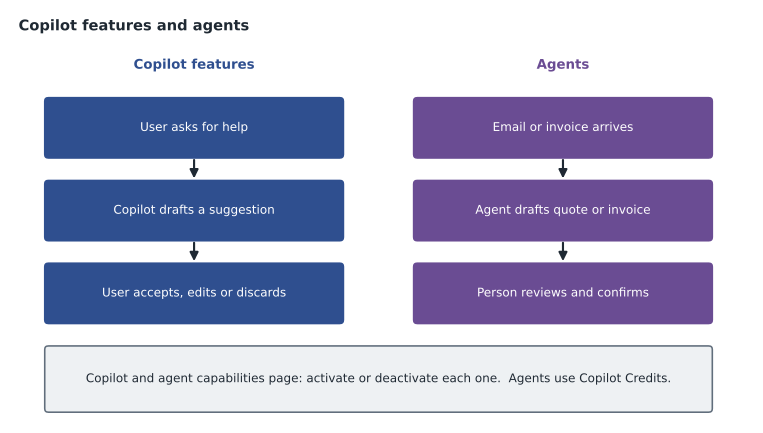
Microsoft groups the AI in Business Central into three kinds. Copilot features are generative AI helpers built into specific pages, where a user asks for a draft and decides what to keep. Agents are AI helpers that carry out a multi-step task on their own, such as reading an email and preparing a sales quote, and hand results to people for review. Other AI features are older machine-learning or search tools that are not generative AI.
| Kind | Examples in Business Central (late 2026) | Who is in control |
|---|---|---|
| Copilot features | Chat; analysis assist; summarize; autofill; bank account reconciliation assist; e-document matching; sales line suggestions; marketing text suggestions; item substitute suggestions; number series suggestions; greenhouse gas emission suggestions in sustainability journals | The user asks for a suggestion and accepts, edits or discards it |
| Agents | Sales Order Agent; Payables Agent; Expense Agent (preview) | The agent works on its own task list; people review and approve its work at defined points |
| Other AI features | Search (Tell Me); inventory forecasting; late payment prediction; cash flow analysis | Predictions and search results inform the user |
Several of the Copilot features are marked preview, meaning they are available to try but may change and may not be supported for production use in every way. The Copilot & agent capabilities page separates preview and generally available capabilities.
A few Copilot features in practice
Chat. From version 29 (2026 release wave 2), the Chat capability controls the Microsoft Copilot experience inside Business Central, where users ask questions in plain language, such as "show me open sales orders for Bayside Café" or "how do I set up a payment term?", and get answers, links to pages or help content.
Marketing text suggestions. On an item card, Copilot drafts a product description from the item's attributes, such as origin, roast level and tasting notes, which the user can adjust for tone and length before publishing to the web shop. Corbel & Finch tried it for 20 coffees and kept about half the drafts with light edits.
Sales line suggestions. On a sales order, Copilot suggests lines based on the customer's past orders or on a pasted list, which helps order processors who receive messy emailed orders.
Bank account reconciliation assist. During reconciliation, Copilot proposes matches between bank statement lines and ledger entries, including ones that rule-based matching misses, and suggests G/L accounts for unmatched lines such as bank fees. The user reviews every proposal before it is applied.
Analysis assist. In data analysis mode, users describe the analysis they want, such as "group by customer and show quantity by month", and Copilot sets up the grouping and pivot.
The agents
The Sales Order Agent monitors a mailbox for customer requests, identifies the customer and items, checks availability, and prepares sales quotes, which become orders after confirmation. It communicates with the customer by email and asks people to review its drafts before anything is sent. The Payables Agent processes incoming vendor invoices: it captures data from PDF invoices, validates the vendor and amounts, matches invoices to purchase orders and receipts, and drafts purchase invoices for a person to review and post. The Expense Agent, in preview, helps employees capture receipts for expense reports.
Each agent works under its own identity with permissions that an administrator assigns, and each has configuration such as the mailbox to watch, which steps need human review, and which users supervise it. Agents show their tasks and history so that supervisors can see what they did and why. Callum was interested in the Payables Agent for the 120 or so supplier invoices Corbel & Finch receives each month, but decided to wait until two months after go-live, once the purchase process was stable.
Turning capabilities on and off
Copilot as a whole is a system feature and cannot be switched off entirely; administrators control individual capabilities instead. On the Copilot & agent capabilities page (search for it with Alt+Q), an administrator selects a capability and chooses Activate or Deactivate. Capabilities are active by default when they are available. Some changes take effect immediately; others reach users only after they sign out and back in, so administrators may ask users to do so or end sessions from the administration center.
Configuring these capabilities requires the SUPER permission set or an administrator licence, such as the internal Business Central administrator or Dynamics 365 Administrator role. Business Central does not yet offer separate object-level permissions just for configuring Copilot. Users give feedback on AI output with like and dislike buttons; administrators can turn the feedback option off in the Power Platform admin center.
Data and geography
Business Central's Copilot capabilities use Microsoft-managed Azure OpenAI resources. If a company's environment is in an Azure geography where the needed AI service is not available, the Copilot & agent capabilities page shows an Allow data movement setting. Turning it on lets the affected capabilities process data in another geography; turning it off makes those capabilities unavailable. When the AI service becomes available in the environment's own geography, the environment connects to it automatically and the setting disappears. Tenant-wide privacy and data residency choices for Microsoft 365 Copilot are made separately in the Microsoft 365 admin center.
Copilot respects the user's permissions: it can work only with data the user can already access. Microsoft's documentation on Copilot data security explains that prompts and data are not used to train the underlying foundation models. For Corbel & Finch, the environment was in the Canada geography, and Callum checked the page to see whether the data movement setting appeared before activating anything.
How the agents are billed
Most Copilot features come with Business Central, but Microsoft's billing documentation lists the agents as billable capabilities, charged per use in Copilot Credits, a unit that measures AI interactions and tasks. Billing documentation as of mid-2026 listed the Sales Order Agent, the Payables Agent, the Expense Agent (preview) and designing and coding agents (preview) as billable.
| Billing option | How it works | Where it is managed |
|---|---|---|
| Prepaid capacity | The customer buys Copilot Credit packs; environments draw on the capacity, by default from the default Power Platform environment | Bought in the Microsoft 365 admin center (or by a reseller in Partner Center); allocated in the Power Platform admin center |
| Pay-as-you-go | Usage is charged monthly to an Azure subscription linked to a Power Platform environment, which is linked to the Business Central environment | Linked in the Power Platform and Business Central admin centers; costs and budgets in Microsoft Cost Management |
Microsoft publishes example rates. A typical Sales Order Agent request in its documentation uses 14 Copilot Credits, plus 5 credits for each attachment with sales data. The Payables Agent uses 50 credits per invoice plus 5 per invoice line, and an email with no valid PDF invoice costs nothing. If capacity runs out, the capability stops until more is added, and users see notifications when quota is low.
Worked problem
Estimating Payables Agent usage
Corbel & Finch expects 120 supplier invoices a month, with an average of 4 lines each. Using Microsoft's published example rate of 50 credits per invoice plus 5 per line, how many Copilot Credits would the Payables Agent use each month?
Show solution
- Credits per invoice: 50 + (5 × 4) = 70.
- Monthly total: 70 × 120 = 8,400 Copilot Credits.
- Compare with the price of a prepaid pack or the pay-as-you-go rate in the company's currency from the current price list.
- Monitor actual usage in the Power Platform admin center after go-live, because real invoices vary.
Answer: About 8,400 Copilot Credits a month at the example rate.
Using AI output responsibly
Microsoft's responsible AI principles shape how these features behave: Copilot drafts are labelled as AI-generated, users review before accepting, and agents ask people to approve important steps. In an accounting system, responsibility stays with the people who post. Practical habits Noor taught Callum:
| Habit | Why |
|---|---|
| Read every suggestion before accepting it | AI can be confident and wrong, for example with a similar but different customer |
| Keep approvals on agent work that leaves the company | Quotes and emails to customers carry the company's name |
| Check matches proposed during reconciliation | A wrong match hides an unrecorded payment |
| Edit marketing text for accuracy | Product claims such as certifications must be true |
| Review agent task history regularly | Supervisors can see what an agent did and catch patterns of errors |
Callum's plan for go-live was modest: activate Chat, marketing text suggestions, sales line suggestions and bank account reconciliation assist; leave the agents deactivated until spring 2027; and write a one-page guide for staff on what to check before accepting a suggestion.
Planning a Copilot rollout
Copilot features arrive with release waves and are active by default when available, so a company that does nothing still ends up with AI features in front of its staff. Noor recommended a short, deliberate plan instead, and Callum wrote it as a table so Bettina could approve it in one meeting.
| Capability | Decision at go-live | Owner | Review |
|---|---|---|---|
| Chat | Active for all users | Callum | After one month |
| Marketing text suggestions | Active; drafts edited by Bettina before publishing | Bettina | Quarterly |
| Sales line suggestions | Active for order processors | Callum | After one month |
| Bank account reconciliation assist | Active; every match reviewed | Callum | At each month-end |
| Analysis assist (preview) | Active for Callum only to try | Callum | When generally available |
| Payables Agent | Deactivated until spring 2027 | Callum and Imogen | March 2027 |
| Sales Order Agent | Deactivated; wholesale orders mostly come by phone | Bettina | Later in 2027 |
Because the capabilities page shows preview features separately, the plan also set a rule for previews: they can be tried by one person, but no business process depends on a preview feature until it is generally available. With each release wave, Callum would check the page for new capabilities, decide on each and update the table.
Measuring value keeps the plan honest. For bank reconciliation assist, Callum would record how long the monthly reconciliation took before and after. For marketing text, Bettina would note how many drafts she kept. For the Payables Agent trial in spring, the measure would be minutes spent per supplier invoice, set against the Copilot Credits the agent used. If a capability saves no time or produces drafts that need heavy correction, it is deactivated, which takes a minute on the capabilities page.
Finally, the staff guide. One page, written in plain language, told staff that AI suggestions are drafts, that they remain responsible for what they post or send, what to check for each feature, and how to report a bad suggestion with the dislike button so that Microsoft and Callum could see patterns.
Questions administrators ask
In the first weeks, Callum kept a list of questions staff and auditors asked about Copilot, with the answers he gave. Can it see data I cannot? No; it works within each user's permissions. Does it post anything on its own? Copilot features only suggest; agents carry out tasks but stop for review at the points the supervisor sets, and their work appears in task history. Where does the data go? It stays within Microsoft's cloud, processed in the environment's geography unless the data movement setting says otherwise. What does it cost? The Copilot features in use came with the licences; the agents would be billed in Copilot Credits once activated. Who decides? The capability plan, reviewed each release wave.
Common mistakes
MistakeAssuming Copilot can be switched off with one setting.
InsteadCopilot is a system feature; individual capabilities are activated or deactivated.
MistakeTurning on an agent without planning for its cost.
InsteadAgents consume Copilot Credits from prepaid capacity or pay-as-you-go billing.
MistakeBelieving Copilot can show data the user cannot normally see.
InsteadCopilot works within the user's permissions.
MistakeAccepting AI suggestions without review.
InsteadPeople remain responsible for what is posted and sent.
Summary and key terms
- Business Central AI includes Copilot features that draft suggestions, agents that complete tasks with human review, and older non-generative AI features.
- Agents include the Sales Order Agent, Payables Agent and Expense Agent (preview).
- Administrators activate or deactivate individual capabilities on the Copilot & agent capabilities page; Copilot as a whole cannot be turned off.
- An Allow data movement setting appears if AI processing must happen in another Azure geography.
- Agents are billed in Copilot Credits through prepaid capacity or pay-as-you-go linked through the Power Platform.
- Responsible use means reviewing suggestions, keeping human approval on important steps and monitoring agent work.
- Copilot feature
- A generative AI helper on a page that drafts suggestions for the user.
- Agent
- An AI helper that carries out a multi-step task and hands results to people for review.
- Copilot & agent capabilities page
- The page where administrators activate or deactivate AI capabilities.
- Allow data movement
- A setting that lets AI capabilities process data in another Azure geography.
- Copilot Credits
- The billing unit for AI interactions and agent tasks.
- Prepaid capacity
- Copilot Credit packs bought in advance and allocated to environments.
- Preview
- A feature available to try before general availability, which may change.
Practice problems
Work each problem on paper first, then reveal the answer to check.
Which agent processes vendor invoices from PDFs and matches them to purchase orders?
Show answer
The Payables Agent.
Where does an administrator deactivate marketing text suggestions?
Show answer
On the Copilot & agent capabilities page.
At 14 credits per request, how many credits would 200 Sales Order Agent requests without attachments use?
Show answer
2,800 Copilot Credits.
Lesson quiz · 5 questions
Score 60% or more to complete this lesson.
Create a free account to save your progress, take quizzes and earn a certificate.