
MSBA-150 · Lesson 1 of 12 · 19 min
Business Central for small and midsize businesses
▶ Video coming soon A video version of this lesson is on the way.
In early September 2026, Bettina Szczepanik closed the door of the small office above the roasting floor at Corbel & Finch Coffee Roasters in Victoria and put a printout on the table. It was the company's month-end workbook: fourteen tabs, three of them called "FINAL", one called "FINAL real", and a pivot table that nobody had refreshed since spring. Corbel & Finch had grown from a single café to a roaster with about 40 staff, a wholesale business supplying cafés and grocers, a web shop and two retail counters. The accounting still ran on an old desktop package plus spreadsheets for inventory, green-coffee contracts and wholesale pricing. Callum Rennick-Obi, the bookkeeper, spent the first week of every month reconciling those spreadsheets with each other.
"I want one system," Bettina said. "One place where an order, the coffee it uses and the money it brings in all line up." The partner she had called, Quarrystone Business Systems, sent Noor Haddad-Kessel, a Business Central developer and consultant, to the first meeting. Noor's first question was not about software at all: "What has to be true on the day you switch over?" This course follows that project from the first conversation to the cutover plan. Callum, who will become the company's in-house Business Central expert, is the learner we follow most closely.
What Business Central is
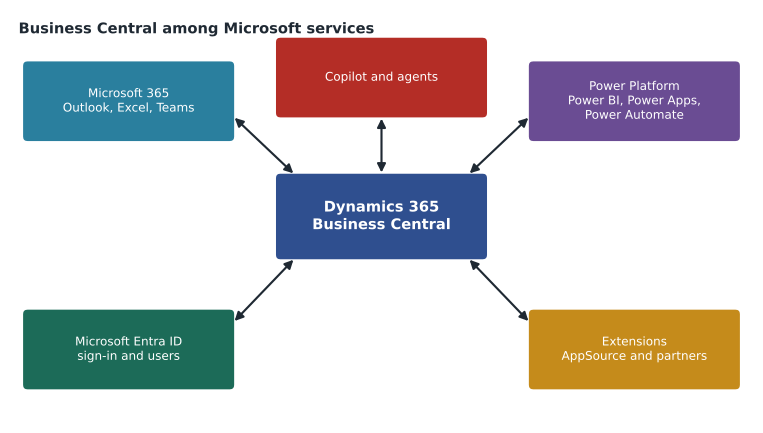
Dynamics 365 Business Central is Microsoft's enterprise resource planning (ERP) application for small and midsize organizations. An ERP system keeps a business's core records in one database, so that a sales order, the inventory it reserves, the invoice it produces, the customer payment and the general ledger entries all refer to the same customer, the same item and the same posting rules. Business Central covers financial management, sales and receivables, purchasing and payables, inventory and warehousing, projects, and, with the Premium licence, manufacturing and service management.
Business Central descends from Dynamics NAV (originally Navision), a product with a long history among small and midsize businesses. Microsoft moved it to the cloud and renamed it in 2018. Today it is sold mainly as a software-as-a-service product that Microsoft runs in Azure, although an on-premises version still exists for organizations that need it. The online version is updated by Microsoft on a fixed rhythm: two major updates a year, called release waves, plus smaller monthly updates in between.
Who it is for
Microsoft positions Business Central for organizations that have outgrown entry-level accounting software but do not need the scale of Dynamics 365 Finance and Supply Chain Management. There is no hard cut-off. A company with 10 users and one with a few hundred can both run it well; what matters is the shape of the business. Business Central suits companies with one or a few legal entities, straightforward to moderately complex inventory, and a need to connect finance with operations. Very large multinationals with dozens of legal entities, complex shared services and heavy manufacturing usually look at Finance and Supply Chain Management instead, which is covered in other courses in this program family.
Typical signs that a business is ready for Business Central look a lot like Corbel & Finch's situation:
| Symptom | What it costs | How Business Central addresses it |
|---|---|---|
| Inventory kept in spreadsheets separate from accounting | Stock values in the ledger never match the warehouse | Item ledger entries and value entries post to the general ledger automatically |
| Month-end takes a week | Late numbers, tired staff | Posting happens as transactions occur; reconciliation tools replace manual matching |
| Prices and discounts in a separate workbook | Wrong prices on invoices | Price lists and discounts live on customers and items |
| No audit trail for changes | Hard to answer an auditor | Posted entries cannot be deleted; corrections create reversing entries |
| Reports built by hand | Different numbers in different meetings | Financial reports, analysis views and Power BI read the same data |
At the meeting, Callum recognized every row. "The audit trail one hurts," he admitted. "Last year we found an invoice that had been edited after it was sent, and nobody knew who changed it." Noor explained one of Business Central's core principles: once a document is posted, its ledger entries are permanent. Mistakes are fixed by posting correcting entries, such as a credit memo or a reversal, so the history shows both the error and the fix.
The building blocks: documents, journals and ledgers
Every Business Central user eventually meets three kinds of records, and understanding how they relate is the single most useful idea in this course.
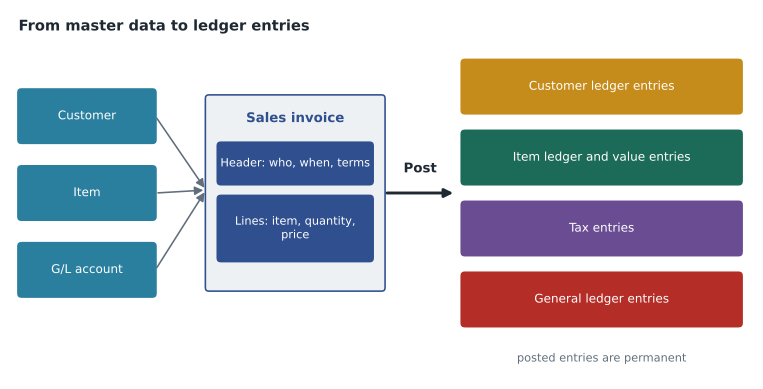
Master data describes the things the business deals with repeatedly: customers, vendors, items, general ledger accounts, bank accounts, fixed assets and employees. A customer card holds the name, address, payment terms, posting groups and default dimensions for that customer. Master data changes rarely.
Documents and journals record business events. A sales order, a purchase invoice or a transfer order is a document: it has a header (who, when, which terms) and lines (what, how many, at what price). A journal is a simpler, line-based worksheet for entries such as payments, cash receipts, general ledger adjustments or inventory counts. Documents and journals are drafts until they are posted.
Ledger entries are what posting creates. When Callum posts a sales invoice, Business Central writes customer ledger entries (what the customer owes), item ledger entries and value entries (the quantity and cost of coffee that left inventory), VAT or sales tax entries, and general ledger entries (the revenue, receivables, cost of goods sold and inventory accounts). Posting groups, covered in lesson 7, decide which general ledger accounts are used.
Worked problem
What does one wholesale invoice create?
Corbel & Finch invoices a grocery chain for 120 bags of its House Blend at 14 dollars a bag. The bags cost 6.50 dollars each to produce. Ignoring tax, which ledgers receive entries when Callum posts the invoice, and what are the amounts?
Show solution
- The customer owes 120 × 14 = 1,680 dollars, so a customer ledger entry of 1,680 dollars is created.
- The item leaves inventory, so an item ledger entry for −120 bags is created, with value entries recording the cost of 120 × 6.50 = 780 dollars.
- The general ledger receives a debit of 1,680 to receivables and a credit of 1,680 to sales revenue.
- Because inventory is posted to the ledger, there is also a debit of 780 to cost of goods sold and a credit of 780 to inventory.
Answer: Customer ledger (1,680 owed), item ledger and value entries (−120 bags, 780 cost), and general ledger entries for revenue, receivables, cost of goods sold and inventory. Tax entries would be added if tax applied.
Essentials, Premium and other licences
Business Central online is licensed per user per month, with a few licence types. Microsoft changes prices from time to time, so always check the current price list or ask a partner; what follows is the structure, with the United States list prices that took effect on November 1, 2025 as a reference point.
| Licence | Who it is for | What it includes |
|---|---|---|
| Essentials | Full users in finance, sales, purchasing, inventory and projects | Financials, sales and purchasing, inventory and warehousing, projects, Copilot features; listed at 80 US dollars per user per month from November 2025 |
| Premium | Full users who also need manufacturing or service management | Everything in Essentials plus manufacturing and service management; listed at 110 US dollars per user per month from November 2025 |
| Team Member | Occasional users who read data and do light tasks | Read access and limited edits, such as approving requests or updating some records |
| Device | A shared device such as a warehouse scanner or point-of-sale terminal | Several people use one device under one licence |
A tenant does not mix Essentials and Premium freely: the functionality available in the tenant follows the licence type that full users hold, so a company that needs manufacturing generally licenses all full users with Premium. Corbel & Finch roasts green coffee into finished bags, which looks like manufacturing, but Noor pointed out that its process is simple: one green-coffee input, one roasting step, one bagging step. Many roasters handle this with assembly orders, which Essentials includes, rather than full production orders. The decision on Essentials versus Premium was parked for lesson 12, where the team weighs it with real numbers.
Each subscription includes one production environment and three sandbox environments at no extra charge, plus a pool of database storage that grows with the number of licensed users. Lesson 3 explains environments and companies.
How Business Central is delivered and updated
Because Microsoft runs Business Central online, customers do not install servers or apply patches. Instead they live with a predictable update cycle. Major releases arrive in release wave 1 (rolling out from April) and release wave 2 (rolling out from October), with numbered versions: 2026 release wave 2 is version 29, which began rolling out in October 2026, with some features arriving later in the wave. Minor updates follow monthly. Administrators can schedule when an environment receives an update within a window, and they should test each major update in a sandbox first, because extensions and customizations need to keep working.
Customization works through extensions. Rather than changing Microsoft's code, partners and developers write extensions in the AL language that add fields, pages, logic and integrations alongside the base application. Thousands of ready-made extensions are published on Microsoft AppSource, covering things like shipping integrations, payment processing, banking formats and industry features. Extensions are what make automatic updates possible: the base application can change underneath while extensions keep their own code. The developer side of this is the subject of the MB-820 program; as a functional consultant, Callum needs to know that extensions exist, how they are installed from the Extension Management page, and that each one must be tested before an update.
Localizations and the Canadian and US versions
Business Central is available in many countries, each with a localization that adds local features such as tax handling, statutory reports and bank file formats. A company chooses its country version when the environment is created, and that choice cannot be changed later. The Canadian and US versions both use the North American sales tax design with tax areas, tax jurisdictions and tax groups, rather than the VAT design used in most of Europe, although the posting setup still uses the same posting group structure. In Canada, the Canadian version handles GST, HST, PST and QST through tax jurisdictions, and supports bilingual English and French use.
Corbel & Finch collects GST and British Columbia PST, so Noor set up the trial environment in the Canadian version. "Pick the country first and the language second," Noor said. "You can switch display languages any time. You can't switch countries."
Where Business Central fits in a project
Business Central projects have a recognizable shape, and Microsoft's implementation guidance describes phases much like these: initiate (goals, scope and plan), implement (configure, migrate, test, train) and prepare to go live, then operate. Microsoft's Success by Design approach and partners' own methods add checkpoints, but the core idea is simple: decide what the business needs, configure the standard product to fit as much as possible, extend only where there is a real gap, and move data and people carefully.
| Phase | Corbel & Finch milestone | Lessons in this course |
|---|---|---|
| Discover | Map processes: roasting, wholesale orders, web shop, cafés, month-end | 1, 2 |
| Set up | Create the company, apply configuration packages, set users and permissions | 3, 4, 5 |
| Migrate | Bring in customers, vendors, items and opening balances | 6 |
| Configure finance | Posting groups, dimensions, approvals | 7, 8, 9 |
| Enable AI and reporting | Turn on Copilot features, build reports | 10, 11 |
| Cut over | Test, train, switch on January 1, 2027 | 12 |
By the end of the first meeting, Bettina had a plan on the whiteboard and a target: go live on January 1, 2027, the start of the company's fiscal year. Noor set up a free trial environment so that Callum could start exploring. "Spend a week clicking around," she told him. "Break things. It's a trial."
What changes for each person
Moving to an ERP system changes daily work more than people expect, and the change is different for each role. At Corbel & Finch, Noor asked each person to describe a normal Tuesday, then showed how that day would look in Business Central.
| Person | Today | After go-live |
|---|---|---|
| Order processors | Retype emailed orders into the accounting package and a stock sheet | Enter one sales order; stock, invoice and receivables update together |
| Purchasing lead | Track green-coffee contracts in a workbook | Purchase orders and blanket orders in Business Central, with approvals |
| Roastery manager | Count bags by hand and email totals | Post output and consumption; see inventory by location |
| Café managers | Phone the roastery to ask what is in stock | Look up items and availability with a Team Member licence |
| Callum | Reconcile spreadsheets for a week each month | Review exceptions, reconcile banks and close in days |
| Bettina | Wait for quarterly profit estimates | Filter the income statement by café any day |
The table became the first slide of the training plan, because it answered the question every staff member asked first: "What does this mean for me?"
Common mistakes
MistakeTreating Business Central as accounting software with extras.
InsteadIt is an ERP system: finance, sales, purchasing and inventory share one database and post to one ledger.
MistakeAssuming posted documents can be edited or deleted.
InsteadPosted entries are permanent; corrections are new entries such as credit memos or reversals.
MistakeChoosing a country version casually.
InsteadThe localization is fixed when the environment is created and drives tax and statutory features.
MistakeCustomizing by changing the base application.
InsteadOnline, customizations are extensions written in AL or installed from AppSource, so updates keep working.
Summary and key terms
- Business Central is Microsoft's ERP for small and midsize organizations, covering finance, sales, purchasing, inventory, projects and, with Premium, manufacturing and service.
- Master data feeds documents and journals; posting turns them into permanent ledger entries in subledgers and the general ledger.
- Licences are Essentials, Premium, Team Member and Device; a subscription includes one production and three sandbox environments.
- Microsoft updates the online service twice a year in release waves, with monthly minor updates; 2026 release wave 2 is version 29.
- Customization is done through extensions, from partners or AppSource, which survive updates.
- The country version (localization) is chosen at environment creation and cannot be changed.
- Enterprise resource planning (ERP)
- Software that keeps a business's core financial and operational records in one shared database.
- Master data
- Long-lived records such as customers, vendors, items and accounts that documents refer to.
- Posting
- Turning a document or journal into permanent ledger entries.
- Ledger entry
- A permanent record created by posting, such as a customer ledger entry or general ledger entry.
- Release wave
- One of Microsoft's two major yearly updates to Business Central online.
- Extension
- An add-on written in AL that adds or changes functionality without modifying the base application.
- Localization
- The country version of Business Central, with local tax and statutory features.
Practice problems
Work each problem on paper first, then reveal the answer to check.
Name the three kinds of records every Business Central user works with.
Show answer
Master data, documents and journals, and the ledger entries that posting creates.
What licence would a warehouse scanner shared by four pickers use?
Show answer
A Device licence.
Why must the country version be chosen carefully?
Show answer
It is fixed at environment creation and determines tax handling and statutory features.
Lesson quiz · 5 questions
Score 60% or more to complete this lesson.
Create a free account to save your progress, take quizzes and earn a certificate.