
MSBA-140 · Lesson 9 of 12 · 18 min
Copilot and agents in Dynamics 365
▶ Video coming soon A video version of this lesson is on the way.
By the time the pilot started, every Kestrelbay user had seen a news story about AI, and they arrived with two opposite worries. Joaquim feared the system would write emails to his customers that sounded nothing like him. Ravi feared it would not be allowed to do anything useful at all. Mirela opened the session by showing both of them the same case summary. "Copilot read the case, the emails and the warranty and wrote this paragraph. It hasn't sent anything. It hasn't changed anything. You decide what happens next." This lesson explains what Copilot and agents do in the customer engagement apps, how they are switched on and governed, and where people stay in charge.
Copilot and agents: the difference
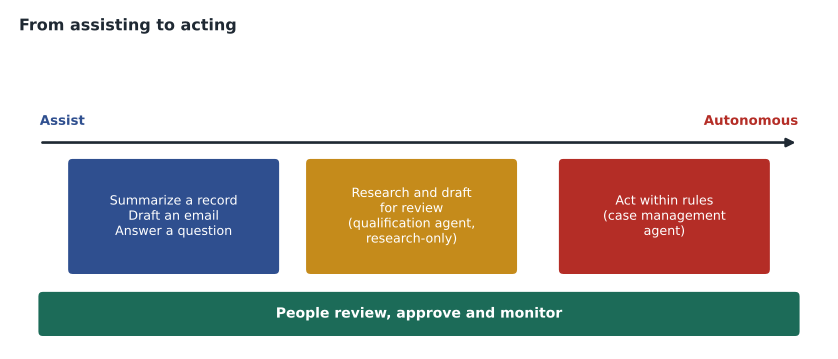
Copilot in Dynamics 365 is an assistant that works alongside a user. It answers questions about records the user can already see, summarizes rows and their activities, drafts emails and replies, and suggests next steps. It acts when a user asks and returns its work to the user. Agents go further: they take on a defined job, often running on their own when triggered, such as researching every new lead overnight or creating cases from incoming email. Agents carry out several steps, use tools and data sources, and record what they did so that people can review it.
Copilot in Sales
In Dynamics 365 Sales, Copilot appears in a side pane and in places on forms. It can summarize a lead, opportunity or account, pulling together the record, recent activities, notes and emails into a short paragraph with key facts and risks. It can produce a catch-up of what changed on a user's records since they last signed in. It can draft emails using the context of the record, in a chosen tone, for the seller to edit and send. It can answer questions in plain language, such as "Which of my opportunities closing this month have had no activity for two weeks?", and it can help prepare for meetings by summarizing the account and open deals. Copilot features in Sales are configured in the Sales app settings, where administrators choose which features are on and for which roles.
The newer sales agents take on whole tasks. The AB-210 skills outline names several. The Sales Qualification Agent researches leads using configured knowledge sources, public web sources and Dataverse data, judges how well each lead fits the company's target customer profile and drafts an initial outreach email; an organization configures it in a research-only mode or a research-and-engage mode, and sellers review the drafts before anything is sent. The Sales Opportunity Agent, Sales Close Agent and Sales Research Agent support opportunity management, closing deals and analysing sales performance with a research canvas. Configuring those agents is the subject of the specialist Sales courses.
Copilot in Customer Service
In Customer Service, Copilot helps agents work cases. It can summarize a case and its conversation history, draft email responses and chat replies from the case and knowledge articles, answer questions by searching the knowledge base and other approved sources, and suggest replies during live conversations in Contact Center. Ravi's agents used case summaries most: when a case moved from the counter to a phone agent, the summary saved a five-minute read.
Microsoft has also released autonomous service agents. The Case Management Agent automates parts of the case lifecycle, creating, updating, resolving and closing cases according to rules that administrators configure. The Customer Intent Agent analyses past and current cases and conversations to discover the most common reasons customers get in touch and recommends knowledge for them. The Customer Knowledge Management Agent reviews closed cases to draft knowledge articles, filling gaps in the knowledge base. Each is configured by an administrator, with rules about what it may do.
| Feature | What it does | Who stays in charge |
|---|---|---|
| Record and case summaries | Condense a row and its history into a paragraph | The user reads and decides |
| Email and reply drafts | Write a draft from record context | The user edits and sends |
| Sales Qualification Agent | Researches leads and drafts outreach | Sellers review drafts; admins choose which leads it handles |
| Case Management Agent | Creates and updates cases within configured rules | Admins set rules; supervisors monitor its actions |
| Customer Knowledge Management Agent | Drafts knowledge articles from resolved cases | Knowledge managers review before publishing |
How Copilot uses data
Copilot in Dynamics 365 works through the signed-in user's permissions. It reads only rows and columns that the user's security roles allow, so a counter agent in North branch cannot use Copilot to learn about a South branch customer, and nobody can ask Copilot for Ravi's credit notes unless they hold the column security profile. That is why the security design in lesson 5 matters even more once AI is switched on: Copilot makes it easier to find everything a user is allowed to see.
Some features use data beyond Dataverse. Copilot in Sales can draw on the user's Microsoft 365 email and meetings when that integration is enabled. The Sales Qualification Agent can use public web sources and knowledge sources that administrators approve. Administrators decide which sources are allowed, and good practice is to start narrow.
Turning features on and paying for them
Copilot features in Sales and Customer Service are generally included with the corresponding Dynamics 365 licences, though some depend on the tier. Agents consume Copilot Credits, which an organization buys as prepaid capacity or pays for through pay-as-you-go billing linked to an Azure subscription in the Power Platform admin center. The AB-210 outline lists configuring capacity, billing and credits as a prerequisite for deploying agents. Prices and included allowances change, so a consultant checks the current licensing guide when planning.
Features also depend on the environment. Administrators can turn generative AI features on or off for an environment, and some features are available only in certain regions or need data movement across regions to be allowed. Preview features are off by default in production and must be switched on deliberately. Mirela turned on summaries and email drafting for the pilot group first, then added the Sales Qualification Agent in research-only mode after two weeks.
Worked problem
Planning a careful start
Ottilie wants the Sales Qualification Agent to research and email every new lead automatically from day one. Ravi wants the Case Management Agent to close cases on its own. How should Mirela phase these?
Show solution
- Start with Copilot summaries and drafts for a pilot group, so people learn to review AI output.
- Configure the Sales Qualification Agent in research-only mode, limited to the inside sales role's leads, and review its research for two weeks.
- Move to research and engage only if drafts are consistently good, keeping a seller review step for outreach.
- Configure the Case Management Agent with narrow rules, for example creating cases from the warranty mailbox and updating fields, but leaving resolution to people at first.
- Monitor agent actions weekly and widen the rules gradually.
Answer: A phased rollout: assistive features first, agents in their most limited mode next, then wider permissions as evidence builds, with monitoring throughout.
Responsible use
Microsoft publishes responsible AI documentation for each Copilot feature and agent, describing intended uses, limitations and how to keep a person in control. The principles are familiar: AI output can be wrong or out of date, it should be checked before it reaches a customer, and accountability stays with people. Practically, Kestrelbay adopted three rules. Every AI-drafted email is read before sending. Agents start in their narrowest mode. And anyone who sees a wrong summary uses the feedback buttons and tells Mirela, so that sources and instructions can be fixed.
Agents add a fourth rule: monitor what they do. Agent actions are recorded and can be reviewed in the app, and supervisors should look at them regularly, especially after a rule change. If the Case Management Agent starts creating duplicate cases because a customer replied to an old thread, someone needs to notice within a day, not a month.
Extending with Copilot Studio
When the built-in features do not cover a need, Microsoft Copilot Studio lets makers build custom agents or extend Copilot with topics, knowledge sources and actions, including actions that read and write Dataverse data. A Kestrelbay example for a later phase was an agent on the website that answered questions about product compatibility from the parts catalogue and created a lead when a visitor asked for a quote. Copilot Studio agents follow the same principles: limited permissions, approved knowledge, monitoring and a clear handover to a person.
Copilot and the exams
Both certifications this course prepares for put AI at the centre. AB-210 is built around AI-first selling, from predictive scoring and the sales accelerator to the four sales agents, and expects candidates to configure prerequisites, interpret what an agent did and monitor it. MB-230 covers Copilot for service agents, knowledge and the service agents. In both, questions often turn on the boundary between what the AI does and what a person must do: who approves, where settings live, what data a feature can reach and how to tell whether it is working. The habit of asking "who stays in charge?" is the most useful thing to bring from this lesson into those courses.
Writing good instructions and knowledge
Much of what makes Copilot and agents useful is outside the AI itself. Copilot answers questions in Customer Service from the knowledge base, so out-of-date or contradictory articles produce poor answers. Agents follow instructions and rules that administrators write, and vague instructions produce vague results. Kestrelbay's first improvement after the pilot had nothing to do with settings: Ravi's team rewrote forty knowledge articles about warranty terms, pump compatibility and return procedures, each with a clear title, a short answer at the top and the details below. Case summaries and draft replies improved immediately.
For sales, the same was true of the target customer profile the Sales Qualification Agent used to judge fit. Ottilie's first version said "marinas and fleets"; her second version named the regions Kestrelbay served, the size of marina it wanted, the products that mattered and the signals of a good prospect, such as a planned refit. The agent's research became far more useful.
Measuring AI value
Mirela asked for a simple measure for each AI feature before switching it on, so that its value could be judged. For case summaries, the measure was the time an agent spent reading a transferred case before speaking to the customer. For email drafts, it was the share of drafts sent with only light edits. For the Sales Qualification Agent, it was how many researched leads sellers chose to contact. Each measure was checked at the four-week review, and features that did not earn their place were switched off.
Copilot in model-driven apps generally
Beyond the Sales and Customer Service features, model-driven apps include a Copilot pane that can answer questions about data in the app in plain language, such as "How many open cases does Harbour View Marina have?" or "Show me accounts in the North territory with opportunities over 50,000". It uses the tables in the app and the user's permissions. Makers can improve its answers by giving tables and columns clear names and descriptions, which is one more reason the glossary and labels from lesson 6 matter. Administrators turn the pane on or off for each environment in the Power Platform admin center, and can control whether users can give feedback on answers.
Kestrelbay's warehouse staff, who used only the small Warehouse app, found the pane surprisingly useful. Instead of learning views, they asked it which orders for a given marina were still open and got a list they could click straight into.
Common mistakes
MistakeAssuming Copilot can see data the user cannot.
InsteadCopilot works through the user's permissions; fix security before enabling AI.
MistakeLetting agents send customer email from day one.
InsteadStart in research-only or draft modes and add autonomy as evidence builds.
MistakeForgetting capacity for agents.
InsteadPlan Copilot Credits or pay-as-you-go billing before deploying agents.
MistakeTurning agents on and never checking them.
InsteadReview agent actions regularly and after every rule change.
Summary and key terms
- Copilot assists users with summaries, drafts and answers; agents take on defined jobs with several steps.
- Sales agents include the Sales Qualification, Opportunity, Close and Research agents; service agents include Case Management, Customer Intent and Customer Knowledge Management.
- Copilot respects the user's security roles and column security; agents use only approved sources and rules.
- Agents consume Copilot Credits through capacity or pay-as-you-go billing; features are turned on per environment and app.
- Responsible use means human review, narrow starts, feedback and regular monitoring.
- Copilot
- An AI assistant in Dynamics 365 that summarizes, drafts and answers for the signed-in user.
- Agent
- An AI component that carries out a defined multi-step job, often autonomously within rules.
- Research-only mode
- A Sales Qualification Agent configuration that researches leads and drafts outreach without engaging customers itself.
- Copilot Credits
- Capacity that agents consume, bought in packs or billed pay-as-you-go.
- Copilot Studio
- The Microsoft tool for building custom agents and extending Copilot.
- Grounding
- Supplying an AI model with specific data, such as a record and its activities, so its answer is based on it.
Practice problems
Work each problem on paper first, then reveal the answer to check.
What is the main difference between Copilot and an agent?
Show answer
Copilot assists a user on request; an agent carries out a defined multi-step job, often on its own within rules.
Why must security be right before Copilot is enabled?
Show answer
Copilot can reach everything the user is permitted to see, making overly broad access easy to exploit.
Name two Customer Service agents and what they do.
Show answer
For example: the Case Management Agent automates case creation and updates; the Customer Knowledge Management Agent drafts articles from resolved cases.
Lesson quiz · 5 questions
Score 60% or more to complete this lesson.
Create a free account to save your progress, take quizzes and earn a certificate.