
MSBA-140 · Lesson 12 of 12 · 18 min
Case study: setting up a CRM for a small firm
▶ Video coming soon A video version of this lesson is on the way.
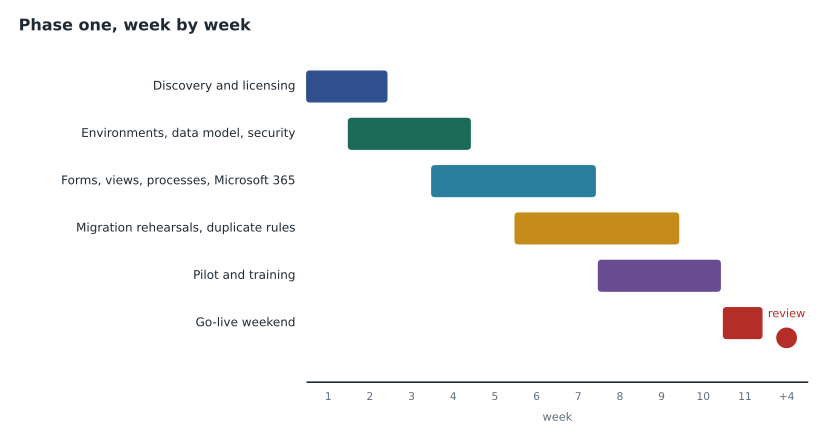
Eleven weeks after the first workshop, Kestrelbay went live with Dynamics 365 Sales and Customer Service on a wet Monday in October. This final lesson walks through the whole project as a case study, from the questions Mirela asked on day one to the review she held a month after go-live, so that every topic in the course is seen working together. It ends with a smaller firm for you to plan yourself.
The starting point
Kestrelbay Marine Supply had about 90 staff: 18 sellers (inside sales and field reps), 12 service and counter agents across three locations, 6 warehouse staff, a small finance team and four managers. Customers were marinas, yacht clubs, fishing fleets and retail sailors. Customer data lived in a fifteen-year-old database, spreadsheets and a shared mailbox. Ottilie wanted a visible pipeline and a sales process people followed; Ravi wanted service history in one place and response targets he could measure; the owner wanted one set of numbers.
Decisions, lesson by lesson
Mirela kept a decision log throughout. Its main entries map onto the lessons of this course.
| Area | Decision | Lesson |
|---|---|---|
| Apps and licences | Sales Enterprise for sellers, Customer Service Enterprise for agents, team members licences for warehouse lookups; Contact Center and Customer Insights deferred | 1 |
| Environments | A sandbox and a production environment in the home region, restricted to a security group | 1 |
| Data model | Standard Account, Contact, Opportunity and Case tables; a custom, user-owned Vessel table; restrict delete from Account to Vessel | 2 |
| Apps and navigation | Sales Hub, Customer Service workspace and a small Kestrelbay Warehouse app | 3 and 6 |
| Customers and activities | Organizations as accounts, people as contacts, retail sailors as contacts with no parent; activities closed promptly | 4 |
| Security | Business units for head office and two branches; copied roles per job; Entra ID group teams per branch; column security for credit fields | 5 |
| Forms and dashboards | Focused main forms per role, quick view forms, an interactive dashboard for agents and a pipeline dashboard for managers | 6 |
| Process | A two-table sales process with a revenue branch; a warranty claim process across case and a custom table | 7 |
| Microsoft 365 | Server-side synchronization, the Outlook add-in, Teams chat and channels for large deals, SharePoint document management | 8 |
| AI | Summaries and drafts in the pilot; the Sales Qualification Agent in research-only mode after two weeks; Case Management Agent deferred | 9 |
| Reporting | Views and dashboards for daily work; one Power BI report combining pipeline and invoiced sales | 10 |
| Data | Dataflows with Power Query, alternate keys on customer number, three duplicate detection rules and a merge exercise | 11 |
The pilot
Two weeks before go-live, eight users ran the system on real data in the sandbox: three sellers, three agents, a warehouse lead and Ottilie. Each had a script of daily tasks and a feedback form. The pilot found 27 issues. Most were small: a missing column on a view, a confusing label, a required step that sellers could not yet answer. Three were significant. Email tracking for counter staff was pulling in supplier invoices, so their tracking option was narrowed. The North branch security role could not see walk-in customers created at head office, so those accounts were moved to team ownership. And the Sales Qualification Agent was researching leads from the website's newsletter sign-up form, which were not sales enquiries at all, so the lead source was filtered.
The pilot also produced the training plan. Mirela ran role-based sessions of ninety minutes each, built around the navigation drill from lesson 3 and the daily scripts from the pilot, and the pilot users became floor-walkers for go-live week.
Go-live weekend
The cutover followed the rehearsed plan from lesson 11. The old database was frozen on Friday at six in the evening. The dataflows ran on Saturday morning and took a little under four hours. Verification passed at lunchtime on Saturday: row counts matched within the expected differences from merges, and Ottilie and Ravi checked their samples. Duplicate detection rules were published, mailboxes were tested and enabled, the Outlook add-in was deployed, and the system opened on Monday at seven.
Worked problem
Handling a go-live surprise
On Monday morning three field reps report that they cannot see the Documents tab on accounts, although head office staff can. What should Mirela check, in what order?
Show solution
- Confirm the reps can open the account form at all; if so, the issue is with document management, not the form.
- Check whether the reps have access to the SharePoint site used for document management; SharePoint permissions are separate from Dataverse roles.
- Check whether the reps' security role includes privileges on the document location table.
- Fix the gap (in this case the reps were missing from the SharePoint site's members group), then ask one rep to test before telling everyone.
Answer: Work from the simplest cause outward: form access, then SharePoint permissions, then Dataverse privileges. Fix, test with one user, then announce.
The four-week review
A month after go-live, Mirela met Ottilie, Ravi and the owner with numbers from the system itself. Of 18 sellers, 17 had logged activities every working day. The pipeline report matched finance's order book within a few percent, and the difference was explained by deals finance had not yet invoiced. Ravi could see that the average first response to an email case had fallen from just over a day to under five hours, and that one branch was still slower than the others. The duplicate detection job found only eleven new duplicates in four weeks.
The review also produced the phase two list: Customer Service service-level agreements and entitlements for fleet contracts; the Case Management Agent for the warranty mailbox, starting with narrow rules; Teams calling for inside sales; and Customer Insights for marketing, once the consent columns on contacts were reliable.
What made it work
Looking back, Mirela credited four things more than any feature. The business owned the decisions: every entry in the decision log had a name next to it. Data was cleaned before it was loaded, not after. Security was designed early and tested with real user accounts, which mattered even more once Copilot made data easier to find. And the project changed in small, tested steps through solutions in a sandbox, so production was never the place for experiments.
Your turn: Halyard Sailmakers
Halyard Sailmakers is a 12-person firm in Lunenburg that designs and repairs sails. It has 3 sellers who quote new sails, 2 service staff who handle repairs and warranty claims, 5 workshop staff and 2 owners. Customers are yacht clubs, sailing schools and individual sailors. Quotes depend on the boat, so the boat's measurements matter. The owners want to see quotes in progress and repair turnaround times, and they work entirely in Outlook and Teams. Their customer list is in a spreadsheet of 2,100 rows that mixes companies and people.
| Question to answer | Points to consider |
|---|---|
| Which apps and licences? | Sales for sellers, Customer Service for repairs, lighter licences for workshop lookups; check tiers against needs |
| What data model? | Accounts, contacts, a custom Boat table with measurements, opportunities for quotes, cases for repairs |
| What security? | Is one business unit enough for a single site? Which roles, and who sees prices? |
| What process? | A short quote process and a repair process; which steps must be required? |
| What integration? | Server-side synchronization, the Outlook add-in, Teams chat and SharePoint for sail drawings |
| What reports? | Open quotes by stage and repair turnaround on a dashboard; is Power BI needed yet? |
| What migration? | Split companies and people, profile duplicates, load accounts before contacts |
A strong answer for Halyard is smaller than Kestrelbay's, not a copy of it. One business unit is likely enough. Two or three copied roles cover sellers, service staff and workshop lookups. A Boat table with a lookup to the customer, which can be an account or a contact, supports both quotes and repairs. A short business process flow on opportunities and another on cases give structure without bureaucracy. Server-side synchronization and the Outlook add-in matter more than dashboards for a firm that lives in email. And Copilot summaries and drafts can be switched on early, because a firm this size has no spare time for reading long email threads, while agents can wait until the basics are steady.
Checklist for any customer engagement setup
Mirela left Kestrelbay a one-page checklist that applies to any small firm starting with the customer engagement apps. Before configuring: agree goals, users, licences, environments and a decision owner. Data model: use standard tables first, add custom tables only for real things with their own data, choose ownership and relationship behaviour deliberately. Security: design business units and roles for jobs, test with real user accounts, use column security for sensitive fields. Apps: focused forms, views and dashboards per role, business process flows for the steps that matter. Integration: synchronize mailboxes, deploy the Outlook add-in, connect Teams and SharePoint where they help. AI: start with assistive features, add agents in narrow modes, monitor. Data: profile, clean, map, load parents first, publish duplicate rules, rehearse. After go-live: review with real numbers at four weeks and plan the next phase.
A note on scale
The steps in this case study are the same for a firm of twelve and a company of twelve thousand; what changes is how much of each step is needed. A small firm may have one environment pair, one business unit and three roles, and a migration that fits in an afternoon. A large company may have a dozen environments, deep business unit hierarchies, hundreds of roles and a migration programme that runs for months with an integration partner. The exams test the same concepts at both sizes, so it pays to be able to explain each decision in plain terms: what it does, why it was chosen and what would change at a different scale.
The people side
Software was the easier half of the project. Mirela spent as much time on people as on configuration: explaining why the change was happening, listening to objections, and making the first week easy. Each team had a named champion from the pilot. The training used Kestrelbay's own customers and products, not demo data. Ottilie stopped accepting pipeline updates by email from go-live day, which made the new system the only place the pipeline lived. And Ravi celebrated the first week's response times in the counter teams' Teams channel, so agents could see the difference their work made.
Resistance came where Mirela expected it. Two long-serving counter staff missed the old database's single screen. Rather than argue, she built them a personal dashboard that showed open cases, today's callbacks and the customer search on one page. Within a fortnight one of them was showing new colleagues how to use it.
Measuring success
Mirela insisted on a small number of measures, agreed before go-live, so that the four-week review could say whether the project had worked. For sales: the share of sellers logging activities daily, and the gap between the pipeline report and the order book. For service: first response time on email cases and the number of cases reopened. For data: new duplicates found each week and the number of open opportunities missing a close date. For adoption: how many people still kept their own spreadsheets, measured by asking them. Each measure had a target and an owner, and each could be read from the system itself, which made the review a conversation about facts rather than feelings.
Common mistakes
MistakeCopying a large company's design for a 12-person firm.
InsteadScale the design to the firm: fewer business units, fewer roles, simpler processes.
MistakeGoing live without a pilot on real data.
InsteadPilot with real users and data to find the problems test data hides.
MistakeTreating go-live as the end of the project.
InsteadReview with real numbers after a few weeks and plan the next phase.
MistakeLeaving decisions without an owner.
InsteadRecord each decision with the business person who made it.
Summary and key terms
- A customer engagement project moves from discovery through environments, data model, security, configuration, integration, migration, pilot and go-live.
- A decision log ties each choice to a business owner and to the platform feature that implements it.
- Pilots on real data find the problems test data hides; rehearsed migrations make go-live predictable.
- Post-go-live reviews use the system's own data to measure success and plan the next phase.
- Small firms need the same steps as large ones, scaled down.
- Decision log
- A record of project decisions, who made them and why.
- Pilot
- A trial of the system by a small group of real users on real data before go-live.
- Cutover
- The planned switch from the old system to the new one, including the final data load.
- Floor-walker
- A trained user who helps colleagues in person during go-live.
- Phase two
- The next set of features planned after the first go-live.
- Verification
- Checks after a data load that counts and sample rows are correct.
Practice problems
Work each problem on paper first, then reveal the answer to check.
Name three issues Kestrelbay's pilot found and how each was fixed.
Show answer
Counter email tracking pulled in supplier invoices (tracking narrowed); branches could not see walk-in customers (moved to team ownership); the qualification agent researched newsletter sign-ups (lead source filtered).
Why might Halyard Sailmakers need only one business unit?
Show answer
It is a single small site where everyone can see the same customers; business units are for dividing data.
What evidence did the four-week review use?
Show answer
Numbers from the system: activity logging rates, pipeline compared with orders, email case response times and new duplicates.
Lesson quiz · 5 questions
Score 60% or more to complete this lesson.
Create a free account to save your progress, take quizzes and earn a certificate.