
MSBA-140 · Lesson 7 of 12 · 18 min
Business process flows
▶ Video coming soon A video version of this lesson is on the way.
Ottilie had a sales process. It lived on a laminated card pinned above every seller's desk: qualify the need, check the budget, visit the site, quote, negotiate, close. The trouble was that nobody followed it the same way twice, and when a big refit deal slipped, nobody could say which step had been skipped. "Can the system make them follow the card?" she asked. Mirela's answer was a business process flow, and she was careful to add: "It can guide them. Whether they follow it depends on you." This lesson explains what business process flows are, how to design them and where they fit among the other automation tools.
What a business process flow is
A business process flow guides users through a series of stages, each with steps that ask for particular columns. It appears as a bar beneath the form header with the stages in order, the current stage highlighted, and a panel that opens to show the steps for that stage. When the required steps are done, the user moves to the next stage with a Next Stage button. Each flow is itself stored as a Dataverse table, and every time a flow runs for a row, an instance of that table records which stage the row is at, so reporting can show how many opportunities sit at each stage.
Dynamics 365 Sales includes the Lead to Opportunity Sales Process, which starts on a lead with a Qualify stage and continues on the opportunity through Develop, Propose and Close. Customer Service includes the Phone to Case Process, with Identify, Research and Resolve stages. These are good starting points, and like predefined security roles they are best copied or extended rather than edited.
Stages, steps and categories
Each stage belongs to one table and has a category, such as Qualify, Develop, Propose or Close, which reports use to group stages from different flows. Each step points to a column on that table; when the user fills the step, the column is filled. A step can be marked required, in which case the user cannot move to the next stage until it is complete. Steps can also be action steps, which run an on-demand workflow or action, or flow steps that run a Power Automate flow from the stage, such as sending a request for a site visit to the operations team.
A stage can also run logic when users enter or leave it, through a cloud flow or workflow that watches the active stage. A flow can contain up to 30 stages, each with up to 30 steps, and a single flow can span up to five different tables. Those limits are rarely reached; a flow that long is usually a sign that the process needs simplifying.
Crossing tables and branching
A business process flow can move from one table to another, which is how the sales process crosses from lead to opportunity. When a lead is qualified, the next stage opens on the new opportunity and the flow continues there. Mirela used the same idea at Kestrelbay for warranty claims: the flow started on the case and moved to a custom Warranty claim table for the inspection and approval stages.
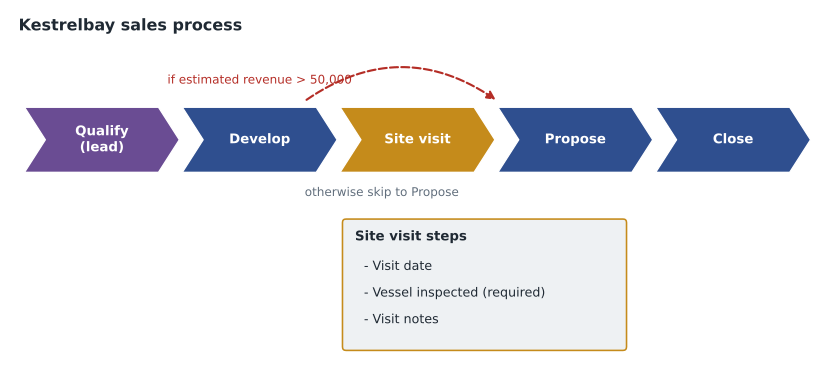
Branching lets a flow take different paths. After a stage, a condition such as "Estimated revenue is greater than 50,000" can send the user to one stage or another. Conditions can combine several rules with AND, and a branch can rejoin the main path later. At Kestrelbay, small counter sales skipped the site visit stage, and large refit deals went through it. Branches can only be based on columns of the current stage's table, and a flow cannot return to an earlier stage through a branch; users move back with the Previous Stage button instead.
Worked problem
Designing Kestrelbay's sales process
Ottilie's card lists qualify the need, check the budget, visit the site, quote, negotiate and close. Site visits are needed only for deals above 50,000. Sellers often forget to record the budget. How should Mirela turn this into a business process flow?
Show solution
- Copy the Lead to Opportunity Sales Process as "Kestrelbay sales process".
- Qualify stage on the lead: steps for the need, the budget amount (required) and the decision maker.
- Develop stage on the opportunity: steps for the vessel, the products of interest and the expected close date.
- Branch: if estimated revenue is greater than 50,000, go to a Site visit stage with the visit date and vessel inspected (required); otherwise go straight to Propose.
- Propose stage: quote sent and proposal presented; Close stage: final decision and the reason won or lost.
Answer: A two-table flow (lead and opportunity) with five or six stages, one branch on revenue and required steps for the information sellers forget. Ottilie then uses the stage counts in her pipeline reports.
Who sees which flow
A table can have several business process flows, and each is enabled for particular security roles. A row can only be in one flow at a time, but a user with access to more than one can switch process. The process order decides which flow a new row starts with. Kestrelbay ended with two flows on opportunity: the standard sales process and a short "Repeat parts order" process for regular fleet customers who reorder the same items, assigned to the inside sales role.
A flow must be activated before it appears. Like other components, it is built in a sandbox inside a solution, tested and moved to production. Changing an active flow is possible, but changes that remove stages can strand rows that are already in those stages, so changes should be planned with the business.
Business process flows among other automation
Business process flows guide people; they do not run in the background. For background work, Dataverse offers other tools, and choosing the right one is a frequent exam question.
| Tool | Runs | Use it for |
|---|---|---|
| Business process flow | In the form, as the user works | Guiding users through stages and required information |
| Business rule | On the form and, at table scope, on the server | Simple conditional logic: show, hide, require, set values |
| Power Automate cloud flow | In the background when rows change, on a schedule or on demand | Notifications, approvals, integration, multi-step automation |
| Classic workflow | In the background or in real time | Existing automation; new work normally uses cloud flows |
| Plug-in | On the server, within the transaction | Complex logic written by developers |
Kestrelbay used all of these together. The sales process guided the seller. A business rule made the vessel required on the opportunity when the product family was Engines. A cloud flow sent a Teams message to the operations manager when an opportunity entered the Site visit stage, and another sent the customer a thank-you email when a case was resolved. A developer at the partner wrote one plug-in to calculate freight charges from the warehouse's rate table.
Measuring a process
Because each business process flow stores its instances in a table, the flow becomes measurable. The instance table records the active stage, how long each stage has been active and when the process started and finished. Ottilie's pipeline dashboard showed opportunities by stage, and a simple chart of average days in each stage showed that deals sat longest in Propose, waiting for quotes. That led to a change that had nothing to do with software: the quoting team added a second person on Mondays.
Designing processes people will follow
Mirela had seen many projects where a business process flow became a box-ticking exercise. Her rules for Kestrelbay were simple. Model the process people actually follow, not the one on a slide. Keep each stage short, with only the steps that matter at that point. Make a step required only when the information is truly needed to move on. Name stages in the business's own words. And review the flow after three months with real data, removing steps nobody uses.
The designer in practice
Business process flows are built in a visual designer opened from the solution in Power Apps. The designer shows the stages as a horizontal chain, with a components pane for adding stages, conditions, data steps (the ordinary column steps), action steps and flow steps, and a properties pane for the selected item. Each stage asks for its table, display name and category; each step asks for its column and whether it is required. A Validate button checks for problems such as a branch that leads nowhere, and the flow must then be saved and activated. Changes to a business process flow are part of the solution, so they move to production in the same managed solution as the rest of the configuration.
Mirela built Kestrelbay's flows with Ottilie sitting beside her, which turned the design into a conversation rather than a specification. When Ottilie saw the five stages laid out on screen, she removed one herself. "Negotiate is just Propose that takes longer," she said, and the stage was merged.
Business process flows in Customer Service
The service side of Kestrelbay used a copy of the Phone to Case Process. The Identify stage asked for the customer, the vessel and the product; the Research stage asked whether the issue was covered by warranty and linked any knowledge article used; and the Resolve stage asked for the resolution type and whether the customer confirmed the fix. Warranty claims branched into a separate stage on the custom Warranty claim table, where the warehouse recorded the returned part and the supplier's credit. Ravi liked the flow for one reason above all: new counter staff learned the service process simply by following it.
Service flows tend to be shorter than sales flows, because cases move quickly. Mirela kept each stage to four steps or fewer and made only the vessel and resolution type required. Agents could still record more detail on the form; the flow simply made sure the essentials were never missed.
Automating around stages
Many companies want something to happen when a row reaches a stage. Because the active stage is stored on the flow's instance table, a Power Automate cloud flow can be triggered when the stage changes, or a flow step placed in the stage can run on demand. Kestrelbay used both. When an opportunity entered Site visit, a cloud flow created an appointment request for the operations manager. In the Close stage, a flow step let the seller send the customer a satisfaction survey with one click. Both were built and tested in the sandbox, in the same solution as the business process flow itself, so they moved to production together.
Testing a business process flow
Business process flows are easy to test badly. A consultant clicks through every stage with complete test data and declares success. Mirela tested Kestrelbay's sales process the way sellers would actually meet it: a lead that arrived with no budget, a deal that dropped below 50,000 after the site visit stage, an opportunity reopened after being lost, a seller who switched process halfway, and a user whose role was not enabled for the flow. Each case exposed something. The reopened opportunity started again at Qualify until she set it to resume at the stage it had reached; and the user without the role saw no stage bar at all, which was correct but needed explaining in training.
She also checked what happened to rows created before the flow existed. Old opportunities migrated from the previous database had no flow instance, so the stage bar appeared only when someone next opened and saved them. For reporting, Mirela ran a one-off update that set the right stage on every migrated open opportunity, so that Ottilie's pipeline chart included them from day one.
Common mistakes
MistakeUsing a business process flow to send emails in the background.
InsteadUse a Power Automate cloud flow for background work; a business process flow guides users.
MistakeMaking every step required.
InsteadRequire only the information truly needed to move on, or users will type junk to get past.
MistakeEditing the out-of-the-box process directly.
InsteadCopy or extend it in your own solution.
MistakeBuilding a 25-stage flow to capture every detail.
InsteadKeep stages few and short; if a flow is very long, simplify the process.
Summary and key terms
- A business process flow guides users through stages with steps that fill columns; it appears beneath the form header.
- Stages belong to tables and have categories; a flow can span up to five tables, with up to 30 stages and 30 steps per stage.
- Branches send users down different paths based on conditions; required steps gate progress.
- Flows are enabled for security roles, ordered, activated and moved between environments in solutions.
- Business rules, cloud flows, workflows and plug-ins handle other kinds of logic; each instance of a flow can be reported on.
- Business process flow
- A guided series of stages and steps shown on a form.
- Stage
- A phase of a business process flow, belonging to one table and one category.
- Step
- An item within a stage that asks for a column value or runs an action.
- Branch
- A condition that sends a flow down one of several paths.
- Process order
- The sequence that decides which flow a new row starts with.
- Stage category
- A label such as Qualify or Propose used to group stages for reporting.
Practice problems
Work each problem on paper first, then reveal the answer to check.
What is the difference between a business process flow and a Power Automate cloud flow?
Show answer
A business process flow guides a user through stages on a form; a cloud flow runs automation in the background.
How many different tables can one business process flow span?
Show answer
Up to five.
Ottilie wants to know where deals wait longest. Where does that data come from?
Show answer
The business process flow's instance table, which records the active stage and how long it has been active.
Lesson quiz · 5 questions
Score 60% or more to complete this lesson.
Create a free account to save your progress, take quizzes and earn a certificate.