
MSBA-140 · Lesson 4 of 12 · 19 min
Accounts, contacts and activities
▶ Video coming soon A video version of this lesson is on the way.
When Mirela loaded a sample of Kestrelbay's old customer table into the sandbox, the first record she opened was a perfect example of the problem. "Harbour View Marina" appeared four times, once for each person who had ever ordered from it, and the harbourmaster's mobile number was typed into the company's fax column. Ottilie laughed. "That's our whole customer list. Companies and people mixed together, and the history in somebody's head." This lesson covers the records at the centre of every customer engagement app: accounts, contacts and the activities that record every interaction with them.
Accounts and contacts
In Dynamics 365, an account represents an organization: a company, a marina, a fishing co-operative, a government department. A contact represents a person. The separation is deliberate. A marina can have a harbourmaster, a purchasing clerk and an accounts payable contact, and each of those people can change jobs without the marina's history going with them. Together, accounts and contacts are often called customers, and many lookups in Sales and Customer Service, such as the customer on a case or an opportunity, accept either.
A contact usually has a parent account, the organization the person works for, set through the Company Name lookup. An account has a primary contact, the main person to deal with. An account can also have a parent account of its own, which lets Kestrelbay model a group: a regional port authority as the parent of the five marinas it operates. The hierarchy view then shows the whole group in one chart, and rollups can total opportunities or revenue across it.
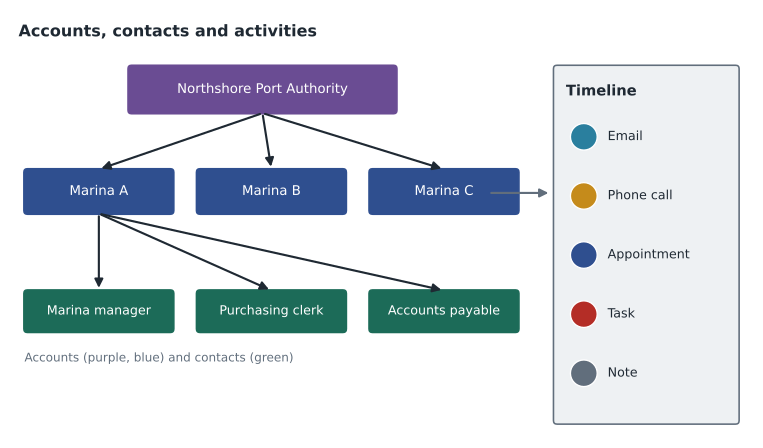
Not every customer is an organization. Kestrelbay sells to individual sailors at its counters, and those customers have no company. Dynamics 365 supports this: a contact can stand alone without a parent account, and cases, opportunities and orders can name a contact as the customer. Mirela set a rule for Kestrelbay: retail customers are contacts with no parent account; anyone buying on behalf of a business is a contact under that business's account.
What goes on an account
The account form holds identifying details (name, account number, main phone, website, addresses), classification (relationship type, industry, customer size, territory) and commercial details (credit limit, payment terms, currency, price list). The form also shows related records in subgrids or tabs: contacts, opportunities, cases, orders and, at Kestrelbay, the custom Vessel table.
Accounts and contacts each have addresses. The form shows two address blocks, but the platform stores any number of addresses for a customer, which suits a fishing company with a head office, a wharf and a mailing box. Address columns can use the built-in address input, which suggests complete addresses as the user types. Territories, which group customers by region for sales management, are a separate table: each account can be assigned a territory, and territories can have a manager and members.
| Question | Account | Contact |
|---|---|---|
| What does it represent? | An organization | A person |
| Can it have a parent? | Yes, another account (hierarchy) | Yes, an account (the company the person works for) |
| Can it be the customer on a case or opportunity? | Yes | Yes |
| Kestrelbay example | Harbour View Marina | The harbourmaster of Harbour View Marina |
Activities
Every interaction with a customer is recorded as an activity. Activities are rows in their own tables, but they share a common set of columns through the activity table and appear together on a timeline. The standard types are:
| Activity type | Typical use | Key columns |
|---|---|---|
| Messages sent and received, often tracked from Outlook | From, To, Subject, Description | |
| Phone call | Inbound and outbound calls | Direction, Phone number, Duration |
| Appointment | Meetings and visits, synchronized with Outlook calendars | Start, End, Location, Attendees |
| Task | Something to do by a date | Due date, Priority, Owner |
| Letter and fax | Older channels, still available | Address, Direction |
Every activity has a Regarding column, a lookup that ties it to the row it concerns: an account, contact, opportunity, case or another table enabled for activities. An email about a quote for a new outboard can be regarding the opportunity, and it will then appear on the opportunity's timeline and also roll up to the account's. Activities also have parties, such as the sender and recipients of an email or the attendees of an appointment, and those parties can be users, contacts, accounts or leads.
Activities have a status. An open activity is planned or in progress; a completed activity has happened; a cancelled one did not. Marking a phone call complete is what turns a plan into history. Many reports and Copilot summaries rely on completed activities, so Mirela trained the team to close activities promptly.
Administrators can enable activities for custom tables too. When Mirela created the Vessel table she ticked the option to allow activities, so that a phone call about a boat's refit could be regarding the vessel itself.
Worked problem
Recording a visit
Joaquim visits Harbour View Marina, meets the harbourmaster and the purchasing clerk, promises a quote for two new fuel dock pumps by Friday, and agrees to call back after the clerk checks the budget. How should he record this?
Show solution
- Create an appointment, regarding the marina account, with both contacts as attendees, and mark it complete.
- Create a task due Friday: "Send fuel dock pump quote", regarding the open opportunity for the pumps.
- Create a phone call activity for the follow-up, regarding the same opportunity, with a due date next week.
- Add a short note to the opportunity with what the clerk said about the budget.
Answer: One completed appointment, one open task and one open phone call, all tied to the right rows, plus a note. The timeline then tells the whole story to anyone who opens the account.
Notes, posts and attachments
Besides activities, the timeline shows notes and posts. A note is free text attached to a row, optionally with a file such as a photo or a PDF. A post is a short update, either written by a user or generated automatically when something happens, such as an opportunity being won. Attachments to notes and emails count against file capacity, so very large files are often better stored in SharePoint and linked, a topic for lesson 8.
The timeline
The timeline control on a form brings all of this together in date order: activities, notes, posts and, depending on configuration, related records' activities. Users can filter it by type, status or date, search it, expand an item to read it, and create a new item directly from it. Administrators configure which record types appear, whether related rows' activities roll up, and how many items load at once. At Kestrelbay, Mirela configured the account timeline to include activities from the account's opportunities and cases, so the account became a single story of the customer.
The timeline is also where Copilot helps most visibly. In Sales and Customer Service, Copilot can summarize a row and its recent activities, which turns a long scroll into a short paragraph. Lesson 9 covers those features.
Connections and relationship roles
Some relationships between customers do not fit a lookup. A marina's insurance broker, a fleet's naval architect or a former employee who now works at a competitor are links between rows that matter to sellers but are not ownership. Connections record these: a connection links two rows, such as two contacts or a contact and an account, with a connection role on each side, such as Broker and Client. Connection roles are defined by an administrator, and connections appear in their own subgrid on forms.
Leads and how they become customers
In Dynamics 365 Sales, a first enquiry from someone who is not yet a customer is usually recorded as a lead, not as an account and contact. A lead holds both company and person details on one row, which suits an enquiry from a website form or a trade show where the facts are still uncertain. When a seller qualifies the lead, the app can create an account, a contact and an opportunity from it in one step, or link the lead to an existing account and contact if they are already in the system. If the enquiry goes nowhere, the lead is disqualified with a reason, and it stays in the system for reporting.
Leads keep the customer list clean. A trade show can bring Kestrelbay two hundred badge scans, most of which will never buy. If each scan became an account, the account list would fill with noise. As leads, they can be researched, scored and either qualified or disqualified. The AB-210 exam spends a whole section on leads, including predictive lead scoring and the Sales Qualification Agent, which researches leads and drafts outreach for a seller to review. The specialist Sales courses cover those features in depth; for now, the key point is where leads sit in the data model: before accounts and contacts, feeding them.
Customer Service and the customer record
In Customer Service, the customer record works the same way but from the service side. A case has a Customer column that can point to an account or a contact, and an optional contact for the person who reported the problem. Cases also link to entitlements, which describe what support the customer is owed, such as a number of free service calls or a support period, and to products and, at Kestrelbay, vessels. Service agents spend much of their day on the account and contact forms, checking warranties, open cases and past orders, so the same well-kept records that help sellers help agents.
Ravi made one request that affected the contact form: show the contact's preferred method of contact and the language they prefer to be served in, near the top. Dynamics 365 has standard columns for both, along with columns for whether the contact allows email, bulk email, phone calls and mail. Those consent columns matter for privacy rules as well as courtesy, and Kestrelbay's marketing plans in a later phase would depend on them being accurate.
Email tracking and server-side synchronization
Most activities at Kestrelbay would arrive from Outlook, not be typed. Server-side synchronization connects each user's Exchange Online mailbox to Dataverse, so that emails, appointments, contacts and tasks can be synchronized. A user's mailbox record must be approved and tested before synchronization starts. Users then track emails and appointments, either manually with the Dynamics 365 app for Outlook or automatically by rules set in their personal options, such as tracking all email from known contacts. A tracked email becomes an email activity in Dataverse, with its Regarding set by the user or matched automatically from a reply to an earlier tracked message. Lesson 8 returns to Microsoft 365 integration.
Good data from the start
Accounts and contacts are only useful if people trust them. Mirela agreed four rules with Ottilie and Ravi before go-live. Search before creating: every user should search for a customer before adding one, and duplicate detection (lesson 11) would warn them. Use the right record: organizations are accounts, people are contacts. Fill in the parent: every business contact gets a parent account. And close the loop: activities are marked complete or cancelled, never left open forever.
Customer records and privacy
Customer records hold personal information, and privacy law applies to them. In Canada that means federal and provincial privacy laws, and in the United States a mix of state laws such as those in California. Practically, Kestrelbay kept only the personal details it needed, recorded each contact's consent preferences, and agreed a process with its privacy lead for responding when a customer asked to see or remove their data. Dataverse supports this with consent columns, auditing and the ability to find all rows related to a contact.
Account and contact views worth building
A few views on accounts and contacts paid for themselves at Kestrelbay within the first month. "My accounts with no activity in ninety days" gave sellers a call list. "Contacts without a parent account" helped clean up business customers wrongly created as retail. "Accounts by territory and customer type" supported Ottilie's quarterly planning. And "Contacts who do not allow email" kept the service team from sending reminders to customers who had opted out. Each was a system view, built once and shared with the roles that needed it.
Common mistakes
MistakeCreating a new account for each person at a company.
InsteadCreate one account for the organization and a contact for each person, linked through the parent account.
MistakeTyping call details into the account's description field.
InsteadRecord calls as phone call activities regarding the right row so they appear on the timeline.
MistakeLeaving activities open after they have happened.
InsteadMark activities complete so reports, timelines and Copilot summaries reflect what really happened.
MistakeStoring large drawings and videos as note attachments.
InsteadKeep large files in SharePoint and link them, to save Dataverse file capacity.
Summary and key terms
- Accounts represent organizations and contacts represent people; either can be the customer on a case or opportunity.
- Contacts usually have a parent account; accounts can form hierarchies through a parent account.
- Activities (email, phone call, appointment, task and others) record interactions and link to a row through Regarding.
- The timeline shows activities, notes and posts in date order and can include related rows' activities.
- Connections with connection roles record links that are not ownership, such as a broker and client.
- Account
- A row representing an organization that Kestrelbay does business with.
- Contact
- A row representing a person, usually linked to a parent account.
- Activity
- A record of an interaction, such as an email, phone call, appointment or task.
- Regarding
- The lookup on an activity that ties it to the row it is about.
- Timeline
- The form control that shows activities, notes and posts for a row in date order.
- Connection role
- A label describing each side of a connection between two rows.
Practice problems
Work each problem on paper first, then reveal the answer to check.
Why are accounts and contacts kept separate?
Show answer
So that an organization's history survives when people change jobs, and so several people can be linked to one organization.
An email about a quote should appear on both the opportunity and the account timelines. How?
Show answer
Set the email's Regarding to the opportunity and configure the account timeline to include related activities.
How would you record that a contact is the insurance broker for a marina?
Show answer
Create a connection between the contact and the marina account with connection roles such as Broker and Client.
Lesson quiz · 5 questions
Score 60% or more to complete this lesson.
Create a free account to save your progress, take quizzes and earn a certificate.