
MSBA-140 · Lesson 1 of 12 · 19 min
Dynamics 365 customer engagement apps
▶ Video coming soon A video version of this lesson is on the way.
Kestrelbay Marine Supply sells engines, rigging, electronics and safety gear to marinas, boatyards, fishing fleets and weekend sailors from its head office and warehouse in Nanaimo and two branch counters up the coast. For fifteen years the company has run on a home-built database, a wall of spreadsheets and a shared orders mailbox that four people read in turns. In the first week of the project, the sales director, Ottilie Graves-Mendoza, put the problem plainly to the consultant they had hired, Mirela Dragomir-Hale: "Joaquim visits forty marinas a month and nobody else knows what he promised. Ravi's team answers the same question three times because the last answer lives in someone's inbox. We need one place for customers."
Mirela's answer was the family of products Microsoft calls the Dynamics 365 customer engagement apps. This course follows her as she sets up those apps for Kestrelbay, and it covers the foundations that the AB-210 (Sales AI Consultant) and MB-230 (Customer Service Functional Consultant) exams both assume. This first lesson maps the territory: what the apps are, what they share and how a company chooses among them.
Customer engagement and finance and operations
Dynamics 365 is a brand that covers two quite different families of business applications. The finance and operations apps (Finance, Supply Chain Management, Commerce, Human Resources and Project Operations) run the back office: ledgers, inventory, production and payroll. They have their own database and development model. The customer engagement apps run the front office: everything a company does to find, win and keep customers. They include Dynamics 365 Sales, Customer Service, Contact Center, Field Service, Customer Insights and the customer engagement side of Project Operations.
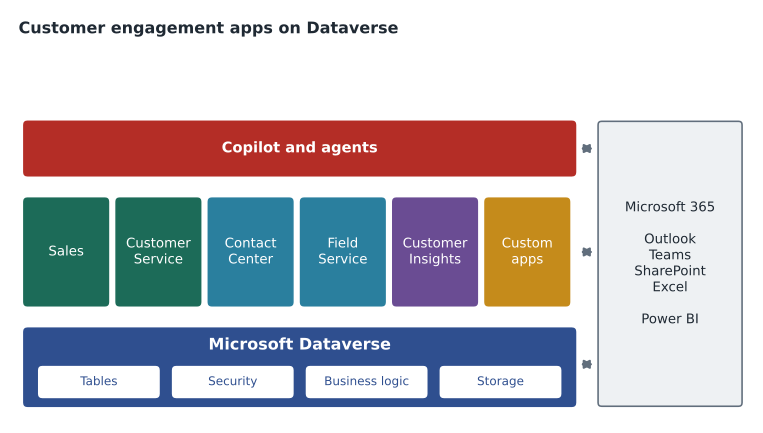
A third product, Business Central, is an all-in-one system for small and mid-sized companies, with its own database. It is covered in its own course. This course stays with the customer engagement family, which all run on Microsoft Dataverse, the data platform shared with Microsoft Power Platform.
The main apps
Dynamics 365 Sales manages the path from a first enquiry to a closed deal: leads, opportunities, quotes, orders and invoices, product catalogues and price lists, forecasts and goals. Its sales accelerator gives sellers a work list of who to contact next. Recent releases have added agents, such as the Sales Qualification Agent, which researches incoming leads and drafts outreach for a seller to review.
Dynamics 365 Customer Service manages support: cases, queues, routing rules, service-level agreements, entitlements and a knowledge base. The Customer Service workspace app lets an agent handle several cases in tabs. Microsoft has also released autonomous agents for service, including the Case Management Agent, which helps create and update cases, and the Customer Knowledge Management Agent, which drafts knowledge articles from resolved cases.
Dynamics 365 Contact Center adds voice, chat, messaging and other channels with unified routing, and can be used with Customer Service or with another CRM. Field Service schedules technicians, tracks work orders and manages spare parts. Customer Insights combines customer data from many sources into unified profiles and runs marketing journeys.
| App | Core records | Typical users at Kestrelbay |
|---|---|---|
| Sales | Leads, opportunities, quotes, orders, products | Inside sellers, field reps, the sales director |
| Customer Service | Cases, queues, knowledge articles, entitlements | Counter staff, phone and email agents |
| Contact Center | Conversations across voice, chat and messaging | Not needed in phase one |
| Field Service | Work orders, bookings, resources | Not needed: Kestrelbay sells parts but does not send technicians |
| Customer Insights | Unified profiles, segments, journeys | A later phase for marketing |
Mirela's first recommendation was to resist buying everything at once. Kestrelbay's urgent pain was in selling and service, so phase one would be Sales and Customer Service, with Contact Center and Customer Insights held back until the data was clean.
What the apps share
Because every customer engagement app stores its data in Dataverse, a lot is shared. An account created by a seller in Sales is the same row that a service agent opens in Customer Service. Contacts, activities, users, teams and security roles are common. That is the main argument for the platform: one customer record, many teams.
The apps also share the model-driven app framework. A model-driven app is generated from the data model: you choose tables, forms, views, charts and dashboards, and the platform builds the screens. Sales Hub and Customer Service Hub are themselves model-driven apps, and a company can build its own, such as a small app just for the warehouse team to see open orders. Lesson 3 covers navigation in detail.
Finally, the apps share Microsoft's AI features. Copilot in Sales and in Customer Service summarizes records, drafts emails and answers questions about the data a user can already see. Agents go further and carry out multi-step work, with a person reviewing the results. Lesson 9 covers both.
Environments and where an app lives
Dynamics 365 apps are installed into a Dataverse environment, a container that holds a database, apps, flows and security settings. Environments are managed in the Power Platform admin center. A typical company has at least a production environment and a sandbox for testing changes. Each environment has a type (production, sandbox, trial or developer), a region, a security group that limits who can be added, and capacity that counts towards the tenant's database, file and log storage.
Kestrelbay chose the Canada region for its environments so that its customer data would be stored in Canadian datacentres. Mirela created a sandbox called Kestrelbay-Test for configuration and training and a production environment called Kestrelbay, and limited both to a security group of the staff who would use them.
Apps arrive in an environment as solutions: packages of tables, forms, processes and other components. Microsoft's apps are installed as managed solutions that Microsoft updates. A company's own changes are made in its own unmanaged solution in a sandbox, then exported as a managed solution and imported into production. That discipline, called application lifecycle management, keeps production stable.
Licensing in outline
Customer engagement apps are licensed per user, and most come in tiers. Dynamics 365 Sales has Professional, Enterprise and Premium plans: Professional covers core sales force automation, Enterprise adds the full lead-to-cash process, predictive scoring, forecasting and deeper customization, and Premium adds conversation and relationship intelligence and more AI. Customer Service has a similar Professional, Enterprise and Premium ladder. In 2026 the US list prices for Sales were about 65, 105 and 150 US dollars per user per month for the three tiers; prices change, so always check the current price list.
Two other licence types matter. A team members licence gives light, mostly read-only access for staff who only need to look things up. And because agents consume AI capacity, many agent features draw on Copilot Credits bought as capacity packs or through pay-as-you-go billing attached to an Azure subscription. Licensing is a deep topic of its own; for a foundations course the point is to know that the tier decides which features a user can use.
Worked problem
Matching people to licences
Kestrelbay has 18 sellers, 12 service agents, 6 warehouse staff who only need to look up orders and customers, and 4 managers who approve discounts and read dashboards. Ottilie wants predictive lead scoring and forecasting. What licence types should Mirela propose for phase one?
Show solution
- Sellers need lead-to-cash, scoring and forecasting, so Sales Enterprise (or Premium if they also want conversation intelligence).
- Service agents need cases, queues, SLAs and knowledge, so Customer Service Enterprise.
- Warehouse staff only read records, so team members licences may be enough; check the current use rights.
- Managers who approve discounts in Sales need a Sales licence; read-only dashboard viewers might manage with team members.
Answer: About 18 Sales Enterprise, 12 Customer Service Enterprise and 6 to 10 team members licences, confirmed against the current licensing guide before purchase.
Who does what
Customer engagement projects involve several roles, and the exams assume you know them. A functional consultant, like Mirela, gathers requirements and configures the apps without code: tables, forms, views, processes, security and the features of Sales and Customer Service. A developer writes plug-ins, client scripts and integrations when configuration is not enough. A solution architect designs how the apps fit together with other systems. A Power Platform administrator manages environments, capacity and policies, and a Microsoft 365 administrator assigns licences in the Microsoft 365 admin center. On the customer side, a business owner such as Ottilie decides priorities, and key users test changes and help colleagues.
Microsoft releases new features twice a year in release waves, with monthly updates in between, and publishes plans for each wave months in advance. Many features first appear as previews that administrators can choose to turn on in a sandbox. A good consultant reads the release plans before every wave, because an AI feature that was a preview at the start of a project may be generally available, renamed or licensed differently by the end.
How a project starts
Mirela uses the same opening questions on every customer engagement project, and they are worth learning because the exams describe the same work as "evaluating prerequisites". Who are the users and what do they do each day? Which records do they need, and where does that data live now? What must be true on day one, and what can wait? Which systems must connect, such as email, the finance system and the website? Who owns decisions about security and data quality?
At Kestrelbay the answers shaped everything that follows in this course. Sellers and service agents would share one set of accounts and contacts. The old database held about 6,400 customer companies and 11,000 people, many duplicated. Email ran on Exchange Online and staff already used Teams, so integration with Microsoft 365 would be straightforward. And Ravi Castellane-Duff, the customer service manager, insisted on one rule: "Nobody sees a customer's credit notes except finance and me." That single sentence would become a security role in lesson 5.
A day at Kestrelbay after go-live
Mirela finished the first workshop by describing a single morning as it would look once phase one was live, because a concrete picture helps people agree on scope. At eight o'clock Joaquim opens the Sales mobile app in his truck outside a marina and sees the account, its open opportunities, the last three service cases and a Copilot summary of recent emails. He logs a meeting note by voice, and the note lands on the account's timeline. At nine a deckhand from a fishing fleet calls the counter about a failed bilge pump. The agent who answers finds the account by phone number, opens a new case linked to the fleet's vessel record, and sees at once that the pump was sold four months ago with a one-year warranty.
At ten Ottilie opens her pipeline dashboard and sees that two large refit quotes are stuck at the proposal stage. She asks Copilot which deals have had no activity for two weeks, and it lists them. At eleven Ravi's queue dashboard shows that cases from one branch are breaching their response target, so he moves an agent over for the afternoon. Nobody exports a spreadsheet, and nobody forwards an email to ask what was promised. That picture became the project's definition of success, and the lessons that follow build each part of it.
Where the exams fit
This course is the shared starting point for two certifications. Exam AB-210, Accelerating Sales Pipelines with AI in Dynamics 365, leads to the Dynamics 365 Sales AI Consultant Associate certification. Its skills outline covers configuring Sales core features for AI (15 to 20 percent of the exam), optimizing AI-driven sales (20 to 25 percent), qualifying and prioritizing leads with AI (15 to 20 percent), developing deals with intelligent opportunity research (25 to 30 percent) and extending Sales (10 to 15 percent). Exam MB-230 leads to the Dynamics 365 Customer Service Functional Consultant Associate certification and covers cases, queues, routing, service-level agreements, knowledge and Copilot for service.
Both exams expect candidates to know the Dataverse data model, the security model, model-driven app navigation, business process flows, Microsoft 365 integration and data import, because those are the ground every app stands on. Both are passed with a scaled score of 700 or more, and both include questions on Copilot and agents. The specialist courses in each program go deep into the app; this course makes sure the foundations are solid first.
Common mistakes
MistakeTreating Dynamics 365 as one product with one database.
InsteadSeparate the customer engagement apps on Dataverse from the finance and operations apps and Business Central, which have their own platforms.
MistakeBuying every app in the first phase.
InsteadStart with the apps that solve the urgent problem and add others when data and processes are ready.
MistakeConfiguring directly in production.
InsteadChange a sandbox in an unmanaged solution, then move a managed solution to production.
MistakeAssuming every user needs the top tier.
InsteadMatch the licence tier to the features each group actually uses.
Summary and key terms
- The customer engagement apps (Sales, Customer Service, Contact Center, Field Service, Customer Insights) run on Microsoft Dataverse; finance and operations apps and Business Central do not.
- Shared Dataverse data means one account and contact record serves every team.
- Sales Hub and Customer Service Hub are model-driven apps; companies can build their own.
- Apps live in environments managed in the Power Platform admin center and arrive as solutions.
- Licences are per user and tiered; agent features can also consume Copilot Credits.
- Customer engagement apps
- The Dynamics 365 front-office apps built on Dataverse, such as Sales and Customer Service.
- Dataverse
- Microsoft's cloud data platform that stores tables, enforces security and runs business logic for these apps.
- Environment
- A container for a Dataverse database, apps and settings, such as a production or sandbox environment.
- Model-driven app
- An app generated from tables, forms, views and dashboards rather than drawn screen by screen.
- Solution
- A package of components used to move customizations between environments.
- Copilot Credits
- Capacity consumed by AI agents and some Copilot features, bought in packs or billed pay-as-you-go.
Practice problems
Work each problem on paper first, then reveal the answer to check.
Name three Dynamics 365 customer engagement apps and the main record each one manages.
Show answer
For example: Sales (opportunities), Customer Service (cases), Field Service (work orders).
Why does a seller and a service agent see the same account?
Show answer
Both apps store accounts in the same Dataverse table in the same environment.
What are the two common environment types a company needs at minimum, and why?
Show answer
A production environment for live work and a sandbox for building and testing changes safely.
Lesson quiz · 5 questions
Score 60% or more to complete this lesson.
Create a free account to save your progress, take quizzes and earn a certificate.