
MSBA-131 · Lesson 8 of 12 · 20 min
Copilot Studio agents
▶ Video coming soon A video version of this lesson is on the way.
Once approvals moved into Teams, the media desks noticed a new pattern in their inboxes. Fewer messages asked "has my request been approved?", but just as many asked questions the loan policy already answered: How long can I keep a laptop over the reading break? Can a student pick up equipment for me? What happens if a microphone breaks during an event? Each answer took a technician two minutes and the same paragraph of the policy. Maribeth wondered whether an agent could answer those questions, and check a request's status while it was at it.
This lesson introduces Microsoft Copilot Studio, the Power Platform service for building agents. In the PL-900 outline dated July 24, 2026, Copilot Studio has its own domain, worth 20 to 25 percent of the exam, covering how agents are built (use cases, topics, knowledge, tools and channels) and how they are managed (Microsoft Agent 365, monitoring usage and adoption, and evaluations). The lesson follows the same order.
What an agent is
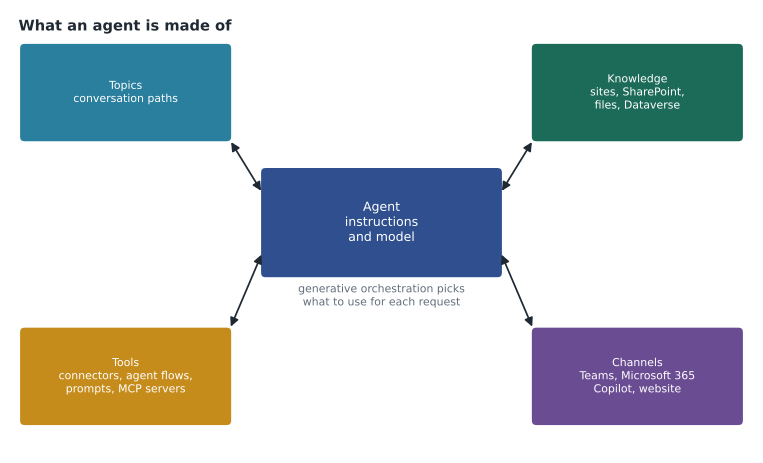
In Copilot Studio, an agent is an AI assistant that holds conversations in natural language and can take actions on a person's behalf. An agent combines a large language model with things the maker supplies: instructions that describe its purpose, tone and limits; knowledge it can search to answer questions; topics that define conversation paths for particular tasks; tools that let it read and change data in other systems; and channels where people talk to it. Agents can answer questions, guide someone through a process, collect information, start flows and, in some designs, act autonomously when an event occurs, without a person starting a conversation.
Use cases for agents
Agents fit where people ask questions or request actions in their own words. Common use cases include employee self-service for HR, IT and facilities policies; customer service on a website; answering questions from product documentation; guiding staff through a process step by step; checking the status of an order or request; and handling routine tasks such as resetting a booking. Agents are a poor fit where a form with fixed fields is faster, or where an answer must be exactly right every time and there is no room for interpretation; a canvas app or a flow serves those cases better. Lesson 11 returns to choosing between tools.
Lumenvale's use case had two parts. Most questions were about policy, which an agent could answer from the loan policy document. Some were about a specific request, which needed data from Dataverse. Maribeth decided to build one agent, the Equipment Help agent, available in Teams, that would do both.
Creating an agent
Makers create agents at the Copilot Studio website or from within Teams. The fastest start is to describe the agent in natural language: what it is for, who uses it and how it should behave. Copilot Studio drafts a name, description and instructions, which the maker edits. The maker then adds knowledge, topics and tools and tests the agent in a test pane that shows each step of its reasoning. Copilot Studio also offers templates for common agents. Simpler agents can be built in Agent Builder inside Microsoft 365 Copilot and later copied into Copilot Studio when they need more capability, such as tools, more channels or detailed analytics.
You are Equipment Help for Lumenvale Community Colleges.
Answer questions about borrowing equipment from campus media desks using
the Equipment Loan Policy and the Media Desk FAQ only.
If a question is not covered, say so and give the campus media desk contact.
When someone asks about their own request, use the Check request status tool.
Never change a request. Never discuss other people's requests.
Keep answers short and friendly, and quote the policy section you used.
Knowledge sources
Knowledge lets an agent answer questions from content it was not trained on. Makers can add public websites, SharePoint sites and libraries, uploaded files such as PDFs and Word documents, Dataverse tables, and enterprise data through connectors. When someone asks a question, the agent searches the knowledge sources, finds relevant passages and generates an answer grounded in them, usually with citations. The agent searches using the person's own permissions for sources such as SharePoint, so a person never gets an answer from a document they could not open themselves.
Knowledge quality decides answer quality. Maribeth first added the whole media services SharePoint site, which included old drafts of the policy, and the agent cheerfully quoted a 2019 rule about overnight loans that no longer applied. She replaced the site with two current documents, the Equipment Loan Policy and the Media Desk FAQ, and the answers became accurate. A focused set of current sources beats a large set of mixed ones.
Topics: conversation paths
A topic is a defined conversation path for a particular task or question. Each topic has a trigger and a series of nodes: send a message, ask a question and store the answer in a variable, check a condition, call a tool, show an adaptive card, redirect to another topic, or end the conversation. Questions can use entities, which recognize types of information such as dates, numbers, email addresses or a custom list of values like campus names. Every agent also has system topics, such as Conversation Start, Fallback when the agent cannot help, Escalate when someone asks for a person, and End of Conversation.
How a topic is chosen depends on the agent's orchestration. With generative orchestration, the agent reads the descriptions of its topics, tools and knowledge and decides which to use for each message, and can combine several in one answer. With classic orchestration, each topic is triggered by phrases that the maker supplies, such as "check my request" or "where is my laptop". Generative orchestration is the default for new agents. Topics remain valuable even then, because they give the maker control over tasks that must happen the same way every time.
Worked problem
Designing the request status topic
The Equipment Help agent must tell a staff member the status of their own request, and only their own. What should the Check request status topic contain?
Show solution
- Description (for generative orchestration): "Use when the user asks about the status of an equipment request they made."
- Ask a question: "Which item did you request?" with the answer stored in a variable; offer the user's recent requests as choices if possible.
- Call a tool that looks up Requests in Dataverse filtered to the signed-in user and the item, so the agent can see only that person's rows.
- Condition on the result: if no request is found, say so and offer to start a new one in the canvas app; otherwise show the status, needed-on date and campus desk in a short message.
- End the topic, or offer to answer a policy question.
Answer: A described topic with one question, a tool call filtered to the signed-in user, a condition and a clear message. The filtering by user is what keeps other people's requests private.
Tools: connectors, agent flows, prompts and MCP servers
Tools let an agent do things beyond conversation. The PL-900 outline names two kinds explicitly: MCP servers and agent flows. A maker can add tools of several kinds:
| Tool type | What it does | Equipment example |
|---|---|---|
| Connector action | Calls an action from a Power Platform connector, such as get a row or send an email | Get a Dataverse row for a request |
| Agent flow | Runs a flow built for agents, with inputs and outputs, for multi-step logic | Look up a request, its approvals and its loan in one step |
| Prompt | Runs a reusable AI prompt with its own instructions, such as summarizing or classifying text | Classify a question as damage, policy or status |
| MCP server | Connects to a server that uses the Model Context Protocol, bringing its tools and resources to the agent | Use a vendor's MCP server for the asset system, if one existed |
| REST API and other agents | Calls an API described for the agent, or hands part of the work to another agent | Pass a damage report to the IT service desk agent |
The Model Context Protocol, or MCP, is an open standard for connecting AI agents to tools and data. When a system offers an MCP server, an agent can discover and use its tools without a custom connector for each one. Agent flows are flows designed to be called by agents, built with the same designer as Power Automate cloud flows; in 2026 Microsoft also introduced a newer workflows experience for automation in Copilot Studio. Every tool should have a clear name and description, because under generative orchestration the agent decides when to call a tool by reading its description, and it should run with only the permissions the task needs.
Publishing through channels
An agent does nothing until it is published to one or more channels. Channels include Microsoft Teams and Microsoft 365 Copilot, a demo website for testing, a custom website using an embed code, SharePoint, Power Pages sites, mobile and custom apps through the Direct Line interface, and other messaging platforms. Before publishing, the maker chooses an authentication setting: agents for staff usually require sign-in with Microsoft Entra ID, which lets the agent know who is asking and use their permissions; public website agents may allow anonymous use but then cannot reach private data. Each time the maker changes the agent, they publish again so the channels get the new version.
Maribeth published Equipment Help to Teams and Microsoft 365 Copilot with Microsoft Entra ID sign-in, and Rupert approved it for the college's Teams app catalogue so staff could find it. Lesson 9 covers who can edit and use an agent; lesson 10 covers testing before publishing.
Managing agents: monitoring, evaluations and Agent 365
The PL-900 outline's second Copilot Studio skill area is managing agents. Analytics in Copilot Studio show how an agent is used: the number of sessions, how many conversations were resolved, escalated or abandoned, satisfaction scores from users, which topics and knowledge sources were used, and where the agent could not help. These reports, together with Microsoft 365 usage reports for agents in Microsoft 365 Copilot, are how makers track usage and adoption and decide what to improve.
Agent evaluations test an agent systematically rather than one question at a time. The maker creates a test set of questions with expected answers or criteria, runs the agent against the whole set, and reviews results scored by graders for qualities such as accuracy and relevance. Test sets can be imported from production conversations, and results can be compared between versions to catch regressions before a change goes live. Microsoft described evaluations as being in public preview in March 2026. Maribeth built a test set of 40 real questions from the desks' inboxes and reran it after every change to the knowledge sources.
Microsoft Agent 365 sits above individual tools. Microsoft made it generally available on May 1, 2026 as a control plane for observing, governing and securing agents across an organization, including agents built in Copilot Studio, prebuilt agents in Microsoft 365 Copilot and Teams, and agents from other platforms. It provides an agent registry and inventory, access controls built on Microsoft Entra, and security monitoring with Microsoft Defender. It is licensed per user, included in Microsoft 365 E7 or sold separately. For PL-900, know its purpose: as agents multiply, IT needs one place to see which agents exist, who owns them, what they can reach and whether they are behaving safely.
Writing good instructions
An agent's instructions are the single most important text the maker writes. Good instructions state the agent's purpose and audience, the sources it should rely on, what it must never do, how to handle questions it cannot answer and the tone to use. They are written as clear, direct sentences rather than marketing language. Maribeth's first version said only "Help staff with equipment questions", and the agent happily answered questions about buying personal laptops. Her final version, shown earlier, limited it to the two documents and the status tool and told it what to do when stuck. Instructions should be tested like code: each change is followed by a run of the evaluation test set.
Common mistakes
MistakeAdding every document in a SharePoint site as knowledge.
InsteadChoose a small set of current, authoritative sources; old drafts produce wrong answers.
MistakeGiving tools vague names and descriptions.
InsteadDescribe each tool and topic clearly, because generative orchestration chooses them by description.
MistakePublishing a staff agent without authentication.
InsteadRequire Microsoft Entra ID sign-in when the agent needs private data or the user's identity.
MistakeTesting an agent only with a few questions typed by the maker.
InsteadUse evaluations with a test set of real questions and rerun it after each change.
Summary and key terms
- Copilot Studio builds agents that combine a language model with instructions, knowledge, topics, tools and channels.
- Knowledge sources such as websites, SharePoint, files and Dataverse ground answers; agents search with the user's permissions.
- Topics are conversation paths made of nodes; generative orchestration chooses topics and tools from their descriptions.
- Tools include connector actions, agent flows, prompts, MCP servers, APIs and other agents.
- Agents are published to channels such as Teams, Microsoft 365 Copilot and websites, with an authentication setting.
- Analytics track usage and adoption; evaluations test agents against test sets; Microsoft Agent 365 (generally available May 1, 2026) governs agents across the organization.
- Agent
- An AI assistant built in Copilot Studio that converses and can take actions.
- Knowledge source
- Content an agent searches to ground its answers.
- Topic
- A defined conversation path made of nodes, with a trigger or description.
- Generative orchestration
- An agent mode that selects topics, tools and knowledge for each message from their descriptions.
- Agent flow
- A flow designed to be called by an agent as a tool.
- Model Context Protocol (MCP)
- An open standard for connecting AI agents to tools and data.
- Channel
- A place where people use a published agent, such as Teams or a website.
- Microsoft Agent 365
- A control plane for observing, governing and securing agents across an organization.
Practice problems
Work each problem on paper first, then reveal the answer to check.
Name four kinds of knowledge source an agent can use.
Show answer
Any four of: public websites, SharePoint, uploaded files, Dataverse, enterprise data through connectors.
What does generative orchestration use to decide which topic or tool to run?
Show answer
The descriptions of the topics, tools and knowledge sources.
Why should a staff agent require Microsoft Entra ID sign-in?
Show answer
So it knows who is asking and can use their permissions to reach private data safely.
What is an agent evaluation?
Show answer
A systematic test of an agent against a test set of questions, scored by graders and compared across versions.
Lesson quiz · 5 questions
Score 60% or more to complete this lesson.
Create a free account to save your progress, take quizzes and earn a certificate.