
MSBA-131 · Lesson 3 of 12 · 20 min
Building an app with Copilot
▶ Video coming soon A video version of this lesson is on the way.
A few weeks into the project, the dean's office asked whether the equipment app could also handle requests to set up rooms for events: chairs, a lectern, a microphone and a projector, delivered to a room at a set time. Maribeth had built the first app by hand over a week. This time Rupert suggested she try a different starting point and describe the app to Copilot, then judge how much of the result she could keep. The experiment turned into the team's working rule for AI in Power Apps: let Copilot draft, then read every part of the draft as if a new colleague had written it.
This lesson covers the ways Power Apps uses AI to create apps, which the PL-900 skills outline lists explicitly: using AI to create a canvas app, using AI to create a model-driven app, the Plan designer, the vibe experience and code apps. These features are among the fastest-changing parts of Power Platform. Microsoft announces changes every month, and several were in preview during 2026. The concepts below are stable; the exact buttons and screens are worth confirming in your own environment before you rely on them.
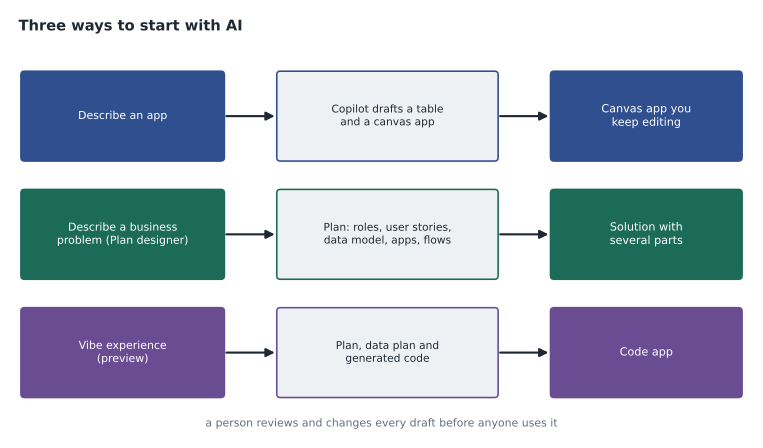
Describing an app to Copilot
From the Power Apps home page, a maker can type a description of the app they need in plain language, for example "an app to track room setup requests with the room, date, time, equipment needed and status". Copilot proposes a Dataverse table with suitable columns and data types, adds sample rows so the app has something to show, and generates a canvas app with browse, detail and edit screens built on that table. Before anything is created, the maker can refine the proposal in conversation: rename the table, add or remove columns, change a column's type, or ask for a choice column with fixed values instead of free text.
Once the app exists, Copilot stays available in Power Apps Studio as a side pane. A maker can ask it to add a screen, change a layout, add a filter to a gallery, or explain what a formula does. Copilot can also suggest Power Fx formulas from a description, which is useful for makers who know what they want but not which function does it. The maker sees the change in the editor and can undo it like any other edit.
Worked problem
Reviewing a Copilot draft
Maribeth described the room setup app and Copilot proposed a table called Room Setup Requests with these columns: Room (text), Event Date (date and time), Equipment Needed (text), Requested By (text), Status (text). What should she change before creating the app?
Show solution
- Room as free text invites typos such as "B-214" and "B 214". A lookup to a Rooms table, or a choice column, keeps values consistent.
- Equipment Needed as one text column cannot be counted or filtered by item. A related table of requested items, or a multi-select choice, works better.
- Requested By as text duplicates something Dataverse already records: the Created By column holds the person who created the row.
- Status as text should be a choice column with fixed values such as New, Approved, Scheduled and Done, so views and flows can rely on them.
- Event Date should be checked for time zone behaviour, because the colleges sit in one time zone but a visiting presenter might not.
Answer: Keep the table name and date column, and change Room, Equipment Needed and Status to structured types; drop Requested By. The draft was a useful start but would have produced messy data if accepted as is.
The example shows the pattern that held for every AI draft the team reviewed. Copilot was good at naming things sensibly and at producing working screens quickly. It was weaker at data design decisions that depend on how the data will be used later: reporting, flows, security and growth. Those are exactly the decisions a maker must own, because they are expensive to change once people are using the app.
Using AI to create a model-driven app
Copilot can also start from a description and produce a model-driven app. The maker describes the business data, Copilot proposes several related Dataverse tables with columns and relationships, and the maker reviews and adjusts them on a visual canvas that shows the tables and the lines between them. Copilot then generates a model-driven app with those tables, default forms and views and a site map. The same review rules apply: check each column's data type, the direction and type of each relationship, which columns are required, and whether any table duplicates one that already exists in the environment.
Signe found this useful for a different reason than speed. When she showed the proposed data model to the media desk supervisors, the visual canvas of tables and relationships gave them something concrete to argue with. A supervisor pointed out that one loan sometimes covered several items, a projector, a cable kit and a screen, which meant Loan and Equipment needed a many-to-many relationship or a separate Loan Item table. That conversation would have happened weeks later, after real data existed, if the model had stayed in Signe's head.
Plan designer
Plan designer works at a higher level than a single app. Instead of describing an app, the maker describes a business problem, such as "media desks on three campuses lend equipment to staff; requests are on paper, approvals are slow and we cannot see what is overdue." Copilot responds with a plan: the people or roles involved, user stories describing what each needs to do, the processes, a proposed data model, and a set of recommended components, which can include canvas apps, model-driven apps, Power Automate flows, Copilot Studio agents and Power Pages sites. The maker reviews and edits each part of the plan, then asks Copilot to build the components. The plan and what it produces are stored in a solution, so they can be moved between environments and managed like any other project (lesson 10).
| Part of a plan | What it contains | What to check |
|---|---|---|
| Roles | The kinds of people who use the solution | Missing roles, such as an approver or an auditor |
| User stories | Statements such as "as a technician, I want to see overdue loans" | Stories that are vague, duplicated or out of scope |
| Process | The steps of the business process | Steps that differ by campus or department |
| Data model | Proposed Dataverse tables and relationships | Data types, relationships, existing tables to reuse |
| Solution components | Recommended apps, flows, agents and sites | Whether each recommended tool is the right one |
Plan designer requires an environment with Dataverse, and an administrator can control whether it is available. Signe used it in a development environment to sketch the whole equipment system. The plan recommended a canvas app for requests, a model-driven app for the desks, an approval flow and an agent to answer policy questions, which matched what the team had already decided. It also recommended a Power Pages site for external borrowers, which Lumenvale did not need yet. Signe kept the plan as a record of the design and deleted the unneeded component, a good reminder that a plan is a proposal, not an instruction.
The vibe experience and code apps
The vibe experience is a newer way of building apps by conversation, reached from its own Power Apps site. In 2026 Microsoft labelled it a preview. The maker describes what they want, and the experience produces a plan, a data plan with the Dataverse tables the app needs, and a working app built from generated code. The maker keeps refining by chatting, seeing the app update as they go. Because the result is code rather than a canvas of controls, a vibe app is a kind of code app, and Microsoft documents how to convert a vibe app into a code app that developers can continue in their own tools.
Code apps let professional developers build apps with standard web technologies, such as React and TypeScript, in their own code editor, and run them on Power Platform. A code app connects to Power Platform connectors and Dataverse, signs users in with Microsoft Entra ID, respects data loss prevention policies and is shared and managed like other Power Apps. For an organization, this means a developer's custom app can live under the same governance as low-code apps instead of on a separate web server that IT must secure on its own. For PL-900, you need to describe what code apps are for, not build one: they suit teams that want full control of the user interface in code while keeping Power Platform's data access, security and administration.
Rupert tried the vibe experience in a sandbox environment one afternoon, because Lumenvale's policy did not allow preview features in production. In twenty minutes he had a working room-booking app that looked more polished than anything built by hand. He also had code nobody in central IT could maintain except Signe, who already had a full workload. He wrote up the result as "impressive, not yet for us", and recorded it in the governance log so the decision could be revisited when the feature reached general availability.
Copilot for people who use the app
AI in Power Apps is not only for makers. Canvas and model-driven apps can include Copilot features for the people who use them. In model-driven apps, users can ask questions about the data in a chat pane, get summaries of records and get help filling in forms, if an administrator has turned these features on. Canvas apps can include AI capabilities through AI Builder models, such as reading text from an image or classifying a description, and through connections to agents. Microsoft also added support during 2026 for canvas apps to work with agents through the Model Context Protocol, an open standard for connecting AI agents to tools and data. These features usually need Dataverse and may consume capacity such as Copilot Credits or AI Builder credits, so check licensing before promising them to users.
Governing AI-built apps
An app built with Copilot is still an app. It needs an owner, it needs testing, it must respect the organization's data policies and it must be supportable. Administrators can turn Copilot features on or off at the tenant and environment level in the Power Platform admin center, decide whether data may move across geographic regions for AI processing, and use Managed Environments to apply sharing limits and other controls. Most organizations allow AI drafting in development environments and keep production for solutions that have passed review.
Lumenvale's rules, which Rupert published on the staff intranet in the fall, were short. Use Copilot freely in development and sandbox environments. Review every generated table before creating it. Never paste personal data about students into a prompt. Treat generated formulas as suggestions and test them. Do not publish preview features to production. Record which parts of each app were AI-generated in the app's description, so the next maintainer knows where to look first.
A review checklist for AI-built apps
After several drafts, Maribeth turned her reviews into a checklist that any maker at Lumenvale could use before keeping an AI-generated app. Is every table needed, or does one already exist in the environment that should be reused? Does every column have the right data type, with choices or lookups wherever values must be consistent? Are required columns marked as required? Do the relationships point the right way, and is any many-to-many relationship hiding inside a one-to-many design? Do the screens show only what the people using them need? Do the generated formulas handle blank values and errors? Is anything named with a placeholder such as Table1 or Screen2? Has the sample data been removed before real users arrive? The checklist took ten minutes and saved hours of rework later, which is the right trade for a draft that took Copilot a few seconds to produce.
Common mistakes
MistakeAccepting Copilot's proposed table without checking data types.
InsteadChange free-text columns to choices or lookups where values must be consistent, and remove columns Dataverse already provides.
MistakeTreating a Plan designer plan as a set of instructions.
InsteadA plan is a proposal; edit roles, stories, data and components before building.
MistakeUsing preview features such as the vibe experience in production.
InsteadTry previews in a sandbox and record the decision; move to production when supported.
MistakePasting real personal data into prompts to get better results.
InsteadDescribe the structure and use invented sample data.
Summary and key terms
- Copilot can turn a description into a Dataverse table and a canvas app, and help edit apps and formulas in Power Apps Studio.
- Copilot can also propose a set of related tables and generate a model-driven app; the visual data model is a useful review tool.
- Plan designer turns a business problem into a plan of roles, user stories, processes, data and recommended components, stored in a solution.
- The vibe experience (preview in 2026) builds apps by conversation and produces code apps.
- Code apps let developers build in code while using Power Platform connectors, security and governance.
- Every AI draft needs a person to review data design, security and supportability before use.
- Plan designer
- A Power Apps experience that turns a described business problem into a plan and recommended solution components.
- Vibe experience
- A conversational way to build apps that produces a plan, a data plan and generated code.
- Code app
- An app built with standard web code that runs on Power Platform and uses its connectors and governance.
- Data plan
- The set of Dataverse tables an AI-built app proposes to use.
- Generative page
- A page in a model-driven app produced by Copilot from a description.
- Managed Environments
- A set of premium governance features for Power Platform environments, such as sharing limits.
Practice problems
Work each problem on paper first, then reveal the answer to check.
What does Copilot create when a maker describes an app on the Power Apps home page?
Show answer
A proposed Dataverse table with columns and sample data, and a canvas app built on it.
How does Plan designer differ from describing a single app?
Show answer
It starts from a business problem and proposes roles, user stories, a data model and several components, stored in a solution.
What kind of app does the vibe experience produce?
Show answer
A code app built from generated code, with a data plan of Dataverse tables.
Give one reason a college might keep the vibe experience out of production in 2026.
Show answer
It was in preview, and the generated code needed developer skills to maintain.
Lesson quiz · 5 questions
Score 60% or more to complete this lesson.
Create a free account to save your progress, take quizzes and earn a certificate.