
MSBA-131 · Lesson 11 of 12 · 20 min
Choosing the right tool
▶ Video coming soon A video version of this lesson is on the way.
In November, word of the equipment system spread. The library wanted something similar for study room keys, the athletics department for sports equipment, and the international office for an assistant that could answer visa-letter questions at any hour. Rupert asked Maribeth to write a short guide that would help the next maker choose the right tool before building anything. Her draft became this lesson: a way of thinking about Power Apps, Power Automate, Copilot Studio and Power Pages that starts from the problem rather than the tool someone happens to know.
Choosing well matters because the wrong tool costs time twice: once to build, and again to rebuild. A flow forced to act like an app, an agent asked to replace a form, or a canvas app managing data that belongs in a model-driven app all work for a while and then become hard to maintain. The PL-900 exam reflects this, with many questions that describe a scenario and ask which component fits.
Start with the problem, not the tool
Maribeth's guide began with five questions to ask about any request before choosing anything. Who will use the solution, and how often? Do they need to enter or review data on screens? Does something need to happen automatically when data changes or at a set time? Do people mostly ask questions in their own words? Are the users inside or outside the organization? The answers usually point to one main tool, and often to one or two supporting tools.
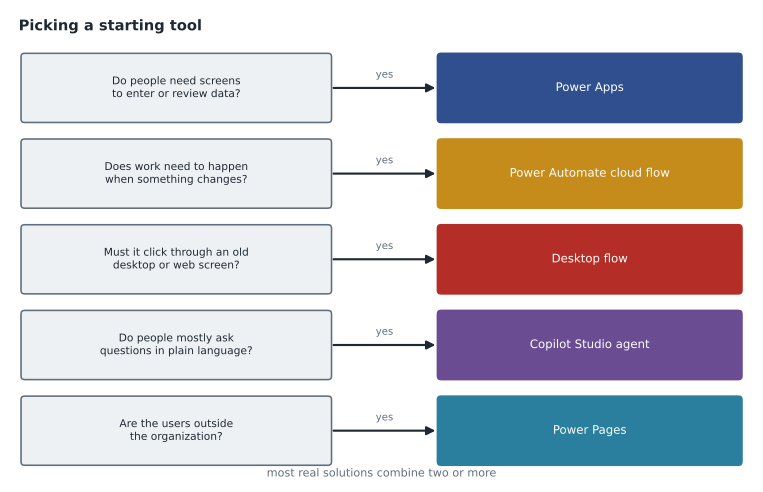
What each tool is best at
| Tool | Best at | Weak at |
|---|---|---|
| Canvas app | Focused tasks with a designed experience, mobile use, several data sources | Managing large related data sets with complex security |
| Model-driven app | Managing related Dataverse data and processes with role-based security | Highly customized layouts; users who visit rarely |
| Cloud flow | Reacting to events, scheduled work, approvals, moving data between services | Interactive screens; anything that needs a person to type a lot |
| Desktop flow | Systems with no API, legacy applications, file tasks on Windows | Anything with a connector; screens that change often |
| Copilot Studio agent | Questions in natural language, guidance, conversational self-service | Tasks needing exact, structured input every time |
| Power Pages | Secure websites for external users at scale | Internal tools for staff who already have accounts |
| Power BI | Analysing and visualizing data for decisions | Entering or changing data |
Power BI appears in the table even though this course does not teach it, because people often ask for "an app" when they really need a report. If the request is "we want to see how many loans each campus made last term", the answer is a Power BI report, covered in MSBA-132, not a canvas app with a chart.
Apps or agents?
The newest choice, and the one people get wrong most often in 2026, is between an app and an agent. Both can collect information and both can show data. The difference is the shape of the interaction. Apps are best when the input is structured and predictable: a request has an item, a date, a campus and a reason, and a form with a date picker and a drop-down gets those right every time. Agents are best when the input is unstructured and varied: people ask about policies in a hundred different ways, and an agent can understand all of them and answer from the policy.
Many good solutions use both. Lumenvale's Equipment Help agent answers policy questions and checks status, but when someone wants to make a request, it offers a link to the canvas app rather than trying to collect five fields through conversation. An agent that asks "what date?", "which campus?", "which item?", "for how long?" and "why?" one at a time is slower and more error-prone than a form, and users notice.
Flows or apps?
A flow has no screens of its own; it works in the background. If people need to see and work with data, they need an app, and the app can start flows. If something must happen without anyone opening anything, such as a reminder at 7:00 or a message when a row is added, that is a flow. A common mistake is building a flow triggered by email and asking people to send specially formatted emails as a substitute for a form; it works until someone formats the email differently.
Cloud or desktop flow?
Lesson 6 gave the rule: use a cloud flow whenever the system has a connector or API, and a desktop flow only when it does not. Desktop flows are more fragile because they depend on screens staying the same, and unattended runs need machines and additional licensing. Before building a desktop flow, check whether a connector exists, whether the vendor offers an API, or whether the system can export and import files that a cloud flow could handle.
Canvas or model-driven?
Lesson 2 compared the two app types. The short version: choose a canvas app when the experience matters and users do one task; choose a model-driven app when people manage related data all day and security must follow the data. When both are true for different groups of people, build both on the same tables, as Lumenvale did.
Other factors: licensing, skills and governance
Technical fit is not the only factor. Licensing can tip a decision: a canvas app using only SharePoint and standard connectors may need no extra licences for Microsoft 365 users, while Dataverse, premium connectors, model-driven apps, unattended desktop flows and Power Pages capacity all add cost. Skills matter: a solution that only one person can maintain is a risk, and code apps or complex plug-ins need developers. Governance matters too: the organization's data policies may block a connector the design depends on, and some features may be turned off or not allowed in production while in preview.
Worked problem
Applying the guide to three new requests
The library wants staff to lend study room keys and track returns. Athletics wants coaches to request sports equipment and get a manager's approval. The international office wants an assistant to answer common questions about visa support letters at any hour. Which tools fit each?
Show solution
- Library: library staff manage keys, rooms and loans all day, and security is simple. A canvas app on a Dataverse table, or a copy of the media desk model-driven app adapted for keys, plus a scheduled flow for overdue reminders.
- Athletics: coaches make occasional structured requests that need approval. A canvas app for requests, a cloud flow with an Approve/Reject approval, and Teams notifications. This is the equipment system again, so reuse the solution rather than rebuild it.
- International office: students ask unstructured questions at all hours. A Copilot Studio agent with the visa letter guidance as knowledge, published to the student portal website channel, with escalation to staff for anything it cannot answer. If students must submit a letter request with documents, a Power Pages form or a link to an existing system handles that part.
Answer: App plus scheduled flow; app plus approval flow, reusing the existing solution; and an agent, possibly with a Power Pages form for submissions. Each choice follows from who the users are and the shape of their task.
Reuse before you build
The athletics example shows a point that is easy to miss. Before building something new, check whether an existing solution, template or component already does most of the job. Solutions can be copied and adapted, components such as canvas component libraries can be shared, Dataverse tables can serve several apps, and agents can call other agents. Lumenvale's Centre of Excellence hub, which Rupert chaired, kept a simple catalogue of every production solution with its purpose and owner, so makers could find what already existed. Administrators can inventory apps, flows and agents across a tenant from the Power Platform admin center; Microsoft's older Center of Excellence (CoE) Starter Kit served the same purpose but is no longer actively maintained, so check the admin center's current inventory features first.
When not to use Power Platform at all
A fair guide also says when to stop. Power Platform is the wrong choice when the organization already has a system that does the job well and the need is training, not a new tool; when the solution needs very high transaction volumes or millisecond responses beyond what the platform's limits allow; when a commercial product would cost less than building and maintaining a custom one; or when regulations require a certified system the platform does not provide. Maribeth's guide ended with a question for every requester: "If this tool disappeared tomorrow, what would you do instead?" Sometimes the honest answer was "use the scheduling system we already pay for", and that was the right outcome.
Practising scenario questions
PL-900 questions about choosing tools are usually short scenarios with one key phrase that decides the answer. "Respond to a new email" points to an automated cloud flow. "Every Friday" points to a scheduled flow. "Press a button" points to an instant flow. "No API" or "legacy desktop application" points to a desktop flow. "Customers outside the organization" points to Power Pages. "Ask questions in natural language" points to a Copilot Studio agent. "Highly customized interface on a phone" points to a canvas app. "Manage related records with role-based security" points to a model-driven app. "Visualize trends" points to Power BI. Reading the scenario for the deciding phrase, rather than for the first tool name you recognize, avoids most wrong answers.
Watch also for distractors that are possible but not best. Almost anything can be forced into almost any tool: a flow can email a form, an agent can collect fields, a canvas app can draw a chart. The exam, like real projects, rewards the tool that fits the scenario most naturally, with the least custom work and the fewest people needing to learn something new.
Combining tools well
Real solutions combine tools, and a few combinations recur so often that they are worth knowing as patterns. An app plus an approval flow covers most request-and-approve processes. A model-driven app plus scheduled flows covers most case management with reminders. An agent plus agent flows covers self-service that needs to look things up or start work. A Power Pages site plus internal model-driven app plus flows covers most external application or request processes. A scheduled cloud flow plus an unattended desktop flow covers most legacy system updates. When a new request arrives, Maribeth's guide suggests checking first whether it matches one of these patterns, because a known pattern comes with known pitfalls and a team that has already solved them.
One request, three designs
A useful exercise is to sketch more than one design before choosing. For the athletics request, Maribeth drew three. Design A used only a SharePoint list and an approval flow started from the list: cheapest, but with no way to stop two coaches booking the same equipment and no campus-level security. Design B copied the equipment solution, with Dataverse, a canvas app for coaches and the approval flow: more licensing, but proven, secure and reusable. Design C added an agent so coaches could request equipment by chatting: impressive in a demonstration, but slower for a five-field request and harder to test. Writing down the trade-offs of each, in a short table of cost, effort, risk and fit, made the choice of Design B easy to explain to the athletics director, who had initially asked for "a chatbot".
The habit of sketching alternatives protects against the most common failure in tool choice: falling in love with the first idea. It also gives the person who asked for the solution a voice in the decision, because they can see what each option would mean for their staff.
The common thread in every pattern is Dataverse in the middle. When each tool reads and writes the same tables, they work together without custom integration, and security, auditing and reporting apply everywhere at once. That is the deepest reason to choose Power Platform tools together rather than one at a time.
Common mistakes
MistakeChoosing the tool you know best for every problem.
InsteadStart from who the users are and the shape of the task, then pick the tool.
MistakeUsing an agent to collect structured data field by field.
InsteadUse a form for structured input and let the agent link to it.
MistakeBuilding an app when the request is really for a report.
InsteadUse Power BI for analysis and visualization.
MistakeBuilding from scratch without checking for existing solutions.
InsteadReuse solutions, tables, components and agents where they fit.
Summary and key terms
- Start from five questions: who uses it, do they need screens, must something happen automatically, do they ask questions in their own words, and are they inside or outside the organization.
- Apps suit structured, predictable input; agents suit unstructured questions; many solutions combine them.
- Flows work in the background and are started by events, schedules or apps; desktop flows are only for systems without APIs.
- Canvas apps suit focused tasks; model-driven apps suit managing related data; Power Pages suits external users; Power BI suits analysis.
- Licensing, skills and governance can change the best choice.
- Reuse existing solutions and components before building new ones, and know when Power Platform is not the answer.
- Scenario fit
- How well a tool matches the users, input and timing of a particular problem.
- Structured input
- Data with known fields and formats, such as a date and a campus.
- Unstructured input
- Free-form questions or text that vary from person to person.
- Center of Excellence (CoE) Starter Kit
- An older set of Microsoft tools for inventorying and governing Power Platform resources, no longer actively maintained.
- Component library
- A collection of reusable canvas app components shared across apps.
Practice problems
Work each problem on paper first, then reveal the answer to check.
A manager wants to see monthly loans by campus. Which tool?
Show answer
Power BI.
Why did Lumenvale's agent link to the canvas app for new requests?
Show answer
Requests are structured input that a form collects faster and more reliably than a conversation.
Before building a desktop flow, what should you check?
Show answer
Whether a connector, an API or a file export and import already exists.
Give one situation where Power Platform is the wrong choice.
Show answer
Any of: an existing system already does the job; needs beyond platform limits; a commercial product is cheaper; regulations require a certified system.
Lesson quiz · 5 questions
Score 60% or more to complete this lesson.
Create a free account to save your progress, take quizzes and earn a certificate.