
MSBA-131 · Lesson 4 of 12 · 20 min
Power Pages basics
▶ Video coming soon A video version of this lesson is on the way.
Lumenvale's three campuses did not lend equipment only to staff. Community groups that rented rooms in the evenings, local high schools that held events in the Ridgeview campus theatre and visiting speakers all asked the media desks for projectors and microphones. None of them had college accounts, so the canvas and model-driven apps were out of reach. They emailed, phoned or filled in a PDF form, and a technician retyped every request. Rupert asked whether Power Platform had anything for people outside the college. It did: Power Pages.
A note on the exam before we start. When Microsoft revised the PL-900 skills outline on July 24, 2026, it removed the Power Pages objectives and added the Copilot Studio domain in their place. Power Pages is still part of Power Platform, still appears in Plan designer recommendations, and is still the right answer whenever a solution needs a website for people outside the organization. This lesson covers the basics a Power Platform professional should know, but if you are studying only for the current PL-900 exam, treat it as background rather than tested material.
What Power Pages is
Power Pages is the Power Platform service for building secure, data-driven business websites, mainly for external audiences such as customers, partners, citizens, suppliers or community members. A Power Pages site stores its configuration and its business data in Dataverse, so the same tables that power internal apps and flows can be shown on the site, and records submitted on the site arrive in Dataverse where internal apps and flows can act on them. Power Pages grew out of an earlier feature called Power Apps portals, and many settings and documentation pages still use the word portal.
Typical uses include a customer self-service site where people check order status or log support cases, a permit or grant application site run by a public agency, a supplier site where vendors update their details, an event registration site and a community request site like the one Lumenvale needed. What these share is that the users are outside the organization's Microsoft Entra ID tenant, there may be thousands of them, and some pages are public while others require sign-in.
The design studio
Makers build sites in the Power Pages design studio, reached from make.powerpages.microsoft.com. Starting a site means choosing a template or a blank site, giving it a name and a web address, and waiting a few minutes while it is provisioned in an environment. New sites get an address on a Microsoft domain and can later use a custom domain owned by the organization. The design studio is organized into workspaces down the left side of the screen.
| Workspace | What you do there |
|---|---|
| Pages | Add and arrange pages, sections, text, images, buttons, lists and forms; edit navigation |
| Styling | Choose a theme, colours and fonts for the whole site |
| Data | Create and edit Dataverse tables, columns, forms and views used on the site |
| Set up | Site details, custom domain, authentication providers, site visibility and other settings |
| Security | Web roles, table permissions and page permissions, plus security scanning tools |
Pages are built from sections and components rather than written as HTML, although developers can edit code when they need to, using the same site from Visual Studio Code. Two components do most of the data work. A form component shows a Dataverse form on a page so visitors can create or edit a record. A list component shows rows from a Dataverse view, with optional search, filters and links to detail pages. Both depend on the security settings described below; without them, a form or list on a page shows nothing or refuses to save.
Copilot in Power Pages
Power Pages includes Copilot features for makers. A maker can describe the site they want and have Copilot generate a starting site with pages, layout and text, ask Copilot to add a form for a Dataverse table, generate page text, or create a table for collecting information. Sites can also include an agent built in Copilot Studio (lesson 8), which visitors use to ask questions answered from the site's content or other knowledge sources. As with Power Apps, AI-generated content needs a person to check it, and site text is public, so wording matters even more.
Who can see what: identity, web roles and table permissions
Security in Power Pages works differently from internal apps, because most visitors do not have accounts in the organization's directory. Instead, the site keeps its own records of people: each signed-up visitor becomes a contact row in Dataverse. Visitors can sign in through identity providers that the maker configures in the Set up workspace, such as Microsoft Entra External ID, a Microsoft account, other providers that use standard protocols such as OpenID Connect or SAML, or a local user name and password stored with the site. A site can also be invitation-only, with sign-up allowed only through codes the organization sends.
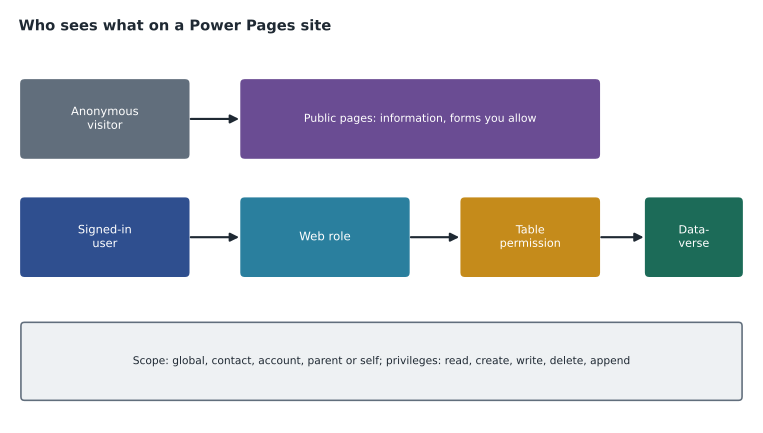
Access is then granted through two layers that work together. Web roles group visitors: every site has an Anonymous Users role, which applies to everyone who has not signed in, and an Authenticated Users role, which applies to everyone who has, and makers add roles such as Community Partner or Media Desk Volunteer. Table permissions grant a web role privileges on a Dataverse table: read, create, write, delete, append and append to. Each table permission has an access type that decides which rows the privilege applies to.
| Access type | Rows it covers | Example |
|---|---|---|
| Global | Every row in the table | Anyone may read the list of lendable equipment types |
| Contact | Rows linked to the signed-in contact | A visitor sees only the requests they submitted |
| Account | Rows linked to the contact's organization (account) | Staff of one school see all of that school's requests |
| Self | The contact's own contact row | A visitor edits their own profile |
| Parent | Rows related to rows another permission already allows | A visitor sees comments on their own requests |
The principle to remember is that nothing in Dataverse is visible on a Power Pages site by default. A list on a page shows rows only if the visitor's web role has a table permission with read privilege and an access type that includes those rows. That default protects organizations from accidentally publishing internal data, but it also produces the most common beginner complaint: "my list is empty". The answer is almost always a missing or too-narrow table permission.
Worked problem
Designing permissions for the community request site
Lumenvale wanted anyone to see what equipment could be borrowed, signed-in community groups to submit and track their own requests, and school coordinators to see every request made by their school. Which web roles and table permissions are needed?
Show solution
- Equipment Types table: a table permission with read privilege and global access, given to the Anonymous Users and Authenticated Users roles.
- External Requests table: a permission with create and read privileges and contact access, given to Authenticated Users, so each visitor creates and sees only their own requests.
- For school coordinators, a new web role, School Coordinator, with a permission on External Requests using account access, so they see every request linked to their school's account.
- Request Comments table: a parent permission under the External Requests permission, so visitors see comments on requests they can already see.
- No permission at all on the internal Equipment table with asset tags and purchase dates, which stays invisible.
Answer: Three web roles (Anonymous, Authenticated, School Coordinator) and four table permissions with global, contact, account and parent access. The internal tables get no permissions and remain private.
Site visibility, trial sites and licensing
A new site starts as private, visible only to selected people in the organization while it is being built. When it is ready, an administrator makes it public. Sites can also start as trial sites, which are meant for evaluation and expire unless converted to production. Power Pages is licensed by capacity rather than per maker: organizations buy capacity for the number of authenticated users per site per month and for anonymous users per site per month, with options for pay-as-you-go billing through an Azure subscription. Internal users who already hold certain Power Apps or Dynamics 365 licences may have access rights that change the calculation. Because pricing and capacity terms change, check the current Power Platform licensing guide before estimating costs.
Lumenvale expected about 60 community groups to sign in each month during the school year and several hundred anonymous visitors to look at the equipment list. Rupert estimated capacity from those numbers and the licensing guide and found the cost small compared with the hours technicians spent retyping requests.
Security and performance tools
Public websites attract attention that internal apps do not. Power Pages includes tools to help: a security scan in the design studio that checks common configuration problems, a web application firewall option for production sites, content delivery network support for faster loading, site health checks, and the ability to restrict a site to known IP addresses during testing. Makers should also review which tables have global read permissions before going public, because a permission granted for testing is easy to forget.
How Power Pages fits with the rest of the platform
Power Pages rarely stands alone. A request submitted on a site lands in Dataverse, where a Power Automate cloud flow can start an approval (lesson 7), a model-driven app lets staff work on the request, and a Copilot Studio agent can answer visitors' questions on the site. This is the main reason to choose Power Pages over a separate website builder: the site is a front door to the same data and processes the organization already runs in Power Platform, with the same governance.
Lumenvale decided to build the community site in the spring term rather than immediately, because the internal system needed to settle first. Maribeth kept a short design note with the permission plan from the example above, so whoever built the site later would not have to rediscover it.
Building the first pages
A typical first build in the design studio follows a clear path. The maker picks a template close to the need, such as a starter layout with a home page, a contact form and a sign-in page, and edits the home page text and images. They add a page for the main task, say "Request equipment", and place a form component on it bound to a Dataverse table and form. They add a second page, "My requests", with a list component bound to a view that shows a visitor's requests. They then visit the Security workspace to create the table permissions that let the right web roles create and read those rows, and the Set up workspace to choose identity providers. Finally they preview the site as an anonymous visitor and as a signed-in test contact to confirm each sees exactly what they should.
Two habits help. First, design the Dataverse forms and views for the site separately from those used by internal model-driven apps, because external visitors should see fewer, plainer fields. Second, keep the site's wording short and specific: external users do not know internal terms, so "media desk" became "equipment loans office" on Lumenvale's draft pages after a community volunteer read them and asked what a media desk was.
Power Pages compared with the other tools
It helps to place Power Pages next to the tools covered elsewhere in this course. A canvas app or model-driven app serves people who sign in with organizational accounts and usually hold Power Apps licences. A Power Pages site serves people who do not, often in large numbers, and is licensed by visitor capacity instead. An agent can answer questions on a site, and a flow can process what a site collects, so a site is often the public face of a solution whose real work happens in Dataverse, flows and internal apps. When a scenario mentions customers, citizens, partners or the general public using a web browser, Power Pages should be the first tool you consider.
Common mistakes
MistakeExpecting a list on a page to show data as soon as it is added.
InsteadAdd a table permission with read privilege and the right access type for the visitor's web role.
MistakeGranting global read on a table to make testing easier and forgetting it.
InsteadUse the narrowest access type that works and review permissions before making the site public.
MistakeAssuming external visitors need accounts in the organization's directory.
InsteadVisitors become contacts and sign in through the identity providers configured for the site.
MistakeStudying Power Pages objectives for the current PL-900 exam.
InsteadThe July 24, 2026 outline removed them; learn Power Pages for real projects and other exams.
Summary and key terms
- Power Pages builds secure, Dataverse-based websites, mainly for people outside the organization.
- The design studio has workspaces for pages, styling, data, setup and security; forms and lists show Dataverse data.
- Visitors become contact rows and sign in through configured identity providers.
- Web roles group visitors; table permissions grant privileges with global, contact, account, self or parent access.
- Nothing in Dataverse is visible on a site until a table permission allows it.
- Sites start private, may start as trials, and are licensed by authenticated and anonymous user capacity.
- Power Pages objectives were removed from PL-900 on July 24, 2026.
- Power Pages
- The Power Platform service for building secure, data-driven websites.
- Design studio
- The browser-based editor for Power Pages sites.
- Web role
- A group of site visitors that receives permissions.
- Table permission
- A rule granting a web role privileges on a Dataverse table with an access type.
- Access type
- The scope of a table permission: global, contact, account, self or parent.
- Identity provider
- A service visitors use to sign in to a site, such as Microsoft Entra External ID.
Practice problems
Work each problem on paper first, then reveal the answer to check.
Where does a Power Pages site store visitor records and business data?
Show answer
In Dataverse; each signed-up visitor is a contact row.
A visitor should see only the requests they created. Which access type?
Show answer
Contact.
Which two web roles does every site have?
Show answer
Anonymous Users and Authenticated Users.
What changed about Power Pages in the July 24, 2026 PL-900 outline?
Show answer
The Power Pages objectives were removed.
Lesson quiz · 5 questions
Score 60% or more to complete this lesson.
Create a free account to save your progress, take quizzes and earn a certificate.