
MSBA-130 · Lesson 6 of 12 · 18 min
Security roles and data loss prevention policies
▶ Video coming soon A video version of this lesson is on the way.
Lumenvale's privacy officer, Dr. Philippa Ondaatje-Ruiz, joined the sixth session with a single question written on a card: "Who will be able to see a student's transcript request, and how would we know if the data went somewhere it should not?" Rupert said that answering it would take the whole afternoon, because Power Platform security works in layers, and each layer answers part of her question.
The layers of security
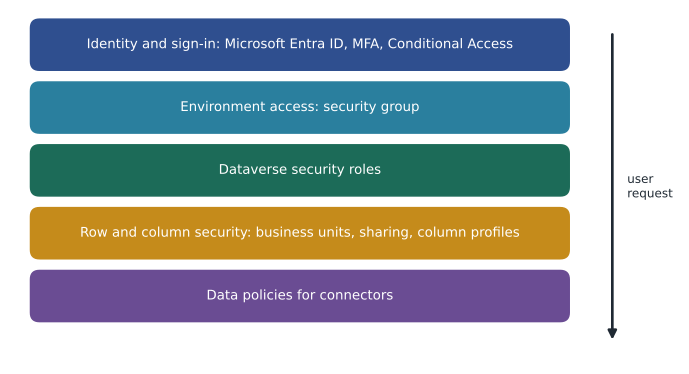
The first layer is identity. Every person signs in with a Microsoft Entra ID account, so the colleges' existing protections apply: multifactor authentication, Conditional Access policies that require a managed device or a trusted location, and the ability to disable an account the day someone leaves. Power Platform does not have its own separate user database.
The second layer is environment access. An administrator can link a security group from Entra ID to an environment, so that only members of that group can be added to it, even if other people hold licences. Rupert created a group called PP-Registrar-Prod-Users and linked it to the Registrar Prod environment. Someone from the bookstore who somehow received a link to the transcript app would be refused, because they are not in the group.
The third and fourth layers live in Dataverse: security roles decide what kinds of records a person can create, read, update and delete, and row and column security narrow that further. The fifth layer is data policies, which control which connectors may be used, and therefore where data can flow. The rest of this lesson takes these in turn.
Security roles in Dataverse
A security role is a named set of privileges. For each table, a role grants or withholds privileges such as Create, Read, Write, Delete, Append, Append To, Assign and Share, and sets an access level for each one. The access level controls which rows the privilege applies to.
| Access level | Applies to rows that are | Registrar example |
|---|---|---|
| None | No rows | Bookstore staff and Transcript Request |
| User | Owned by the user, shared with them or owned by their team | An adviser sees only requests they created |
| Business unit | Owned by anyone in the user's business unit | Ridgeview staff see Ridgeview requests |
| Parent: child business units | Owned in their business unit and any below it | A campus registrar sees that campus and its program offices |
| Organization | All rows in the environment | The registrar's team sees every request |
Dataverse includes predefined roles. System Administrator has full access and can manage the environment. System Customizer can change tables, forms and apps. Environment Maker can create apps, flows and other resources in the environment but has no automatic access to other people's data. Basic User can run apps and work with records they own. Most solutions add custom roles tailored to their users, usually by copying a predefined role and adjusting it. Maribeth and Signe designed two roles for the transcript solution: Transcript Adviser, with Create and Read at User level, and Transcript Officer, with Read and Write at Organization level and no Delete, because requests should be cancelled, not deleted.
A person can have several roles; their privileges add together, so the most generous grant wins. Roles can be assigned directly to users or to teams. A Dataverse team can be linked to an Entra ID group, so adding someone to the group in Entra ID automatically gives them the team's roles in the environment. That kept Rupert's user administration in one place.
Business units, teams and sharing
A business unit is a part of the organization used for security, such as a campus or a department. Every environment has a root business unit, and others can be added beneath it. Users and teams belong to one business unit, and Business unit and Parent: child access levels follow that structure. Lumenvale created business units for its three campuses so that a campus could see its own requests without seeing the others, while the central registrar's team had Organization access.
Individual rows can also be shared with a user or team, granting access to that one record without changing roles. Sharing is useful for exceptions, such as letting an adviser at another campus view one request, but heavy use of sharing makes security hard to understand and can slow performance. Roles should do most of the work.
Column security and masking
Sometimes a person may see a row but not every column in it. Column-level security lets an administrator mark a column as secured and then grant read or update permission on it through column security profiles. Lumenvale secured the Date of Birth column on its student table so that only Transcript Officers could see it. In managed environments, administrators can also create masking rules that show sensitive values in a masked form, such as only the last digits of an identifier, to people who do not need the full value.
Worked problem
Working out what a person can see
Tomasz, an adviser at the Ridgeview campus, has the Transcript Adviser role: Create and Read at User level on Transcript Request. A colleague at Ridgeview created a request for a student and shared it with Tomasz. Another request was created by a Lakeshore adviser and not shared. Which requests can Tomasz read?
Show solution
- User-level Read covers rows he owns, rows owned by his teams and rows shared with him.
- He can read every request he created himself.
- He can read the Ridgeview colleague's request, because it was shared with him.
- He cannot read the Lakeshore request: he does not own it, it is not shared and his access level is not Business unit or Organization.
Answer: His own requests and the one shared with him, but not the unshared Lakeshore request.
App and flow sharing
Security roles protect data, but people also need access to the app. A canvas app is shared with users or groups, much like a document, and the maker can choose whether they become co-owners. A model-driven app is shared by giving users a security role that is assigned to the app. Sharing an app does not automatically grant access to its data: if the app uses Dataverse, the users also need suitable security roles. Flows can likewise be shared with co-owners or run-only users. In managed environments, administrators can limit sharing, for example stopping makers from sharing canvas apps with the whole organization or with security groups larger than a chosen size.
Data policies (data loss prevention)
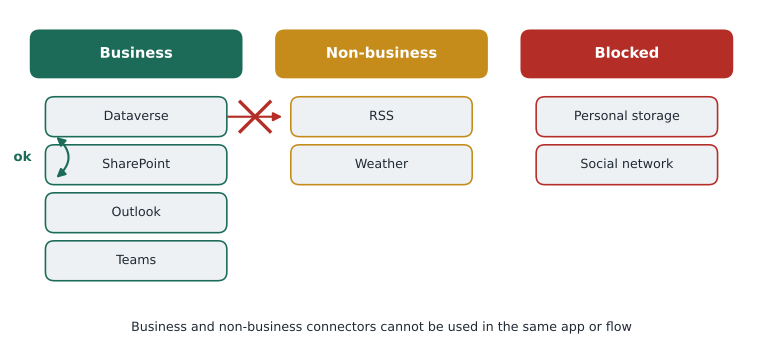
Security roles answer "who can see this record". Data policies, also called data loss prevention (DLP) policies, answer "where can data travel". A data policy sorts connectors into groups.
| Group | Meaning | Lumenvale examples |
|---|---|---|
| Business | Connectors approved for organizational data. They may be used together. | Dataverse, SharePoint, Office 365 Outlook, Teams, the student system custom connector |
| Non-business | Connectors allowed for personal productivity. They may be used together, but not with business connectors in the same app or flow. | Weather, RSS, a public news service |
| Blocked | Connectors that cannot be used at all where the policy applies. | Personal file-sharing and social media services |
The core rule is simple: an app or flow cannot combine connectors from the Business group with connectors from the Non-business group. A flow that reads student records from Dataverse (Business) and posts to a personal cloud storage service (Non-business or Blocked) is stopped, either when the maker tries to save it or, if a policy changes later, when the flow is suspended. Some Microsoft connectors that are part of the platform itself cannot be blocked.
Policies can be created at tenant level, applying to all environments or to all except some, or at environment level, applying to chosen environments. When several policies apply to one environment, they combine and the most restrictive result wins. Policies can be made finer: connector action control can allow a connector but block some of its actions, such as allowing Outlook to send email but not to delete it, and endpoint filtering can restrict which addresses connectors such as HTTP or SQL Server may reach. New connectors that Microsoft releases land in a default group that the administrator chooses, which should usually be Non-business so that nothing new is mixed with business data by accident.
Rupert applied a strict tenant-wide policy that put only Microsoft 365 connectors in Business and blocked a list of consumer services. He then created a separate policy for Registrar Prod that added the student system custom connector to Business there and nowhere else.
Privacy, compliance and accessibility
Dr. Ondaatje-Ruiz's second half of the question was "how would we know". Power Platform supports privacy and compliance obligations, such as Canada's federal and provincial privacy laws or US education privacy rules, in several ways. Environments keep data in a chosen region. Dataverse auditing records who created, changed or deleted rows and when. Activity is logged to Microsoft Purview audit, where compliance staff can search it alongside Microsoft 365 activity. Microsoft publishes compliance documentation and data processing terms. None of this makes a solution compliant on its own; the organization still decides what data to collect, how long to keep it and who may see it.
The PL-900 skills also mention accessibility. Power Apps includes an accessibility checker that flags problems such as missing alternative text, low colour contrast or controls a keyboard cannot reach, and both canvas and model-driven apps support screen readers when they are built with care. Accessible design is good practice and, for public institutions like Lumenvale, often a legal requirement.
Designing roles step by step
Signe showed Maribeth a simple method for designing security roles that she used on every project. Start from the people, not the tables: list each kind of user and what they must be able to do. Then translate each task into privileges on tables, choosing the narrowest access level that works. Finally, test with real accounts.
| Step | Question | Transcript example |
|---|---|---|
| 1. List user types | Who uses the solution? | Advisers, registrar officers, the registrar manager |
| 2. List tasks | What must each do? | Advisers submit and view their own requests; officers process all requests |
| 3. Map to privileges | Which tables, which privileges? | Advisers: Create and Read on Transcript Request; officers: Read and Write |
| 4. Choose access levels | Which rows? | Advisers: User; officers: Organization |
| 5. Test | Does each account see exactly what it should? | Test as an adviser at each campus and as an officer |
The test step matters most. Maribeth signed in with a test adviser account and tried to open a request created by a different adviser by pasting its link; Dataverse refused, as it should. She then tried to delete a request as an officer and found she could, because the officer role had been copied from a role that allowed Delete. Signe removed the privilege before release.
Data policies at Lumenvale
Rupert built Lumenvale's policies in three layers. A tenant-wide baseline applied to every environment: Microsoft 365 connectors in Business, a list of consumer file-sharing and social media services in Blocked, everything else in Non-business, and new connectors defaulting to Non-business. A production policy applied to the registrar and campus operations environments and added the custom student records connector and Dataverse to Business there. A developer policy applied to personal developer environments and blocked custom connectors entirely, so that nobody could experiment with real systems from a personal space. Because the most restrictive combination wins, every environment received at least the baseline protection.
Common mistakes
MistakeThinking that sharing a canvas app gives users access to the Dataverse data behind it.
InsteadUsers also need security roles that grant access to the tables.
MistakeGiving everyone the System Administrator role to avoid permission errors.
InsteadDesign custom roles with the least privilege each group needs.
MistakeExpecting a data policy to control who can read a record.
InsteadData policies control which connectors can be used together; security roles control record access.
MistakeLeaving the default group for new connectors set to Business.
InsteadSet it to Non-business so new connectors cannot mix with business data until reviewed.
Summary and key terms
- Security is layered: Entra ID identity, environment security groups, Dataverse security roles, row and column security, and data policies.
- Security roles grant privileges per table at access levels from User to Organization; privileges from several roles add together.
- Business units, teams and record sharing shape which rows people can reach; column security and masking protect sensitive fields.
- Sharing an app gives access to the app, not automatically to its data.
- Data policies group connectors as Business, Non-business or Blocked; business and non-business connectors cannot be combined.
- Auditing, Purview, regional storage and the accessibility checker support privacy and accessibility obligations.
- Security role
- A set of privileges and access levels that controls what a person can do with each Dataverse table.
- Access level
- The range of rows a privilege applies to: User, Business unit, Parent: child business units or Organization.
- Business unit
- A part of the organization used to scope Dataverse security.
- Column-level security
- Protection of individual columns through column security profiles.
- Data policy
- A rule set, also called a DLP policy, that groups connectors and stops business data mixing with non-business services.
- Security group
- An Entra ID group linked to an environment to limit who can be added to it.
Practice problems
Work each problem on paper first, then reveal the answer to check.
Which access level lets a person read every row in the environment?
Show answer
Organization.
A flow uses Dataverse (Business) and RSS (Non-business). What happens?
Show answer
The data policy prevents it; business and non-business connectors cannot be combined.
Name two ways Power Platform supports privacy obligations.
Show answer
Any two: regional data storage, Dataverse auditing, Purview audit logs, column security and masking, Microsoft compliance documentation.
Lesson quiz · 5 questions
Score 60% or more to complete this lesson.
Create a free account to save your progress, take quizzes and earn a certificate.