
MSBA-130 · Lesson 2 of 12 · 19 min
Power Platform components at a glance
▶ Video coming soon A video version of this lesson is on the way.
At the second session Rupert handed out a single sheet of paper with six boxes on it and said that, by the end of the afternoon, everyone should be able to point at a business problem and say which box it belonged in. Microsoft Power Platform is a family of products that share one data platform, one set of connectors, one security model and one administration centre. Each product solves a different kind of problem, and most real solutions use two or three of them together.
The family
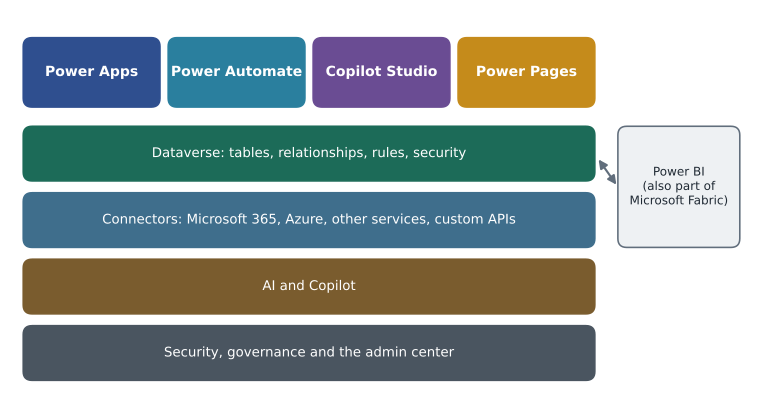
| Product or service | What it is for | Lumenvale example |
|---|---|---|
| Power Apps | Building business applications for web and mobile | An app where advisers submit and track transcript requests |
| Power Automate | Automating processes, from cloud workflows to desktop tasks | A flow that emails a student when a transcript is sent |
| Copilot Studio | Building agents that converse, answer questions and take actions | An agent that answers staff questions about records policy |
| Power Pages | Building secure, low-code websites for people outside the organization | A page where alumni request transcripts |
| Dataverse | Storing and managing business data securely | The tables that hold requests, students and status |
| Connectors | Linking apps, flows and agents to other services and data | Outlook, SharePoint, Teams and the student system |
Power Apps
Power Apps is the app-building part of the platform. An app is something people open and interact with: a form to fill in, a list to search, a screen to approve or update records. Power Apps offers several kinds of app, and choosing the right one is a common exam scenario.
A canvas app starts from a blank screen, a template or a description. The maker places controls such as text boxes, galleries, buttons and images exactly where they want them, like designing a slide. Canvas apps can use data from almost any connector, and their logic is written in Power Fx, the same formula language family as Excel. They suit task-focused apps, especially on phones and tablets, where the layout matters: a lab safety checklist with photos is a typical canvas app.
A model-driven app starts from the data instead. The maker chooses Dataverse tables, forms, views, charts and dashboards, and the app's layout is generated in a consistent, responsive design. Model-driven apps suit processes with many related records and roles, such as case management or tracking requests through stages. They always use Dataverse. Dynamics 365 applications such as Sales and Customer Service are themselves model-driven apps.
Microsoft keeps adding AI-first ways to start an app. Plan designer lets a maker describe a business problem in plain language; Copilot proposes a plan with user roles, data tables, apps and flows, and the maker refines it before anything is built. Code apps let professional developers build an app in code with popular web frameworks and still run it on Power Platform with its connectors, security and governance. Microsoft has also previewed an AI-native "vibe" experience that generates a plan, a data model and a full app with generated code from a description. Product names and preview status in this area change quickly; the exam asks you to describe what each option is for, which is more stable than the menus.
| App type | Starts from | Data | Best for |
|---|---|---|---|
| Canvas app | A blank canvas, template, image or description | Any connector, including Dataverse | Task-focused apps with a custom layout, often mobile |
| Model-driven app | Dataverse tables, forms and views | Dataverse only | Data-rich processes with many related records and roles |
| App from Plan designer | A plain-language description of the problem | Usually Dataverse | Designing a whole solution, not just one screen |
| Code app | Code written by a developer | Connectors and Dataverse | Pro-code front ends that still use platform governance |
Power Automate
Power Automate automates processes. A cloud flow runs in Microsoft's cloud and starts from a trigger: an automated event (a new email arrives, a row is added to a table), a schedule (every weekday at 7:00) or an instant action (someone presses a button in an app or in Teams). After the trigger come actions, such as sending an email, creating a record, posting in Teams or requesting an approval. Cloud flows use connectors to reach other services.
A desktop flow uses robotic process automation (RPA) to automate work in desktop applications and websites that have no connector or API: clicking, typing, reading screens and moving files on a Windows computer. Desktop flows are built in Power Automate for desktop and can run attended (on a user's own machine while they watch) or unattended (on a machine with nobody signed in). Lumenvale's exam office still copies results out of an old grading tool; that is a desktop flow candidate.
Power Automate also includes approvals, which send a request to one or more people and wait for their response in Outlook, Teams or the Power Automate app, and process tools that help analyse how work actually happens. Agent flows are flows built for or used by Copilot Studio agents. MSBA-131 builds each of these.
Copilot Studio
Microsoft Copilot Studio builds agents: AI assistants that understand natural language, answer questions using approved knowledge, and take actions on a person's behalf through tools such as connectors, flows and Model Context Protocol (MCP) servers. An agent can be published to channels such as Microsoft Teams, Microsoft 365 Copilot or a website. Copilot Studio replaced and extended Power Virtual Agents, the chatbot product that was part of the platform until 2023.
Agents can follow designed conversation paths, called topics, for predictable tasks such as "check the status of my request", and can use generative AI to answer from knowledge sources such as SharePoint sites, public websites or Dataverse. In the July 2026 PL-900 skills, Copilot Studio agents weigh 20 to 25 percent of the exam, as much as Power Apps or Power Automate, which tells you how central agents have become.
Power Pages
Power Pages builds websites for people outside the organization, such as customers, partners, applicants or alumni. Sites can be anonymous (anyone can read them) or require sign-in through providers such as Microsoft Entra External ID. Power Pages sites store and show data in Dataverse, so an alumni transcript request form could feed the same table the registrar uses internally. Because external users and the internet are involved, Power Pages sites need careful security design, which MSBA-131 introduces.
Dataverse and connectors: the shared foundation
Microsoft Dataverse is the platform's data service: a secure, cloud database of tables with rich data types, relationships, business rules, security and auditing. Lesson 3 covers it in detail. Connectors are prebuilt wrappers around other services' APIs that let apps, flows and agents read and write data and trigger actions. Lesson 4 covers them. Every product above uses both.
AI across the platform
Generative AI is now built into each product. In Power Apps, a maker can describe an app and Copilot drafts the tables and screens. In Power Automate, a maker can describe a flow in a sentence and Copilot builds the steps. In Copilot Studio, the agent itself is generative. AI features also let apps classify documents, extract text from forms and summarize records. Lesson 7 covers these features and the responsible-use questions they raise.
Where Power BI fits
Microsoft Power BI, the business intelligence and reporting service, has long been grouped with Power Platform and is still licensed and promoted alongside it. It connects to the same data, including Dataverse, and Power BI reports can be embedded in Power Apps. Power BI is also part of Microsoft Fabric, Microsoft's analytics platform. For the exam it helps to know that the PL-900 skills measured as of July 24, 2026 focus on Power Apps, Power Automate, Copilot Studio, Dataverse and connectors and do not list Power BI as a separate domain. Kwabena's reporting work is covered in MSBA-132 and, in depth, in the PL-300 courses.
Worked problem
Choosing components for a problem
The Lakeshore campus wants lab technicians to complete a safety checklist on a tablet in each lab every Monday, attach photos of any problems, and have the facilities manager notified when an item fails. Which Power Platform components fit?
Show solution
- People need to open something and fill it in on a tablet with photos: that is an app. The layout matters and it is task-focused, so a canvas app fits.
- The checklist results must be stored safely and reported on: a Dataverse table, or a SharePoint list for a small team.
- A notification must go out automatically when an item fails: an automated cloud flow triggered when a failed item is saved.
- The flow reaches email or Teams through standard connectors.
Answer: A canvas app for the checklist, Dataverse (or a SharePoint list) for the data, and an automated cloud flow using the Outlook or Teams connector to notify the facilities manager.
How the parts work together
Real solutions rarely use one product alone. Rupert sketched how the transcript request process might look once it was rebuilt, to show how the pieces connect. An adviser opens a canvas app in Teams and submits a request for a student. The request is saved as a row in a Dataverse table called Transcript Request. Saving the row triggers an automated cloud flow that checks the student has no holds, routes the request to Maribeth's team through an approval, and, once approved, emails the student through the Office 365 Outlook connector. Registrar staff work through the queue in a model-driven app with views such as "Waiting for approval" and "Sent this week". An agent in Teams answers advisers' questions such as "How long do official transcripts take?" from the registrar's policy page on SharePoint, and can look up the status of a request through an agent flow. Later, a Power Pages site could let alumni submit their own requests into the same table.
None of those pieces needed a separate database, login system or server. They share the table, the security roles and the environment they live in. That shared foundation is what distinguishes a platform from a collection of tools, and it is why the exam keeps returning to Dataverse, connectors and environments.
| Step in the process | Component | Why that component |
|---|---|---|
| Adviser submits a request | Canvas app in Teams | Quick, focused form where advisers already work |
| Request is stored | Dataverse table | Secure, structured data with security roles and auditing |
| Hold check and approval | Automated cloud flow with an approval | Runs on its own when a row is created |
| Student is notified | Outlook connector in the flow | Prebuilt connection to email |
| Staff work the queue | Model-driven app | Views, forms and stages over many records |
| Advisers ask questions | Copilot Studio agent | Answers from approved knowledge and looks up status |
Solutions like this are packaged in solutions, containers that hold the tables, apps, flows and agents that belong together so they can be moved from a development environment to a test environment and then to production. Lesson 5 introduces environments and Lesson 9 introduces the pipelines that move solutions between them. For now it is enough to know that a well-built Power Platform project is a set of related components, not a single file.
One administration and security model
All of these products are administered together in the Power Platform admin center, where administrators create environments, set data policies, monitor usage and manage capacity. They all use Microsoft Entra ID for identities, so people sign in with their existing work accounts and administrators apply the same Conditional Access and multifactor authentication policies they use for Microsoft 365. Lessons 5, 6 and 9 cover administration and governance.
When the components are learned this way, as parts that work together, exam questions that describe a business scenario become much easier. The question is rarely "what is Power Automate?" and much more often "a team needs X; which components should it use?"
Common mistakes
MistakeChoosing a model-driven app for data stored only in a SharePoint list.
InsteadModel-driven apps require Dataverse. For a SharePoint list, use a canvas app or move the data to Dataverse.
MistakeUsing a cloud flow to automate clicks in an old desktop program with no connector.
InsteadThat is a job for a desktop flow, which uses RPA to drive the user interface.
MistakeBuilding a public alumni website as a canvas app.
InsteadApps are for signed-in users in the organization; Power Pages is the product for external websites.
MistakeThinking Copilot Studio only builds scripted chatbots.
InsteadAgents combine designed topics with generative answers from knowledge and actions through tools.
Summary and key terms
- Power Platform includes Power Apps, Power Automate, Copilot Studio and Power Pages, built on Dataverse, connectors, AI and a shared administration model.
- Canvas apps give full layout control and use any connector; model-driven apps are generated from Dataverse tables, forms and views.
- Cloud flows run in the cloud from automated, scheduled or instant triggers; desktop flows automate user interfaces with RPA.
- Copilot Studio builds agents that use topics, knowledge sources and tools and publish to channels such as Teams.
- Power Pages builds secure websites for external users on Dataverse.
- Power BI works alongside the platform and is part of Microsoft Fabric; the July 2026 PL-900 skills do not list it as a domain.
- Canvas app
- A Power Apps app whose layout the maker designs freely, using data from any connector.
- Model-driven app
- A Power Apps app generated from Dataverse tables, forms, views and dashboards.
- Cloud flow
- A Power Automate flow that runs in the cloud from an automated, scheduled or instant trigger.
- Desktop flow
- A Power Automate flow that uses robotic process automation to work in desktop apps and websites.
- Agent
- An AI assistant built in Copilot Studio that converses, answers from knowledge and takes actions.
- Power Pages
- The Power Platform product for building low-code websites for external users.
Practice problems
Work each problem on paper first, then reveal the answer to check.
Which app type must use Dataverse?
Show answer
A model-driven app.
A flow must run every weekday at 7:00. What kind of trigger is that?
Show answer
A scheduled trigger on a cloud flow.
Which product would you use to let alumni outside the colleges request transcripts on a website?
Show answer
Power Pages.
Lesson quiz · 5 questions
Score 60% or more to complete this lesson.
Create a free account to save your progress, take quizzes and earn a certificate.