
MSBA-130 · Lesson 12 of 12 · 18 min
Case study: replacing spreadsheets with an app
▶ Video coming soon A video version of this lesson is on the way.
On Monday, November 16, 2026, six registrar staff and ten advisers began a pilot of the new Transcript Request solution. Maribeth's old spreadsheet was set to read-only that morning, with a note in cell A1 pointing to the app. This final lesson walks through the whole project from the first audit finding to the pilot, so that each idea in the course appears in context. At the end are capstone questions that mirror the kinds of decisions the PL-900 exam asks about.
Step 1: Understand the problem
The project began with the process, not the technology. Maribeth and Rupert spent two hours walking through how a transcript request actually moved. An adviser or student emailed the registrar. A staff member copied the details into the spreadsheet, looked up the student in the student information system to check for holds, printed or generated the transcript, sent it by email, mail or courier, typed the date and tracking number back into the spreadsheet and emailed the student. Exceptions were common: rush requests, requests on hold, recipients who needed a particular format, and students who wanted several copies sent to different places.
| Pain point | Effect | Root cause |
|---|---|---|
| Retyping details from emails | About 14 hours a week of staff time | No structured way to submit a request |
| Manual hold checks | Holds sometimes missed | No link to the student system |
| Three people editing one file | Overwritten rows, broken formulas | A spreadsheet used as a shared database |
| No access control | Anyone with the link saw every student | File-level sharing only |
| No status for advisers | Frequent "where is it?" emails | Status only visible in the spreadsheet |
Step 2: Make the business case
Lesson 1's estimate held up when checked with staff: about 10 hours a week saved over 46 weeks, worth roughly 20,700 dollars a year at 45 dollars an hour, plus fewer missed holds and an end to an audit finding about unprotected student data. On the cost side, Lesson 8's comparison showed about 370 dollars a month in list-price licences for the mixed approach, about 4,440 dollars a year, plus Signe's time to build the custom connector and Rupert's time to administer. Leadership approved the project in September with one condition: the privacy officer had to sign off before any real student data entered the system.
Step 3: Design the data
The group designed the data in Dataverse before building screens. They reused the standard Contact table for students, which already held names and contact details synchronized from the student system, and created three custom tables.
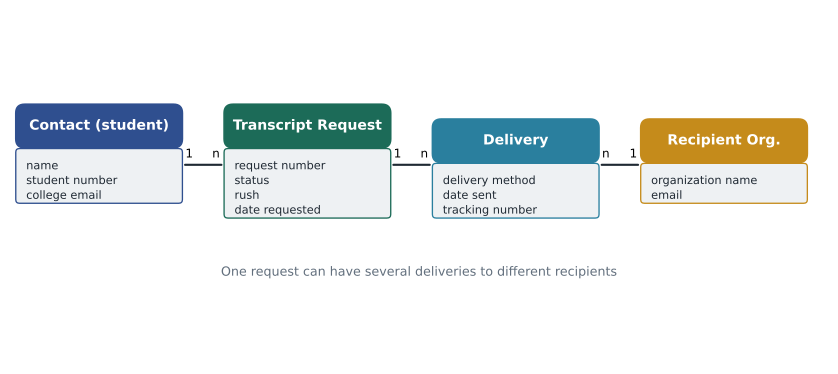
The key design decision was splitting Delivery from Transcript Request. In the spreadsheet, a student who wanted copies sent to three universities filled three rows, repeating everything else. In Dataverse, one request has three related delivery rows, each with its own recipient, method, date sent and tracking number. Status became a choice column with values Submitted, On hold, Approved, In progress, Sent and Cancelled, and a business rule made Tracking Number required whenever Delivery Method was Courier.
Step 4: Set up environments and security
Following Lessons 5, 6 and 9, Rupert created Registrar Dev, Registrar Test and Registrar Prod in the Canada region, linked Registrar Prod to the PP-Registrar-Prod-Users security group, turned on managed environments and placed the three environments in an environment group with shared rules. The Transcript Adviser and Transcript Officer security roles were assigned to Dataverse teams linked to Entra ID groups. The Date of Birth column was secured with a column security profile, and a masking rule showed only the last three digits of student numbers in list views. A data policy for the group allowed Dataverse, Outlook, Teams, SharePoint and the student records custom connector in the Business group and blocked consumer file-sharing services.
Step 5: Build the solution
Everything lived in one solution, Registrar Transcripts, built in Registrar Dev.
| Component | Built by | Purpose |
|---|---|---|
| Tables, columns, business rules | Maribeth, reviewed by Signe | The data model and its rules |
| Model-driven app: Transcript Office | Maribeth | Registrar staff work the queue with views and forms |
| Canvas app in Teams: Request a Transcript | Maribeth | Advisers submit requests and see status |
| Custom connector: Student Records | Signe | Checks holds in the student system |
| Cloud flow: New request | Maribeth | Checks holds, routes for approval, notifies |
| Cloud flow: Delivery sent | Maribeth | Emails the student when a delivery is sent |
| Scheduled flow: Late requests | Kwabena | Weekday summary of requests waiting more than five days |
| Copilot Studio agent: Registrar Helper | Maribeth with Rupert | Answers advisers' questions from the policy page and looks up request status |
| Environment variables and connection references | Signe | Different settings and connections in each environment |
Copilot drafted the first versions of the tables, both apps and the New request flow, which saved, by Maribeth's estimate, about three days. Every draft was then reviewed: data types fixed, the hold check added, wording made consistent and accessibility checked. The agent was grounded only on the registrar's published policy page and used an agent flow to look up the status of a request by number, which respected the signed-in adviser's security roles.
// Canvas app: Submit button OnSelect
If(
    IsBlank(StudentPicker.Selected),
    Notify("Choose a student first.", NotificationType.Error),
    SubmitForm(RequestForm);
    Notify("Request submitted. You will get an email when it is approved.", NotificationType.Success)
)
Step 6: Decide licensing
Because the solution used Dataverse, a model-driven app and a custom connector, its users needed premium rights, and managed environments made that a strict requirement. Following the Lesson 8 analysis, the six registrar staff received Power Apps Premium licences, which also covered their use of premium connectors in flows built into the solution, and Registrar Prod was linked by a billing policy to an Azure subscription so that advisers were billed pay-as-you-go per active user. The agent's usage drew on a small Copilot Credit allocation that the colleges already held for another project. Lionel set an Azure budget alert at 300 dollars a month so that any surprise would be seen early.
Step 7: Test, release and support
Signe ran the solution checker and fixed two warnings about inefficient queries. The solution moved through the pipeline to Registrar Test, where four testers worked through 30 scripted cases, including holds, rush requests, multiple deliveries and an adviser trying to open another campus's request. After the privacy officer's review, Rupert approved the deployment to Registrar Prod. Maribeth became the solution's owner and Signe the backup owner, and both were listed in the solution description. Maribeth wrote a one-page guide for advisers and recorded a three-minute video.
Step 8: Measure and improve
In the first week of the pilot, 61 requests went through the app. Retyping disappeared because advisers entered requests directly. Two requests were stopped automatically because the student had a hold, both of which would probably have been missed before. Advisers' "where is it?" emails fell from about 20 in a typical week to 4. The pilot also surfaced problems: two advisers could not open the app because their accounts had not been added to the security group, and the late-requests email counted weekends. Both were fixed through the normal release process. Full rollout to all advisers was planned for January.
| PL-900 domain | Where it appeared in the project |
|---|---|
| Business value of Power Platform | The business case, choosing components for each step |
| Manage the Power Platform environment | Dataverse design, environments, security roles, data policies, managed environments, monitoring, pipelines |
| Capabilities of Power Apps | The model-driven and canvas apps, built with Copilot drafts |
| Capabilities of Power Automate | The approval, notification and scheduled flows |
| Agents in Copilot Studio | The Registrar Helper agent with knowledge and an agent flow |
Lessons the team recorded
At the project review, the group wrote down what they would tell the next department. Start with the process and its exceptions. Design the data before the screens. Set up environments, security and data policies before real data arrives. Let Copilot draft, then review everything. Put rules where the data lives. Bring in a professional developer for integration early. Check licensing before turning on managed environments. Name an owner and a backup owner. Measure before and after so that the value is visible.
Worked problem
Capstone scenario: the library's room bookings
The library wants students to book study rooms. Bookings are made by about 2,000 students a term, mostly from phones; library staff need to see the day's bookings and mark no-shows; students should get a reminder an hour before. Using what this course covered, outline a solution and its main governance and licensing questions.
Show solution
- Audience: decide first whether students will use Lumenvale accounts with Power Platform licences or sign in as external users. For thousands of occasional external users, a Power Pages site is the natural front end.
- Data: Dataverse tables for Room and Booking, with a lookup from Booking to Room and a choice column for status.
- Staff view: a model-driven app with a view of today's bookings and a form to mark no-shows.
- Automation: a scheduled cloud flow every 15 minutes that sends reminders for bookings starting in the next hour.
- Governance: a library environment in the colleges' environment strategy, security roles for library staff, a data policy, and a named owner and backup owner.
- Licensing: Power Pages authenticated-user capacity or pay-as-you-go for students, and premium licences or pay-as-you-go for library staff using the model-driven app.
Answer: A Power Pages site (or a canvas app if students have organizational accounts and licences) on Dataverse tables, a model-driven app for staff, a scheduled reminder flow, a governed library environment and a licensing plan sized for 2,000 occasional student users.
Risks and mitigations
Before the pilot, the team wrote a short risk register. It is a useful habit for any solution that replaces something people depend on.
| Risk | Likelihood | Mitigation |
|---|---|---|
| Advisers keep emailing requests instead of using the app | Medium | Guide and video; registrar staff reply to emails with the app link |
| The student system API is unavailable | Low | Flow marks the request as Needs manual check and notifies an officer |
| A licence is missing when an adviser first opens the app | Medium | Pay-as-you-go billing policy on Registrar Prod; security group checked before rollout |
| Sensitive data visible to the wrong campus | Low | Roles tested as each campus; column security and masking |
| The owner leaves | Low | Backup owner named; solution documented; service-account connections |
What the case study shows about the exam
The PL-900 exam is a fundamentals exam: it does not ask candidates to build a solution, but it does ask them to describe what each part of the platform does and to choose sensibly between options. Almost every decision in this case study is the kind of choice an exam question describes. Which app type suits staff working a queue? Which trigger starts a flow when a row is added? Which licence covers occasional users? Which environment should hold real data? Which feature limits sharing? Which tool shows why a flow failed? A candidate who can follow the reasoning in this case study is well placed for the fundamentals, and MSBA-131 and MSBA-132 add the hands-on building that makes the ideas concrete.
The registrar team also kept a short decision log during the project, recording each significant choice, the options considered and the reason. Months later, when someone asked why deliveries were a separate table or why advisers used pay-as-you-go, the answer was written down.
With the pilot running, the group's attention turned to the next step: hands-on building in MSBA-131, where the same Lumenvale team builds apps, flows and agents step by step.
Common mistakes
MistakeStarting with screens before understanding the process.
InsteadMap the process and its exceptions first.
MistakeLoading real student data into a development environment.
InsteadUse test data in development and test; real data only in production after review.
MistakeReleasing without testing security from a normal user's account.
InsteadTest as each role, including attempts to see records the user should not see.
MistakeDeclaring success without measuring.
InsteadCompare before and after on the measures in the business case.
Summary and key terms
- The project started from the process, its pain points and a checked business case.
- Dataverse design came first, including splitting deliveries from requests and using choices and business rules.
- Environments, security groups, roles, column security, masking and data policies were in place before real data.
- One solution held tables, apps, flows, an agent, a custom connector, environment variables and connection references.
- Licensing mixed premium per-user licences for daily users with pay-as-you-go for occasional users.
- The solution moved through a pipeline with testing and approval, and the pilot was measured against the business case.
- Pilot
- A limited first release to a small group to test a solution in real use.
- Solution owner
- The person accountable for a solution's operation and changes.
- Test case
- A scripted scenario used to check that a solution behaves correctly.
- Business rule
- A no-code rule on a table that enforces requirements such as a required column.
- Billing policy
- The link between an environment and an Azure subscription for pay-as-you-go.
Practice problems
Work each problem on paper first, then reveal the answer to check.
Why did the team split Delivery into its own table?
Show answer
One request can have several deliveries to different recipients; a separate related table avoids repeating the request on several rows.
Name two problems the pilot found and how they were fixed.
Show answer
Two advisers were missing from the security group, and the late-request count included weekends; both were fixed through the normal release process.
Which PL-900 domain covers environments, security roles and pipelines?
Show answer
Manage the Microsoft Power Platform environment.
Lesson quiz · 5 questions
Score 60% or more to complete this lesson.
Create a free account to save your progress, take quizzes and earn a certificate.