
MSBA-130 · Lesson 5 of 12 · 18 min
Environments and the admin center
▶ Video coming soon A video version of this lesson is on the way.
When Rupert first signed in to the Power Platform admin center for Lumenvale, he found what most organizations find: one environment called "Lumenvale Community Colleges (default)", containing 63 apps and 141 flows that staff had built over four years with their Microsoft 365 licences. Some were useful and well maintained. Some belonged to people who had left. Three flows were still emailing a former employee's personal address every week. "This," he told the group, "is what happens when the only environment is the default one."
What an environment is
An environment is a container for Power Platform resources: apps, flows, Copilot Studio agents, connections, custom connectors, gateways and, optionally, a Dataverse database. Every environment sits in one region (geography), such as Canada, the United States or Europe, which decides where its data is stored. Each environment has its own security: who can see it, who can build in it, and what roles they have. Data in one environment's Dataverse database is separate from another's.
Environments let an organization separate work that should not mix. Common separations are by stage (development, test and production), by department or business unit, by sensitivity of data, and by audience (a personal sandbox for learning versus a production environment for an app hundreds of people rely on).
Environment types
Power Platform offers several environment types, and the PL-900 exam expects candidates to know what each is for.
| Type | Purpose | Key points |
|---|---|---|
| Default | Created automatically for every tenant | Every licensed user can build here; it cannot be deleted; best kept for personal productivity |
| Production | Running apps and flows that people rely on | Full backups and support; the home of finished solutions |
| Sandbox | Development and testing | Can be copied, reset and later converted to production |
| Trial | Trying features for a short period | Expires after a set time, typically 30 days, unless converted |
| Developer | A personal environment for one maker to learn and build | Owned by one person; usable with the free Developer Plan |
| Microsoft Dataverse for Teams | Apps, flows and agents for a single team inside Teams | Created from Teams; smaller and simpler; can be upgraded |
The default environment deserves special attention. Because every licensed person can create apps and flows there, it tends to fill with personal and experimental work. Microsoft's guidance is to treat it as a space for personal productivity, apply strict data policies to it, and move anything important into properly managed environments. A managed environments feature called default environment routing can automatically send new makers to their own personal developer environment instead of the default one, which Lesson 9 returns to.
Planning an environment strategy
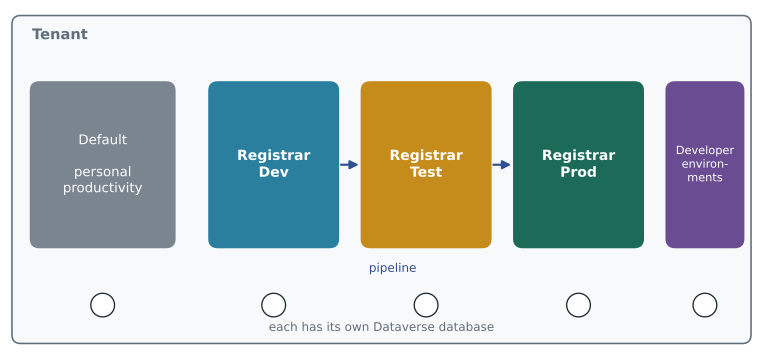
An environment strategy is a written plan for which environments exist, who can create them, what each is for and which policies apply. Rupert drafted Lumenvale's on one page.
| Environment | Type | Who builds | Who uses | Data allowed |
|---|---|---|---|---|
| Lumenvale (default) | Default | Any staff member | The builder and a few colleagues | No student records |
| Registrar Dev | Sandbox | Maribeth, Signe | Builders only | Test data only |
| Registrar Test | Sandbox | Nobody builds directly; solutions arrive by pipeline | A small group of testers | Test data only |
| Registrar Prod | Production | Nobody builds directly | Registrar staff and advisers | Student records |
| Lakeshore Ops | Production | Two trained makers | Lakeshore staff | Operational data, no student records |
| Personal developer | Developer | One maker each | That maker | Sample data only |
Two rules carried most of the weight. First, nobody builds directly in a production environment; changes are made in development, tested, and then moved by a pipeline. Second, sensitive data only lives in environments that have the right security group, data policies and backups. Rupert also limited who could create new production and sandbox environments to administrators, through the admin center's tenant settings, so that environments would not multiply unseen.
The Power Platform admin center
The Power Platform admin center is the web portal where administrators manage environments and the platform as a whole. Its layout has been redesigned more than once, so menu names move, but the main areas are stable.
| Area | What administrators do there |
|---|---|
| Environments and environment groups | Create, copy, reset, back up, restore and delete environments; set security groups; group environments to apply rules together |
| Settings and tenant settings | Control features for one environment or the whole tenant, such as who can create environments and which AI features are on |
| Security and data policies | Define data loss prevention policies, manage access and review security recommendations |
| Monitoring and analytics | See usage of apps, flows and agents, service health and inventory of resources |
| Licensing and capacity | See licences, assign capacity, view Dataverse storage used and set up pay-as-you-go billing |
| Help and support | Open support requests and read service messages |
Many administrators also use PowerShell modules for Power Platform and the Power Platform CLI (the pac command) to automate tasks such as listing every environment and its owner. The admin center itself now includes Copilot assistance for some administrative questions.
# Requires the Power Platform PowerShell modules for administrators
Add-PowerAppsAccount
Get-AdminPowerAppEnvironment |
    Select-Object DisplayName, EnvironmentType, Location, CreatedBy |
    Sort-Object DisplayName
Who administers Power Platform
Administration happens at two levels. At tenant level, people with the Power Platform Administrator role in Microsoft Entra ID (or a Global Administrator or Dynamics 365 Administrator) can manage every environment, create data policies for the tenant and change tenant settings. At environment level, people with the System Administrator security role in an environment's Dataverse database manage that one environment: its users, roles, settings and solutions. That split lets central IT set the rules while a trusted person in a department manages day-to-day access in their own environment. Lesson 6 explains environment security in more detail.
Lifecycle operations
Environments are not static. Administrators often need to copy an environment, for example to give testers production-like configuration without production data; reset a sandbox to a clean state; back up and restore, since production and sandbox environments have system backups and also allow manual backups before a risky change; and convert a sandbox or trial into production when a pilot succeeds. Deleting an environment deletes its Dataverse database and everything in it, so the admin center makes it a deliberate action, and deleted environments can be recovered for a short period.
Capacity and environments
Each Dataverse environment consumes capacity from the tenant's pool: database capacity for table rows, file capacity for attachments and images, and log capacity for audit logs. Capacity comes from licences and from add-ons, and the admin center shows how much each environment uses. An environment strategy should consider capacity: a dozen copies of a large production environment can use up storage the organization has paid for. Lesson 8 covers capacity as part of licensing.
Worked problem
Choosing an environment type
For each need, choose the environment type: (a) Maribeth wants to experiment with Copilot app creation on her own before building anything real; (b) the registrar app will be used by 46 staff from January; (c) Signe needs a place to test a new version of the app with sample data; (d) a team of four wants a simple shift-swap app inside their Teams channel.
Show solution
- (a) A personal place to learn: a developer environment.
- (b) A finished app people rely on: a production environment.
- (c) Testing before release: a sandbox environment, refreshed by copying production configuration without the student data.
- (d) A small team tool inside Teams: Microsoft Dataverse for Teams.
Answer: Developer, production, sandbox and Dataverse for Teams, in that order.
Environment access and settings
Creating an environment is only the start. Each one has settings that administrators choose deliberately: whether auditing is on, which features and previews are enabled, how email is handled, which Copilot features are allowed and how long audit logs are kept. Each one also has access rules. When an environment has a Dataverse database, people are added as users of that database with security roles; when an Entra ID security group is linked to the environment, only members of that group can be added. Removing someone from the group removes their access to the environment the next time it synchronizes.
Lumenvale created a security group for each production environment and asked department heads to approve membership changes through the colleges' usual access request process. In the development environments, only makers and testers were members. That simple arrangement meant that the question "who can reach the registrar app?" could be answered by looking at one group.
Regions and data residency
When an environment is created, the administrator chooses its region. The region decides where the environment's data is stored at rest, and some organizations must keep data in a particular country or region by law, by contract or by policy. Microsoft offers Power Platform regions for many geographies, including Canada and the United States. A few features process data outside the environment's region, particularly some AI features, and administrators decide whether to allow that. Moving an environment to another region later is possible only through a support request and planning, so the region is worth choosing carefully at the start.
| Decision | Options | Lumenvale choice for Registrar Prod |
|---|---|---|
| Type | Production, sandbox, trial, developer | Production |
| Region | The geographies Power Platform offers | Canada |
| Dataverse database | With or without | With |
| Security group | None or a chosen Entra ID group | PP-Registrar-Prod-Users |
| Managed environment | On or off | On |
| Environment group | None or a chosen group | Registrar |
Environment requests
Because Rupert restricted environment creation, departments needed a way to ask for one. The colleges built a short request form, itself a Power Apps canvas app, that asked for the purpose, the data involved, the owner and backup owner, the expected number of users and whether the environment was for development, test or production. Rupert reviewed requests weekly. Approved requests got an environment with a standard naming pattern (department, purpose, stage), the right security group, a data policy and, for production, managed environments. The request record became the environment's documentation.
Default environment hygiene
Rupert did not delete the 63 apps and 141 flows he had found in the default environment. Instead he worked through them over several weeks. First he applied a strict data policy to the default environment, putting only Microsoft 365 connectors in the Business group, so that nothing new could connect business data to outside services. Then he used the admin center inventory to sort resources by owner and last use. Owners of active, important resources were invited to move them into proper environments as solutions. Resources owned by people who had left were reassigned or switched off after checking with their managers. Unused resources were switched off and, after a waiting period, deleted. By November the default environment held mostly personal productivity apps, which was exactly its purpose.
| Finding in the default environment | Action taken |
|---|---|
| Important app used by a whole department | Moved into a production environment as a solution |
| Flow owned by a former employee still running | Ownership reassigned or flow turned off after checking with the manager |
| Personal app used by one person | Left in place under the default environment rules |
| App or flow unused for six months | Turned off, then deleted after a waiting period |
| Flow sending data to a personal account | Turned off immediately and reported to IT security |
The admin center's weekly usage insights and inventory views, covered in Lesson 9, made this kind of review routine rather than a one-off project.
For the exam, remember the purpose of each environment type and the role of the default environment, the link between environments and regions, and the fact that the admin center is where environments, data policies, analytics and capacity are managed.
Common mistakes
MistakeBuilding important apps in the default environment.
InsteadKeep the default environment for personal productivity and move important solutions to managed production environments.
MistakeLetting anyone create production environments.
InsteadRestrict environment creation in tenant settings and follow a written strategy.
MistakeEditing an app directly in production.
InsteadBuild in development, test, then deploy through a pipeline.
MistakeIgnoring the region when creating an environment.
InsteadChoose the geography that meets data residency needs; for Lumenvale, Canadian data stays in Canada.
Summary and key terms
- An environment is a container for apps, flows, agents, connections and an optional Dataverse database, in one region.
- Types are default, production, sandbox, trial, developer and Dataverse for Teams, each with a distinct purpose.
- The default environment is open to every licensed maker and should be kept for personal productivity.
- An environment strategy separates development, test and production and controls who can create environments.
- The Power Platform admin center manages environments, settings, data policies, analytics, licensing and capacity.
- Tenant administrators hold the Power Platform Administrator role; environment administrators hold the System Administrator security role.
- Environment
- A container for Power Platform resources and, optionally, a Dataverse database, in one region.
- Default environment
- The environment created automatically for every tenant, where every licensed user can build.
- Sandbox environment
- A non-production environment for development and testing that can be copied and reset.
- Developer environment
- A personal environment for one maker.
- Environment strategy
- A plan for which environments exist, their purposes, owners and policies.
- Power Platform admin center
- The portal for managing environments, policies, analytics, licensing and capacity.
Practice problems
Work each problem on paper first, then reveal the answer to check.
Which environment type is created automatically and cannot be deleted?
Show answer
The default environment.
Which Entra ID role manages Power Platform across the whole tenant?
Show answer
Power Platform Administrator (Global Administrators and Dynamics 365 Administrators can as well).
Why should makers not build directly in production?
Show answer
Untested changes would affect people relying on the app; changes should be built in development, tested and deployed through a pipeline.
Lesson quiz · 5 questions
Score 60% or more to complete this lesson.
Create a free account to save your progress, take quizzes and earn a certificate.