
MSBA-130 · Lesson 4 of 12 · 19 min
Connectors and data sources
▶ Video coming soon A video version of this lesson is on the way.
Kwabena arrived at the fourth session with a list. Before any new app could be useful, it would need data that already lived somewhere else: student details in the colleges' student information system, staff in Microsoft Entra ID, policy documents on the registrar's SharePoint site, course offerings in a SQL Server database that institutional research maintains, and fee payments in the finance system. "We are not going to retype any of that," he said. "So how does Power Platform reach it?" The answer is connectors.
What a connector is
A connector is a prebuilt wrapper around a service's application programming interface (API). It describes, in a form Power Platform understands, what the service can do: which actions it offers (send an email, create a row, get a file) and, for many services, which triggers it exposes (when an email arrives, when a row is modified, when a file is created). Makers then use those actions and triggers in apps, flows and agents without writing any code to call the API themselves.
A connector is the definition. A connection is an instance of it with credentials: Maribeth's connection to Office 365 Outlook signs in as Maribeth, while a service account's connection to SQL Server uses that account. Apps and flows use connections, and connections can be shared or, inside solutions, referenced through connection references so that the same flow uses a test connection in a test environment and a production connection in production.
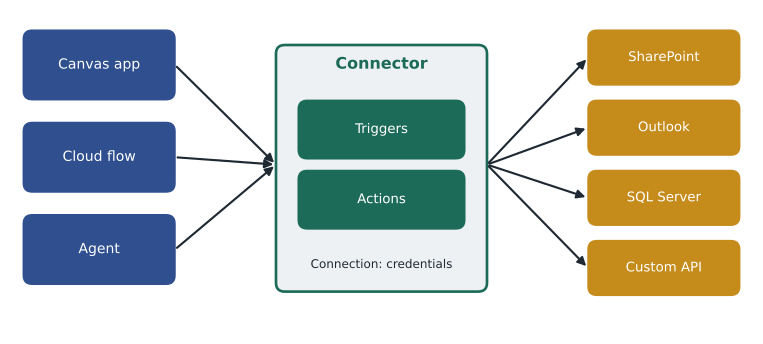
Microsoft documents well over a thousand connectors, covering Microsoft services such as SharePoint, Outlook, Teams, Excel Online, OneDrive, Dataverse, Azure services and Dynamics 365, and services from other companies such as Salesforce, ServiceNow, Adobe, DocuSign, Google, Slack and many smaller software vendors. Some are built and maintained by Microsoft; many are built by the service's own publisher and certified by Microsoft; others are published by community members as independent publishers.
Triggers and actions
In a cloud flow, the first step is always a trigger. Connector triggers come in two styles. A polling trigger checks the service on a schedule, such as every few minutes, and fires when it finds something new. A push trigger is notified by the service the moment an event happens. The maker does not usually need to know which style a connector uses, but polling explains why some flows start a minute or two after the event rather than instantly.
After the trigger come actions. Each action takes inputs, which can include values produced by the trigger or earlier actions, and produces outputs that later steps can use. A flow that sends a confirmation when a transcript request is created might use these steps:
| Step | Connector | Trigger or action | Uses |
|---|---|---|---|
| 1 | Microsoft Dataverse | Trigger: when a row is added | Fires for each new Transcript Request row |
| 2 | Microsoft Dataverse | Action: get a row by ID | Reads the related student's details through the lookup |
| 3 | Office 365 Outlook | Action: send an email | Sends a confirmation to the student's college email |
| 4 | Microsoft Teams | Action: post message in a chat or channel | Tells the registrar team a rush request has arrived |
In canvas apps, connectors appear as data sources: the maker adds a connector to the app and can then read data into galleries and forms, or call actions from formulas, such as sending an email when a button is selected. In Copilot Studio, connectors appear as tools an agent can call, alongside agent flows and Model Context Protocol (MCP) servers.
Standard, premium and custom connectors
Connectors are classified in a way that matters for licensing. Standard connectors can be used with the Power Apps and Power Automate rights included in many Microsoft 365 licences. Examples include SharePoint, Outlook, Teams, OneDrive for Business and Excel Online. Premium connectors need a standalone Power Platform licence or a pay-as-you-go plan for the people who use them. Examples include SQL Server, Dataverse in most scenarios outside Teams, Salesforce, the generic HTTP connector and connectors to many business systems. Every connector's documentation page shows whether it is standard or premium, and the classification can change.
A custom connector wraps an API that has no published connector, such as Lumenvale's own student information system API. A developer describes the API with an OpenAPI definition (or builds it in the custom connector wizard), sets up authentication, and the connector appears alongside the others. Custom connectors are treated as premium for licensing. They are a good example of the partnership between makers and professional developers: Signe would build and secure the student system connector once, and makers like Maribeth would then use it without needing to know how the API works.
| Type | Licence needed for users | Examples | Who builds it |
|---|---|---|---|
| Standard | Included with many Microsoft 365 licences | SharePoint, Outlook, Teams, OneDrive, Excel Online | Microsoft or the publisher |
| Premium | Standalone Power Apps or Power Automate licence, or pay-as-you-go | SQL Server, Dataverse (outside Teams), HTTP, Salesforce | Microsoft or the publisher |
| Custom | Treated as premium | An organization's own API | The organization's developers |
Reaching data on premises
Some data does not live in the cloud. Lumenvale's institutional research database runs on a SQL Server in the colleges' data centre, behind the firewall. To reach it, Power Platform uses the on-premises data gateway, a Microsoft service installed on a server inside the network. The gateway makes an outbound connection to Azure, so no inbound firewall ports need to be opened, and relays requests between cloud apps and flows and the local data source. Gateways support SQL Server, file shares, SharePoint Server and other sources, and the same gateway can also serve Power BI. Because it is a door into the network, a gateway needs an owner, a patching schedule and a careful list of who may create connections through it.
Choosing a data source
Connectors make it possible to build an app on almost any data source, but not every data source is a good home for an app's data. A common early decision is whether data should live in Dataverse, a SharePoint list, Excel or an existing system.
| Data source | Strengths | Limits | Good fit |
|---|---|---|---|
| Excel table in OneDrive or SharePoint | Familiar, quick to start | Weak for several simultaneous editors, no real security per row, file can be moved or broken | Prototypes and personal tools |
| SharePoint list | Included with Microsoft 365, standard connector, versioning | Limited relationships and security, performance limits with large lists | Simple team lists and requests |
| Dataverse | Relationships, security roles, auditing, business logic, model-driven apps | Needs capacity and usually premium licences | Business processes with sensitive or related data |
| Existing system through its connector | Data stays in the system of record | Depends on the system's API and licence | Reading or updating data that belongs elsewhere |
For the transcript request log, Rupert and Maribeth chose Dataverse because the data concerns students, has relationships to students and recipients, and needs auditing. For the lab safety checklist, which a small team uses and which holds no personal information, a SharePoint list would have been acceptable; the team chose Dataverse anyway so it could share the environment and security model with other Lakeshore apps.
Delegation and large data
One technical idea comes up early with canvas apps and connectors: delegation. When a canvas app filters or sorts a large data source, the best result comes when the work is done by the data source itself, which sends back only the matching rows. Power Apps calls that delegating the query. Dataverse, SharePoint and SQL Server can handle many common filters and sorts themselves. If a formula uses a function the data source cannot process, Power Apps instead downloads a limited number of rows, by default the first 500, and filters them locally, which can silently miss records. The app designer shows a delegation warning when that happens. Makers do not need to master delegation for PL-900, but they should know that the choice of data source affects how well an app copes with thousands of rows.
Using connectors responsibly
Connectors are powerful precisely because they move data between services, and that is also their main risk. A flow that copies student records from Dataverse into a personal Dropbox, or posts them to a social media service, uses connectors exactly as designed. Administrators manage that risk with data policies, also known as data loss prevention (DLP) policies, which classify connectors into groups that may or may not be used together and can block some connectors outright. Lesson 6 covers them. Connections also inherit the permissions of the account that creates them, so a flow running with Maribeth's connection can see only what Maribeth can see; the principle of least privilege applies to service accounts used in production flows.
Worked problem
Classifying the connectors in a design
Maribeth's planned solution uses Dataverse, Office 365 Outlook, Microsoft Teams, SharePoint and a custom connector to the student information system. Which of these are premium, and what does that mean for licences?
Show solution
- Outlook, Teams and SharePoint are standard connectors.
- Dataverse used outside Dataverse for Teams is premium.
- Custom connectors are treated as premium.
- Anyone who uses the app or runs flows that use premium connectors needs a premium-capable licence, such as Power Apps Premium, or the environment must use pay-as-you-go billing.
Answer: Dataverse and the custom connector are premium; the rest are standard. Because the app uses premium connectors, its users need premium licences or a pay-as-you-go environment. Lesson 8 covers the options.
Reliability and limits
Connectors call real services across the internet, so they inherit those services' limits. Most connectors apply throttling limits, such as a maximum number of calls per connection in a period, and Power Platform itself has request limits tied to licences. A flow that loops over thousands of rows and calls a connector for each one can hit those limits and slow down or fail. Good design reduces calls: filter data at the source instead of fetching everything, process records in batches, and avoid flows that trigger each other in loops. The flow designer and run history show when an action was throttled, and the admin center shows usage against request limits for heavy users.
Connections can also break. A connection that uses a person's account stops working if their password changes in a way that invalidates the sign-in, if they leave the organization or if their permissions change. For production flows, Lumenvale used connections created with dedicated service accounts, protected by Conditional Access, and documented every connection reference in the solution so that a broken connection could be fixed in one place.
| Design choice | Effect on reliability |
|---|---|
| Filter rows in the trigger or query | Fewer runs and fewer calls |
| Use one action that handles many rows where the connector supports it | Fewer calls than one action per row |
| Use service accounts for production connections | Flows keep working when staff change roles or leave |
| Add retry settings and error handling in flows | Temporary failures do not lose work |
| Keep connection references in solutions | Connections can be swapped per environment without editing flows |
Connectors and agents
Copilot Studio uses connectors in a slightly different way. An agent is given tools, and a connector action can be one of them: an agent might use the Office 365 Outlook connector to send a confirmation, or the custom student records connector to look up a request. The agent decides when to call a tool based on the conversation and the tool's description, which is why each tool needs a clear name and description. Model Context Protocol (MCP) is an open standard that lets an agent discover and call tools offered by an MCP server; Copilot Studio can connect to MCP servers much as it uses connectors. Data policies apply to the connectors agents use, just as they do for apps and flows.
At the end of the session the group listed every connector the registrar solution would need and its tier, so that Rupert could check the data policies and Lionel in procurement could check the licences. That list became part of the solution's documentation.
Common mistakes
MistakeConfusing a connector with a connection.
InsteadThe connector is the definition of a service's actions and triggers; a connection is an authenticated instance of it.
MistakeAssuming every connector is free to use with Microsoft 365.
InsteadOnly standard connectors are included; premium and custom connectors need premium licensing.
MistakeOpening inbound firewall ports so a flow can reach an internal database.
InsteadUse the on-premises data gateway, which connects outbound to the cloud.
MistakeBuilding a large app on an Excel file shared by many editors.
InsteadUse Dataverse or another proper data source for shared, growing data.
Summary and key terms
- Connectors wrap service APIs as triggers and actions that apps, flows and agents use without code; connections hold the credentials.
- Connection references let solutions use different connections in different environments.
- Standard connectors are included with many Microsoft 365 licences; premium and custom connectors need premium licensing.
- Custom connectors wrap an organization's own APIs and are usually built by developers.
- The on-premises data gateway reaches data inside a private network through an outbound connection.
- The choice of data source affects security, relationships and how well apps handle large data.
- Connector
- A prebuilt wrapper around a service's API that exposes triggers and actions to Power Platform.
- Connection
- An authenticated instance of a connector used by an app, flow or agent.
- Trigger
- The event that starts a cloud flow.
- Action
- A step that does something, such as sending an email or creating a row.
- Premium connector
- A connector whose use requires a standalone or pay-as-you-go Power Platform licence.
- Custom connector
- A connector an organization builds for an API that has no published connector.
- On-premises data gateway
- Software that securely relays requests between cloud services and data inside a private network.
Practice problems
Work each problem on paper first, then reveal the answer to check.
What is the difference between a connector and a connection?
Show answer
A connector defines a service's triggers and actions; a connection is an authenticated instance of it used by an app or flow.
Which component lets a cloud flow reach a SQL Server inside the colleges' network?
Show answer
The on-premises data gateway.
Is SharePoint a standard or premium connector?
Show answer
Standard.
Lesson quiz · 5 questions
Score 60% or more to complete this lesson.
Create a free account to save your progress, take quizzes and earn a certificate.