
MSBA-122 · Lesson 5 of 12 · 18 min
Choosing first use cases
▶ Video coming soon A video version of this lesson is on the way.
When Hamish Quarrington opened the AI idea form to all staff in September, he expected a dozen suggestions. He received thirty-one in three weeks. Some were brilliant, some were already possible with Copilot Chat, a few duplicated each other, and two would have breached the guardrails. The council could not build them all, and it could not choose by enthusiasm, because the most enthusiastic proposals were not always the most valuable. It needed a way to choose.
This lesson covers how to choose first use cases: where AI should be applied first to show value, build skills and earn trust. It connects to the first AB-731 domain on business value, and to the third domain's emphasis on planning adoption and understanding impacts on data, security, privacy and cost. Choosing well at the start matters more than at any later point, because early results shape how the whole organization sees AI.
What makes a good first use case
A good first use case is not necessarily the one with the largest possible value. It is the one most likely to deliver clear, measurable value soon, with manageable risk, in a way that teaches the organization something it will need later. Experienced program leaders look for five qualities.
A real business problem. People feel the pain today: a backlog, a slow handoff, a task everyone dislikes. Use cases that solve a felt problem get adopted; use cases that solve an imagined one do not.
A measurable result. There is a baseline you can measure now and a result you can measure after, such as minutes per task, response times or errors.
Ready data. The information the AI needs exists, is reasonably accurate and can be accessed with the right permissions.
Manageable risk. The use case sits in a low or medium risk tier, or a person reviews every output. First use cases that go wrong in public set the program back.
A willing owner. A manager who wants the change and will make time for it.
Three kinds of use case
Most AI use cases in a Microsoft-centred organization fall into three groups, and each needs a different kind of effort.
| Kind | What it looks like | Typical tools | Main effort |
|---|---|---|---|
| Everyday productivity | People use AI in their daily tasks: drafting, summarizing, catching up, preparing | Copilot Chat, Microsoft 365 Copilot | Training and habit change |
| Focused agents | An agent handles one task for a group, such as answering procedure questions | Agent Builder, Copilot Studio | Design, knowledge preparation, testing |
| Process transformation | AI changes how a whole process works, often with integration | Copilot Studio, Power Automate, Microsoft Foundry, business applications | Process redesign, integration, governance |
A balanced first year usually includes all three, weighted toward the first two. Everyday productivity gives broad value quickly. Focused agents show what tailored AI can do. One carefully chosen process transformation shows where larger gains lie, but it takes longer and carries more risk.
Scoring the ideas
The council scored every idea on three dimensions, each from 1 to 5, using a short rubric so that scores meant the same thing for every member.
| Dimension | 1 means | 5 means |
|---|---|---|
| Value | Small saving for a few people; no link to a priority | Large, measurable gain linked to a strategic priority |
| Feasibility | Data not ready, heavy integration, no owner | Data ready, available tools, committed owner |
| Risk (scored as safety, so 5 is safest) | Influences client outcomes or acts on its own | Internal use with a person reviewing every output |
Each idea's total was the sum of the three scores, out of 15. The council then plotted value against feasibility, using the risk score to flag ideas that needed extra care.
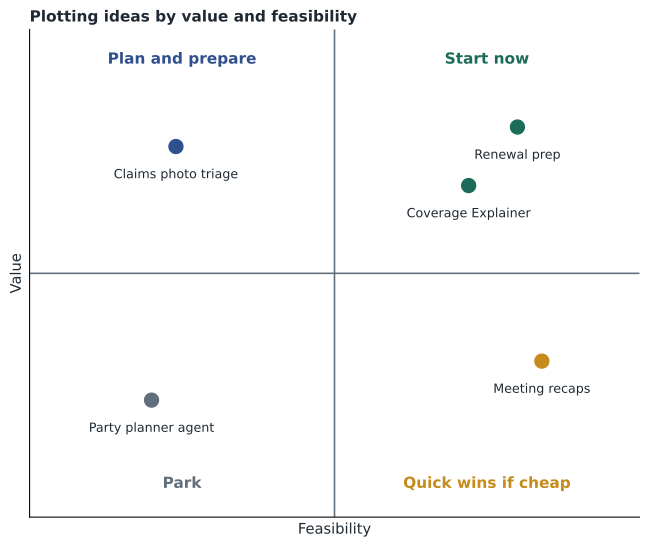
Start now (high value, high feasibility). These are the first use cases. At Quillfield: renewal preparation for commercial lines with Microsoft 365 Copilot, and the Coverage Explainer agent for the contact centre.
Plan and prepare (high value, lower feasibility). Valuable, but something must happen first: data cleanup, integration or a risk review. At Quillfield: Bram's idea to triage hail-damage claim photos with Azure Vision in Foundry Tools needed a labelled set of past photos and a Tier 3 review.
Quick wins if cheap (lower value, high feasibility). Worth doing if they cost almost nothing, often by showing people how to use tools they already have. At Quillfield: meeting recaps in Teams, which needed training rather than a project.
Park (lower value, lower feasibility). Recorded and revisited later. At Quillfield: an agent to plan office social events.
Worked problem
Scoring three ideas
The council scores three ideas. (A) An agent that answers staff questions about the new HR leave rules: value 3, feasibility 5, safety 4. (B) Using Copilot to draft first notices of loss from claim calls for adjusters to check: value 4, feasibility 3, safety 3. (C) An autonomous agent that emails clients renewal reminders and adjusts the wording to each client: value 4, feasibility 3, safety 1. Rank them by total score and say which should start first.
Show solution
- Totals: A = 3 + 5 + 4 = 12; B = 4 + 3 + 3 = 10; C = 4 + 3 + 1 = 8.
- A has the highest total, mainly because it is feasible and safe; its value is moderate.
- B has good value but needs process work with the claims team; it belongs in planning.
- C has the same value as B but the lowest safety score, because it sends to clients on its own; under the policy it would start as drafts only, which changes its design.
Answer: A ranks first (12), B second (10), C third (8). Start A now; prepare B; redesign C as a drafting agent before reconsidering it. Scores guide the discussion; they do not replace judgement.
Scoring is not an exact science, and the council treated totals as a starting point. Ideas close together were discussed; ideas that served the same priority were sometimes combined; and an idea that scored well but duplicated an existing agent was merged into it. The value of the rubric was that it made reasons explicit. When a proposer asked why their idea was not chosen, Hamish could show the scores and what would raise them.
Checking the details before committing
For each idea in the top right of the grid, the council asked for a one-page use case definition before giving the go-ahead. It answered seven questions.
Two questions on the card caught most problems. "What data and knowledge sources will it use?" revealed that an agent proposed for the group benefits team would have needed access to a site that was still overshared. "What is the baseline?" revealed that nobody knew how long the task took today, so Hamish spent a week timing it before the project started. Without a baseline, there would have been no way to show the result later.
Avoiding common traps
Three traps catch many organizations choosing first use cases.
The impressive demo. A use case is chosen because it looks good in a presentation, not because it solves a felt problem. It gets applause at the launch and little use afterwards.
The moonshot. The first use case is the most ambitious one, such as automating an entire claims process. It takes much longer than planned, runs into data and integration problems, and the program has nothing to show for a year.
The orphan. A use case is chosen without an owner in the business. IT builds it, but nobody changes how the work is done, so it is not used.
Quillfield's choices avoided all three: renewal preparation and the Coverage Explainer solved problems people complained about, could be measured within weeks, carried moderate risk with human review, and each had a manager who asked for it.
Including everyday productivity
It is easy to forget that the most widely felt value often comes not from a project at all but from people using Copilot Chat and Microsoft 365 Copilot well in ordinary work. At Quillfield, Hamish's measurements of the 60-person pilot found the largest time savings on five everyday tasks: catching up on long email threads, preparing for meetings, recapping meetings, drafting routine correspondence and summarizing documents. None required building anything. The "use case" was a training plan and a habit.
For that reason the council treated everyday productivity as its own priority, with its own measures, rather than as background. The Microsoft scenario library in the Copilot Success Kit, which describes common tasks by role and department, helped managers pick the three or four tasks to teach first in each team.
Building a backlog
Ideas that did not start now went into a backlog, a ranked list reviewed at every council meeting. Each idea kept its scores and the reason it was waiting. New ideas joined through the same form. When an idea in "plan and prepare" became feasible, for example because a data cleanup finished, it moved up. When Microsoft released a feature that made a parked idea easy, it was rescored. A visible backlog also helped adoption: staff could see that their ideas had been considered and what was happening to them.
Allocating licences
One of the most frequent "use case" requests at Quillfield was not for a project at all but for more Microsoft 365 Copilot licences. The council treated licence allocation as a use case decision, because each licence is an investment that should pay back in specific work. Its criteria were simple: people whose work involves a lot of reading, writing, meeting preparation or analysis across Outlook, Teams, Word and Excel; managers who would model use; champions; and people in the priority areas. Copilot Chat stayed available to everyone, so nobody was left without AI, and licences could be moved from people who did not use them after a review period. Microsoft's Copilot Success Kit includes a licence allocation guide that follows a similar logic.
| Group | Licence priority | Reason |
|---|---|---|
| Account executives in commercial lines | High | Priority area; heavy meeting preparation and correspondence |
| Managers and team leads | High | Model use for their teams; heavy email and meetings |
| Champions | High | Need to know the tool well to help others |
| Finance analysts | Medium | Analyst and Excel work; smaller group |
| Staff with mostly phone-based work | Lower | Copilot Chat and targeted agents may meet the need |
Revisiting the choice
First use cases are not permanent commitments. The council set a review date for each one, usually after eight to twelve weeks, and agreed in advance what would count as success, what would count as failure and what it would do in each case. If a use case met its target, it would scale to more people. If it partly met it, the owner would adjust and try again for one more period. If it clearly failed, it would stop, and the lesson would be recorded. Deciding the rule before the results arrived made it much easier to stop something that was not working, because nobody had to argue that their project deserved another chance.
Ideas from outside the organization
Not every good idea comes from staff. Microsoft's scenario library, peers in the same industry, partners and industry associations all publish examples of what has worked elsewhere. The council found these useful for checking its own list: if similar brokerages were getting value from AI in meeting preparation and service desks, that supported Quillfield's first choices; if nobody had yet made a particular idea work, it was a sign to treat it as an experiment. Outside examples should still be scored with the same rubric, because what worked for a larger company with different systems may not be feasible at Quillfield.
Common mistakes
MistakeChoosing the most impressive demo as the first use case.
InsteadChoose a felt business problem with a measurable result.
MistakeStarting with the largest, most ambitious process.
InsteadStart with feasible, moderate-risk use cases and prepare the larger ones.
MistakeStarting work without a baseline.
InsteadMeasure the task today so that results can be shown later.
MistakeBuilding agents without a business owner.
InsteadRequire a willing owner who will change how the work is done.
MistakeIgnoring everyday productivity because it is not a project.
InsteadTreat training on everyday tasks as a priority with its own measures.
Summary and key terms
- Good first use cases solve a felt problem, have a measurable result, use ready data, carry manageable risk and have a willing owner.
- Use cases fall into everyday productivity, focused agents and process transformation, each needing different effort.
- Score ideas on value, feasibility and safety with a shared rubric, then plot value against feasibility.
- Start the high-value, high-feasibility ideas; prepare the high-value, lower-feasibility ones; park the rest in a visible backlog.
- A one-page use case definition catches data, risk and baseline problems before work starts.
- Avoid the impressive demo, the moonshot and the orphan.
- Use case
- A specific business task or process where AI is applied to achieve a measurable result.
- Feasibility
- How practical a use case is to deliver, given data, tools, integration and ownership.
- Baseline
- A measurement of how a task performs before a change, used to show the effect of the change.
- Backlog
- A ranked list of ideas waiting to be started, reviewed regularly.
- Scenario library
- Microsoft's collection of Copilot scenarios by role and department, part of the Copilot Success Kit.
- Quick win
- A low-effort change that delivers visible value quickly.
Practice problems
Work each problem on paper first, then reveal the answer to check.
An idea scores value 4, feasibility 4 and safety 2. What is its total, and what does the low safety score suggest?
Show answer
10 out of 15; it needs extra controls or a redesign, such as human review, before it starts.
Name the three traps in choosing first use cases.
Show answer
The impressive demo, the moonshot and the orphan.
Which quadrant holds high-value ideas that need data or integration work first?
Show answer
Plan and prepare.
Lesson quiz · 5 questions
Score 60% or more to complete this lesson.
Create a free account to save your progress, take quizzes and earn a certificate.