
MSBA-120 · Lesson 7 of 12 · 20 min
Build, buy or extend
▶ Video coming soon A video version of this lesson is on the way.
By the seventh workshop, Quillfield had more ideas than it could fund. Bram Oosterhuis, the solutions architect, arrived with a single slide showing a horizontal line. At the left end he had written "buy", in the middle "extend", and at the right end "build". "For every use case on our list," he said, "the first question after whether it is worth doing is where it sits on this line."
Every technology investment faces a build-or-buy choice. Generative AI adds a middle option that is often the best one: extend a product the organization already has. This lesson explains the three options, how Microsoft's offerings map onto them, and the criteria leaders use to choose.
Three options
Buy means using a ready-made AI capability as it comes, configured but not changed: Microsoft 365 Copilot in Word and Outlook, the Researcher and Analyst agents, AI features built into Dynamics 365 or a specialist vendor's insurance product. Buying is fastest and needs the least skill. The organization gets the same capability as everyone else, shaped by the vendor's roadmap.
Extend means adding the organization's own knowledge, data, instructions or actions to a ready-made AI. An agent that answers questions from Quillfield's own underwriting guidelines, a connector that brings policy records into Microsoft 365 Copilot, or an action that lets Copilot look up a claim's status in a business system are all extensions. Extending keeps the vendor's model, interface, security and compliance while making the AI specific to the business.
Build means creating a custom AI application or agent, choosing the model, the orchestration, the interface and the integrations. Building gives the most control and the most differentiation, and costs the most in skills, time and ongoing maintenance.
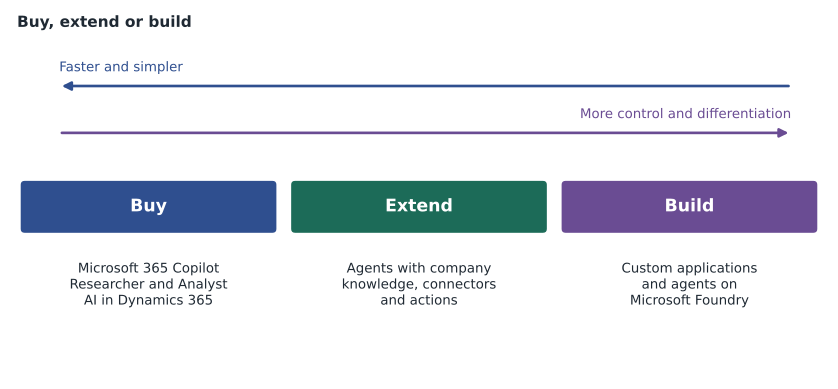
How Microsoft's offerings map onto the options
Microsoft organizes much of its AI around this same spectrum, sometimes called the Copilot extensibility approach: start with Copilot as it comes, extend it with your data and actions, and build custom agents where you need more.
| Option | Microsoft examples | Who usually does the work |
|---|---|---|
| Buy | Microsoft 365 Copilot in the apps; Copilot Chat; Researcher and Analyst; Copilot features in Dynamics 365 and Power Platform; agents from Microsoft and partners | IT administrators and business owners configure and roll out |
| Extend | Agents created with Agent Builder in Copilot or with Copilot Studio, grounded in SharePoint and other knowledge; Copilot connectors that bring outside data into Microsoft 365; actions that call business systems | Business makers and power users, with IT governance |
| Build | Custom agents in Copilot Studio with their own logic and integrations; custom applications and agents on Microsoft Foundry using Foundry Tools and a choice of models | Professional developers and data teams |
The boundaries are not sharp. A Copilot Studio agent can be a simple extension with a few knowledge sources or a substantial build with complex logic, actions and integrations. What matters for a leader is the amount of custom design and ongoing ownership involved, not the tool name.
Criteria for choosing
Leaders typically weigh seven questions.
1. Is the capability a differentiator? If the use case is the same everywhere, such as summarizing meetings or drafting emails, buying is almost always right: there is no advantage in building what every vendor already sells. If it embodies something unique about the business, such as a proprietary underwriting approach, extending or building may be worth the cost.
2. Where does the knowledge and data live? If the AI needs information already in Microsoft 365, buying or a light extension works. If it needs data from business systems, extension through connectors and actions is required. If it needs data that must be transformed, combined or protected in special ways, building may be necessary.
3. How much control is needed? Some use cases need exact control over the model, the prompt, the response format or the data flow, for regulatory or quality reasons. Buying gives the least control; building gives the most.
4. How fast is value needed? Buying can deliver in weeks; extending in weeks to a few months; building usually takes months.
5. What skills does the organization have? Building needs developers, data engineers and people who can evaluate AI quality. Many organizations, Quillfield included, have a small IT team, which makes extension the practical sweet spot.
6. What is the total cost of ownership? Bought capabilities have predictable licence costs. Extensions add consumption costs and some maintenance. Builds add development, hosting, model consumption, evaluation, monitoring and the cost of keeping up with model changes.
7. What are the risks? Bought products come with the vendor's security, compliance and responsible AI controls. Each step toward building moves more of that responsibility onto the organization.
| Criterion | Favours buy | Favours extend | Favours build |
|---|---|---|---|
| Differentiation | Common task | Common task with company knowledge | Unique capability |
| Data | Already in Microsoft 365 | In business systems reachable by connectors or actions | Needs special processing |
| Control | Vendor defaults are fine | Need own instructions and sources | Need full control of model and flow |
| Speed | Weeks | Weeks to months | Months |
| Skills | Administrators | Makers with IT support | Developers and data scientists |
| Risk ownership | Mostly vendor | Shared | Mostly the organization |
Common patterns
Three patterns cover most decisions in organizations like Quillfield.
Buy for everyday productivity. Meeting recaps, email triage, drafting and summarizing are bought. The work is licensing, data readiness, training and adoption, not technology.
Extend for company knowledge and simple actions. Agents that answer from the firm's own documents, look up records or start a simple process are extensions. They are where most organizations get their first distinctive value, because they combine a capable model with knowledge competitors do not have.
Build where the process is the product. When an AI capability is part of what the business sells, or must meet strict requirements that off-the-shelf products cannot, building is justified. An insurer that wants an AI model to read inspection photos and flag roof damage, a capability that sits at the core of its underwriting, might build with Foundry Tools and its own data.
Worked problem
Placing Quillfield's use cases
Place each use case on the spectrum: (1) call summaries in Teams; (2) an agent that answers brokers' questions from Quillfield's underwriting guidelines in SharePoint; (3) an agent that checks a claim's status in the insurers' claims portals and drafts an update to the client; (4) a model that reads photos of commercial roofs and estimates their condition.
Show solution
- Call summaries: a standard Copilot capability. Buy.
- Guidelines agent: Copilot plus Quillfield's own documents. Extend with an agent grounded in SharePoint.
- Claim-status agent: needs actions that call outside systems and a drafting step. Extend, possibly a substantial Copilot Studio agent with actions; check that the portals offer suitable connections.
- Roof-condition model: a specialized vision capability with Quillfield's own labelled photos; nothing off the shelf fits. Build, perhaps with Foundry Tools, or buy from a specialist vendor if one exists.
Answer: Buy, extend, extend, build. Most of Quillfield's list sits in buy or extend, which matches its small IT team.
Third-party products and partners
Buying does not only mean buying from Microsoft. Specialist vendors sell AI products for specific industries and tasks, and many integrate with Microsoft 365. Partners can also extend or build on an organization's behalf. The same criteria apply, with two additions: how the vendor handles the organization's data, and how well the product fits the organization's existing security and governance. A specialist product that requires copying client data into another cloud may carry more risk than a less polished extension that keeps data inside Microsoft 365.
The MIT NANDA report mentioned in lesson 3 also claimed that organizations buying AI tools from specialized vendors and partners succeeded more often than those building internally. Whatever the precise figures, the direction matches long experience with enterprise software: building is harder than it looks, and the organizations most likely to succeed with it are those with strong engineering teams and a clear reason to build.
Revisiting the decision
The right answer changes over time. A capability that had to be built two years ago may now be available off the shelf; an extension that started small may grow into something better rebuilt properly. Leaders should review build, buy and extend decisions at least yearly and ask whether the vendor's roadmap now covers what was built, and whether the organization is paying to maintain something it could buy.
At the end of the workshop, the leadership team placed every remaining use case on Bram's line. Two-thirds were buy, nearly a third were extend, and one, the roof-condition model, was build. Celestine asked Bram to find out whether a specialist vendor already offered it before anyone wrote a line of code.
Extending in practice
Extension is where most of Quillfield's list landed, so the leadership team spent time on what it involves. An extension project has the same parts whatever tool is used. Someone defines the purpose and scope of the agent: what it is for, who will use it and what it must not do. Someone curates the knowledge: which documents or sites the agent may draw on, and who keeps them current. If the agent needs data from other systems, someone sets up the connection, either a connector that brings content into Microsoft 365 or an action that calls the system directly. Someone writes and refines the instructions that tell the agent how to behave. Someone tests it with realistic questions, including awkward ones. And someone owns it after launch: watches its usage and costs, fixes problems and decides when it should be retired.
None of these tasks needs a professional developer for a simple agent, which is why extension suits organizations with small IT teams. But every one of them needs a person with time allocated to it. Yusra estimated that the guidelines agent took about three weeks of her time to build and test, and would take about two hours a week to maintain. That time belongs in the business case as a cost, even though no invoice will arrive for it.
| Extension task | Who usually does it | Ongoing effort |
|---|---|---|
| Purpose and scope | Business owner with compliance | Review when the process changes |
| Knowledge curation | Content owner in the business | Regular, whenever documents change |
| Connections to other systems | IT or a partner | When systems change |
| Instructions | Maker, such as a power user | Small, after feedback |
| Testing | Maker and real users | Before each significant change |
| Ownership and monitoring | Named business owner | Weekly usage and cost check |
Worked problem
Comparing extend and build over three years
For the claim-status agent, a partner quotes 60,000 dollars to build a custom application on Microsoft Foundry plus 15,000 dollars a year to maintain it, with model and hosting costs of about 6,000 dollars a year. An extension in Copilot Studio would take about 15,000 dollars of partner and internal time to build, about 8,000 dollars a year of maintenance time, and about 7,000 dollars a year in Copilot Credits. Compare three-year costs.
Show solution
- Build: 60,000 + 3 x (15,000 + 6,000) = 60,000 + 63,000 = 123,000 dollars.
- Extend: 15,000 + 3 x (8,000 + 7,000) = 15,000 + 45,000 = 60,000 dollars.
- Difference: 123,000 minus 60,000 = 63,000 dollars over three years in favour of extending.
- The build would be justified only if it delivered capabilities the extension could not, worth more than about 63,000 dollars over the period.
Answer: Extending costs about half as much over three years. Building needs a clear capability gap to justify the difference.
Questions to ask before committing
Before any build or significant extension, Bram asked the team to answer five questions in writing. Has anyone checked whether a product already does this, from Microsoft or a specialist vendor? Who will own the solution in two years, and is their time budgeted? What happens to the process if the solution is unavailable for a day? How will quality be tested before launch and monitored after? And what would make us stop or replace it? Answering them took less than an hour for each use case and prevented at least one expensive mistake: the team discovered that one of its insurers already offered a claim-status service that could be connected directly, which made part of the planned agent unnecessary.
Common mistakes
MistakeBuilding a custom chat assistant for tasks Microsoft 365 Copilot already does.
InsteadBuy common capabilities; spend scarce skills on what is specific to the business.
MistakeTreating extension as free because the tools are low-code.
InsteadExtensions need owners, testing, consumption budgets and governance.
MistakeChoosing a specialist product without checking where client data goes.
InsteadAssess data handling and fit with existing security and governance before buying.
MistakeMaking the decision once and never revisiting it.
InsteadReview yearly; vendors' roadmaps may now cover what was built.
Summary and key terms
- Buy uses ready-made AI as it comes; extend adds company knowledge, data and actions; build creates custom AI applications and agents.
- Microsoft's offerings span all three: Copilot to buy, agents, connectors and actions to extend, and Copilot Studio or Microsoft Foundry to build.
- Choose by differentiation, data location, control, speed, skills, total cost and risk ownership.
- Most organizations buy everyday productivity, extend for company knowledge and build only where the process is the product.
- Revisit decisions regularly as products and needs change.
- Buy
- Using a ready-made AI capability as it comes, configured but not changed.
- Extend
- Adding an organization's own knowledge, data, instructions or actions to a ready-made AI.
- Build
- Creating a custom AI application or agent with chosen models, logic and integrations.
- Copilot connector
- A connection that brings content from outside systems into Microsoft 365 so Copilot can use it.
- Action
- A capability that lets an agent call a business system to look something up or do something.
Practice problems
Work each problem on paper first, then reveal the answer to check.
Why is building a custom meeting-summary tool usually a poor choice?
Show answer
Because it is a common task that bought products already do well; building adds cost and maintenance with no differentiation.
Which option keeps most of the vendor's security and compliance while adding company knowledge?
Show answer
Extend.
Name two questions to ask before buying a specialist AI product.
Show answer
How it handles the organization's data, and how it fits existing security and governance; also whether it meets the use case better than an extension.
Lesson quiz · 5 questions
Score 60% or more to complete this lesson.
Create a free account to save your progress, take quizzes and earn a certificate.