
MSAZ-342 · Lesson 9 of 12 · 19 min
Security Copilot in investigations
▶ Video coming soon A video version of this lesson is on the way.
MSAZ-340 introduced Microsoft Security Copilot as the generative AI assistant built into the Defender portal and worked out Harrow & Finch's monthly allocation: 320 Microsoft 365 E5 licences give 128 Security Compute Units, or SCUs, a month, which reset monthly and do not carry over. This lesson is about using it well during an investigation: which features help a hunter or responder, how to write prompts that produce checkable answers, and, most of all, how to check them. Every example comes from incident 4196, where Nadia and Ama used Copilot on November 12 and 13 and kept a note of what it got right and what it did not.
Where Copilot appears in an investigation
Copilot has two kinds of experience. Embedded experiences appear inside the Defender, Entra, Intune and Purview portals, next to the work: a summary on an incident page, an explanation of a script, a draft query. The standalone experience is a separate portal with a chat interface, promptbooks that run a set of prompts in sequence, and plugins that reach other data sources. Agents are a third, newer kind: Copilot-based processes that carry out a defined task, such as triaging reported phishing, and that must be set up and turned on by the organization; Microsoft's inclusion terms say they are not enabled automatically.
| Feature | Where | What it does in an investigation |
|---|---|---|
| Incident summary | Incident page, Defender portal | Describes the incident in prose: what happened, which entities, in what order |
| Guided response | Incident page | Suggests triage, containment, investigation and remediation actions, with buttons for some |
| Script and file analysis | Evidence and alert pages | Explains what a script or command line appears to do |
| Query assistant | Advanced hunting | Turns a question in plain language into a KQL query to review and run |
| Incident report | Incident page | Drafts a report of actions taken, for handover or review |
| Phishing triage agent | Defender for Office 365 | Reviews user-reported messages and proposes a verdict with its reasoning |
| Standalone prompts and promptbooks | Security Copilot portal | Multi-step questions across plugins, such as threat intelligence and Entra |
The incident summary
When Ama opened incident 4196 at 10:09, the Copilot summary had already been generated. It said, in four short paragraphs, that a contractor account signed in from an unusual country, registered a new authentication method within a minute, and that Defender for Office 365 then detected a suspicious inbox rule; it named the address and the account, and noted that the address was associated with known malicious infrastructure. That was an accurate and useful first read, and it took seconds rather than the several minutes of clicking through three alerts.
Two things were missing, and both mattered. The summary did not say that the overseas session reused a session that began the previous afternoon, when Theo signed in through the kit's page, which is what pointed to a stolen session cookie rather than a stolen password. And it did not mention the file downloads at 10:15, because no alert had been raised for them; Copilot summarizes the alerts and entities in the incident, not every event the account produced. The summary is a starting point for triage, not a scope of the incident.
Guided response
Guided response proposed five actions for 4196: disable the user, revoke sessions, reset the password, remove the inbox rule, and review the new authentication method. Each had a short reason. Nadia accepted the first two immediately. She did not accept the password reset as the first step, for a reason the suggestion could not know: Harrow & Finch's contractor accounts are reset through the outside firm's own process, and a reset sent to the wrong person had already happened once this autumn (lesson 5). She also added a step Copilot had not suggested, checking Theo's OAuth consents and mailbox delegations, which the identity compromise task list from lesson 8 included anyway.
The lesson Nadia drew was that guided response is a good list of standard steps, best compared against the SOC's own task list. Where the two disagree, the SOC's list reflects local knowledge, and the difference is worth a comment in the incident.
Natural language to KQL
In advanced hunting, the query assistant turns a question into KQL. Ama typed: show all sign-ins and mailbox actions for the contractor account between 9 and 11 this morning. Copilot produced a query that unioned EntraIdSignInEvents and CloudAppEvents for the account, filtered by time and sorted the results. She read it before running it, as the clinic had taught, and found one problem: the time filter used UTC, and the question meant local time in Winnipeg, six hours behind. The query she ran used the corrected window.
let acct = "contractor.account@harrowfinch.example";
let t0 = datetime(2026-11-12 15:00);   // 09:00 local is 15:00 UTC in November
let t1 = datetime(2026-11-12 17:00);
union
  (EntraIdSignInEvents
   | where Timestamp between (t0 .. t1) and AccountUpn =~ acct
   | project Timestamp, Source = "sign-in", Detail = strcat(IPAddress, " ", Country, " ", Application)),
  (CloudAppEvents
   | where Timestamp between (t0 .. t1)
   | where tostring(RawEventData.UserId) =~ acct
   | project Timestamp, Source = "cloud app", Detail = strcat(ActionType, " ", IPAddress))
| sort by Timestamp asc
The let statements make the account and window easy to change. The comment records the time zone reasoning so the next reader does not repeat the mistake. Each branch of the union projects the same three columns, so the results line up in one timeline. The draft from Copilot had been right in structure, which saved several minutes; it was wrong in one detail that would have hidden the events that mattered. That pattern, useful structure with a detail to check, is what the SOC came to expect from generated queries.
Prompting for checkable answers
Answers that can be checked are more useful than answers that sound complete. Nadia's guidance for prompts had four parts. Name the entity and time window exactly. Ask for the source of each statement: which table, alert or event. Ask for times in UTC and local time. Ask what is not known. A prompt that followed the guidance, used in the standalone portal on November 13, was: for the account in incident 4196 between 13:00 and 18:00 UTC on November 12, list each authentication method change, inbox rule change and file download, with the table and time of each, and say if any data source was unavailable.
| Weak prompt | Stronger prompt |
|---|---|
| What happened in this incident? | List the events for this account between these times, with the source table and time of each. |
| Is this user compromised? | Which evidence in the incident supports or contradicts account compromise? |
| Write a query for suspicious sign-ins. | Write a KQL query on SigninLogs for successful sign-ins in the last 7 days where the country differs from the user's most common country. |
| Summarize the threat actor. | Summarize the threat analytics report on this phishing kit, listing techniques by ATT&CK name and the indicators with their dates. |
Checking what Copilot says
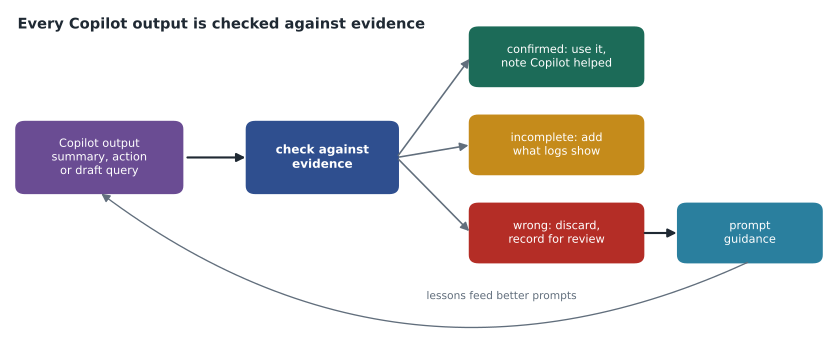
Generative AI can state wrong things fluently. It can also leave things out, as the incident summary did. Harrow & Finch's rule, which Carmen Ortiz and Sunil wrote into the AI use policy for the SOC, is that the analyst owns every conclusion and every action. A Copilot output is used only after it is checked against the evidence. Ama kept a simple table during 4196 and scored it at the end.
# claim from Copilot output -> what the evidence showed
checks = [
    ("Overseas sign-in at 09:57 local",             "confirmed"),
    ("Address linked to known malicious infrastructure", "confirmed"),
    ("New authenticator registered at 09:58",       "confirmed"),
    ("Inbox rule moves mail containing 'invoice'",  "confirmed"),
    ("No other accounts used the address",          "confirmed"),
    ("Session reused from the Nov 11 kit sign-in",  "missing"),
    ("Files downloaded at 10:15",                   "missing"),
    ("Draft query time window",                     "wrong (UTC vs local)"),
    ("Reset password as first step",                "not followed (local process)"),
]
from collections import Counter
tally = Counter(v.split()[0] for _, v in checks)
for k in ("confirmed", "missing", "wrong", "not"):
    print(f"{k:10} {tally.get(k, 0)}")
print("Usable without change:", tally["confirmed"], "of", len(checks))confirmed 5 missing 2 wrong 1 not 1 Usable without change: 5 of 9
What this code does
Nine statements or suggestions from Copilot during the incident are listed with what the evidence showed. The program counts them by the first word of the verdict and reports how many could be used without change. Five were confirmed, two were missing information the analyst found in the logs, one draft query had the wrong time window, and one suggestion was not followed for a local reason.
Five of nine usable as they were is a fair result, and the other four were caught because Ama checked. None of the four was dangerous on its own, but each would have weakened the investigation if accepted without a look: the missing session detail changed the likely technique, and the missing downloads changed what data was exposed. The tally went to the post-incident review, where it became a recommendation: keep using summaries and draft queries for speed, keep checking them, and add the session-reuse question to the prompt guidance because Copilot did not volunteer it.
Recording Copilot use
An incident record should show where AI contributed, for the same reason it shows which analyst took each action: a reviewer needs to know how each conclusion was reached. Harrow & Finch added one line to its comment standard. When a Copilot output informs a decision, the comment says so and says how it was checked, for example: '10:12 Copilot summary used for triage; confirmed overseas address against threat intelligence indicator; session reuse found separately in SigninLogs.' Generated incident reports are saved as drafts and edited by the analyst before they go to anyone outside the SOC, because a report sent to management or to the outside firm is a statement by Harrow & Finch, not by a tool.
Copilot works with the permissions of the person using it. It cannot show an analyst data their role does not allow, and its sessions are recorded with the user's identity. That makes role design from MSAZ-341 matter here too: a store IT technician with Copilot access but only device permissions will get answers about devices, not mailboxes. Carmen asked one more question during the policy review, whether prompts and responses with personal information are kept, and where. The answer, from Microsoft's documentation on data handling, was that the organization chooses settings for data sharing and that session data is stored in a region based on the tenant's location; she recorded the settings in the privacy impact assessment for the SOC and set a review for the trial in December.
Agents and capacity
The phishing triage agent in Defender for Office 365 reviews messages that users report with the Report button, decides whether each is phishing, spam or clean, and explains its reasoning in plain language; analysts can give feedback that the agent takes into account. Harrow & Finch planned a December trial, limited to head office reports, with every verdict reviewed by an analyst for the first month. Agents use SCUs too, and the SOC's 128 a month are shared across every Copilot experience in the tenant. Nadia's plan was to track SCU use weekly in the Security Copilot usage dashboard and to keep about a quarter of the month's allocation unused until the last week, for incidents.
Worked problem
A summary that sounds complete
A Copilot summary of a new incident says: 'The user signed in from a new location and changed their MFA settings. No further malicious activity was observed.' What should the analyst do with the second sentence?
Show solution
- Treat it as a statement about the alerts in the incident, not about everything the account did.
- Query the account's activity after the MFA change directly: sign-ins, mailbox actions, file access, consents and Graph activity.
- If the queries find more activity, add it to the incident with a comment, and consider whether a rule should have alerted on it.
- Record in the incident whether the Copilot statement was confirmed or not.
Answer: Check it: 'no further activity observed' describes what the alerts show, and only queries over the account's events can confirm it.
Common mistakes
MistakeAccept a Copilot summary as the scope of an incident.
InsteadUse it for triage and query the account's activity to set the scope.
MistakeRun a generated query without reading it.
InsteadRead it, check the time zone, filters and table, then run it.
MistakeFollow guided response over the SOC's own process.
InsteadCompare them and record why you chose one.
MistakeAssume agents work once licensed.
InsteadSet them up, trial them with reviews and track SCU use.
Summary and key terms
- Copilot appears embedded in portals, as a standalone portal and as agents that must be set up.
- Incident summaries and guided response speed triage but cover only what the incident contains.
- The query assistant drafts KQL; read it before running, especially time windows and filters.
- Prompts should name entities and times and ask for sources and unknowns.
- The analyst owns every conclusion; check outputs against evidence and record the results.
- Security Copilot
- Microsoft's generative AI assistant for security work.
- Security Compute Unit (SCU)
- The unit of capacity that measures Security Copilot use.
- Guided response
- Copilot's suggested triage, containment and remediation actions for an incident.
- Promptbook
- A saved sequence of prompts that runs as one task.
- Query assistant
- The advanced hunting feature that turns plain-language questions into KQL.
- Agent
- A Copilot-based process that carries out a defined task once set up.
Practice problems
Work each problem on paper first, then reveal the answer to check.
What did the 4196 summary leave out?
Show answer
The reused session from November 11 and the file downloads, which had no alert.
What was wrong with the generated query?
Show answer
Its time window used UTC instead of local time.
Who owns a conclusion that Copilot drafted?
Show answer
The analyst.
How many SCUs a month does Harrow & Finch get?
Show answer
128, from 320 E5 licences.
Lesson quiz · 5 questions
Score 60% or more to complete this lesson.
Create a free account to save your progress, take quizzes and earn a certificate.