
MSAZ-342 · Lesson 5 of 12 · 20 min
Hunting in Sentinel
▶ Video coming soon A video version of this lesson is on the way.
Sentinel's own hunting tools arrived in the clinic on Tuesday, November 10, halfway through the build sprint described in MSAZ-341. By then the security workspace, law-hf-sentinel-cc, had nine days of Entra ID, Office 365, Windows security event and firewall data, and Sunil had installed the content hub solutions that bring hunting queries with them. Nadia had one hypothesis on the board: the contractor whose account had two failed sign-ins from the phishing kit's addresses on November 4 was still a target. The session followed that hypothesis through Sentinel's hunting page, and ended with a hunt record, two bookmarks and a recommendation that, as lesson 12 shows, arrived two days too late.
Where Sentinel hunting lives
With the workspace connected to the Defender portal, Sentinel's hunting features appear under Threat management, Hunting. The page has three tabs that matter for SC-200: Queries, the library of hunting queries; Bookmarks, saved results; and Hunts, the workspace for a hypothesis. Advanced hunting, covered in lesson 4, is a separate page that can also query the same Sentinel tables. The difference is purpose. Advanced hunting is the general query editor, while the Sentinel hunting page organizes a library of queries by MITRE ATT&CK tactic, shows which of them return results, and records what a hunter found. Microsoft's documentation notes that bookmarks are not available in advanced hunting but remain available in the Sentinel hunting experience.
Sentinel's experience in the Azure portal will not be supported after March 31, 2027, so everything in this lesson is described as it works in the Defender portal. Harrow & Finch had connected its workspace there from the start.
The query library
The Queries tab lists every hunting query installed from content hub solutions and every custom query the SOC has written. Each query shows its MITRE ATT&CK tactics and techniques, the data sources it needs, and, after it runs, its result count and the change from the previous day. Queries whose data sources are missing show N/A, with an icon listing what they need, which is a quick way to find gaps in data collection.
| Column or control | What it shows |
|---|---|
| Results | How many rows the query returned in its last run |
| Results delta | The change between the last 24 hours and the 24 to 48 hours before |
| Results delta percentage | The same change as a proportion of the earlier count |
| Tactics and techniques | The MITRE ATT&CK mapping the author gave the query |
| Data sources | The tables the query needs; N/A if any are missing |
| Favourite star | Favourite queries run automatically each time the hunting page opens |
| Run all, run selected | Run the library or a subset on demand; runs take seconds to minutes |
Microsoft recommends running the hunting queries for your ingested data at least once a week. Nadia set a Monday routine: Ama opened the page, ran all queries, sorted by results delta and investigated anything that had jumped. Most jumps had dull explanations, such as a new store opening or a holiday sale, and recording those explanations was part of the job, because next week's analyst should not have to rediscover them.
queries = [
    # name, results last 24 h, results the 24 h before
    ("Sign-ins from kit hosting ranges", 2, 0),
    ("New inbox rules with forwarding", 3, 2),
    ("Rare process run by a service account", 41, 39),
    ("Mass file download from SharePoint", 18, 4),
    ("Password spray against Entra ID", 0, 6),
]
for name, now, before in queries:
    delta = now - before
    share = "new" if before == 0 and now > 0 else (
            "-" if before == 0 else f"{delta / before:+.0%}".replace("%", " in 100"))
    flag = "  <- look first" if (before == 0 and now > 0) or (before and delta / before >= 1) else ""
print(f"{name:<40} {now:>3} vs {before:>3} delta {delta:+d} ({share}){flag}")Sign-ins from kit hosting ranges 2 vs 0 delta +2 (new) <- look first New inbox rules with forwarding 3 vs 2 delta +1 (+50 in 100) Rare process run by a service account 41 vs 39 delta +2 (+5 in 100) Mass file download from SharePoint 18 vs 4 delta +14 (+350 in 100) <- look first Password spray against Entra ID 0 vs 6 delta -6 (-100 in 100)
What this code does
Five hunting queries each have a result count for the last day and for the day before. The program prints the change for each, as a number and as a share of the earlier count, and marks any query that went from nothing to something or that at least doubled. Sign-ins from the kit's hosting ranges and mass downloads from SharePoint come out on top, which is where Ama started on Monday morning.
The share in the simulation is printed as so many in 100, the same comparison the portal shows as a percentage. A query that rises from 0 to 2 has no meaningful percentage at all, which is why Nadia always read the counts before the change.
Writing and sharing custom queries
A custom hunting query is saved with a name, a description, the KQL, the MITRE ATT&CK tactics and techniques, and the entities its results contain. Entity mapping on a hunting query works like entity mapping on an analytics rule (MSAZ-341 lesson 7) and makes bookmarks from its results carry those entities automatically. Ama saved the kit sign-in query from lesson 4 in its Sentinel form.
let kitRanges = dynamic(["203.0.113.0/24", "198.51.100.0/24"]);
SigninLogs
| where TimeGenerated > ago(14d)
| where ipv4_is_in_any_range(IPAddress, kitRanges)
| project TimeGenerated, UserPrincipalName, IPAddress, Location, ResultType,
          ResultDescription, AuthenticationRequirement, AppDisplayName
| sort by TimeGenerated asc
Two improvements over the advanced hunting version are visible. It matches whole address ranges rather than three single addresses, using ipv4_is_in_any_range, because the kit's operators had moved between addresses in the same ranges. And it keeps the authentication requirement and the application name, which showed that both of the contractor's November 4 attempts had failed at the multifactor step against the Office 365 web application.
Bookmarks
A bookmark saves one or more rows from a query result together with the query that produced them. The hunter adds a name, notes, tags, mapped entities and MITRE ATT&CK techniques. Bookmarks are stored in the HuntingBookmark table in the workspace, so they can themselves be queried, and they can be turned into a new incident or added to an existing one. They are the hunter's evidence log: if a hunt finds something, the bookmark shows exactly what was seen and how.
Ama bookmarked the contractor's two failed sign-ins. The account entity was the contractor's user principal name; the IP entities were the two kit addresses; the technique was Valid Accounts, with the note that the attacker appeared to hold the password but had been stopped by multifactor authentication. She tagged the bookmark kit-2026-10 so that every finding about the same infrastructure could be found together.
Hunts
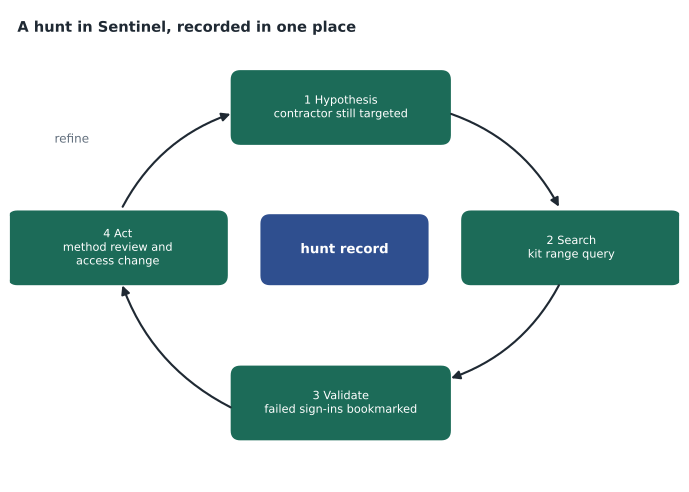
Hunts, a feature Microsoft lists as in preview, give a hypothesis a home. A hunt has a name, a hypothesis, a status and an owner. Queries are added to it from the Queries tab with New hunt or Add to existing hunt; bookmarks made while running them are linked to it; and when the hunt leads to action, such as a new analytics rule, an incident or a threat indicator, those are linked automatically too. The hunt records whether the hypothesis was validated or invalidated, with comments, and a metric bar shows its progress. The documentation describes the cycle as hypothesis, search, validation and action.
Nadia's hunt record read as follows. Hypothesis: the actor behind the October and November phishing kit will keep trying accounts whose passwords it already holds. Queries: kit range sign-ins, the inbox rule query from lesson 3, and the template query for authentication method changes from unfamiliar locations. Findings: two bookmarks, the contractor's failed attempts on November 4 and a single failed attempt against a buyer's account on November 9. Status: validated. Actions: recommend that both accounts' passwords be reset and their authentication methods reviewed, and propose a conditional access policy requiring phishing-resistant authentication for external contractors.
The recommendation went to the IT service desk as a ticket on November 10 at 15:40. The buyer's password was reset that evening. The contractor worked for an outside merchandising firm, and the request to reset their password went to the firm's account manager, who was travelling. Lesson 12 starts two days later.
Livestream is no longer available
Older study material describes livestream, a Sentinel feature that ran a hunting query continuously and notified the hunter of new results. Microsoft's hunting documentation now says livestreams are no longer available and points to KQL jobs, analytics rules and playbooks instead, which keep their results and can notify through various messaging tools. The practical replacements are an NRT or scheduled analytics rule for anything that should alert, and a KQL job for anything that should be collected and reviewed.
KQL jobs and summary rules
The SC-200 study guide asks candidates to create and manage KQL jobs in the data lake and summary rule tables for querying. Both turn hunting into something that runs on its own.
A KQL job runs a query against the Sentinel data lake tier, and against federated sources such as Microsoft Entra ID and Microsoft 365, and writes the results to a table. Jobs can run once or on a schedule, by minute, hourly, daily, weekly or monthly, and can append to an existing table or create a new one. A new table in the analytics tier gets the suffix _KQL_CL, which makes its results available to analytics rules, advanced hunting and workbooks. Microsoft's documentation lists limits of 100 enabled jobs per tenant, 5 running at the same time, one output table per job, a one-hour timeout and a query range of up to 12 years. Because newly ingested lake data can take up to 15 minutes to become queryable, the documentation suggests offsetting a scheduled job's window by a delay.
let delay = 15m;
let endTime = now() - delay;
let startTime = endTime - 1d;
SigninLogs
| where TimeGenerated between (startTime .. endTime)
| where ResultType == "0"
| summarize SignIns = count(), Countries = make_set(Location, 10),
            Apps = dcount(AppDisplayName) by UserPrincipalName, bin(TimeGenerated, 1d)
Harrow & Finch's lake onboarding was planned for December 7, 2026, so the job above was a design, not yet a running job. Its purpose was to keep a year of compact daily sign-in summaries in the analytics tier at a small fraction of the cost of keeping a year of raw sign-ins there, so that a hunter could ask 'has this user ever signed in from this country?' over twelve months in seconds.
Summary rules do a similar job inside a workspace. A summary rule runs an aggregating query on a schedule over a table, including tables on lower-cost plans, and writes the summarized results to a custom table on the Analytics plan, whose name ends in _CL. Microsoft presents them as a way to keep verbose logs in a cheaper tier while querying compact summaries quickly, and to share summaries without exposing the raw data. Sunil planned one for the Azure Firewall flow logs, which MSAZ-341 had sent to the lake only: an hourly summary of bytes and connections per source and destination.
| Tool | Runs over | Writes to | Typical use |
|---|---|---|---|
| Hunting query | Workspace tables, on demand | Nothing; results shown on screen | Exploration and weekly review |
| Bookmark | Rows from a query result | HuntingBookmark table | Evidence from a hunt |
| Analytics rule | Workspace tables, on a schedule | Alerts and incidents | Anything that needs a response |
| KQL job | Data lake and federated tables, once or scheduled | A table in the lake or analytics tier | Long-range hunting and baselines |
| Summary rule | Workspace tables, including lower-cost tiers | A custom table on the Analytics plan | Cheap, fast summaries of verbose logs |
From hunt to rule
A hunt that finds something real usually ends by making sure the next occurrence does not need a hunt. From a query in the Defender portal, New alert rule, Create Microsoft Sentinel alert opens the analytics rule wizard with the query filled in. Ama turned the kit range query into a scheduled rule that ran every hour with a two-hour lookback, raising a medium-severity alert for any sign-in attempt from those ranges, successful or not. A failed attempt was still worth knowing about, because it meant the password was in an attacker's hands.
Worked problem
Planning a weekly hunting routine
The SOC has 214 hunting queries installed. 63 show N/A because their data sources are not connected. Running all of the rest takes about 25 minutes. Ama has 90 minutes every Monday. How should she spend it?
Show solution
- Run all queries at the start of the session; with 151 active queries, 25 minutes leaves 65 for review.
- Sort by results delta and look first at queries that went from zero to something or at least doubled; on a typical Monday that was five to eight queries.
- For each, decide: explained (note the reason), worth a bookmark (save it with tags), or needing an incident (create one).
- Spend the last 15 minutes on the N/A list: pick one query whose missing source would be cheap to connect and add it to the data collection backlog.
- Favourite the queries tied to current hypotheses, such as the kit ranges, so they run every time the page opens during the week.
Answer: Run everything, triage by delta, record a decision for each spike, and use the last part of the session to close one data gap at a time.
Common mistakes
MistakeUse livestream to watch a query continuously.
InsteadLivestream is no longer available; use an analytics rule or a KQL job.
MistakeLook for bookmarks in advanced hunting.
InsteadBookmarks are part of the Sentinel hunting experience, stored in HuntingBookmark.
MistakeIgnore queries that show N/A.
InsteadN/A lists missing data sources, which are gaps in what the SOC can see.
MistakeLeave a validated hunt without an action.
InsteadClose it with a rule, an indicator, an incident or a recorded recommendation.
Summary and key terms
- Sentinel hunting in the Defender portal has Queries, Bookmarks and Hunts tabs under Threat management.
- Run the query library at least weekly and triage by results delta; N/A shows missing data sources.
- Bookmarks save rows, the query, entities, techniques and notes in HuntingBookmark and can become incidents.
- Hunts (preview) record a hypothesis, queries, bookmarks, status and linked actions.
- Livestream is no longer available; KQL jobs, analytics rules and playbooks replace it.
- KQL jobs run on the data lake and write to tables (_KQL_CL in the analytics tier); summary rules write compact results to Analytics-plan custom tables.
- Hunting query
- A saved query in Sentinel used to look for threats that rules have not caught.
- Results delta
- The change in a hunting query's results between the last 24 hours and the 24 hours before.
- Bookmark
- Saved query results with notes, entities and techniques, stored in HuntingBookmark.
- Hunt
- A Sentinel record of a hypothesis and the queries, bookmarks and actions that tested it.
- KQL job
- A one-time or scheduled query over the Sentinel data lake that writes results to a table.
- Summary rule
- A scheduled aggregation that writes compact results to a custom Analytics-plan table.
Practice problems
Work each problem on paper first, then reveal the answer to check.
What does N/A mean on a hunting query?
Show answer
Its data sources are missing from the workspace.
Where are bookmarks stored?
Show answer
In the HuntingBookmark table in the Log Analytics workspace.
What replaced livestream?
Show answer
KQL jobs, analytics rules and playbooks.
What suffix does a KQL job give a new analytics-tier table?
Show answer
_KQL_CL.
Lesson quiz · 5 questions
Score 60% or more to complete this lesson.
Create a free account to save your progress, take quizzes and earn a certificate.