
MSAZ-342 · Lesson 2 of 12 · 19 min
Filtering, aggregating and joining
▶ Video coming soon A video version of this lesson is on the way.
The second clinic session, on Tuesday, October 27, began with a question Nadia had been asked by the chief financial officer the week before: how many people at Harrow & Finch had clicked the October 20 phishing link, and how many of them had then signed in from somewhere unusual? A list of rows could not answer that. It needed counting, grouping and combining two tables, which are the jobs of summarize and join. By four o'clock Ama could answer it in nine lines, and the answer was smaller and more precise than the number the CFO had been given.
Counting and grouping with summarize
The summarize operator collapses rows into groups and calculates something for each group. It takes one or more aggregation functions and an optional by clause listing the columns to group on. Without a by clause it returns a single row for the whole table.
| Function | Returns | Typical use |
|---|---|---|
| count() | Number of rows | Events per user, device or hour |
| dcount(x) | Approximate number of distinct values | How many devices an account touched |
| min(x), max(x) | Smallest and largest value | First and last time something was seen |
| arg_max(x, *) | The whole row with the largest x | The latest record for each entity |
| make_set(x) | A list of distinct values | Every country an account signed in from |
| countif(condition) | Rows where the condition is true | Failures and successes side by side |
| sum(x), avg(x), percentile(x, n) | Totals, averages, percentiles | Bytes sent, typical durations |
EntraIdSignInEvents
| where Timestamp > ago(7d)
| summarize Total = count(),
            Failed = countif(ErrorCode != 0),
            Countries = dcount(Country),
            LastSeen = max(Timestamp)
            by AccountUpn
| where Countries > 1
| sort by Countries desc
Two properties of dcount surprised Ama. It is approximate: for large numbers of distinct values it uses an estimate that is accurate to within a small error, which is fine for hunting but worth knowing if a report needs an exact count, when count_distinct or summarize by followed by count is better. And it counts what the data contains, so a sign-in with an empty country counts as a distinct value of its own. She added where isnotempty(Country) before the summarize.
Grouping by time with bin
Security questions are often about when. The bin function rounds a value down to a multiple of a size, so summarize by bin(Timestamp, 1h) groups events into hourly buckets. Combined with a chart, it shows patterns such as a burst of failed sign-ins at 03:00 that a list hides.
EmailEvents
| where Timestamp between (datetime(2026-10-19) .. datetime(2026-10-22))
| where SenderFromDomain =~ "hf-supplier-review.example"
| summarize Messages = count() by bin(Timestamp, 30m), DeliveryAction
| render timechart
The chart showed what the incident page had summarized as one number: 37 messages delivered between 08:50 and 09:20 on October 20, almost all removed by zero-hour auto purge within the hour, and a second, smaller burst at 13:10 that had been blocked at the gateway because by then the sender domain was on the block list. The second burst was new information. The attacker had tried again, which told Nadia that Harrow & Finch was a chosen target rather than a random one.
The top-nested and top operators
top returns the first n rows by a column, which is sort and take in one step and is guaranteed to return the right rows. top-nested goes further, returning the top values at several levels, such as the top three devices for each of the top five accounts. Ama used top 10 by Messages to find the busiest external senders in a week, a quick way to see whether a new bulk sender has appeared.
Combining tables with join
A join matches rows from two tables on a shared column and combines them. The left table comes before the join keyword and the right table goes inside parentheses after it. The on clause names the matching column, or uses the left and right qualifiers to match columns with different names. The kind of join decides which rows survive.
| Kind | Keeps | Hunting use |
|---|---|---|
| innerunique (the default) | Matches, but removes duplicate keys from the left table first | Quick lookups where one match per key is enough |
| inner | Every matching pair of rows | When every combination matters |
| leftouter | Every left row, with right columns when a match exists | Enriching events with context that may be missing |
| leftanti | Left rows with no match on the right | Finding what is new or missing |
| rightanti | Right rows with no match on the left | The same, from the other side |
| leftsemi | Left rows that have a match, with left columns only | Filtering one set by another |
The default is the trap. Because innerunique removes duplicate keys from the left table before matching, a join of clicks to sign-ins on the account name keeps only one click per account. That is fine when you only need to know that an account clicked; it silently loses data when you need every click. Nadia's rule was to write kind= on every join, even when she wanted the default, so that whoever read the query knew it was deliberate.
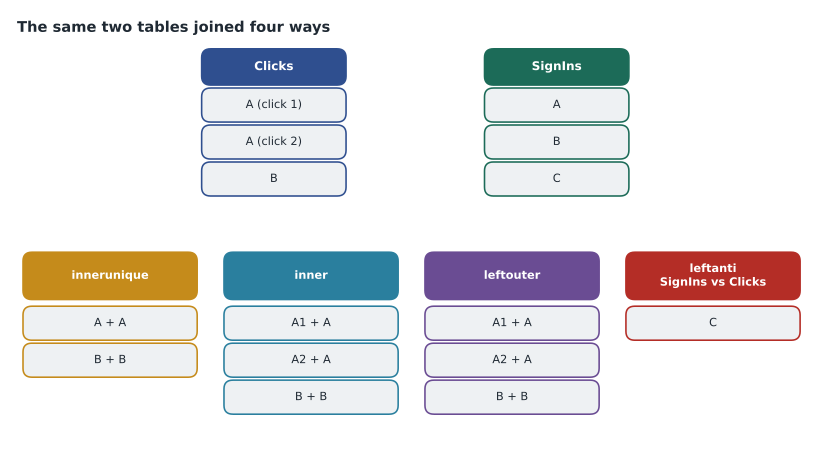
clicks = [("mnovak", "09:12"), ("mnovak", "09:14"), ("kmoreau", "11:31")]
signins = [("mnovak", "Lagos"), ("kmoreau", "Des Moines"), ("tlambert", "Brandon")]

def inner(left, right):
    return [(a, t, place) for a, t in left for b, place in right if a == b]
def innerunique(left, right):
    seen, first = set(), []
    for a, t in left:
        if a not in seen:
            seen.add(a); first.append((a, t))
    return inner(first, right)
def leftanti(left, right):
    keys = {b for b, _ in right}
    return [row for row in left if row[0] not in keys]

print("innerunique:", innerunique(clicks, signins))
print("inner:      ", inner(clicks, signins))
print("sign-ins with no click (leftanti):", leftanti(signins, clicks))innerunique: [('mnovak', '09:12', 'Lagos'), ('kmoreau', '11:31', 'Des Moines')]
inner: [('mnovak', '09:12', 'Lagos'), ('mnovak', '09:14', 'Lagos'), ('kmoreau', '11:31', 'Des Moines')]
sign-ins with no click (leftanti): [('tlambert', 'Brandon')]What this code does
Two small lists stand in for a click table and a sign-in table. The innerunique version drops the second click by the same account before matching, so it returns two pairs, while the inner version keeps both clicks and returns three. The leftanti version lists sign-ins whose account never clicked, which is how a hunter finds what is missing rather than what matches.
Answering the CFO's question
With summarize and join, Ama wrote the query the CFO had wanted. It found every account that clicked a kit link, then joined to sign-ins in the four hours after each account's first click, and kept sign-ins from outside Canada and the United States.
let clicks = UrlClickEvents
    | where Timestamp between (datetime(2026-10-20) .. datetime(2026-10-21))
    | where Url has_any (dynamic(["hf-supplier-review.example"]))
    | where ActionType == "ClickAllowed"
    | summarize FirstClick = min(Timestamp) by AccountUpn;
clicks
| join kind=inner (
    EntraIdSignInEvents
    | where Timestamp between (datetime(2026-10-20) .. datetime(2026-10-21))
    | project AccountUpn, SignInTime = Timestamp, Country, IPAddress, ErrorCode
  ) on AccountUpn
| where SignInTime between (FirstClick .. (FirstClick + 4h))
| where Country !in ("CA", "US") and ErrorCode == 0
| project AccountUpn, FirstClick, SignInTime, Country, IPAddress
The CFO had been told 46 people read the message. The query showed that 11 accounts clicked the link, 4 entered credentials on the kit page according to the proxy logs Sunil checked separately, and 1, Marek Novak's, had a successful sign-in from abroad, the one already handled in the incident. The difference between 46, 11, 4 and 1 is the difference between exposure and compromise, and putting it in that order was the most useful thing Ama produced that week.
Union and lookup
Where join combines tables side by side, union stacks them, which is how a hunter searches several tables at once. union with withsource=SourceTable adds a column showing where each row came from. union isfuzzy=true tolerates tables that do not exist in a workspace, which matters in shared queries. lookup is a specialized join for adding columns from a small reference table, such as a watchlist of high-value accounts, to a large fact table; it is faster than join for that case because the small table is broadcast to every node.
let ip = "203.0.113.48";
union withsource=SourceTable isfuzzy=true
    (SigninLogs | where IPAddress == ip | project TimeGenerated, Who = UserPrincipalName),
    (OfficeActivity | where ClientIP has ip | project TimeGenerated, Who = UserId),
    (CommonSecurityLog | where SourceIP == ip or DestinationIP == ip | project TimeGenerated, Who = DeviceName)
| summarize Events = count(), First = min(TimeGenerated), Last = max(TimeGenerated) by SourceTable, Who
The address 203.0.113.48 is from a documentation range, like every address in this course; in the clinic it stood in for the kit's hosting address. The pattern of one indicator, many tables, summarized by source, is the first thing Nadia ran on any new indicator, and the result took the form of a short table that went straight into the incident notes.
Making sense of counts
Counts invite comparison, and comparison needs a baseline. Eleven clicks is a lot for one message and few for a whole year. Before reporting a number, Ama learned to ask: compared with what? The usual answers are the same period last week, the same weekday over the last four weeks, or the same population, such as all buyers rather than all staff. Lesson 3 turns this into a method with make-series. For now the rule was to put the comparison next to the number in every summary.
Choosing the right join
Choosing a join kind is a question about which rows should survive. Inner keeps only matches on both sides. Leftouter keeps every row on the left and fills the right side with empty values where nothing matched, which suits enrichment, such as adding a click to every delivered message whether or not anyone clicked. Leftanti keeps left rows with no match, which suits exclusions and gap checks: messages that were delivered but never reported, devices that should send logs but did not. Rightanti and rightsemi do the same from the other side. Because the default kind, innerunique, removes duplicate keys from the left side first, Nadia asked the clinic to write the kind on every join, even when it is the default, so that the reader never has to remember what the default does.
Size matters too. Put the smaller table on the left when the kind allows it, filter both sides by time and other conditions before the join, and project only the columns the rest of the query needs. When the right side is small and static, such as a watchlist, lookup is simpler and usually faster than join, and it never drops left rows that do not match.
Worked problem
Choosing the join kind
Nadia wants a list of every device that ran the malicious label utility from the November 5 incident, and for each one, the most recent logged-on user if there is one. Some devices have no logon events in the period. Which join kind should Ama use, and in what order?
Show solution
- Start from the smaller table: devices that ran the utility, found with DeviceProcessEvents filtered on the file hash, summarized to one row per DeviceId.
- The user information is optional, so devices without logons must still appear. That rules out inner and innerunique.
- Use kind=leftouter with the device list on the left and the logons on the right, so every device is kept and user columns are empty where no logon matched.
- Prepare the right side with summarize arg_max(Timestamp, AccountName) by DeviceId, so each device contributes only its latest logon and the join does not multiply rows.
- Join on DeviceId rather than DeviceName, because names can change and IDs do not.
Answer: Use a leftouter join from the small device list to logons reduced to the latest per DeviceId, matched on DeviceId.
Common mistakes
MistakeRely on the default join kind.
InsteadThe default, innerunique, drops duplicate left keys; write kind= every time.
MistakePut the largest table on the left of a join.
InsteadPut the smaller table on the left and filter both sides before joining.
MistakeReport a count without a comparison.
InsteadGive a baseline, such as last week or the same weekday, beside every count.
MistakeUse dcount for exact figures in a report.
Insteaddcount is approximate for large sets; use an exact method when precision matters.
Summary and key terms
- summarize groups rows and calculates aggregates such as count, dcount, min, max, arg_max and make_set.
- bin groups events into time buckets; render timechart shows the pattern.
- top returns the first n rows by a column reliably; top-nested ranks at several levels.
- join combines tables; the default kind, innerunique, removes duplicate left keys, so name the kind explicitly.
- leftouter enriches, leftanti finds what is missing, inner keeps every pair.
- union stacks tables, and lookup adds columns from a small reference table efficiently.
- Every count needs a baseline before it means anything.
- summarize
- A KQL operator that groups rows and calculates aggregates for each group.
- bin()
- A function that rounds values down to fixed-size buckets, often used on time.
- innerunique
- The default join kind, which removes duplicate keys from the left table before matching.
- leftanti join
- A join that keeps left rows with no match on the right.
- union
- An operator that stacks rows from several tables into one result.
- lookup
- An operator that adds columns from a small reference table to a large one.
Practice problems
Work each problem on paper first, then reveal the answer to check.
Why did Nadia write kind= on every join?
Show answer
So readers know the join kind is deliberate; the default silently drops duplicate left keys.
What did the timechart reveal about the phishing wave?
Show answer
A second, blocked burst at 13:10 that showed the attacker tried again.
Why use leftouter for the device-to-user query?
Show answer
Devices without logons must still appear, with empty user columns.
What is the difference between join and union?
Show answer
join combines rows side by side on a key; union stacks rows from several tables.
Lesson quiz · 5 questions
Score 60% or more to complete this lesson.
Create a free account to save your progress, take quizzes and earn a certificate.