
MSAZ-342 · Lesson 8 of 12 · 19 min
Managing incidents and evidence
▶ Video coming soon A video version of this lesson is on the way.
Hunting finds things; incident management makes sure that what is found gets handled, by someone, in order, with a record. At Harrow & Finch both Sentinel and Defender XDR incidents are worked in the Defender portal, where the unified incident queue has been the SOC's main screen since MSAZ-340. Microsoft has said that managing Sentinel in the Azure portal ends on March 31, 2027, later than the July 2026 date first announced, so this course works in the Defender portal throughout. This lesson uses incident 4196, raised on Thursday, November 12, to show how an incident is triaged, assigned, worked and documented, and how the evidence that a later review or a regulator might ask for is collected and kept.
The incident queue
An incident is a group of related alerts with the entities they share: accounts, devices, mailboxes, addresses, files. The Defender portal's correlation engine builds incidents from alerts raised by Defender products, Entra ID Protection and Sentinel analytics rules, and it merges alerts into an existing incident when they share entities within a time window. The queue lists incidents with their severity, status, owner, categories (drawn from ATT&CK tactics), affected assets, tags and the time of first and last activity.
Nadia's queue rules were short. Sort by severity, then by last activity. Filter out anything assigned to someone else unless it is high and unacknowledged for more than 15 minutes. Use saved filters for the views each shift needs. Never leave the default status of Active on an incident someone is working on; change it to In progress so others can see it is taken.
| Field | What it is for | Harrow & Finch practice |
|---|---|---|
| Severity | How bad the incident could be | Set by the highest alert; an analyst may raise it, not lower it without a comment |
| Status | Active, In progress or Resolved | In progress as soon as someone starts work |
| Assigned to | One user or group | The analyst working it; the SOC group for overnight |
| Classification | True positive, False positive or Informational, expected activity | Required before resolving, with a determination where offered |
| Tags | Free labels for filtering and reporting | Campaign tags such as kit-2026-10; critical asset tags |
| Comments | The running record of the investigation | Every decision and its reason, with time |
Triage
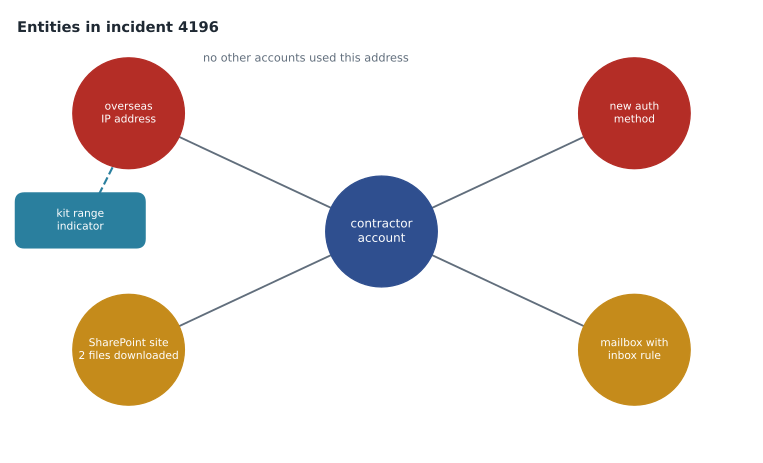
Triage answers three questions quickly: is it real, how bad is it, and who works it? It is not the investigation. An analyst reading a new incident looks at the alert titles and sources, the entities and whether they are critical, the attack story summary and any automatic actions already taken, then decides whether to work it now, assign it, or close it with a reason. For incident 4196 that took Ama seven minutes. The incident had two alerts: the new-country-then-MFA-change analytics rule from MSAZ-341, and an Entra ID Protection atypical travel detection for the same account. The account belonged to Theo Lambert, a contractor with Brightfield Merchandising, an outside firm that plans store layouts for Harrow & Finch. His account had access to the merchandising SharePoint site and a mailbox. Ama assigned the incident to herself at 10:09, set it to In progress, raised it to Nadia because the account had a new authentication method registered from abroad, and Nadia took the lead at 10:31.
Brightfield Merchandising and Theo Lambert are invented for this course, like every name at Harrow & Finch.
The incident page
The incident page gathers what the analyst needs. The attack story shows the alerts in time order with an incident graph of the entities and how they connect. The alerts tab lists each alert with its source and detection. The assets tab lists users, devices, mailboxes and apps. The evidence and response tab lists files, processes, addresses and other evidence, with the verdict from automated investigation where one ran and the actions taken. In 2026 the page also shows a Security Copilot summary for licensed users, which lesson 9 covers.
The investigation graph is most useful for scope. Starting from the contractor's account, Nadia expanded the overseas address to see whether any other account had signed in from it: none had. She expanded the mailbox to see recent mail flow and the inbox rules alert that Defender for Office 365 raised at 10:11, which the correlation engine had added to the incident, making three alerts.
Tasks, comments and the record
Incident tasks are checklists inside the incident. They can be added by hand or by automation rules, and each has a status. At Harrow & Finch an automation rule adds the identity compromise task list to any incident with a high-severity identity alert: confirm with the user by a separate channel, revoke sessions, review authentication methods, review inbox rules and forwarding, review OAuth consents, review files accessed, decide on notification. The list made sure the same steps happened at 10:30 on a Thursday as at 03:00 on a Sunday.
Comments are the record. Every change an analyst or the system makes is kept in the incident's activity log, but the log shows what changed, not why. Nadia's standard was one comment per decision, starting with the time: '10:44 Account disabled and sessions revoked; confirmed with Brightfield by phone that Theo is in Winnipeg and did not sign in from abroad.' Comments are kept with the incident and can be used directly in the post-incident review.
SecurityIncident
| where IncidentNumber == 4196
| summarize arg_max(TimeGenerated, *) by IncidentNumber
| project IncidentNumber, Title, Severity, Status, Classification,
          Owner = tostring(Owner.assignedTo), FirstActivityTime, CreatedTime,
          FirstModifiedTime, ClosedTime, AlertCount = array_length(AlertIds)
The SecurityIncident table in the Sentinel workspace keeps a new row each time an incident changes, so arg_max by incident number returns the latest version. It holds the times a review needs: when the first activity happened, when the incident was created, when it was first changed by someone, and when it was closed. Lesson 11 uses those columns to measure response times across many incidents.
Response times
Harrow & Finch's SOC targets, written into the incident response plan that Nadia revised after incident 4127, depend on severity: a high-severity incident should be acknowledged within 15 minutes and contained within 4 hours; medium within 1 hour and 24 hours. Acknowledged means assigned and set to In progress. Ama wrote a small script for the weekly report that checks each incident against its targets.
from datetime import datetime as dt

targets = {"High": (15, 240), "Medium": (60, 1440)}   # minutes: acknowledge, contain
incidents = [
    # number, severity, created, acknowledged, contained
    (4196, "High",   "2026-11-12 10:02", "2026-11-12 10:09", "2026-11-12 10:44"),
    (4188, "Medium", "2026-11-10 21:40", "2026-11-10 23:05", "2026-11-11 09:30"),
    (4191, "High",   "2026-11-11 03:12", "2026-11-11 03:20", "2026-11-11 08:01"),
]
f = "%Y-%m-%d %H:%M"
for n, sev, c, a, k in incidents:
    c, a, k = (dt.strptime(x, f) for x in (c, a, k))
    ack = (a - c).total_seconds() / 60
    con = (k - c).total_seconds() / 60
    ta, tc = targets[sev]
    print(f"{n} {sev:6} ack {ack:4.0f} min ({'met' if ack <= ta else 'MISSED'})"
f" contain {con:5.0f} min ({'met' if con <= tc else 'MISSED'})")4196 High ack 7 min (met) contain 42 min (met) 4188 Medium ack 85 min (MISSED) contain 710 min (met) 4191 High ack 8 min (met) contain 289 min (MISSED)
What this code does
Each incident has a severity and three times: created, acknowledged and contained. The program looks up the targets for the severity, works out the minutes from creation to each step and reports whether the target was met. Incident 4196 met both. The medium incident was acknowledged 85 minutes after it was created, missing its one-hour target, and the overnight high incident took 289 minutes to contain, missing its four-hour target.
The two misses were real. The medium incident arrived during a shift change, and the overnight one waited for a store manager to confirm a till PC could be isolated. Both went to the review in lesson 11 as process gaps, not personal failures. Targets are not the goal in themselves. A team that chases acknowledgement times can learn to click Assign quickly and look later, which improves the number and not the response. Nadia asked for the number and a sample: each week, two incidents that met their targets were read in full to check that the work behind the timestamps was real.
Collecting evidence
Evidence is anything that shows what happened, and an investigation should collect it before it changes or expires. For a cloud identity incident most evidence is in logs, and logs have retention limits. The analytics tier at Harrow & Finch keeps 90 days. The data lake keeps a year for sign-ins and audit data. Microsoft Purview Audit keeps records for 180 days with Audit Standard and a year by default with Audit Premium, which the E5 licences include; longer retention needs add-on policies. Defender advanced hunting keeps 30 days. Evidence that a review, insurer or regulator might need must be exported or preserved before those clocks run out.
| Evidence | Where it is | What it showed for incident 4196 |
|---|---|---|
| Sign-ins | SigninLogs, EntraIdSignInEvents | Overseas sign-in at 09:57 reusing the session begun through the kit on November 11 |
| Authentication method changes | AuditLogs | New authenticator app registered at 09:58 |
| Mailbox access | Purview Audit (MailItemsAccessed), OfficeActivity | Mail items read between 09:59 and 10:40 |
| Inbox rules | OfficeActivity (New-InboxRule), CloudAppEvents | Rule moving mail containing invoice to RSS Feeds, 10:06 |
| File access | OfficeActivity, CloudAppEvents | Two files downloaded from the merchandising site, 10:15 |
| API calls | MicrosoftGraphActivityLogs | Mail read through Graph from the overseas address |
| Content search in Purview eDiscovery | The phishing email from November 11 and its link |
Microsoft Graph activity logs record calls to Microsoft Graph made by applications and users, including the address, the application, and the request. They had been sent to the Sentinel workspace since MSAZ-341 and showed that the attacker used a mail client that read mail through Graph, not just the web interface, which mattered for scoping: MailItemsAccessed covers both, but Graph logs showed the request rate.
Preserving and sharing evidence
Ama exported the relevant log rows to a storage account set aside for incident evidence, with immutable storage enabled so the files could not be changed or deleted for a year, and recorded each file's SHA-256 hash in the incident comments. That is a simple chain of custody: what was collected, by whom, when, from where, and a hash that shows it has not changed since. For mail, she used a Purview eDiscovery case to search for and hold the phishing message and the items the attacker had read, rather than copying mail into the SOC's tools. eDiscovery holds preserve content even if a user deletes it, and access to the case is limited to the people named on it.
Evidence contains personal information about the contractor, the people he emailed and the store staff named in those emails. Access was limited to the SOC, Carmen Ortiz and Sunil, and the plan was to delete the evidence package when the retention period in the incident response plan ended, unless a legal reason to keep it arose. Under PIPEDA, Harrow & Finch must also keep a record of every breach of security safeguards for 24 months, whether or not it is reported, which lesson 11 completes.
Worked problem
Before the clock runs out
On November 13, Nadia asked which evidence for incident 4196 would expire first if nothing were done. Advanced hunting keeps 30 days, the analytics tier 90 days, the lake a year for sign-ins and audit data, and Purview Audit a year under the E5 licences.
Show solution
- The Defender advanced hunting tables, such as CloudAppEvents and EntraIdSignInEvents, keep 30 days, so they expire around December 12.
- The analytics tier keeps the Sentinel copies for 90 days, until about February 10, 2027.
- The lake and Purview Audit keep a year, until November 2027.
- Export the relevant rows from the 30-day tables now, hash them and store them with the other evidence, so the review on November 20 and any later question can use them.
Answer: The 30-day advanced hunting data expires first, around December 12, so it was exported on November 13.
Common mistakes
MistakeLeave an incident Active while working on it.
InsteadSet it to In progress and assign it.
MistakeRecord actions without reasons.
InsteadWrite one comment per decision, with the time and the reason.
MistakeAssume logs will still be there for the review.
InsteadCheck retention and export evidence that would expire.
MistakeCopy mailbox content into the SOC's file share.
InsteadUse an eDiscovery case and hold, with access limited.
Summary and key terms
- The Defender portal's unified queue holds Sentinel and Defender XDR incidents; Sentinel management in the Azure portal ends March 31, 2027.
- Triage decides if an incident is real, how bad it is and who works it.
- Status, owner, classification, tags and comments make the incident a record.
- Tasks added by automation make the same steps happen on every shift.
- Collect evidence before retention ends, hash it and store it immutably; use eDiscovery for mail.
- Incident
- A group of correlated alerts and their entities, worked as one case.
- Triage
- A quick assessment of whether an incident is real, how severe it is and who should work it.
- Incident task
- A checklist item inside an incident, added by hand or automation.
- Chain of custody
- A record of who collected evidence, when and how, showing it has not changed.
- eDiscovery hold
- A preservation of mailbox or site content that keeps it even if deleted.
- Graph activity logs
- Logs of calls to Microsoft Graph by users and applications.
Practice problems
Work each problem on paper first, then reveal the answer to check.
What are the three incident statuses?
Show answer
Active, In progress and Resolved.
What does the activity log not record that comments should?
Show answer
Why a change was made.
Which evidence for 4196 expired first?
Show answer
The 30-day advanced hunting data.
How was the evidence protected from change?
Show answer
Immutable storage and SHA-256 hashes recorded in the incident.
Lesson quiz · 5 questions
Score 60% or more to complete this lesson.
Create a free account to save your progress, take quizzes and earn a certificate.