
MSAZ-341 · Lesson 9 of 12 · 20 min
User and entity behaviour analytics
▶ Video coming soon A video version of this lesson is on the way.
Most of the rules built so far look for something specific: twenty failed sign-ins, a cleared log, a forwarding rule, a known bad address. The phishing cases of October had shown Nadia the limit of that approach. In each one, the first sign of trouble was not a known bad thing but an ordinary thing done in an unusual way: a buyer signing in from an internet provider she had never used, a store manager reading far more mail in an hour than she ever had. "I don't want a rule for every kind of unusual," Nadia said on the morning of Thursday, November 12. "I want the platform to know what usual looks like." That is what user and entity behaviour analytics (UEBA) is for.
What UEBA does
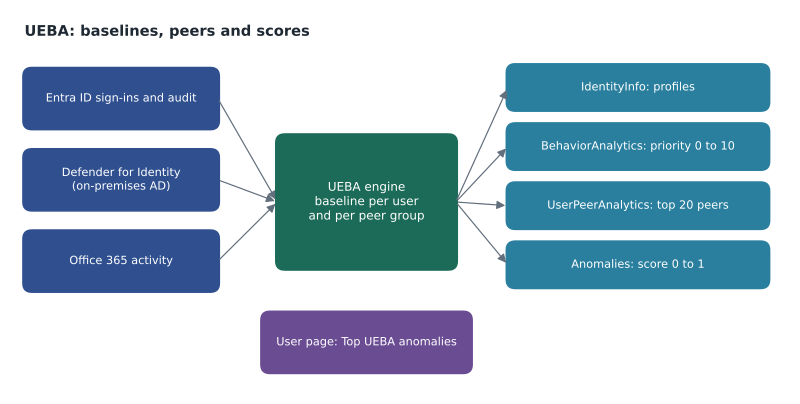
UEBA builds behavioural baselines for users, hosts, IP addresses, applications and other entities from the data in the workspace, and then flags activity that departs from those baselines. It compares an entity with its own history, such as whether this user has ever used this device, country or application before, and with its peers, the people it most resembles by group membership and other associations. The result is not an alert but enrichment: scores and flags attached to activity, which analysts use for triage and hunting, and which anomaly rules and other analytics can build on.
The feature is included with Microsoft Sentinel without a separate charge; its output is written to tables in the workspace like other data. It is enabled in the Sentinel settings for the workspace, where you choose which data sources it should analyze. Microsoft names Microsoft Entra ID, Defender for Identity and Office 365 as the key connectors to enable for UEBA, with on-premises Active Directory information available through Defender for Identity. UEBA can also use some other sources, such as other clouds' identity and audit logs, when their connectors are in place.
| Table | What it holds | How the SOC uses it |
|---|---|---|
| IdentityInfo | Profiles of users, groups and devices from Entra ID and, through Defender for Identity, on-premises Active Directory | Joining activity to job title, department, manager and group membership |
| BehaviorAnalytics | Activity enriched with location, threat intelligence and flags for first-time or uncommon behaviour, with an investigation priority score | Triage and hunting: which activity is unusual for this user |
| UserPeerAnalytics | Each user's top 20 peers, weighted so that small shared groups count more | Comparing a user with people like them |
| Anomalies | Results of anomaly detection rules, with an anomaly score | Hunting and correlation |
| SentinelBehaviorInfo and SentinelBehaviorEntities | Summaries of behaviours from raw logs, with plain-language explanations and MITRE ATT&CK mappings | Only if the separate UEBA behaviours layer is enabled |
Scores and flags
Two scores appear in UEBA data, and they measure different things. The investigation priority score, in BehaviorAnalytics, ranges from 0 to 10, where 0 is benign and 10 highly anomalous. It is calculated for individual events in near real time, combining how anomalous the entity is with how anomalous the event is in a time series, and it is meant for quick triage. The anomaly score, in the Anomalies table, ranges from 0 to 1 and comes from machine learning models that look at behaviour over time in batches. A high investigation priority means "look at this event"; a high anomaly score means "this pattern of behaviour is unusual".
BehaviorAnalytics also carries insight flags in its UsersInsights, DevicesInsights and ActivityInsights columns, such as whether this is the first time the user has connected from this country, used this device, or performed this action, and whether the action is uncommon among the user's peers. For analysts these flags are often more useful than the score, because they say why something is unusual.
BehaviorAnalytics
| where TimeGenerated > ago(1d)
| where InvestigationPriority >= 5
| extend FirstCountry = tostring(ActivityInsights.FirstTimeUserConnectedFromCountry),
         UncommonISP = tostring(ActivityInsights.ISPUncommonlyUsedAmongPeers)
| project TimeGenerated, UserPrincipalName, ActivityType, ActionType,
          SourceIPLocation, InvestigationPriority, FirstCountry, UncommonISP
| sort by InvestigationPriority desc
Enabling UEBA at Harrow & Finch
Sunil enabled UEBA on November 11 with three sources: Microsoft Entra ID sign-in and audit logs, Defender for Identity, which brings in the on-premises Active Directory view of users and groups, and Office 365 activity. He also installed the UEBA Essentials solution from the content hub, which adds dozens of hunting queries built on the UEBA tables. Baselines need history, and UEBA's first days of output are less reliable than its later ones, so Nadia asked the team not to build any automation on UEBA scores until it had several weeks of data, planned for review in mid-December.
Enabling UEBA also changed the Defender portal. User pages gained a UEBA anomalies tag and a Top UEBA anomalies section showing the three most significant anomalies for that user over the last 30 days, with links to the queries behind them. Incident graphs offered a Go hunt option for all of a user's anomalies, and advanced hunting started to suggest joining the Anomalies table. Ama found these more useful than the tables themselves: when she opened a user's page from an incident, the anomalies were already there.
Reading the first results
By the morning of November 12, UEBA had less than a day of history and had already flagged something. A store manager at Selkirk had signed in at 06:40 with an investigation priority of 7. The insight flags said it was the first time she had connected from that internet provider and that the provider was uncommon among her peers. Ama checked the sign-in: multifactor authentication had succeeded with the Authenticator app, the device was compliant, and a quick call confirmed that the manager had a new phone on a new mobile plan. Ama closed it as benign and noted that early UEBA output would flag many changes like this until baselines settled.
events = [
    # user, investigation priority (0-10), first-time country?, uncommon among peers?
    ("r.delgado", 7, False, True),
    ("a.mendes", 3, False, False),
    ("t.marchand", 2, False, False),
    ("p.lindqvist", 8, True, True),
    ("p.lindqvist", 6, False, True),
    ("svc-reporting", 9, True, False),
    ("a.mendes", 4, False, True),
]
from collections import defaultdict
score = defaultdict(int)
reasons = defaultdict(set)
for user, prio, first_country, uncommon in events:
    if prio >= 5:
        score[user] += prio
        if first_country: reasons[user].add("first-time country")
        if uncommon: reasons[user].add("uncommon among peers")
for user in sorted(score, key=score.get, reverse=True):
print(f"{user:<14} total priority {score[user]:>2} {', '.join(sorted(reasons[user]))}")p.lindqvist total priority 14 first-time country, uncommon among peers svc-reporting total priority 9 first-time country r.delgado total priority 7 uncommon among peers
What this code does
The program takes a small set of scored events, keeps only those with an investigation priority of 5 or more, and adds up the priorities for each user while collecting the insight flags. It then lists users from the highest total down, with the reasons. The output puts p.lindqvist first with two notable events, one from a country he had never connected from, followed by the reporting service account and the store manager; that order is the queue an analyst would work through.
The service account in second place mattered more than its score suggested. Service accounts should behave very consistently, so any first-time country for one is suspicious. Ama checked and found that the reporting vendor had moved its integration to a data centre in another country without telling anyone. Nadia asked the vendor to confirm in writing and added the new location to a watchlist used by the rules, which lesson 10 uses again.
Anomaly rules
Anomaly detections are a kind of analytics rule built on Microsoft's machine learning models. Sentinel provides anomaly rule templates, for example for unusual sign-in patterns or unusual volumes of activity, and their results go to the Anomalies table rather than directly creating incidents. The SC-200 study guide expects candidates to configure them. An anomaly rule's thresholds and parameters can be adjusted by duplicating it and running the copy in a test mode, often called flighting, beside the original in production, then comparing the two sets of results in the Anomalies table before switching which one is live.
Because anomaly results are not incidents on their own, the SOC uses them in two ways. Hunting queries look for users with several anomalies in a short time, which is more telling than any single one. And scheduled rules can join Anomalies with specific events, for example creating an incident when a user with a high anomaly score in the last day also changes their multifactor authentication methods.
Anomalies
| where TimeGenerated > ago(1d) and AnomalyScore >= 0.8
| summarize AnomalyCount = count(), Rules = make_set(RuleName) by UserPrincipalName
| join kind=inner (
    AuditLogs
    | where TimeGenerated > ago(1d)
    | where OperationName has "security info"
    | extend UserPrincipalName = tostring(TargetResources[0].userPrincipalName)
  ) on UserPrincipalName
| project UserPrincipalName, AnomalyCount, Rules, OperationName, TimeGenerated
Privacy and fairness
Behavioural analytics watches employees closely, and Nadia raised that before switching it on. UEBA uses data the company already collects for security, but it builds profiles of people's normal behaviour, which is a new use. Harrow & Finch's privacy officer, Carmen Ortiz, reviewed the change against PIPEDA's principles on limiting use to the purposes identified to employees; the company's employee privacy notice already said that sign-in and system activity is monitored for security, and the review confirmed that UEBA fell within that purpose. The review added two conditions: UEBA output would be used only for security investigations, not performance management, and access to user pages would stay limited to the SOC roles in lesson 2.
How analysts use UEBA day to day
In practice UEBA shows up in three places in the SOC's work. In triage, the user page and the BehaviorAnalytics rows answer the first question about any account in an incident: is this behaviour normal for this person? In hunting, the UEBA Essentials queries look for patterns across many users, such as several first-time countries in one department on the same day. And in rules, the Anomalies table can raise the severity of an incident or add a condition, as in the example query above. Ama's habit, which Nadia encouraged, is to open the user page for every account entity before deciding anything, because the anomalies section often settles in seconds whether an alert is worth deeper work.
Worked problem
Triage with UEBA
An incident reports that a head office buyer's account downloaded 340 files from SharePoint in 20 minutes. BehaviorAnalytics shows an investigation priority of 8 for the activity, with flags: first time the user has done this volume of downloads, uncommon among peers, and the activity came from the user's usual device and city. What should the analyst conclude and do?
Show solution
- The scores say the volume is very unusual for this user and for people like her, so the incident is worth investigating.
- The usual device and city make account takeover from elsewhere less likely, but do not rule out misuse from her own device or a compromised session.
- Check the user page for other UEBA anomalies in the last 30 days, and the incident for related alerts such as a new sign-in or mailbox rule.
- Look at which files were downloaded and whether they were shared onward, using OfficeActivity.
- Ask her manager whether a project explains it before contacting the user, following the insider risk process, since an innocent explanation is common and an accusation is damaging.
Answer: Treat the high score as a reason to investigate, not a verdict; check related anomalies and activity, look at the files, and confirm the business reason through the manager.
Common mistakes
MistakeUEBA scores are alerts and should go straight to automation.
InsteadThey are enrichment for triage and hunting; let baselines settle before relying on them for automation.
MistakeA high investigation priority proves compromise.
InsteadIt shows the activity is unusual; the analyst decides whether it is malicious.
MistakeThe investigation priority score and the anomaly score are the same thing.
InsteadInvestigation priority (0 to 10) scores events in near real time; anomaly score (0 to 1) scores behaviour patterns in batches.
MistakeBehaviour analytics needs no privacy review because the data is already collected.
InsteadIt is a new use of the data; check it against the purposes employees were told about.
Summary and key terms
- UEBA builds baselines for users and other entities and flags departures from their own history and their peers.
- Key sources are Microsoft Entra ID, Defender for Identity and Office 365.
- IdentityInfo, BehaviorAnalytics, UserPeerAnalytics and Anomalies are the main UEBA tables.
- Investigation priority runs from 0 to 10 for events; anomaly score runs from 0 to 1 for behaviour.
- Insight flags explain why activity is unusual.
- Anomaly rules write to the Anomalies table and can be tuned by running a copy in test mode.
- UEBA output is enrichment for analysts, not a verdict, and its use should match the privacy notice.
- UEBA
- User and entity behaviour analytics: baselining entities and flagging unusual activity.
- Baseline
- The normal pattern of activity for an entity, learned from history.
- Peer group
- The users an entity is most similar to, used for comparison.
- Investigation priority score
- A 0 to 10 score of how anomalous an event is.
- Anomaly score
- A 0 to 1 score of how anomalous a behaviour pattern is.
- Insight flag
- A marker explaining why activity is unusual, such as a first-time country.
Practice problems
Work each problem on paper first, then reveal the answer to check.
Which three connectors does Microsoft name as key for UEBA?
Show answer
Microsoft Entra ID, Defender for Identity and Office 365.
What is the range of the investigation priority score?
Show answer
0 to 10.
Why was the store manager's 06:40 sign-in benign?
Show answer
She had a new phone on a new mobile plan; multifactor authentication succeeded on a compliant device.
Why did the service account's first-time country matter?
Show answer
Service accounts should behave consistently, so a new location is suspicious until explained.
How can an anomaly rule be tuned safely?
Show answer
Duplicate it, run the copy in test mode beside the original, and compare results.
Lesson quiz · 5 questions
Score 60% or more to complete this lesson.
Create a free account to save your progress, take quizzes and earn a certificate.