
MSAZ-341 · Lesson 7 of 12 · 20 min
Entity mapping and alert grouping
▶ Video coming soon A video version of this lesson is on the way.
On the morning of Wednesday, November 11, Ama opened the first incident created by one of the new rules and found it almost useless. The mailbox forwarding rule had fired on a test Sunil had set up, and the incident said only that a rule had matched. It did not say which mailbox, which outside address the mail was going to, or which user had made the change; to find out she had to open the query results and read the raw columns. Nadia looked over her shoulder and said, "That's the rule talking to itself. An alert has to talk to the analyst." The session that followed was about the parts of a rule that make its alerts useful: entity mapping, custom details, alert details and alert grouping.
Entities
An entity is a thing that an alert is about: an account, a host, an IP address, a URL, a file, a process, a mailbox, a cloud application, an Azure resource and more. Entities are what connect alerts to each other and to the rest of the Defender portal. When an alert carries an account entity, the analyst can open that user's entity page with its timeline and behaviour analytics; the correlation engine can see that two alerts involve the same account; and a playbook can act on the account without parsing text. Without entities, every alert is an island.
Entity mapping is the part of an analytics rule that says which columns of the query results identify which entities. Each entity type has identifiers. An account can be identified by its user principal name, its object ID in Microsoft Entra ID, its security identifier, or a name plus a domain; a host by its name, its fully qualified domain name or its Defender device ID; an IP address by the address itself. Microsoft's advice is to use strong identifiers, the ones that pin down one entity uniquely, whenever the data has them, because they let Sentinel match the same entity across different data sources.
| Limit | Value |
|---|---|
| Entity mappings per rule | Up to 10, and the same type can be mapped more than once |
| Identifiers per entity mapping | Up to 3, at least one of them required |
| Entities per alert across all mappings | Up to 500, divided equally between the mappings |
| Size of the alert's Entities field | 64 KB |
| Custom details per rule | Up to 20, each with up to 50 values, 2 KB in total per alert |
Mapping the same type more than once is common. A firewall rule might map the source address and the destination address as two IP entities, and a mail rule might map both the sender and the recipient. The 500-entity limit is divided between the mappings, so a rule with five mappings can extract at most 100 of each per alert; a query that returns thousands of addresses should summarize first.
OfficeActivity
| where Operation in ("New-InboxRule", "Set-InboxRule", "Set-Mailbox")
| extend Params = tostring(Parameters)
| where Params has_any ("ForwardTo", "RedirectTo", "ForwardingSmtpAddress")
| extend Target = extract(@"([A-Za-z0-9._-]+@[A-Za-z0-9.-]+)", 1, Params)
| where isnotempty(Target) and not(Target endswith "@harrowfinch.com")
| project TimeGenerated, UserId, MailboxOwnerUPN, ClientIP, Operation, Target
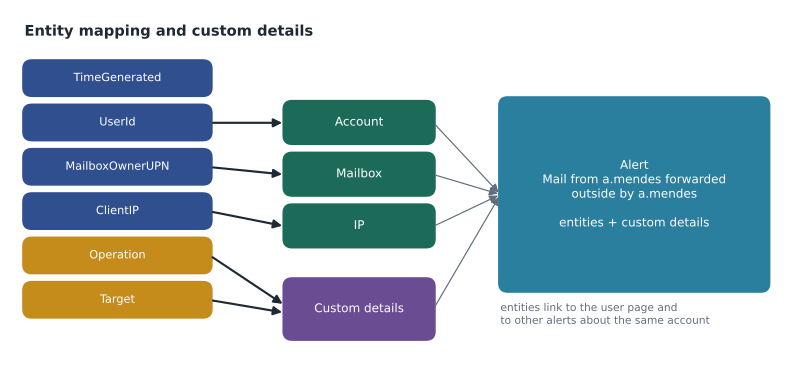
Ama mapped three entities: an Account entity from UserId, the person who made the change; a Mailbox entity from MailboxOwnerUPN, the mailbox whose mail is forwarded; and an IP entity from ClientIP, the address the change was made from. The outside address was not mapped, because it is not an account or mailbox Sentinel knows, so it went into a custom detail instead.
Custom details and alert details
Custom details surface event fields in the alert itself, as key-value pairs, so an analyst sees them in the incident without opening the query. They can also be used in automation rules and playbooks, and they are stored with the alert for hunting. A rule can have up to 20, each holding up to 50 values, within a total of 2 KB per alert. Ama added two: ForwardingTarget from the Target column and Operation from the Operation column.
Alert details let the alert's name, description, severity and tactics change with the data. A rule can use column values in its alert name and description, so instead of every alert being called "Mailbox forwarding to outside domain", each is called something like "Mail from a.mendes forwarded to an outside address by a.mendes". Severity can also come from a column, so a query can set high severity when the forwarding target is a free webmail domain and medium otherwise. Incidents take their titles from their alerts, so a good alert name makes the queue readable at a glance.
| Part of the rule | Before | After |
|---|---|---|
| Alert name | Mailbox forwarding to outside domain | Mail from {{MailboxOwnerUPN}} forwarded outside by {{UserId}} |
| Entities | None | Account (UserId), Mailbox (MailboxOwnerUPN), IP (ClientIP) |
| Custom details | None | ForwardingTarget, Operation |
| Severity | Medium, fixed | From a column: high for free webmail targets, medium otherwise |
Alert grouping
Rules can create many alerts about one piece of activity. A brute force attack on three till PCs, a phished user whose mailbox rule and sign-ins both trigger rules, an hour of the same firewall alert: each is one story for the analyst, not ten. Alert grouping is how alerts become incidents. In a Sentinel workspace on its own, each analytics rule has incident settings that can group alerts from that rule into a single incident when all entities match, when selected entities match, or when selected details match, within a time window, and can reopen a closed incident when a matching alert arrives.
In a workspace connected to the Defender portal, the Defender correlation engine controls how alerts are grouped into incidents and merged across sources. The rule's grouping settings are still shown, and they still influence how alerts from a single rule relate, but the engine may also merge a Sentinel alert into an incident with Defender XDR alerts about the same user or device. Two behaviours differ from the Sentinel-only world, and Sunil wrote them on the whiteboard: a closed incident is not reopened when a new matching alert arrives, because the new alert starts a new incident; and an incident's title can change as alerts are correlated into it, so automation should not depend on incident titles.
from datetime import datetime, timedelta
alerts = [
    # time, rule, account
    ("08:02", "Failed sign-ins on till PCs", "svc-till"),
    ("08:12", "Failed sign-ins on till PCs", "svc-till"),
    ("09:40", "New country then MFA change", "a.mendes"),
    ("09:52", "Mailbox forwarding outside", "a.mendes"),
    ("13:15", "Mailbox forwarding outside", "a.mendes"),
    ("16:30", "Failed sign-ins on till PCs", "svc-till"),
]
window = timedelta(hours=5)
day = datetime(2026, 11, 11)
incidents = []   # each: [account, first alert time, list of rules]
for t, rule, acct in alerts:
    when = day + timedelta(hours=int(t[:2]), minutes=int(t[3:]))
    for inc in incidents:
        if inc[0] == acct and when - inc[1] <= window:
            inc[2].append(rule)
            break
    else:
        incidents.append([acct, when, [rule]])
for acct, start, rules in incidents:
    n = len(rules)
print(f"Incident for {acct}, from {start:%H:%M}: {n} alert{'s' if n != 1 else ''}")Incident for svc-till, from 08:02: 2 alerts Incident for a.mendes, from 09:40: 3 alerts Incident for svc-till, from 16:30: 1 alert
What this code does
The program walks through six alerts in time order. Each alert joins an existing incident if that incident is about the same account and started no more than five hours earlier; otherwise it starts a new incident. The output shows three incidents instead of six alerts: one for the service account in the morning, one for a.mendes with three alerts from two different rules, and a new one for the service account in the afternoon because its earlier incident was more than five hours old. The real correlation engine uses many more signals, but the effect of a shared entity and a time window is the same.
The model shows why entity mapping comes before grouping: without the account entity, the alerts for a.mendes from two different rules could not have been seen as one story. Ama checked this on the real test the next day. Sunil's forwarding test and a staged sign-in from an unusual country for the same test account produced two alerts from two rules, and the Defender portal correlated them into a single incident titled with the account's name.
Tuning noisy rules
Grouping reduces the number of incidents; tuning reduces the number of alerts. Once the workspace is in the Defender portal, the alert tuning rules described in MSAZ-340 also apply to Sentinel alerts, so a known benign pattern can be hidden or resolved automatically without editing the rule. For Sentinel rules there are two other tools: exclusions in the query, preferably driven by a watchlist so they can be changed without editing the rule, and automation rules that close known false positives with a classification (lesson 10). Nadia's order of preference was to fix the query if the rule is wrong, to use a watchlist exclusion if the exception is legitimate and lasting, and to use tuning or automation only for patterns that are understood and recorded.
Choosing which entities matter
Mapping every column that looks like an entity is tempting and unhelpful. Each mapping uses part of the alert's entity limit, and entities that are not the subject of the alert can mislead the correlation engine into merging unrelated incidents. A firewall alert that maps the firewall's own management address as an IP entity, for example, would link every incident from that firewall together. Nadia's test for each mapping is a question: would an analyst want to pivot from this alert to everything else about this thing? The user who made a change, the mailbox affected and the address the change came from pass the test; the firewall that logged the traffic does not, so it belongs in a custom detail.
Strong identifiers matter most for accounts. The same person can appear as a user principal name in sign-in logs, as a security identifier in Windows events and as a name and domain in firewall logs. When a rule can map more than one identifier, for example the user principal name and the Microsoft Entra object ID, Sentinel can match the account across sources and the user page shows the full picture. When only a display name is available, the entity may match the wrong person or nobody, and the alert stands alone again. Ama checked each of the five rules against this and changed the break-glass rule to map the object ID as well as the user principal name.
Worked problem
Mapping a firewall rule
Sunil wrote a rule for outbound connections from store networks to countries the company does not trade with. Its query returns TimeGenerated, SourceIP, SourceHostName, DestinationIP, DestinationCountry, DeviceName and BytesSent, summarized per source host and destination. What entity mappings, custom details and alert name should it have?
Show solution
- SourceHostName identifies the store device, so map a Host entity with host name as the identifier.
- Map two IP entities, one from SourceIP and one from DestinationIP, so each address can be pivoted on and correlated.
- DeviceName is the firewall that logged the traffic; it helps the analyst but is not the subject of the alert, so make it a custom detail along with DestinationCountry and BytesSent.
- Name the alert with values, for example "{{SourceHostName}} connected to {{DestinationCountry}}".
- Check the entity limit: three mappings share 500 entities, so each mapping can extract up to about 166; the query already summarizes per host and destination, so it stays well within that.
Answer: A Host entity from SourceHostName, two IP entities from SourceIP and DestinationIP, custom details for DestinationCountry, DeviceName and BytesSent, and an alert name built from the host and country.
Common mistakes
MistakePut everything useful in the alert description text.
InsteadMap entities and add custom details, so analysts, the correlation engine and playbooks can use the values.
MistakeUse weak identifiers such as display names when an object ID is available.
InsteadUse strong identifiers whenever possible so entities match across sources.
MistakeExpect a new alert to reopen a closed incident in the Defender portal.
InsteadClosed incidents are not reopened there; a new alert creates a new incident.
MistakeWrite automation that matches on incident titles.
InsteadTitles can change as alerts are correlated; use rule names, entities, tags or custom details instead.
Summary and key terms
- Entities identify what an alert is about and connect it to entity pages, correlation and automation.
- A rule can have up to 10 entity mappings with up to 3 identifiers each; use strong identifiers.
- Up to 500 entities per alert are shared between the mappings.
- Custom details surface up to 20 event fields in the alert, within 2 KB.
- Alert details can set the alert's name, description and severity from the data.
- In the Defender portal, the correlation engine groups alerts into incidents across Sentinel and Defender XDR.
- Closed incidents are not reopened there, and incident titles can change.
- Entity
- Something an alert is about, such as an account, host, IP address, file or mailbox.
- Entity mapping
- The part of a rule that says which result columns identify which entities.
- Identifier
- An attribute that identifies an entity, such as a user principal name or a host name.
- Custom details
- Event fields shown in an alert as key-value pairs.
- Alert details
- Settings that build an alert's name, description or severity from result values.
- Alert grouping
- Combining related alerts into a single incident.
Practice problems
Work each problem on paper first, then reveal the answer to check.
Why did the first forwarding incident help nobody?
Show answer
It had no entities or custom details, so the analyst had to read the raw query results.
How many entity mappings can a rule have?
Show answer
Up to 10, each with up to 3 identifiers.
Where did the outside forwarding address go, and why?
Show answer
Into a custom detail, because it is not an entity Sentinel knows.
Why should automation not match on incident titles?
Show answer
Titles can change as the correlation engine merges alerts.
What happens to a new matching alert after its incident is closed, in the Defender portal?
Show answer
It creates a new incident.
Lesson quiz · 5 questions
Score 60% or more to complete this lesson.
Create a free account to save your progress, take quizzes and earn a certificate.