
MSAZ-341 · Lesson 5 of 12 · 20 min
Data tiers and retention
▶ Video coming soon A video version of this lesson is on the way.
Nadia's question from the first day had two halves: what will we need to see, and how long will we need to see it for. By Monday, November 9, the first half was answered by the connectors. The second half filled that morning's session, and it turned out to be mostly about money. Keeping every table searchable at full speed for two years would have cost several times the rest of the Sentinel budget. Keeping nothing beyond the free period would have left investigations blind. The answer lay in using different tiers for different data.
Three places data can live
Microsoft now describes security data in the Defender portal in terms of tiers. The analytics tier is the Sentinel workspace as analysts have always used it: data there can be queried quickly, drives analytics rules, workbooks and hunting, and is billed for ingestion. The data lake tier is the Microsoft Sentinel data lake, a lower-cost store designed for keeping large volumes for a long time and querying them less often, with KQL or with Jupyter notebooks. The XDR tier is the Defender XDR data that advanced hunting can query in the Defender portal for about 30 days without it being ingested into Sentinel at all.
| Tier | Best for | Query and detection | Retention |
|---|---|---|---|
| XDR (Defender portal) | Recent Defender XDR device, mail and identity data | Advanced hunting and custom detections in Defender | About 30 days |
| Analytics (Sentinel workspace) | Data used by rules, workbooks and frequent hunting | Fast queries; analytics rules run here | 90 days included; can be extended at extra cost |
| Data lake | Large volumes kept for investigations, compliance and occasional hunting | KQL queries and jobs, notebooks; slower, billed per data scanned | Up to 12 years |
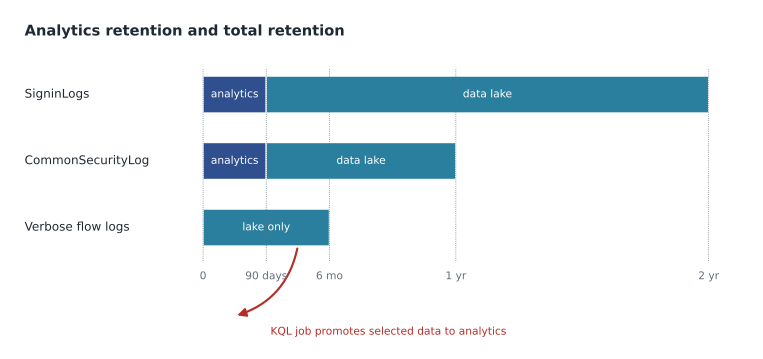
Two facts about the lake shaped the design. First, when the lake is enabled, data in the analytics tier is mirrored into the lake, so there is a single copy of each record: a table can keep 90 days in the analytics tier and two years in total, with the older data living only in the lake. Second, a table can be set to the lake tier only. Its data is then not in the analytics tier at all, which is much cheaper for high-volume data, but analytics rules cannot use it. You can bring selected lake data back into the analytics tier with a KQL job that runs once or on a schedule.
Retention settings
Retention is set per table. Analytics retention is how long data stays in the analytics tier; total retention is how long it is kept at all, including time in the lake. Data in the analytics tier is retained free for 90 days in a Sentinel workspace, and retention beyond that is charged at Log Analytics retention prices. Once the lake is onboarded, the extra time beyond analytics retention is held in the lake and billed by the lake's storage meter. Retention for many tables is managed in the Defender portal under data management for tables, where each table shows its tier, its analytics retention and its total retention.
Nadia set requirements by asking what investigations look like at Harrow & Finch. Most incidents are triaged within days, so 90 days of fast access covered almost all daily work. But two kinds of question reach further back. A phished account found in March might have been compromised in December, and the investigation needs the sign-ins from then. And the company's insurer and auditors expect to be able to ask what happened during an incident up to about two years later. So the rule she wrote was: 90 days in the analytics tier for anything rules use, two years in total for identity and audit data, and one year for network data.
| Table or data | Tier | Analytics retention | Total retention |
|---|---|---|---|
| SigninLogs, AADNonInteractiveUserSignInLogs, AuditLogs | Analytics | 90 days | 2 years |
| OfficeActivity, AzureActivity | Analytics | 90 days | 2 years |
| SecurityEvent, WindowsEvent | Analytics | 90 days | 1 year |
| CommonSecurityLog (firewalls) | Analytics | 90 days | 1 year |
| Defender XDR raw tables ingested | Analytics | 90 days | 1 year |
| SecurityIncident, SecurityAlert | Analytics | 2 years | 2 years |
| Azure Firewall flow logs (verbose) | Data lake only | None | 180 days |
The last row is the lake-only case. The cloud team had asked for Azure Firewall's verbose flow logs, about 7 GB a day, for occasional network investigations. No analytics rule needed them, and in the analytics tier they would have nearly doubled the bill. In the lake only, they would cost a fraction as much and could still be searched, or promoted into the analytics tier for an investigation, when needed. Incidents and alerts, by contrast, stay fully in the analytics tier for two years, because they are small and the SOC's own reports in lesson 12 need them.
How the lake is billed
The lake has its own meters, and they behave differently from analytics ingestion. Tables set to the lake only are billed for lake ingestion and for data processing, such as transformations, per gigabyte. Data kept in the lake, whether it was mirrored from the analytics tier or sent there directly, is billed for storage per gigabyte per month after the analytics retention period, and Microsoft bills storage with a uniform compression ratio of 6 to 1, so 600 GB of raw data is billed as 100 GB. Queries and KQL jobs against the lake are billed per gigabyte of uncompressed data scanned, and notebook sessions per compute hour.
The query meter changes how analysts should work. In the analytics tier a careless query costs only time; in the lake, scanning two years of sign-ins to find one user costs money every time. Sunil wrote a short guide for the team: narrow the time range first, filter on the most selective column, and use a KQL job to promote a small, filtered result into the analytics tier if an investigation will query it repeatedly.
# Illustrative prices only; real prices vary by region and change over time.
analytics_payg = 5.20          # dollars per GB ingested, pay-as-you-go
tier_100_per_day = 296.0       # dollars per day for a 100 GB/day commitment tier
lake_storage = 0.026           # dollars per GB-month, billed after 6:1 compression

billable_gb_day = 16.1
print(f"Pay-as-you-go per day: {billable_gb_day * analytics_payg:6.2f} dollars")
print(f"100 GB/day tier per day: {tier_100_per_day:6.2f} dollars")
print(f"Break-even volume: {tier_100_per_day / analytics_payg:.1f} GB per day")

# Lake storage for data kept 2 years in total, 90 days of it in the analytics tier
monthly_raw = billable_gb_day * 30
months_in_lake = 24 - 3
billed_gb = monthly_raw * months_in_lake / 6
print(f"Raw data per month: {monthly_raw:.0f} GB")
print(f"Lake storage billed at steady state: {billed_gb:,.0f} GB")
print(f"Lake storage per month: {billed_gb * lake_storage:.2f} dollars")Pay-as-you-go per day: 83.72 dollars 100 GB/day tier per day: 296.00 dollars Break-even volume: 56.9 GB per day Raw data per month: 483 GB Lake storage billed at steady state: 1,691 GB Lake storage per month: 43.95 dollars
What this code does
The program uses illustrative prices to compare the daily cost of pay-as-you-go ingestion with a 100 GB a day commitment tier, and works out the volume at which the tier would become cheaper. It then estimates lake storage when two years of data is kept, 90 days of it in the analytics tier: 21 months of data sits in the lake, and the 6 to 1 compression divides the billed size by six. The output shows that at about 16 GB a day pay-as-you-go is far cheaper than the tier, which only pays off above about 57 GB a day, and that two-year retention in the lake adds only a small monthly storage cost.
Pay-as-you-go or a commitment tier
Analytics ingestion is billed either pay-as-you-go, per gigabyte, or through a commitment tier, where you commit to a daily volume at a lower effective price per gigabyte. Commitment tiers start at 100 GB a day. Ingestion above the commitment is billed at the tier's effective rate, you can move to a higher tier at any time, and you can move to a lower tier only every 31 days. A tier pays off only when daily volume reliably exceeds its break-even point.
With about 16 GB a day of billable analytics data, Harrow & Finch was far below the smallest tier, so pay-as-you-go was the obvious choice. Sunil wrote down the break-even point anyway. If the company ever ingested DeviceFileEvents and the verbose firewall logs into the analytics tier, volume could pass 50 GB a day, and the comparison would need to be done again with real prices from the calculator.
Reducing volume without losing what matters
Tiers are one way to control cost; reducing what is ingested is the other. The team now had four techniques, and Ama wrote them down in order of preference, from least to most risky for investigations.
- Choose data types in each connector deliberately, as in lesson 3, so unneeded tables never arrive.
- Use event sets and XPath queries for Windows, and facilities and severities for Syslog, as in lesson 4.
- Send high-volume data that no rule uses to the lake only, so it is still searchable.
- Drop records or columns with DCR transformations, only with a recorded reason, because dropped data is gone.
Ama also noticed the AdditionalExtensions column in CommonSecurityLog, which holds the extra CEF fields that a vendor sends beyond the standard ones. Microsoft warns that it can be large and variable in volume. A week of trial data showed it was a quarter of the firewall volume and contained mostly debug information, so the team planned a transformation to drop that column from the store firewalls' records, with Nadia's approval, after checking that none of the vendor's rule templates used it.
Onboarding the lake
The lake is enabled at tenant level from the Defender portal, by someone with the right Microsoft Entra and Azure roles, and it must be in a supported region. Once onboarded, the old long-term retention and auxiliary log meters for that workspace are replaced by the lake meters. Because this changes billing and tenant-level settings, Nadia scheduled it as a change for December 7, 2026, after the free trial ended and real ingestion figures were known, rather than doing it during the sprint.
Retention also has a privacy side. Keeping personal data longer than needed is a risk in itself, so the two-year and one-year periods are written in the security workspace's record of processing with their reasons: investigation needs and the insurer's expectations. If those reasons change, the periods should change too.
Worked problem
Setting retention for a new table
In January 2027, the HR and payroll connector from lesson 3 will add a table of HR system sign-ins and bank detail changes, about 0.05 GB a day. Nadia wants a rule that alerts when bank details change shortly after a sign-in from a new country, and the auditors want the records for two years. Which tier and retention should the table have?
Show solution
- The rule needs the data, so the table must be in the analytics tier, not the lake only.
- Daily work and the rule need recent data, so 90 days of analytics retention is enough, the period included at no extra retention charge.
- The auditors want two years, so total retention is 2 years, with the remaining time in the lake.
- Volume is tiny, about 1.5 GB a month, so neither the ingestion cost nor the lake storage is a concern.
- Record the setting in the retention table with the reason: rule use plus audit.
Answer: Analytics tier, 90 days of analytics retention and 2 years of total retention.
Common mistakes
MistakeKeep everything in the analytics tier for two years so it is fast to search.
InsteadUse 90 days of analytics retention for rule data and keep older data in the lake, which is far cheaper.
MistakePut high-volume data in the lake only and still expect analytics rules to use it.
InsteadRules run on the analytics tier; promote lake data with a KQL job if a rule needs it.
MistakeQuery two years of lake data whenever an investigation needs one user.
InsteadLake queries are billed per data scanned; narrow the time range and promote small results.
MistakeA commitment tier is always cheaper.
InsteadIt pays off only above its break-even volume, and the smallest tier is 100 GB a day.
Summary and key terms
- Security data can live in the XDR tier, the analytics tier or the data lake tier.
- The analytics tier runs rules and fast queries; 90 days of retention is included in a Sentinel workspace.
- The data lake keeps data up to 12 years at lower cost and is queried with KQL or notebooks.
- Analytics data is mirrored to the lake, so analytics retention and total retention are set per table.
- Lake-only tables are cheap but cannot be used by rules until promoted with a KQL job.
- Lake storage is billed after 6 to 1 compression, and lake queries per data scanned.
- Commitment tiers start at 100 GB a day and can be lowered only every 31 days.
- Analytics tier
- The Sentinel workspace storage used for rules, workbooks and fast queries.
- Data lake tier
- Lower-cost long-term storage in the Microsoft Sentinel data lake.
- Analytics retention
- How long a table's data stays in the analytics tier.
- Total retention
- How long a table's data is kept at all, including time in the lake.
- KQL job
- A one-time or scheduled query that promotes data from the lake to the analytics tier.
- Commitment tier
- A daily volume commitment that lowers the effective price per gigabyte.
Practice problems
Work each problem on paper first, then reveal the answer to check.
Why was the verbose Azure Firewall flow log set to the lake only?
Show answer
No rule needed it, and in the analytics tier it would nearly have doubled the bill.
How long is analytics retention included in a Sentinel workspace?
Show answer
90 days.
How can lake-only data be used in an investigation that needs repeated queries?
Show answer
Promote a filtered result into the analytics tier with a KQL job.
At what volume did the illustrative commitment tier break even?
Show answer
About 57 GB a day.
Why was lake onboarding scheduled for December rather than during the sprint?
Show answer
It changes tenant settings and billing, and real ingestion figures were needed first.
Lesson quiz · 5 questions
Score 60% or more to complete this lesson.
Create a free account to save your progress, take quizzes and earn a certificate.