
MSAZ-341 · Lesson 4 of 12 · 20 min
Ingesting Windows, syslog and CEF data
▶ Video coming soon A video version of this lesson is on the way.
Thursday, November 5 was the most hands-on day of the sprint. The Microsoft connectors from lesson 3 had taken an afternoon; the servers and the firewalls took two days, because they need an agent, a data collection rule and, for the firewalls, a log forwarder in between. Sunil did the work at the keyboard while Ama kept the checklist and asked why at every step. By the evening of November 6, the workspace was receiving Windows security events from 52 servers, forwarded events from the store till PCs, and firewall logs from 26 devices.
The Azure Monitor Agent and data collection rules
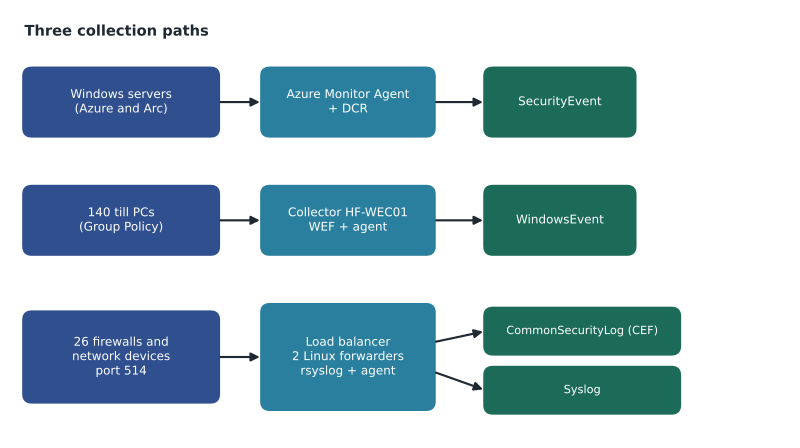
Servers send logs to Sentinel through the Azure Monitor Agent (AMA). It replaced the older Log Analytics agent, which Microsoft retired on August 31, 2024, so every new deployment uses AMA. Azure virtual machines can have the agent installed as an extension. Machines outside Azure, such as Harrow & Finch's 38 on-premises servers, first need the Azure Arc Connected Machine agent, which makes them appear as Azure resources; the Azure Monitor Agent is then installed on them as an extension in the same way. Project Skylight had already put the on-premises servers under Arc for Defender for Cloud, so this step was done.
What the agent collects is decided by a data collection rule (DCR), an Azure resource that says which data to collect, how to transform it and where to send it. A DCR is associated with machines, and one machine can have several DCRs. Sentinel's connector pages create DCRs for you when you configure Windows security events or Syslog, but they are ordinary Azure resources afterwards and can be managed with templates like anything else. Sunil kept them in rg-secops-prod-cc with the workspace.
Windows security events
The Windows Security Events via AMA connector collects from the Security event log into the SecurityEvent table. When you create its DCR you choose an event set. All collects every security event and is very large. Common collects a set Microsoft considers useful for auditing and investigation while leaving out high-volume, low-value events. Minimal collects a much smaller set aimed at detecting threats rather than full investigation. Custom lets you write your own XPath queries to pick events by ID or other attributes.
| Machines | Count | Event set | Reason |
|---|---|---|---|
| Domain controllers | 4 | Common | Most security-relevant activity happens here; All would multiply the volume for little gain |
| Other servers (Azure and on premises) | 48 | Common | A balanced default for investigation |
| Certificate authority | 1 (counted with the other servers) | Common plus custom events for certificate services | Certificate requests matter for identity attacks |
| Store till PCs | 140 | Custom XPath, through Windows Event Forwarding | Only sign-ins, failed sign-ins, new services and audit log clearing |
The domain controllers produced a debate. Ama had read that domain controllers should send everything. Sunil showed her the numbers from a one-day test: All would have tripled the controllers' volume, mostly with object access events that Defender for Identity was already watching through its own sensors. They settled on Common, plus a custom XPath query for a handful of events Nadia specifically wanted, such as changes to the audit policy.
Security!*[System[(EventID=4624 or EventID=4625 or EventID=4697 or EventID=1102)]]Windows Event Forwarding for the till PCs
The 140 till PCs were a special case. They are managed by Group Policy, not Intune, and are not Azure Arc machines, so installing the Azure Monitor Agent on each one was not practical. Windows Event Forwarding (WEF), built into Windows, solves this: Group Policy tells each till PC to send selected events to a Windows Event Collector server, and the collector holds them in its Forwarded Events log. Sunil built a collector, HF-WEC01, put it under Azure Arc with the Azure Monitor Agent, and configured the Windows Forwarded Events connector, which sends the collected events to the WindowsEvent table.
WEF has two traps. The subscription on the collector and the Group Policy on the clients must agree on which events to send, or the collector receives nothing; and a single collector is a single point of failure for 140 machines. Sunil accepted the second risk for now, with a silent-table rule watching WindowsEvent, and planned a second collector for the spring.
Syslog and CEF through a log forwarder
Firewalls, switches and many security appliances cannot run an agent. They send their logs over the network, either as Syslog messages or in Common Event Format (CEF), a structured format carried over Syslog that many security vendors use. Sentinel collects both through a Linux log forwarder: a Linux machine running a Syslog daemon (rsyslog or syslog-ng) and the Azure Monitor Agent. Devices send to the forwarder, and the agent sends to the workspace using DCRs created by the Syslog via AMA and CEF via AMA connectors. CEF lands in the CommonSecurityLog table, with the vendor's fields mapped to columns; plain Syslog lands in the Syslog table.
Sunil built two forwarders, vm-logfwd-cc-01 and vm-logfwd-cc-02, in the hub virtual network behind an internal load balancer using round-robin distribution, so one could be patched while the other carried the load. Microsoft provides an installation script that configures the daemon and opens port 514 for UDP and TCP; Sunil ran it on each forwarder, then checked that the agent and the daemon were both running. Where a device supported it he used TCP rather than UDP, because UDP gives no warning when messages are lost.
sudo systemctl status azuremonitoragent.service
sudo systemctl status rsyslog.service
netstat -lnptv | grep 514
In each DCR you choose facilities and a minimum severity per facility, and the agent collects that level and everything more severe. Sunil collected the local4 facility for CEF from the firewalls and the authpriv facility at Info and above from the Linux servers themselves. One rule mattered: never collect the same facility in both the Syslog and the CEF rule on the same forwarder, or the messages are ingested twice and billed twice. He also configured the forwarders' Syslog daemon not to write the received messages to local disk, because a forwarder whose disk fills stops the agent, and then nothing arrives at all.
# Estimating firewall log volume through the forwarders
devices = {
    "Head office firewall": (1, 60.0),      # count, average events per second each
    "Store firewalls": (23, 2.0),
    "Distribution site firewalls": (2, 5.0),
}
bytes_per_event = 400          # average CEF message size after parsing
seconds_per_day = 24 * 60 * 60
total_eps = sum(n * eps for n, eps in devices.values())
events_per_day = total_eps * seconds_per_day
gb_per_day = events_per_day * bytes_per_event / 1e9
print(f"Total events per second: {total_eps:.0f}")
print(f"Events per day: {events_per_day:,.0f}")
print(f"Estimated volume: {gb_per_day:.1f} GB per day")
print(f"Per forwarder when both run: {total_eps / 2:.0f} events per second")Total events per second: 116 Events per day: 10,022,400 Estimated volume: 4.0 GB per day Per forwarder when both run: 58 events per second
What this code does
The program lists the three groups of firewalls with how many devices each has and their average events per second. It adds up the rate for all 26 devices, multiplies by the seconds in a day to get events per day, and converts to gigabytes using an average message size. The result, about 116 events per second or 4.0 GB a day, matches the firewall estimate in lesson 1, and shows each forwarder handling about 58 events per second when both are running.
That load is small for a forwarder, and Microsoft publishes performance benchmarks for the Azure Monitor Agent that show much higher rates per machine. Sunil sized the forwarders modestly and set an alert on their CPU and disk, so the numbers would warn him if the head office firewall's logging grew, for example after a policy change that logged every allowed connection.
Testing the path
A forwarder can be listening while no data reaches the workspace. Sunil tested end to end: he sent a test CEF message from the forwarder to itself with the netcat tool, watched it arrive with tcpdump, and then waited for it in the workspace. Microsoft notes that new data can take up to about 20 minutes to appear, so a test that shows nothing after two minutes is not yet a failure.
CommonSecurityLog
| where TimeGenerated > ago(1h)
| summarize Events = count(), LastEvent = max(TimeGenerated) by DeviceVendor, DeviceProduct, Computer
| sort by Events desc
The query showed 26 firewalls by the evening of November 6, the head office one producing about half the events. One store, Selkirk, was missing; its firewall had the forwarder's old test address. A one-line change on the firewall fixed it, and Ama added the query to the morning checks.
Shaping data before it is stored
A DCR can include a transformation: a KQL statement that runs on each record before it is stored, written against a virtual table called source. Transformations can drop records, drop columns, add calculated columns or mask values. They reduce cost, because data dropped before storage is not billed as ingestion into the analytics tier, and they can remove personal information that has no security value.
source
| where not(EventID == 4624 and LogonType == 3 and TargetUserName endswith "$")
| project-away RenderedDescription
Nadia approved this transformation only after Ama showed her, with a week of trial data, that network logons by computer accounts made up about a fifth of the servers' SecurityEvent volume and had not appeared in any investigation. Dropping data is a one-way decision: what the transformation removes is never stored. So every transformation is listed in the design record with its reason and the date it was approved.
One more detail affects every agent-based source: time. Analytics rules and investigations depend on accurate timestamps, and a server whose clock drifts can make events appear in the wrong order or outside a rule's lookback. Sunil checked that the on-premises servers synchronize their clocks with the domain controllers and that the forwarders use the Azure time service, and he noted that CEF messages carry the device's own timestamp, so a firewall with a wrong clock would need fixing on the firewall itself.
Worked problem
Choosing collection for a new source
In January 2027 the distribution centres plan to add a door access control system that can send Syslog. It produces about 3 events per second. How should it be collected, and what should the team check?
Show solution
- The device cannot run an agent, so it sends Syslog to the existing forwarders through the load balancer.
- Choose a facility it can use that is not already used by the CEF rule, for example local5, so messages are not collected twice.
- Add local5 at Info and above to the Syslog DCR associated with the forwarders; the data will arrive in the Syslog table.
- Estimate volume: 3 events per second × 86,400 seconds is 259,200 events a day; at about 300 bytes each that is about 0.08 GB a day.
- Test end to end, add the device to the morning check query, and include the table in the silent-table rule.
Answer: Send Syslog on an unused facility to the existing forwarders, add it to the Syslog DCR, expect about 0.08 GB a day, and test and monitor it like the firewalls.
Common mistakes
MistakeInstall the Log Analytics agent on new servers.
InsteadIt was retired on August 31, 2024; use the Azure Monitor Agent, with Azure Arc for non-Azure machines.
MistakeCollect the All event set from every server to be safe.
InsteadStart with Common and add specific events with custom XPath; All is very large.
MistakeCollect the same facility in both the Syslog and CEF rules.
InsteadUse separate facilities, or the data is ingested and billed twice.
MistakeA forwarder listening on port 514 proves data is arriving.
InsteadTest end to end and query the workspace; allow up to about 20 minutes for new data.
Summary and key terms
- Servers send data through the Azure Monitor Agent; non-Azure machines need Azure Arc first.
- Data collection rules decide what is collected, how it is transformed and where it goes.
- Windows security events use the All, Common, Minimal or Custom event sets and land in SecurityEvent.
- Windows Event Forwarding sends events from many machines to a collector, which forwards them to WindowsEvent.
- Network devices send Syslog or CEF to a Linux forwarder; CEF lands in CommonSecurityLog and Syslog in Syslog.
- Avoid collecting a facility twice, keep forwarder disks from filling, and test end to end.
- DCR transformations drop or reshape data before storage; record every one with its reason.
- Azure Monitor Agent
- The agent that collects logs from Windows and Linux machines for Azure Monitor and Sentinel.
- Data collection rule (DCR)
- An Azure resource that defines what data to collect, how to transform it and where to send it.
- Event set
- A predefined selection of Windows security events: All, Common, Minimal or Custom.
- Windows Event Forwarding (WEF)
- A Windows feature that sends events from many machines to a collector server.
- Common Event Format (CEF)
- A structured log format carried over Syslog, used by many security devices.
- Log forwarder
- A Linux machine that receives Syslog and CEF from devices and sends them to the workspace through the agent.
- Transformation
- A KQL statement in a DCR that changes or filters records before they are stored.
Practice problems
Work each problem on paper first, then reveal the answer to check.
What must an on-premises server have before the Azure Monitor Agent can be installed as an extension?
Show answer
The Azure Arc Connected Machine agent.
Which table receives CEF data?
Show answer
CommonSecurityLog.
Why did the team use Windows Event Forwarding for the till PCs?
Show answer
They are managed by Group Policy and not under Azure Arc, so an agent on each was not practical.
What happens if the forwarder's disk fills?
Show answer
The agent stops and no data reaches the workspace.
Why must transformations be recorded and approved?
Show answer
Data dropped by a transformation is never stored, so the decision cannot be undone later.
Lesson quiz · 5 questions
Score 60% or more to complete this lesson.
Create a free account to save your progress, take quizzes and earn a certificate.