
MSAZ-320 · Lesson 9 of 12 · 20 min
Slowly changing dimensions
▶ Video coming soon A video version of this lesson is on the way.
On Friday, November 6, Grace Oduya's team sent a small change that turned into a big question. On October 1, store 9 had moved from the West region to the Central region when the company redrew its regions. Should last year's sales for store 9 appear under West, where they happened, or under Central, where the store is now? Finance wanted the first; the regional managers wanted the second for their year-on-year comparisons. Both were right, and the answer lies in how a dimension handles change over time, a topic data warehousing calls slowly changing dimensions.
Why dimensions change slowly
Facts arrive constantly: tens of thousands of sale lines a day. Dimensions change rarely: a store changes region once in years, a product moves category once in a while, a manager leaves. But when they change, the warehouse must decide what history means. The decisions are named by type, and DP-700 expects candidates to know the common ones, to recognize them in a scenario, and to implement them, under the skill of preparing data for loading into a dimensional model.
| Type | What happens on change | History kept | Example in the hub |
|---|---|---|---|
| Type 0 | The attribute never changes once loaded | Original value only | Store opening date |
| Type 1 | The old value is overwritten | None | Store manager's name, product description spelling fixes |
| Type 2 | A new row is added with a new surrogate key; the old row is closed | Full: one row per version | Store region, product category |
| Type 3 | A column holds the previous value next to the current one | One previous value | PreviousRegion for a one-year comparison |
| Type 6 | A hybrid: Type 2 rows plus a current-value column on every row | Full, with easy current view | Considered for region; not chosen |
Type 2 is the one that answers Grace's question. When store 9 changed region, the dimension closes the old row, valid until September 30, and adds a new row with a new surrogate key, valid from October 1. Sales before October carry the old key and report under West; sales from October carry the new key and report under Central. Finance's question, where did the sales happen, is answered by default. The regional managers' question, how did the stores now in Central do last year, is answered by grouping on the store's business key and its current region, which a current-flag column or a Type 6 column makes easy.
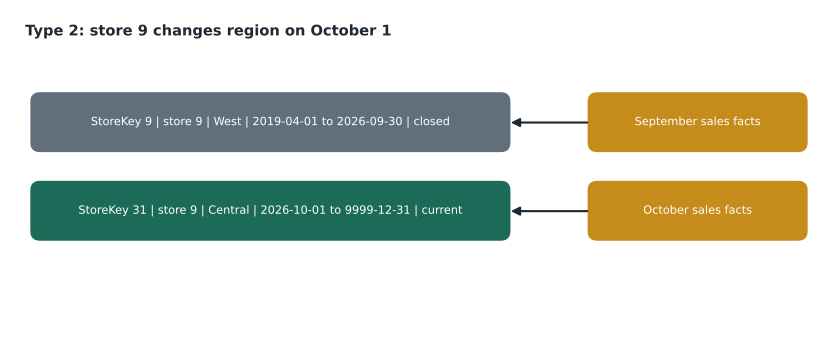
The columns of a Type 2 dimension
A Type 2 dimension adds a few columns to each row. The surrogate key identifies the version. The business key, here StoreNumber, identifies the store across versions. ValidFrom and ValidTo give the dates the version applied, with ValidTo set to a far-future date, such as 9999-12-31, for the current version. IsCurrent is a flag that makes current rows easy to find. Many designs also keep a hash of the tracked attributes, a single value computed from region, district and any other Type 2 column, so that detecting a change means comparing one value instead of every column.
Not every column is Type 2. Ines and Grace went through dim_store column by column: region and district were Type 2, because reports are grouped by them; the manager's name was Type 1, because nobody reports history by manager and a correction should apply everywhere; the opening date was Type 0. Writing the decision into the design note mattered more than the code, because the same choice affects every report built on the dimension.
Implementing Type 2
A Type 2 load runs in two steps each night. First, find dimension rows whose tracked attributes differ from the source and close them: set ValidTo to the day before the change and IsCurrent to false. Second, insert a new version for each changed member and a first version for each new member, with a new surrogate key, ValidFrom set to the change date, ValidTo set to the far-future date and IsCurrent true. Type 1 columns are updated in place on all versions, or only on the current version, depending on the design. Both steps run in one warehouse transaction, so the dimension never has a member with no current row.
BEGIN TRANSACTION;
-- 1. close versions whose Type 2 attributes changed
UPDATE d
SET    d.ValidTo = DATEADD(day, -1, @ChangeDate), d.IsCurrent = 0
FROM   dbo.dim_store d
JOIN   dbo.stg_store s ON s.StoreNumber = d.StoreNumber
WHERE  d.IsCurrent = 1 AND d.Type2Hash <> s.Type2Hash;

-- 2. add new versions for changed and new stores
DECLARE @MaxKey int = (SELECT MAX(StoreKey) FROM dbo.dim_store);
INSERT INTO dbo.dim_store (StoreKey, StoreNumber, StoreName, Region, District, Manager, ValidFrom, ValidTo, IsCurrent, Type2Hash)
SELECT @MaxKey + ROW_NUMBER() OVER (ORDER BY s.StoreNumber), s.StoreNumber, s.StoreName, s.Region, s.District,
       s.Manager, @ChangeDate, '9999-12-31', 1, s.Type2Hash
FROM   dbo.stg_store s
WHERE  NOT EXISTS (SELECT 1 FROM dbo.dim_store d WHERE d.StoreNumber = s.StoreNumber AND d.IsCurrent = 1);

-- 3. Type 1: manager names corrected on the current version
UPDATE d SET d.Manager = s.Manager
FROM dbo.dim_store d JOIN dbo.stg_store s ON s.StoreNumber = d.StoreNumber
WHERE d.IsCurrent = 1 AND d.Manager <> s.Manager;
COMMIT TRANSACTION;
Step 2 relies on step 1: once the changed versions are closed, those stores have no current row, so the NOT EXISTS condition picks them up along with any brand-new store. The same pattern works in Spark with MERGE, either in two statements or with a single MERGE whose source includes each changed row twice, once to close the old version and once to insert the new one, a well-known trick that is harder to read. The hub kept the two-statement form for Walt's sake.
Watching Type 2 happen
Ines wrote the two steps in plain Python on three stores, to check her understanding before running anything on the warehouse.
# Apply one night of changes to a Type 2 store dimension
FAR = "9999-12-31"
dim = [  # key, store, region, valid_from, valid_to, current
    {"key": 9,  "store": 9,  "region": "West",    "from": "2019-04-01", "to": FAR, "current": True},
    {"key": 12, "store": 12, "region": "Central", "from": "2015-06-01", "to": FAR, "current": True},
    {"key": 15, "store": 15, "region": "West",    "from": "2017-09-01", "to": FAR, "current": True},
]
source = {9: "Central", 12: "Central", 15: "West", 24: "North"}   # store -> region today
change_date, day_before = "2026-10-01", "2026-09-30"

current = {r["store"]: r for r in dim if r["current"]}
next_key = max(r["key"] for r in dim) + 1
for store, region in sorted(source.items()):
    old = current.get(store)
    if old and old["region"] == region:
        continue                                        # nothing changed
    if old:
        old["to"], old["current"] = day_before, False   # step 1: close the old version
    dim.append({"key": next_key, "store": store, "region": region,
                "from": change_date, "to": FAR, "current": True})   # step 2: add a version
    next_key += 1

for r in dim:
print(r["key"], r["store"], f'{r["region"]:8}', r["from"], r["to"], "current" if r["current"] else "closed")9 9 West 2019-04-01 2026-09-30 closed 12 12 Central 2015-06-01 9999-12-31 current 15 15 West 2017-09-01 9999-12-31 current 16 9 Central 2026-10-01 9999-12-31 current 17 24 North 2026-10-01 9999-12-31 current
What this code does
The program starts with a store dimension of three rows and compares each store's region with today's source list, which also contains a brand-new store. For a store whose region changed, it closes the old row by ending its dates and marking it no longer current, then adds a new row with the next free key that starts on the change date. Unchanged stores are left alone. The output lists every row with its key, store, region, dates and whether it is current, showing store 9 with two versions and the new store 24 with its first.
The output shows store 9's old row closed on September 30 and a new row with key 16 for Central, and new store 24 arriving with key 17. In the real dim_store the new keys were 31 and 32, because the dimension already had 30 rows, but the shape is the same.
Loading facts against a Type 2 dimension
Once a dimension has versions, the fact load must pick the right one. Joining on StoreNumber alone would match both of store 9's rows and double its sales. The fact load joins on the business key and on the sale date falling between ValidFrom and ValidTo, which matches exactly one version. For a nightly load of yesterday's sales, the current row is nearly always right, but backfills and late-arriving sales need the date range, so the hub uses it everywhere.
SELECT s.SaleDate, d.StoreKey, s.Revenue
FROM   lh_curated.stockline.sales s
JOIN   dbo.dim_store d
  ON   d.StoreNumber = s.StoreNumber
 AND   s.SaleDate BETWEEN d.ValidFrom AND d.ValidTo;
Reporting on current or historical attributes
Once dim_store keeps history, report authors have a choice to make for every report. Grouping by the region on the fact's own dimension row shows history as it was. Grouping by the store's current region, found by joining on StoreNumber to the row where IsCurrent is true, restates history as if today's regions had always existed. Neither is wrong, but mixing them in one report confuses readers, so the semantic model built in MSAZ-311 will offer both, clearly named Region at time of sale and Current region, and the report guidelines say which to use for which question.
Type 2 dimensions also grow, though slowly. dim_store gains a row each time a store's region or district changes, perhaps a few rows a year, and dim_product gains a row each time a product changes category. Neither is a concern for size. The concern is clarity: the hub's dimensions keep a ChangeReason column, filled by the load from a small mapping maintained by store operations and merchandising, so that anyone looking at two versions of a store can see why the second one exists.
Worked problem
Which key does each sale get?
dim_store has store 9 as key 9 (West, valid 2019-04-01 to 2026-09-30) and key 31 (Central, valid from 2026-10-01). Three late sales from store 9 arrive: one dated September 29, one dated September 30 and one dated October 2. Which StoreKey does each get, and which region will it report under?
Show solution
- September 29 falls between 2019-04-01 and 2026-09-30: key 9, West.
- September 30 is the last day of the old version, and BETWEEN includes both ends: key 9, West.
- October 2 falls after 2026-10-01: key 31, Central.
- No sale matches both rows, because the old version ends the day before the new one starts.
Answer: Key 9 (West) for September 29 and 30, key 31 (Central) for October 2.
Late-arriving dimension members and copy jobs
Sometimes a fact arrives before its dimension row: a sale of a product added to StockLine minutes before closing, after the product extract had already run. Dropping the sale would lose revenue; holding it back would delay the report. The usual answer is an inferred member: insert a placeholder dimension row with the business key and unknown attributes, give the sale its key, and let the next product load fill in the attributes as a Type 1 update. The hub's product load does this for any ProductId it has not seen, and the data quality report in lesson 12 lists inferred members older than two days.
Copy jobs, from lesson 3, can write a destination as SCD Type 2 when they use change data capture, keeping versioned rows with effective dates and turning source deletes into soft deletes. That is useful for keeping a history of a source table in the curated layer with no code. The gold dimension still needs the design decisions above, such as which columns are Type 2, so the hub uses the copy job's history as input and builds dim_store with its own rules.
Common mistakes
MistakeMake every column Type 2 to be safe.
InsteadChoose per column; Type 2 only where reports need history, Type 1 for corrections.
MistakeJoin facts to a Type 2 dimension on the business key only.
InsteadJoin on the business key and the sale date between ValidFrom and ValidTo.
MistakeLet the new version start on the same day the old one ends.
InsteadEnd the old version the day before the new one starts, so no date matches both.
MistakeDrop facts whose dimension member has not arrived yet.
InsteadInsert an inferred member and fill in its attributes later.
Summary and key terms
- Slowly changing dimensions define what history means when descriptive attributes change.
- Type 1 overwrites, Type 2 adds a versioned row, Type 3 keeps one previous value, Type 0 never changes.
- Type 2 rows carry a surrogate key, the business key, ValidFrom, ValidTo and a current flag.
- A Type 2 load closes changed versions and inserts new ones, in one transaction.
- Facts join to the version valid on their date.
- Inferred members keep early facts; copy jobs with CDC can keep SCD Type 2 history.
- Slowly changing dimension (SCD)
- A dimension whose attributes change occasionally, with a chosen rule for keeping history.
- Type 1
- An SCD rule that overwrites the old value and keeps no history.
- Type 2
- An SCD rule that adds a new row with a new surrogate key for each change.
- Type 3
- An SCD rule that keeps the previous value in an extra column.
- Current flag
- A column marking the version of a dimension member that is valid now.
- Type 2 hash
- A value computed from the tracked attributes, used to detect changes quickly.
- Inferred member
- A placeholder dimension row created when a fact arrives before its dimension data.
Practice problems
Work each problem on paper first, then reveal the answer to check.
Which SCD type answers where did the sales happen at the time?
Show answer
Type 2.
Which columns does a Type 2 dimension add?
Show answer
A surrogate key per version, ValidFrom, ValidTo and a current flag, often with a hash.
Why does the Type 2 load run in a transaction?
Show answer
So a member is never left with no current row if the load fails.
How does a fact load choose the right version?
Show answer
It joins on the business key and the date between ValidFrom and ValidTo.
What is an inferred member?
Show answer
A placeholder dimension row created for a fact whose dimension data has not arrived.
Lesson quiz · 5 questions
Score 60% or more to complete this lesson.
Create a free account to save your progress, take quizzes and earn a certificate.