
MSAZ-320 · Lesson 5 of 12 · 20 min
Spark notebooks and PySpark
▶ Video coming soon A video version of this lesson is on the way.
With the history sitting in lh_raw, Friday, October 30 was for turning it into something people could trust. The raw stockline_sale table held exactly what StockLine had sent, including the leading-zero store numbers that MSAZ-310 described, duplicate rows from two nights in 2025 when a till had re-sent its batch, and quantities stored as text in a few old extracts. Cleaning that into lh_curated was a job for Spark, and Ines opened her first Fabric notebook, nb_clean_sales.
Notebooks and Spark in Fabric
A Fabric notebook is an item made of cells. Code cells run in a language chosen for the notebook or set per cell with a magic command: PySpark (Python), Spark SQL through the sql magic command, Scala, SparkR, and, for lighter work, plain Python without Spark. Markdown cells hold notes. Running a code cell starts a Spark session if one is not running, and the session keeps state between cells, so a DataFrame created in one cell can be used in the next. Notebooks can be run by hand, scheduled, called from a pipeline's notebook activity or called from other notebooks.
A notebook is attached to one or more lakehouses, one of which is the default lakehouse. Relative paths such as Files/stockline/ and table names such as stockline_sale refer to the default lakehouse, which keeps code short and means the same notebook can point at a different lakehouse in each deployment stage, as lesson 10 of MSAZ-310 showed with variable libraries. Other lakehouses are reached by name or by their full OneLake path.
Compute: pools, nodes and capacity
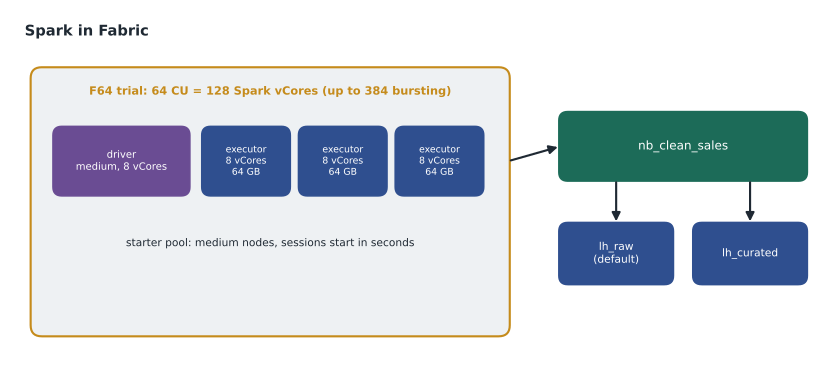
Spark runs on a cluster of nodes: one driver that plans the work and executors that do it. Fabric offers starter pools, clusters kept ready by Microsoft with medium nodes, which usually start a session in 5 to 10 seconds when no extra libraries or custom properties are needed. Custom pools let a workspace admin choose node size and how far the pool can scale; they take about three minutes to start unless set up as a custom live pool. A session ends after it has been idle for a while, 20 minutes by default, and the cluster is released soon after. Capacity is consumed only while a session is active.
Spark's share of a capacity is measured in virtual cores. Each capacity unit provides two Spark vCores, and Fabric lets Spark burst to three times that for short periods, so the trial capacity, equivalent to an F64, offers 128 vCores normally and up to 384 with bursting. A medium node has 8 vCores and 64 GB of memory; small, large, extra-large and double-extra-large nodes have 4, 16, 32 and 64 vCores. Extra-large and larger nodes are not available on trial capacities.
| Node size | vCores | Memory | Maximum nodes on F64 with bursting (384 vCores) |
|---|---|---|---|
| Small | 4 | 32 GB | 96 |
| Medium | 8 | 64 GB | 48 |
| Large | 16 | 128 GB | 24 |
| X-Large | 32 | 256 GB | 12 |
| XX-Large | 64 | 512 GB | 6 |
Environments package what a notebook needs beyond the defaults: public or custom Python libraries, Spark properties and the compute settings. A notebook or Spark job definition is attached to an environment, and the workspace can set a default one. Adding libraries lengthens session start, by seconds to minutes depending on how the environment is published, which is one reason Nikolai asked for libraries to be added only when a notebook genuinely needed them.
DataFrames and lazy evaluation
PySpark's main object is the DataFrame: a table of rows and named, typed columns, spread across the cluster in partitions. Transformations, such as select, filter, withColumn, join, groupBy and dropDuplicates, describe a new DataFrame without computing it. Actions, such as count, show, write and saveAsTable, make Spark actually run the work. This is lazy evaluation: Spark waits until an action, then plans the whole chain at once, pushing filters early and reading only the columns it needs, much as query folding does for dataflows. A common beginner's habit, calling count after every step to see progress, forces Spark to run the chain again each time and can multiply run time.
from pyspark.sql import functions as F

raw = spark.read.table("stockline_sale")                      # lh_raw, the default lakehouse

clean = (raw
    .withColumn("StoreNumber", F.col("StoreNumber").cast("int"))       # "012" becomes 12
    .withColumn("Quantity",    F.col("Quantity").cast("decimal(9,2)"))
    .withColumn("SaleDate",    F.to_date("SaleDateTime"))
    .filter(F.col("SaleId").isNotNull())
    .dropDuplicates(["SaleId", "LineNumber"])                         # re-sent till batches
)

(clean.write.mode("overwrite")
      .format("delta")
      .saveAsTable("lh_curated.stockline.sales"))
Each line of the listing maps to a decision recorded in the design note. Casting the store number to an integer turns 012 and 12 into the same store. Casting quantity to a decimal surfaces any text that is not a number as an empty value, which lesson 12 counts and reports rather than letting it pass. Deduplicating on the sale id and line number removes the re-sent till batches while keeping genuinely repeated items, which have different line numbers. Writing with saveAsTable to the stockline schema of lh_curated creates a managed Delta table that the SQL analytics endpoint and the warehouse can read.
The same work in Spark SQL
Many engineers mix Python and SQL in one notebook. A Spark SQL cell can query any table in the attached lakehouses, and spark.sql runs SQL from Python and returns a DataFrame. Keiko, who knew SQL better than Python, found the daily store totals easier to read as SQL; Spark plans both forms the same way, so the choice is about who will read the code.
%%sql
CREATE OR REPLACE TEMPORARY VIEW daily_store AS
SELECT StoreNumber, SaleDate, SUM(Quantity * UnitPrice) AS Revenue, COUNT(DISTINCT SaleId) AS Baskets
FROM   lh_curated.stockline.sales
GROUP  BY StoreNumber, SaleDate;
Seeing the logic without a cluster
Grouping, aggregating and removing duplicates are ideas first and Spark features second, and DP-700 lists them by name: denormalize data, group and aggregate data, and handle duplicate, missing and late-arriving data. Ines wrote the same steps in plain Python on eight rows to show Keiko what the Spark code does, row by row.
# The cleaning rules on a handful of rows, in plain Python
raw = [
    {"SaleId": 501, "Line": 1, "Store": "012", "Qty": "2",   "Price": 19.99},
    {"SaleId": 501, "Line": 1, "Store": "012", "Qty": "2",   "Price": 19.99},   # re-sent batch
    {"SaleId": 501, "Line": 2, "Store": "012", "Qty": "1",   "Price": 4.49},
    {"SaleId": 502, "Line": 1, "Store": "12",  "Qty": "3",   "Price": 4.49},
    {"SaleId": 503, "Line": 1, "Store": "015", "Qty": "two", "Price": 54.00},   # bad quantity
    {"SaleId": 504, "Line": 1, "Store": "15",  "Qty": "1",   "Price": 54.00},
]
seen, clean, rejected = set(), [], []
for r in raw:
    key = (r["SaleId"], r["Line"])
    if key in seen:
        continue                                   # drop the duplicate
    seen.add(key)
    try:
        qty = float(r["Qty"])
    except ValueError:
        rejected.append(r["SaleId"])               # keep for the data quality report
        continue
    clean.append({"store": int(r["Store"]), "revenue": qty * r["Price"]})

totals = {}
for c in clean:
    totals[c["store"]] = round(totals.get(c["store"], 0) + c["revenue"], 2)
print("rows in:", len(raw), "| clean:", len(clean), "| rejected sale ids:", rejected)
print("revenue by store:", totals)rows in: 6 | clean: 4 | rejected sale ids: [503]
revenue by store: {12: 57.94, 15: 54.0}What this code does
The program applies the notebook's cleaning rules to six sample sale lines. It skips a line whose sale number and line number it has already seen, sets aside any line whose quantity is not a number, turns store codes such as 012 into the plain number 12, and then adds up revenue for each store. The output shows how many rows came in, how many survived, which sale was rejected for a bad quantity and the revenue total for each store, so the same logic can be checked by hand before it runs on millions of rows.
The output shows six rows in and four clean, with sale 503 rejected and the duplicate silently gone; stores 12 and 15 total 57.94 and 54.00. On the real table, the same rules removed 1,208 duplicate lines from the two 2025 nights and sent 37 lines with unreadable quantities to the rejected-rows table that lesson 12 reviews.
Parameters and running notebooks from pipelines
A notebook becomes reusable when its values come from outside. Marking one cell as the parameter cell, through the cell's toggle, lets a pipeline's notebook activity or another notebook pass values that override the defaults in that cell. Ines gave nb_clean_sales a load_date parameter, defaulting to yesterday, so the nightly pipeline could pass the date it had just copied and a backfill could pass any other. Notebooks can also return a value to the caller with notebookutils.notebook.exit, which the pipeline reads from the activity's output; Ines returned the number of rows written, so the next activity could check it.
Plain Python notebooks
Not every notebook needs Spark. Fabric also offers Python notebooks that run on a single small machine without a Spark cluster, starting faster and using less capacity. They suit light work: calling a REST API, reading a few small files, running a quick check or orchestrating other items through the Fabric REST API. Libraries such as pandas and Polars work in them, and they can read and write Delta tables in OneLake through libraries built for the Delta format. Ines used one for the supplier price check, which reads a single file of a few thousand rows; starting a Spark session for that would have cost more time than the work itself.
The trade-off is scale. A Python notebook runs on one machine, so when data grows beyond what fits comfortably in that machine's memory, the work belongs in Spark. A useful habit is to write transformations as small functions that take a table and return a table, so that moving from a Python notebook to a Spark notebook later means changing how the data is read and written, not rewriting the logic.
Reading and writing other formats
Raw files do not always arrive as tidy CSV. Spark reads JSON, Parquet, Avro, ORC, XML through extensions, and plain text, and each reader has options that matter in practice. For CSV, the header option says whether the first row holds column names, inferSchema asks Spark to guess types by scanning the data, and an explicit schema avoids both the guessing and the extra scan. Ines gave every production read an explicit schema, because a guessed schema can change silently when one file has an odd value, and a changed schema in raw data is exactly the kind of quiet problem lesson 12 tries to catch early.
Worked problem
How much Spark can the pilot capacity run at once?
From January the hub moves to an F16 capacity. Ines wants to know the largest Spark workload it can run at a burst, and how many medium nodes that is.
Show solution
- Each capacity unit gives two Spark vCores: 16 × 2 = 32 vCores.
- Spark can burst to three times that: 32 × 3 = 96 vCores.
- A medium node has 8 vCores: 96 ÷ 8 = 12 nodes.
- Other Spark jobs and notebooks running at the same time share the same vCores, so a backfill and the nightly clean should not overlap.
Answer: 96 vCores, or 12 medium nodes, at a burst; the nightly clean, sized at 4 medium nodes, leaves room for one interactive session alongside it.
Good habits for notebooks that others will maintain
Nikolai gave Ines four habits for production notebooks. Keep the parameter cell first and small. Put reusable functions, such as the date and store-number cleaning, in a shared notebook or a library so every load cleans the same way. Avoid actions in the middle of the chain, such as count and show, except while developing. And never write to the raw layer from a cleaning notebook: raw is written by ingestion only, so a mistake in cleaning can always be fixed by running the clean again.
Common mistakes
MistakeCall count after every transformation to check progress.
InsteadTransformations are lazy; extra actions rerun the chain. Check with small samples while developing.
MistakeA starter pool can use any node size.
InsteadStarter pools use medium nodes; other sizes need a custom pool and start more slowly.
MistakeNotebook values must be edited by hand for each run.
InsteadMark a parameter cell so pipelines and other notebooks can pass values.
MistakeSpark vCores are separate from the capacity.
InsteadSpark uses the capacity: two vCores per capacity unit, with bursting to three times that.
Summary and key terms
- Notebooks run PySpark, Spark SQL, Scala, SparkR or plain Python in cells, attached to a default lakehouse.
- Starter pools start in seconds with medium nodes; custom pools take longer and allow other sizes.
- One capacity unit gives two Spark vCores, with bursting to three times that.
- DataFrame transformations are lazy and run when an action, such as write, is called.
- Cleaning steps cast types, remove duplicates, filter bad rows and write managed Delta tables.
- Parameter cells and notebookutils let pipelines and notebooks pass values in and out.
- Notebook
- A Fabric item of code and text cells that runs Spark or Python.
- Default lakehouse
- The lakehouse a notebook's relative table names and paths refer to.
- Starter pool
- A ready-to-use Spark pool of medium nodes that starts sessions in seconds.
- Environment
- A Fabric item packaging libraries, Spark properties and compute settings for notebooks and jobs.
- DataFrame
- A distributed table of rows and typed columns in Spark.
- Lazy evaluation
- Spark's practice of planning transformations and running them only when an action is called.
- Parameter cell
- A notebook cell whose values can be overridden when the notebook is run by a pipeline or another notebook.
Practice problems
Work each problem on paper first, then reveal the answer to check.
What does the default lakehouse of a notebook control?
Show answer
Which lakehouse relative table names and paths refer to.
How many vCores does a medium node have?
Show answer
8.
Name two transformations and two actions in PySpark.
Show answer
For example filter and groupBy are transformations; count and saveAsTable are actions.
Why deduplicate on SaleId and LineNumber rather than SaleId alone?
Show answer
A sale can have several lines; only lines with the same id and line number are true duplicates.
How does a notebook return a row count to a pipeline?
Show answer
With notebookutils.notebook.exit, read from the notebook activity's output.
Lesson quiz · 5 questions
Score 60% or more to complete this lesson.
Create a free account to save your progress, take quizzes and earn a certificate.