
MSAZ-320 · Lesson 10 of 12 · 20 min
Mirroring external databases
▶ Video coming soon A video version of this lesson is on the way.
Two weeks earlier, on October 26, Ines had mirrored the Finch Rewards test database, hf-sql-rewards-test-cc, into the hub as an experiment, and MSAZ-310 had touched on it in passing. On Monday, November 9, she came back to it properly. Hana Sato, who rebuilt the Rewards database in MSAZ-300, joined the session, because the marketing team wanted points balances in the hub within minutes of a purchase, and mirroring was the only pattern so far that promised that without anyone writing a load.
What mirroring does
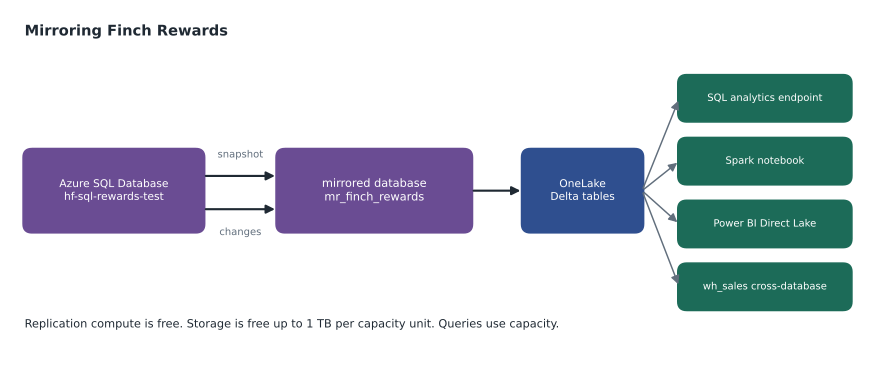
Mirroring continuously replicates data from an operational database into OneLake as Delta tables. After an initial snapshot of the chosen tables, it reads the source's changes and applies them in Fabric, so the mirrored tables stay close to the source without schedules, watermarks or pipelines. For database mirroring, Microsoft's documentation says changes can be published as often as every 15 seconds; how fresh the copy is in practice depends on the volume of changes, the regions involved and the network. The mirrored data is read-only in Fabric; the source stays the system of record.
There are three kinds. Database mirroring replicates whole databases or chosen tables from supported sources. Metadata mirroring copies only the catalog, the names of schemas and tables, from sources such as Azure Databricks, and reaches the data through shortcuts, so no data is replicated. Open mirroring lets any application write change data into a landing zone in the open Delta format, so that vendors and in-house systems can mirror themselves into Fabric.
| Source (examples) | Kind of mirroring | Note |
|---|---|---|
| Azure SQL Database | Database | Finch Rewards test database |
| Azure SQL Managed Instance | Database | Planned for StockLine after its 2027 move |
| SQL Server | Database | On-premises servers through a gateway; check version support |
| Azure Cosmos DB | Database | |
| Azure Database for PostgreSQL | Database | |
| Snowflake | Database or metadata | |
| Oracle, Google BigQuery, SAP Datasphere | Database | Check each source's status page |
| Azure Databricks | Metadata | Catalog only; data through shortcuts |
| Any application | Open mirroring | Writes changes to a landing zone |
What appears in the workspace
Creating a mirror adds a mirrored database item to the workspace. It holds the replication process and the Delta tables it maintains, and it comes with a SQL analytics endpoint, just like a lakehouse, so the mirrored tables can be queried with T-SQL in the SQL editor, SQL Server Management Studio or Visual Studio Code. Spark notebooks can read the tables through OneLake, Power BI can read them in Direct Lake mode without copying, and the warehouse can join them with other tables by three-part name. Ines's first query joined mirrored Rewards members with curated sales on the member number, something that had previously needed a nightly export.
-- In wh_sales: points earned yesterday by members, joined with their sales
SELECT m.MemberTier, COUNT(DISTINCT s.MemberNumber) AS Members, SUM(s.Revenue) AS Revenue
FROM   lh_curated.stockline.sales              AS s
JOIN   mr_finch_rewards.dbo.Member             AS m ON m.MemberNumber = s.MemberNumber
WHERE  s.SaleDate = DATEADD(day, -1, CAST(GETDATE() AS date))
GROUP  BY m.MemberTier;
Setting up the Rewards mirror
Setting up a mirror from Azure SQL Database starts on the source. The logical server needs a system-assigned managed identity, which mirroring uses to publish changes into Fabric. The connection needs a login with enough permission to read the tables and their changes, and the network must let Fabric reach the server, either through public access with firewall rules or through private routes such as a virtual network data gateway. Then, in Fabric, Ines created the mirrored database item, chose the connection, picked the tables, nine of the fourteen in Rewards, and started replication. The status page showed each table moving from snapshotting to replicating, with a count of rows replicated.
Choosing tables deliberately mattered. Two Rewards tables held card tokens and contact preferences that the hub had no reason to see, so they were left out, the same principle as dropping phone numbers in lesson 4. The mirrored database also carried the Highly Confidential sensitivity label from MSAZ-310, so its endpoint and anything built on it inherited protection.
What mirroring costs
Mirroring is priced to encourage its use. The background compute that replicates data does not consume capacity. Storage for mirrored data is free up to a limit tied to the capacity: one terabyte for each capacity unit purchased, so an F16 includes 16 TB of mirroring storage and an F64 includes 64 TB. Beyond that, and while the capacity is paused, OneLake storage is billed normally. Querying the mirrored data with SQL, Spark or Power BI uses capacity in the usual way. A running capacity is required: if it is paused or deleted, replication stops.
# Does the hub's planned mirroring fit in the free storage of its pilot capacity?
capacity_units = 16                     # F16 pilot capacity from January 2027
free_tb = capacity_units * 1            # 1 TB of mirroring storage per capacity unit

mirrors_gb = {"Finch Rewards": 38, "StockLine (after its move)": 410, "Pricing": 22}
growth_per_year = 0.25                  # assume each database grows by a quarter a year

total_gb = sum(mirrors_gb.values())
for year in range(4):
    size_tb = total_gb * (1 + growth_per_year) ** year / 1000
print(f"year {year}: about {size_tb:5.2f} TB mirrored | free allowance {free_tb} TB | fits: {size_tb <= free_tb}")year 0: about 0.47 TB mirrored | free allowance 16 TB | fits: True year 1: about 0.59 TB mirrored | free allowance 16 TB | fits: True year 2: about 0.73 TB mirrored | free allowance 16 TB | fits: True year 3: about 0.92 TB mirrored | free allowance 16 TB | fits: True
What this code does
The program works out the free mirroring storage that comes with a 16-unit capacity, one terabyte per unit, and adds up the planned mirrored databases in gigabytes. It then grows the total by a quarter each year for three years and prints the estimated size in terabytes next to the free allowance, with a yes-or-no check of whether it still fits. The point is not the exact growth figure, which is an assumption, but that the planned databases use only a small part of the allowance for years.
The output shows less than a terabyte even after three years of growth, against 16 TB free. The 410 GB figure is StockLine's database size from MSAZ-280; the mirror would hold only the tables the hub needs, so the real number would be smaller still. Storage is not where mirroring costs money for the hub; queries are, and those are counted like any other workload.
Retention and maintenance
Mirroring maintains its own Delta tables, including running vacuum to remove old files. For mirrored databases created after mid-June 2025 the default retention is one day, and older ones default to seven days; the setting can be changed under the item's Delta table management settings. One day is enough for replication, but it limits time travel on mirrored tables, which is one reason the hub does not treat a mirror as an archive. If history is needed, a copy job or notebook takes snapshots into the curated layer.
Mirroring, copy jobs and shortcuts compared
DP-700 lists implementing mirroring and creating shortcuts as separate skills, and scenario questions often ask which to use. A shortcut, from MSAZ-310, points at data that is already in a Delta or file format somewhere else and copies nothing. Mirroring copies and continuously updates data from an operational database that is not in such a format. A copy job with change data capture also replicates inserts, updates and deletes, but on a schedule, with a choice of destination and write behaviour, including SCD Type 2.
| Need | Shortcut | Mirroring | Copy job with CDC |
|---|---|---|---|
| Data already in Delta or files in ADLS, S3 or OneLake | Best fit | Not needed | Possible but copies data |
| Near real-time copy of a supported operational database | No | Best fit | Scheduled, so less fresh |
| Keep history of changes as SCD Type 2 | No | No | Yes |
| Choose any destination, such as a warehouse table | No | No; a mirrored database item | Yes |
| No schedule or state to manage | Yes | Yes | The job manages state on a schedule |
Limits worth checking before you mirror
Each source has its own list of supported and unsupported features, and it is worth reading before promising a mirror to anyone. Typical limits include data types that cannot be replicated, such as some spatial or user-defined types, tables without a primary key in some sources, a maximum number of tables per mirrored database, and source features that block replication. Ines checked the Rewards schema against the Azure SQL Database list before the test and found one column, a geography type holding store catchment areas, that would be skipped; the hub did not need it, and the design note records that it is missing on purpose.
Permissions and networking cause most first-time failures. If the source server's firewall does not allow Fabric, or the login lacks the permissions mirroring needs, the mirror stays in an error state with a message on the status page. Fixing it is usually quick, but it involves the database team, which is why Ines brought Hana and Walt into the session rather than discovering the problems alone.
Mirroring StockLine after its move
StockLine is the hub's most important source, and today it is loaded by the nightly pipeline because SQL Server 2016 on HF-SQL01 is old and busy. The 2027 plan from MSAZ-280 moves StockLine to Azure SQL Managed Instance, which mirroring supports. Once it is there, the sales increment could come from a mirror rather than a nightly copy, giving store managers data minutes old instead of a night old, at no extra replication cost. The design note marks that as a decision for after the move, not a commitment: the nightly pattern works, and a working pattern should be replaced only when the new one has been tested on real volumes.
Mirroring also changes how the downstream layers think about freshness. If raw data arrives continuously, the cleaning notebook and the gold procedure still run on a schedule unless they are redesigned, so the end-to-end freshness is set by the slowest step. Making reports truly fresher means reviewing the whole chain, not only the first link.
Worked problem
Pick the pattern for three requests
Three requests reach Ines in one week. Marketing wants points balances from Finch Rewards within minutes. Finance wants a monthly history of every change to member tiers, kept for seven years. The supplier analytics team wants the hub to read Parquet files that a supplier already writes to its own ADLS Gen2 account. Which pattern fits each?
Show solution
- Points within minutes from a supported Azure SQL Database: mirroring, which replicates continuously with no schedule.
- A long history of every tier change: a copy job with CDC writing SCD Type 2, or snapshots from the mirror into the curated layer, because the mirror's one-day retention is not an archive.
- Parquet files already in a storage account: a shortcut, which reads them in place with no copy.
- None of the three needs a hand-built pipeline.
Answer: Mirroring for points, a copy job with CDC writing SCD Type 2 for tier history, and a shortcut for the supplier's Parquet files.
Watching a mirror
The mirrored database's replication status page shows, for each table, whether it is running, how many rows have been replicated and when it last synchronized, and it reports errors such as a table with an unsupported data type or a lost connection. The monitoring hub lists the item too. Ines added a step to the nightly pipeline that queries the mirrored Member table's most recent ModifiedAt and compares it with the source's, raising an alert if the gap exceeds thirty minutes. It never fired during the trial; the largest gap she measured, on November 9 during a points promotion test, was under two minutes.
Common mistakes
MistakeMirroring uses capacity for replication.
InsteadReplication compute is free; storage is free up to 1 TB per capacity unit; queries use capacity.
MistakeA mirror keeps long history for time travel.
InsteadMirrors vacuum aggressively, by default after one day for new items; snapshot history elsewhere.
MistakeMirroring keeps working while the capacity is paused.
InsteadReplication needs a running capacity.
MistakeUse mirroring for files already in ADLS.
InsteadUse a shortcut for data already in Delta or file formats.
Summary and key terms
- Mirroring replicates operational databases into OneLake as Delta tables, continuously and read-only.
- Database, metadata and open mirroring cover different sources and patterns.
- A mirrored database item comes with a SQL analytics endpoint and can be read by Spark, Power BI and the warehouse.
- Replication compute is free and storage is free up to 1 TB per capacity unit.
- Mirrors use short retention, so they are not archives.
- Choose shortcuts for data already in place, mirroring for live database copies and copy jobs with CDC for history.
- Mirroring
- Continuous replication of an external database into OneLake as Delta tables.
- Mirrored database
- The Fabric item that holds a mirror's replication and tables, with a SQL analytics endpoint.
- Database mirroring
- Mirroring that copies data from whole databases or chosen tables.
- Metadata mirroring
- Mirroring that copies only catalog information and reaches data through shortcuts.
- Open mirroring
- Mirroring in which an application writes change data into a landing zone in Delta format.
- Initial snapshot
- The first full copy of each mirrored table before changes are applied.
- Replication status
- The page showing each mirrored table's state, rows replicated and last sync.
Practice problems
Work each problem on paper first, then reveal the answer to check.
What does a mirrored database item come with for T-SQL queries?
Show answer
A SQL analytics endpoint.
How much free mirroring storage does an F16 include?
Show answer
16 TB.
Why is a mirror not a good archive?
Show answer
It vacuums old files after a short retention, one day by default for new mirrors.
Which pattern suits Parquet files already in a supplier's ADLS account?
Show answer
A shortcut.
What happens to replication if the capacity is paused?
Show answer
It stops.
Lesson quiz · 5 questions
Score 60% or more to complete this lesson.
Create a free account to save your progress, take quizzes and earn a certificate.